Solved Secure boot update HowTo


You're running from PowerShell ISE, instead of powershell or pwsh? I can duplicate the error from ISE.
Code:
UEFI Variables
--------------
    SBAT (Linux only): sbat,1,2024010900 / shim,4 / grub,3 / grub.debian,4

EFI Files
---------
Get-FileHash : The file '\\.\HarddiskVolume1\EFI\Microsoft\Boot\bootmgfw.efi' cannot be read: FileStream will not open Win32 devices such as disk partitions and tape drives. Avoid use of "\\.\" in the path.
At C:\Users\GARLIN\Downloads\Check_UEFI-CA2023.ps1:1080 char:31
+ ...   $BootMgr_File_Hash = (Get-FileHash -LiteralPath $BootMgr_File).Hash
+                             ~~~~~~~~~~~~~~~~~~~~~~~~~~~~~~~~~~~~~~~
    + CategoryInfo          : ReadError: (\\.\HarddiskVol...ot\bootmgfw.efi:PSObject) [Write-Error], WriteErrorException
    + FullyQualifiedErrorId : FileReadError,Get-FileHash

Please run the scripts from a non-ISE version of PowerShell.
 

My Computer

System One

  • OS
    Windows 7
You're running from PowerShell ISE, instead of powershell or pwsh? I can duplicate the error from ISE.
Code:
UEFI Variables
--------------
    SBAT (Linux only): sbat,1,2024010900 / shim,4 / grub,3 / grub.debian,4

EFI Files
---------
Get-FileHash : The file '\\.\HarddiskVolume1\EFI\Microsoft\Boot\bootmgfw.efi' cannot be read: FileStream will not open Win32 devices such as disk partitions and tape drives. Avoid use of "\\.\" in the path.
At C:\Users\GARLIN\Downloads\Check_UEFI-CA2023.ps1:1080 char:31
+ ...   $BootMgr_File_Hash = (Get-FileHash -LiteralPath $BootMgr_File).Hash
+                             ~~~~~~~~~~~~~~~~~~~~~~~~~~~~~~~~~~~~~~~
    + CategoryInfo          : ReadError: (\\.\HarddiskVol...ot\bootmgfw.efi:PSObject) [Write-Error], WriteErrorException
    + FullyQualifiedErrorId : FileReadError,Get-FileHash

Please run the scripts from a non-ISE version of PowerShell.
First device, ran on non-ISE Powershell:
PS C:\users\tengheng\Downloads> .\Drallion_Check_UEFI-CA2023.ps1 -verbose
Windows 11 25H2 (26200.8328)

Secure Boot: ON
Virtualization Based Security: ON
BitLocker on (C:) OFF

BIOS Firmware
-------------
Dell Inc. Precision 7960 Tower
Version: 2.18.0
Date: 2026-01-27

Factory Default UEFI PK Cert
----------------------------
Dell Inc. Platform Key

UEFI PK Cert
------------
Dell Inc. Platform Key

Factory Default UEFI KEK Certs
------------------------------
Microsoft Corporation KEK CA 2011
Microsoft Corporation KEK 2K CA 2023
Dell Inc. Key Exchange Key

UEFI KEK Certs
--------------
Microsoft Corporation KEK CA 2011
Microsoft Corporation KEK 2K CA 2023
Dell Inc. Key Exchange Key

Factory Default UEFI DB Certs
-----------------------------
Microsoft Corporation UEFI CA 2011
Microsoft Windows Production PCA 2011
Dell Bios FW Aux Authority 2018
Microsoft Option ROM UEFI CA 2023
Microsoft UEFI CA 2023
Windows UEFI CA 2023
Dell Bios DB Key

UEFI DB Certs
-------------
Microsoft Corporation UEFI CA 2011
Microsoft Windows Production PCA 2011
Dell Bios FW Aux Authority 2018
Microsoft Option ROM UEFI CA 2023
Microsoft UEFI CA 2023
Windows UEFI CA 2023
Dell Bios DB Key

Factory Default UEFI DBX Certs
------------------------------
Microsoft Windows PCA 2010
EFI_CERT_SHA256_GUID Signatures: 371

UEFI DBX Certs
--------------
Microsoft Windows PCA 2010
Microsoft Windows Production PCA 2011
Windows BootMgr SVN 8.0
EFI_CERT_SHA256_GUID Signatures: 433

UEFI Variables
--------------
Credential Guard: ON
SBAT (Linux only): sbat,1,2024010900 / shim,4 / grub,3 / grub.debian,4

EFI Files
---------
Windows Boot Manager [Windows UEFI CA 2023] is ALLOWED.
\\?\Volume{c32677f1-1917-4145-9cff-2526af9013cd}\EFI\Microsoft\Boot\bootmgfw.efi
File Version: 28000.322, SVN 8.0

Registry: "WindowsUEFICA2023Capable" = 1
[Windows UEFI CA 2023] in UEFI DB.

[OPTIONAL] SkuSiPolicy.p7b (for VBS) is MISSING.


STATUS REPORT
-------------
Get-ItemPropertyValue : Property UEFICA2023Status does not exist at path
HKEY_LOCAL_MACHINE\SYSTEM\CurrentControlSet\Control\SecureBoot\Servicing.
At C:\users\tengheng\Downloads\Drallion_Check_UEFI-CA2023.ps1:1715 char:29
+ ... 023Status = Get-ItemPropertyValue -Path 'HKLM:\SYSTEM\CurrentControlS ...
+ ~~~~~~~~~~~~~~~~~~~~~~~~~~~~~~~~~~~~~~~~~~~~~~~~~~~~~~~~~
+ CategoryInfo : InvalidArgument: (:) [Get-ItemPropertyValue], PSArgumentException
+ FullyQualifiedErrorId : Argument,Microsoft.PowerShell.Commands.GetItemPropertyValueCommand

SUCCESS: UPDATES ARE FINISHED.
UEFI CA 2023 certs are present, PCA 2011 cert is revoked.
 

My Computer

System One

  • OS
    Windows 11
    Computer type
    PC/Desktop
I’ll try on the second device.

Should I try on first device which is not a Chromebook converted to Windows 11?

The two commands, first will revoke the CA 2011, so CA 2033 cuts in, and the 3 missing files will get copied into DBX?

The second command provides more details, I believe


Here's the result for the Chromebook/Windows 11 device.

Should I try on the first device, i.e. the Workstation?


PS C:\users\tengh\Downloads> .\Drallion_Check_UEFI-CA2023.ps1 verbose

Security warning
Run only scripts that you trust. While scripts from the internet can be useful, this script can potentially harm your
computer. If you trust this script, use the Unblock-File cmdlet to allow the script to run without this warning
message. Do you want to run C:\users\tengh\Downloads\Drallion_Check_UEFI-CA2023.ps1?
[D] Do not run [R] Run once Suspend [?] Help (default is "D"): r
Secure Boot: ON
Virtualization Based Security: OFF
BitLocker on (C:) OFF

UEFI KEK Certs
--------------
Microsoft Corporation KEK CA 2011
Microsoft Corporation KEK 2K CA 2023

UEFI DB Certs
-------------
Microsoft Corporation UEFI CA 2011
Microsoft Windows Production PCA 2011
Microsoft UEFI CA 2023
Windows UEFI CA 2023

UEFI DBX Certs
--------------
(NONE)

EFI Files
---------
Windows Boot Manager [Windows UEFI CA 2023] is ALLOWED.

Registry: "WindowsUEFICA2023Capable" = 2
[Windows UEFI CA 2023] in UEFI DB, and Windows starting from CA 2023 Boot Manager.


REQUIRED ACTION
===============

OPTION 1: DO NOTHING AND WAIT. Windows will apply the UEFI updates (PC has supported BIOS).

OPTION 2: To install [UEFI CA 2023] certs WITHOUT REVOKING the [PCA 2011] cert, run the commands:

reg add HKEY_LOCAL_MACHINE\SYSTEM\CurrentControlSet\Control\Secureboot /v AvailableUpdates /t REG_DWORD /d 0x4900 /f
powershell Start-ScheduledTask -TaskName "\Microsoft\Windows\PI\Secure-Boot-Update"


OPTION 3: To install [UEFI CA 2023] certs and REVOKE the [PCA 2011] cert, run the commands:

reg add HKEY_LOCAL_MACHINE\SYSTEM\CurrentControlSet\Control\Secureboot /v AvailableUpdates /t REG_DWORD /d 0x4b82 /f
powershell Start-ScheduledTask -TaskName "\Microsoft\Windows\PI\Secure-Boot-Update"


========

PS C:\users\tengh\Downloads> .\Drallion_Update_UEFI-CA2023.ps1 -Revoke

Security warning
Run only scripts that you trust. While scripts from the internet can be useful, this script can potentially harm your
computer. If you trust this script, use the Unblock-File cmdlet to allow the script to run without this warning
message. Do you want to run C:\users\tengh\Downloads\Drallion_Update_UEFI-CA2023.ps1?
[D] Do not run [R] Run once Suspend [?] Help (default is "D"): r
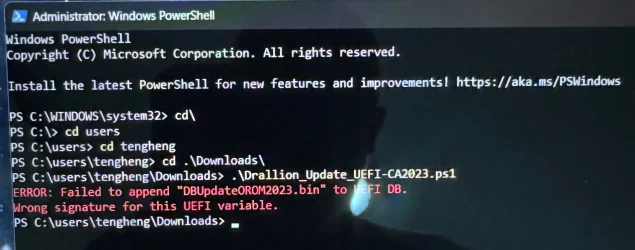
ERROR: Failed to append "DBUpdateOROM2023.bin" to UEFI DB.
Wrong signature for this UEFI variable.
This is for the Chromebook. The error "Failed to append "DBUpdateOROM2023.bin" to UEFI DB, Wrong signature for this UEFI variable, could it be because the original Bios was from Mr.Chromebox, signed by his certificate? So it means that I'm at the end of the road for the Chromebook, just wait for the InProgress to progress to Updated or wait till June 26 and see if Microsoft does their magic?
 

My Computer

System One

  • OS
    Windows 11
    Computer type
    PC/Desktop
I fixed the condition when UEFICA2023Status doesn't exist in the registry.

For the Chromebook, you should ask MrChromebox how were the original certs signed. If he created a custom Platform Key, then he has to provide a signed KEK CA 2023 for the BIOS. Otherwise the MS issued Option ROM cannot be appended, because it's not authorized without a KEK CA 2023.

This is not a MS problem, and Windows can't fix it for you. If there's an option in the provided BIOS to clear all keys and end up in Setup Mode, then the update script can handle replacing all the keys with the Windows OEM Devices set from MS.

In the UEFI security model, anyone who controls their PK must sign the KEK CA 2023. If you BIOS has manual KEK key enrollment (from a file), then you can import the KEK cert file from the EFI partition.
 

Attachments

My Computer

System One

  • OS
    Windows 7
I fixed the condition when UEFICA2023Status doesn't exist in the registry.

For the Chromebook, you should ask MrChromebox how were the original certs signed. If he created a custom Platform Key, then he has to provide a signed KEK CA 2023 for the BIOS. Otherwise the MS issued Option ROM cannot be appended, because it's not authorized without a KEK CA 2023.

This is not a MS problem, and Windows can't fix it for you. If there's an option in the provided BIOS to clear all keys and end up in Setup Mode, then the update script can handle replacing all the keys with the Windows OEM Devices set from MS.

In the UEFI security model, anyone who controls their PK must sign the KEK CA 2023. If you BIOS has manual KEK key enrollment (from a file), then you can import the KEK cert file from the EFI partition.
Thanks for the fixed. Below is the output for first device, not the Chromebook. For the Chromebook, I will get to MrChromebox, hopefully he is will help out.

PS C:\users\tengheng\Downloads> .\Check_UEFI-CA2023.ps1 -verbose

Security warning
Run only scripts that you trust. While scripts from the internet can be useful, this script can potentially harm your
computer. If you trust this script, use the Unblock-File cmdlet to allow the script to run without this warning
message. Do you want to run C:\users\tengheng\Downloads\Check_UEFI-CA2023.ps1?
[D] Do not run [R] Run once Suspend [?] Help (default is "D"): r
Windows 11 25H2 (26200.8328)

Secure Boot: ON
Virtualization Based Security: ON
BitLocker on (C:) OFF

BIOS Firmware
-------------
Dell Inc. Precision 7960 Tower
Version: 2.18.0
Date: 2026-01-27

Factory Default UEFI PK Cert
----------------------------
Dell Inc. Platform Key

UEFI PK Cert
------------
Dell Inc. Platform Key

Factory Default UEFI KEK Certs
------------------------------
Microsoft Corporation KEK CA 2011
Microsoft Corporation KEK 2K CA 2023
Dell Inc. Key Exchange Key

UEFI KEK Certs
--------------
Microsoft Corporation KEK CA 2011
Microsoft Corporation KEK 2K CA 2023
Dell Inc. Key Exchange Key

Factory Default UEFI DB Certs
-----------------------------
Microsoft Corporation UEFI CA 2011
Microsoft Windows Production PCA 2011
Dell Bios FW Aux Authority 2018
Microsoft Option ROM UEFI CA 2023
Microsoft UEFI CA 2023
Windows UEFI CA 2023
Dell Bios DB Key

UEFI DB Certs
-------------
Microsoft Corporation UEFI CA 2011
Microsoft Windows Production PCA 2011
Dell Bios FW Aux Authority 2018
Microsoft Option ROM UEFI CA 2023
Microsoft UEFI CA 2023
Windows UEFI CA 2023
Dell Bios DB Key

Factory Default UEFI DBX Certs
------------------------------
Microsoft Windows PCA 2010
EFI_CERT_SHA256_GUID Signatures: 371

UEFI DBX Certs
--------------
Microsoft Windows PCA 2010
Microsoft Windows Production PCA 2011
Windows BootMgr SVN 8.0
EFI_CERT_SHA256_GUID Signatures: 433

UEFI Variables
--------------
Credential Guard: ON
SBAT (Linux only): sbat,1,2024010900 / shim,4 / grub,3 / grub.debian,4

EFI Files
---------
Windows Boot Manager [Windows UEFI CA 2023] is ALLOWED.
\\.\HarddiskVolume12\EFI\Microsoft\Boot\bootmgfw.efi
File Version: 28000.322, SVN 8.0

Registry: "WindowsUEFICA2023Capable" = 1
[Windows UEFI CA 2023] in UEFI DB.

[OPTIONAL] SkuSiPolicy.p7b (for VBS) is MISSING.


STATUS REPORT
-------------
SUCCESS: UPDATES ARE FINISHED.
UEFI CA 2023 certs are present, PCA 2011 cert is revoked.
 

My Computer

System One

  • OS
    Windows 11
    Computer type
    PC/Desktop
Users on his GitHub claim you can go into Setup Mode. But I don't have his firmware to know that.

Once you're in Setup Mode (no keys), then run the Update script and it will download and install the Windows OEM Devices EDK2 files. This gives you a complete set of CA 2011 + CA2023 certs.
 

My Computer

System One

  • OS
    Windows 7
Users on his GitHub claim you can go into Setup Mode. But I don't have his firmware to know that.

Once you're in Setup Mode (no keys), then run the Update script and it will download and install the Windows OEM Devices EDK2 files. This gives you a complete set of CA 2011 + CA2023 certs.
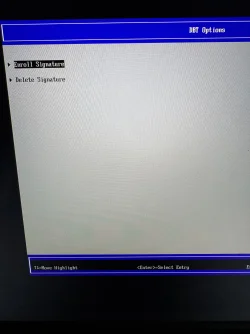
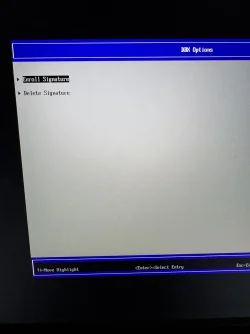
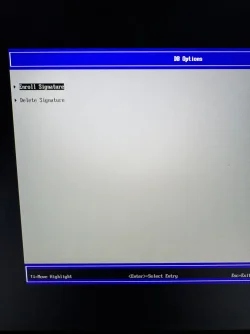
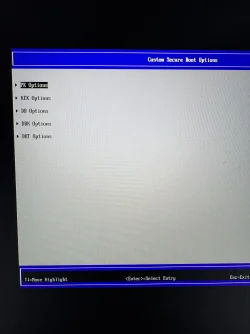
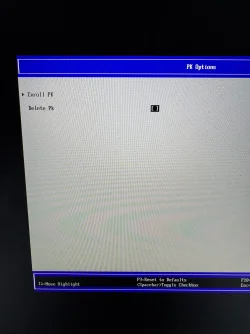
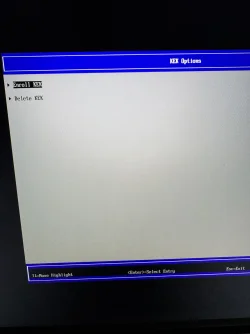
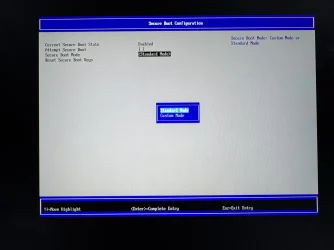
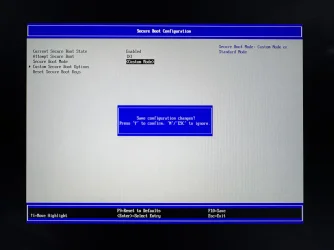
I went into the Bios. There is Custom and Standard mode. In Custom Mode, PK Options, KEL Options, DB Options, DBX Options and DBT Options are listed. So I need to delete PK and KEK, and delete the signatures for the DB, DBX and DBT?
 

Attachments

  • IMG_6030.webp
    IMG_6030.webp
    1.6 MB · Views: 1
  • IMG_6029.webp
    IMG_6029.webp
    641.5 KB · Views: 1
  • IMG_6028.webp
    IMG_6028.webp
    416.6 KB · Views: 1
  • IMG_6025.webp
    IMG_6025.webp
    876.1 KB · Views: 1
  • IMG_6026.webp
    IMG_6026.webp
    1.7 MB · Views: 1
  • IMG_6027.webp
    IMG_6027.webp
    624.1 KB · Views: 2
  • IMG_6024.webp
    IMG_6024.webp
    625.8 KB · Views: 1
  • IMG_6023.webp
    IMG_6023.webp
    642.3 KB · Views: 1
  • IMG_6031.webp
    IMG_6031.webp
    1.7 MB · Views: 3

My Computer

System One

  • OS
    Windows 11
    Computer type
    PC/Desktop
I went into the Bios. There is Custom and Standard mode. In Custom Mode, PK Options, KEL Options, DB Options, DBX Options and DBT Options are listed. So I need to delete PK and KEK, and delete the signatures for the DB, DBX and DBT?
Personally? I won't delete anything. Why? All that must be done is update all keys or certificates. If that Check-UEFI fails for some reason you have to address that issue and not delete everything. Garlin just said "if you have no keys *as in empty*". He meant not "delete every key". For the time beiing leave it at it currently is. No need if there are issues to make them bigger.

The problem is your Chromebook. They have a slight internal other configuration where you now ran into. These scripts are first intended for x64 Windows devices. As you noticed they are fine. As Garlin has not a Chromebook his is trying to figure out what's so different. He can't simulate this issue.

As a note; keep your post as clean as possible. If there is a need to post a logging use attachment without any alterations. The above strike through part confused me. You posted a logging from an other device where 1 part was normal and the rest was strike through. What was the question here? Run that script "C:\users\tengheng\Downloads\Check_UEFI-CA2023.ps1" Press "[D] Do not run [R] Run once" D or R? Keep in mind. Nothing will change by running this script. It's only looking. Only "Update_UEFI-CA2023.ps1" could change things.....

You have to wait for Garlin's reaction. He is a busy guy now... :LOL: He's trying to help a lot of people. (y)
 

My Computer

System One

  • OS
    Win 11 Pro "25H2" Build 26200.8524, Zorin OS Pro
    Computer type
    PC/Desktop
    Manufacturer/Model
    Self built
    CPU
    Intel® Core™ i7-12700KF 12th Gen.
    Motherboard
    ASUS Prime Z690-A, BIOS v4505
    Memory
    32GB DDR5 5600-36 Vengeance
    Graphics Card(s)
    PCIe4.0 Asus NVIDIA RTX3060Ti
    Sound Card
    Onboard; Realtek
    Monitor(s) Displays
    34" LG 34UC79G-B Curved 21:9 144Hz
    Screen Resolution
    2560x1080 (No HDR)
    Hard Drives
    250Gb Samsung 870PRO NVMe (Win 11 Pro)
    1Tb Samsung 980PRO NVMe
    1Tb Samsung 970EVO NVMe
    2Tb Samsung 990PRO NVMe with heatsink.
    4Tb WDC WD40EZRZ Blue SATA (Int.)
    4Tb WDC WD40EZRZ Blue SATA (Int.)
    3Tb WDC WD30EFRZ Red SATA (Int.)
    256Gb Samsung 840PRO SSD (RHEL 9,5)
    256Gb Samsung 850PRO SSD (Zorin OS Pro 18)
    PSU
    Coolermaster 850W V2 Gold with internal 12cm exaust fan
    Case
    Be-Quiet Pure Base 600.
    Cooling
    3x Be-Quiet! 12/14cm "Silent Wings 4" casefans, 1x Arctic Freezer i35 CPU towerblock with fan.
    Keyboard
    Steelseries APEX 7 keyboard.
    Mouse
    Logitech G-502 Hero
    Internet Speed
    1Gb
    Browser
    Brave
    Antivirus
    F-Secure
    Other Info
    No Noise system.
    256Gb Kingston Travler USB 3.0 drive.
    64Gb Sandisk USB 3.2 drive. (Ventoy)
    8Gb Philips USB 3.0 drive. (Win. Inst.)
    8Gb Philips USB 3.0 drive. (Rescue disk)
    2Tb WD USB 3.0 Passport drive.
    USB Ext. 500Gb WD SATA drive.
    External USB 3.0 C.A. CD/DVD* burner.
You posted a logging from an other device where 1 part was normal and the rest was strike through
The original text contained
[s]
and the forum software interprets that as the start of a strikethrough selection.

If the poster had attached the results as a file, as hader suggests, then the problem would not have happened,

BBCodes can also be used to avoid such occurrences. That's how I got the second line of my post to appear without triggering strikethrough.
plain 2.webp


All the best,
Denis
 

My Computer

System One

  • OS
    Windows 11 Home x64 Version 25H2 Build 26200.8037
I went into the Bios. There is Custom and Standard mode. In Custom Mode, PK Options, KEL Options, DB Options, DBX Options and DBT Options are listed. So I need to delete PK and KEK, and delete the signatures for the DB, DBX and DBT?
This is the basic UEFI shell. I don't believe there's a "delete all keys" option.

Now that you're in Custom Mode. Just delete all of the keys (one by one) for each of the variables: PK, KEK, DB and DBX. It may be tedious, but you only have to perform this task once. After you have deleted everything, restart Windows and run the update script.

It should recognize the BIOS is in Setup Mode (no certs) and download a complete set of certs. When you get an authentication error, it's because the UEFI already had a different KEK and it doesn't allow the new DB cert to be applied (doesn't match the signing info). By deleting all the certs, we remove the compatibility issues since the new certs are all provided as one complete set.
 

My Computer

System One

  • OS
    Windows 7
Some PCs have Secure Boot Key protection feature that does not allow key updating. You may wish to check your PC BIOS settings.

This is from HP EliteBook series notebook:

View attachment 153375

Hope this helps.

Turn off Secure Boot on Sure Start PCs and turn it back on after successfully updating the secure boot certificates.
 

My Computers

System One System Two

  • OS
    Windows 11 Education For 25H2
    Computer type
    Laptop
    Manufacturer/Model
    HP ZBook G2
    CPU
    Intel® Core i7 5500u
    Motherboard
    HP
    Memory
    8 GB
    Graphics Card(s)
    Intel HD Family Graphics 5500 AMD Firepro 4150M
    Sound Card
    Realtek High Audio
    Hard Drives
    1 TB SSD
    Mouse
    HP USB Mouse
    Antivirus
    Windows Defender
  • Operating System
    Windows 11 Pro For Workstations 25H2
    Computer type
    Laptop
    Manufacturer/Model
    HP Zbook G4
    CPU
    Xeon 1535m v6
    Motherboard
    HP
    Memory
    32 GB
    Graphics card(s)
    AMD Quadro Pro 4100
    Sound Card
    Bang and Olufson Audio
    Hard Drives
    1TB SSD
    Mouse
    HP USB Mouse
    Antivirus
    Windows Defender
OK, here's how to check your Certs...

1. Download the script at the bottom of this post.
2. Extract the Check_BootFile.ps1 script and place it on your desktop.
3. Go to: C:\Users\your account name\Desktop and right click Desktop and choose: Open in Terminal
4. In the powershell windows that pops up, type the following...

.\Check_EFIBootFile.ps1 and hit the ENTER key.

You should get a result similar to this...

View attachment 154191


Here is the script...

If it says allowed, you're done and the 2023 secure boot certificates will manage future secure boot updates.
 

My Computers

System One System Two

  • OS
    Windows 11 Education For 25H2
    Computer type
    Laptop
    Manufacturer/Model
    HP ZBook G2
    CPU
    Intel® Core i7 5500u
    Motherboard
    HP
    Memory
    8 GB
    Graphics Card(s)
    Intel HD Family Graphics 5500 AMD Firepro 4150M
    Sound Card
    Realtek High Audio
    Hard Drives
    1 TB SSD
    Mouse
    HP USB Mouse
    Antivirus
    Windows Defender
  • Operating System
    Windows 11 Pro For Workstations 25H2
    Computer type
    Laptop
    Manufacturer/Model
    HP Zbook G4
    CPU
    Xeon 1535m v6
    Motherboard
    HP
    Memory
    32 GB
    Graphics card(s)
    AMD Quadro Pro 4100
    Sound Card
    Bang and Olufson Audio
    Hard Drives
    1TB SSD
    Mouse
    HP USB Mouse
    Antivirus
    Windows Defender

My Computers

System One System Two

  • OS
    Windows 11 Education For 25H2
    Computer type
    Laptop
    Manufacturer/Model
    HP ZBook G2
    CPU
    Intel® Core i7 5500u
    Motherboard
    HP
    Memory
    8 GB
    Graphics Card(s)
    Intel HD Family Graphics 5500 AMD Firepro 4150M
    Sound Card
    Realtek High Audio
    Hard Drives
    1 TB SSD
    Mouse
    HP USB Mouse
    Antivirus
    Windows Defender
  • Operating System
    Windows 11 Pro For Workstations 25H2
    Computer type
    Laptop
    Manufacturer/Model
    HP Zbook G4
    CPU
    Xeon 1535m v6
    Motherboard
    HP
    Memory
    32 GB
    Graphics card(s)
    AMD Quadro Pro 4100
    Sound Card
    Bang and Olufson Audio
    Hard Drives
    1TB SSD
    Mouse
    HP USB Mouse
    Antivirus
    Windows Defender

My Computers

System One System Two

  • OS
    Windows 11 Education For 25H2
    Computer type
    Laptop
    Manufacturer/Model
    HP ZBook G2
    CPU
    Intel® Core i7 5500u
    Motherboard
    HP
    Memory
    8 GB
    Graphics Card(s)
    Intel HD Family Graphics 5500 AMD Firepro 4150M
    Sound Card
    Realtek High Audio
    Hard Drives
    1 TB SSD
    Mouse
    HP USB Mouse
    Antivirus
    Windows Defender
  • Operating System
    Windows 11 Pro For Workstations 25H2
    Computer type
    Laptop
    Manufacturer/Model
    HP Zbook G4
    CPU
    Xeon 1535m v6
    Motherboard
    HP
    Memory
    32 GB
    Graphics card(s)
    AMD Quadro Pro 4100
    Sound Card
    Bang and Olufson Audio
    Hard Drives
    1TB SSD
    Mouse
    HP USB Mouse
    Antivirus
    Windows Defender
You can apply new certs, but it doesn't take effect until the system restarts. Reboot the system.

Reboot twice and then run the UEFI check again.
 

My Computers

System One System Two

  • OS
    Windows 11 Education For 25H2
    Computer type
    Laptop
    Manufacturer/Model
    HP ZBook G2
    CPU
    Intel® Core i7 5500u
    Motherboard
    HP
    Memory
    8 GB
    Graphics Card(s)
    Intel HD Family Graphics 5500 AMD Firepro 4150M
    Sound Card
    Realtek High Audio
    Hard Drives
    1 TB SSD
    Mouse
    HP USB Mouse
    Antivirus
    Windows Defender
  • Operating System
    Windows 11 Pro For Workstations 25H2
    Computer type
    Laptop
    Manufacturer/Model
    HP Zbook G4
    CPU
    Xeon 1535m v6
    Motherboard
    HP
    Memory
    32 GB
    Graphics card(s)
    AMD Quadro Pro 4100
    Sound Card
    Bang and Olufson Audio
    Hard Drives
    1TB SSD
    Mouse
    HP USB Mouse
    Antivirus
    Windows Defender
Thank you both.

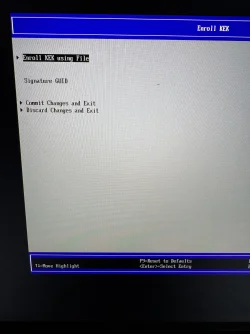
In Custom mode, I deleted all except DBT, disabled Secure Boot, saved. Rebooted, ran Update, hit error.

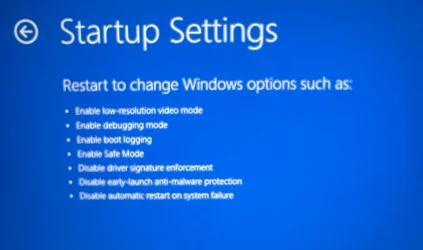
So I rebooted via safe mode.

Ran Update, got the same wrong signature permission error.

Rebooted into Bios, enabled Secure Boot. Boot into Windows. Ran Check, seems like the same output as before. Didn’t have time earlier to capture the outcome.
 

Attachments

  • IMG_6033.webp
    IMG_6033.webp
    18.7 KB · Views: 2
  • IMG_6034.webp
    IMG_6034.webp
    154 KB · Views: 1
  • IMG_6035.webp
    IMG_6035.webp
    200.7 KB · Views: 1

My Computer

System One

  • OS
    Windows 11
    Computer type
    PC/Desktop
That is really weird. Try this update script, which skips over the Option ROM (which is optional).
Ran the script without the Option ROM. So it's done for the Chromebook?


1778740630917.webp


Here's the Check output:
PS C:\users\tengheng\Downloads> .\Drallion_Check_UEFI-CA2023.ps1 -verbose
Windows 11 25H2 (26200.8457)

Secure Boot: ON
Virtualization Based Security: OFF
BitLocker on (C:) OFF

BIOS Firmware
-------------
Google Drallion
Version: MrChromebox-4.22.4
Date: 2024-04-16

Factory Default UEFI PK Cert
----------------------------
(NONE)

UEFI PK Cert
------------
CoolStar

Factory Default UEFI KEK Certs
------------------------------
(NONE)

UEFI KEK Certs
--------------
Microsoft Corporation KEK CA 2011
Microsoft Corporation KEK 2K CA 2023
System76 Secure Boot Key Exchange Key

Factory Default UEFI DB Certs
-----------------------------
(NONE)

UEFI DB Certs
-------------
Microsoft Corporation UEFI CA 2011
Microsoft Windows Production PCA 2011
Microsoft UEFI CA 2023
Windows UEFI CA 2023
System76 Secure Boot Database Key

Factory Default UEFI DBX Certs
------------------------------
(NONE)
EFI_CERT_SHA256_GUID Signatures: 0

UEFI DBX Certs
--------------
(NONE)
Windows BootMgr SVN is MISSING.
EFI_CERT_SHA256_GUID Signatures: 371

UEFI Variables
--------------
Credential Guard: ON
SBAT (Linux only): sbat,1,2024010900 / shim,4 / grub,3 / grub.debian,4

EFI Files
---------
Windows Boot Manager [Windows UEFI CA 2023] is ALLOWED.
\\?\Volume{c1a3a1ae-1261-4bc1-bb12-fb977ec216f4}\EFI\Microsoft\Boot\bootmgfw.efi
File Version: 28000.322, SVN 8.0

Registry: "WindowsUEFICA2023Capable" = 2
[Windows UEFI CA 2023] in UEFI DB, and Windows starting from CA 2023 Boot Manager.


REQUIRED ACTION
===============

OPTION 1: DO NOTHING AND WAIT. Windows will apply the UEFI updates (PC has supported BIOS).

OPTION 2: To install [UEFI CA 2023] certs WITHOUT REVOKING the [PCA 2011] cert, run the commands:

reg add HKEY_LOCAL_MACHINE\SYSTEM\CurrentControlSet\Control\Secureboot /v AvailableUpdates /t REG_DWORD /d 0x4800 /f
powershell Start-ScheduledTask -TaskName "\Microsoft\Windows\PI\Secure-Boot-Update"


OPTION 3: To install [UEFI CA 2023] certs and REVOKE the [PCA 2011] cert, run the commands:

reg add HKEY_LOCAL_MACHINE\SYSTEM\CurrentControlSet\Control\Secureboot /v AvailableUpdates /t REG_DWORD /d 0x4a82 /f
powershell Start-ScheduledTask -TaskName "\Microsoft\Windows\PI\Secure-Boot-Update"


+++++

Registry status still show "InProgress" though.

1778741003592.webp
 

My Computer

System One

  • OS
    Windows 11
    Computer type
    PC/Desktop
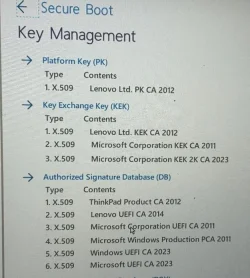
I am still having an issue with my Lenovo ThinkPad laptop. The certificate has been entered as I get "True" from the check for the 2023 version. I tried these commands to do the update"

Set-ItemProperty -Path "HKLM:\SYSTEM\CurrentControlSet\Control\SecureBoot" -Name "AvailableUpdates" -Value 0x40

Start-ScheduledTask -TaskName "\Microsoft\Windows\PI\Secure-Boot-Update"

That sets the update "InProgress".

Do two reboots.

But it ends up back to "NotStarted".

Any more suggestions?

JohnD

Attached Secure Boot BIOS certificate listing.
 

Attachments

  • TP_Secure_Boot_BIOS_Cerrtificate_List.webp
    TP_Secure_Boot_BIOS_Cerrtificate_List.webp
    68.5 KB · Views: 2
Last edited:

My Computer

System One

  • OS
    Windows 10
Thank you both.

In Custom mode, I deleted all except DBT, disabled Secure Boot, saved. Rebooted, ran Update, hit error.

So I rebooted via safe mode.

Ran Update, got the same wrong signature permission error.

Rebooted into Bios, enabled Secure Boot. Boot into Windows. Ran Check, seems like the same output as before. Didn’t have time earlier to capture the outcome.
Just as a note. According to the first screen it seems that a certificate does not belong to a well known supplier that made that certificate. That .bin file contains some information about the certificates and who (company) generated them. It seems that signature does not match with the signature or company who issued that certificate. To bad that we don't see more on which certificate(s) it's about. Can you look inside C:\Windows\System32\SecureBootUpdates if you can find that DBUpdateOROM2023.bin file (dated back around 15-9-2025) I know Windows is updating these files with possible every update to keep them up to date. Other files in that folder are more recent like KEKUpdateCombined.bin (13-5-2026) Dates are when a particular update was executed. So it can differ from machine to machine. (sooner or later)

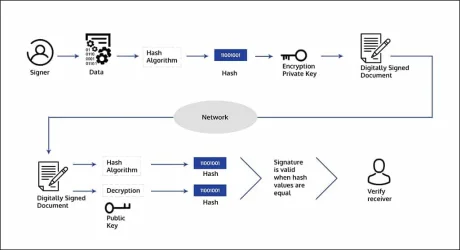
A certificate (.crt or .der) is protected by many ways. See attachment. That verifying proces is now failing for some reason.

Found a custom description on GitHub about signatures.
- It points to the "Microsoft Option ROM CA 2023" certificate, and where to download the official .crt (.der is identical) Rightclick on them let's you install the certificate.
- It unique SHA1 checksum
- Who signed this certificate

[[DB.files]]
path = "PreSignedObjects/DB/Certificates/microsoft option rom uefi ca 2023.der"
url = "http://www.microsoft.com/pkiops/certs/microsoft option rom uefi ca 2023.crt"
sha1 = 0x3FB39E2B8BD183BF9E4594E72183CA60AFCD4277
signature_owner = "77fa9abd-0359-4d32-bd60-28f4e78f784b"
description = "2023+ signed UEFI Third-Party Option ROMs (e.g. Graphics/Storage/Networking Drivers)"
I checked the signature_owner against all certificates inside my valid (current) DB region.

PS C:\WINDOWS\system32> Get-UEFISecureBootCerts -Variable db

SignatureOwner SignatureSubject
-------------- ----------------
3b053091-6c9f-04cc-b1ac-e2a51e3be5f5 CN=ASUSTeK MotherBoard SW Key Certificate
3b053091-6c9f-04cc-b1ac-e2a51e3be5f5 CN=ASUSTeK Notebook SW Key Certificate
77fa9abd-0359-4d32-bd60-28f4e78f784b CN=Microsoft Corporation UEFI CA 2011, O=Microsoft Corporation, L=Redmond, S=Wa...
77fa9abd-0359-4d32-bd60-28f4e78f784b CN=Microsoft Windows Production PCA 2011, O=Microsoft Corporation, L=Redmond, S...
77fa9abd-0359-4d32-bd60-28f4e78f784b CN=Microsoft Option ROM UEFI CA 2023, O=Microsoft Corporation, C=US
77fa9abd-0359-4d32-bd60-28f4e78f784b CN=Microsoft UEFI CA 2023, O=Microsoft Corporation, C=US
77fa9abd-0359-4d32-bd60-28f4e78f784b CN=Windows UEFI CA 2023, O=Microsoft Corporation, C=US

00000000-0000-0000-0000-000000000000
00000000-0000-0000-0000-000000000000
00000000-0000-0000-0000-000000000000
00000000-0000-0000-0000-000000000000
00000000-0000-0000-0000-000000000000
In this case the unique signature "77fa9abd-0359-4d32-bd60-28f4e78f784b" belongs indeed to Microsoft.

PS C:\WINDOWS\system32> Get-SecureBootUEFI -Name db -Decoded
shows the same list but now with some more info about all certificates like valid from/till.
Saw that that "Microsoft Option ROM CA 2023" certificate is valid from "2023-10-26" till "2038-10-26"
So much for the general info part.

I can see that your Factory (The default section) PK, KEK, DB has been erased. (as instructed by Garlin) The Current PK, KEK, DB are intact but it is still missing that "MS Option ROM CA 2023" (Check if both commands above produces some result's like mine (No ASUS and that Option ROM))

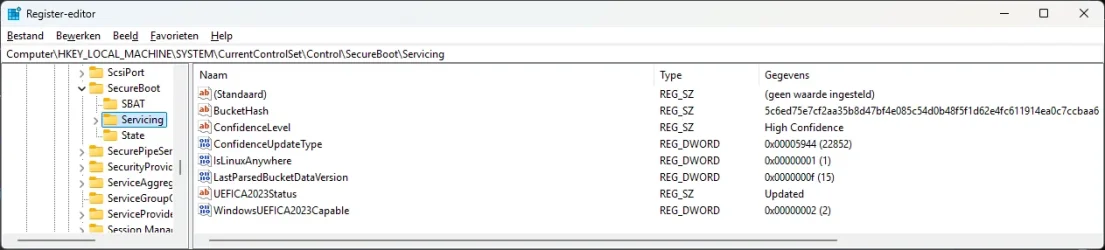
I look at my part inside the registry (your screendump) It may say "InProgress" but I doubt it. I see more and troublesome entry's. One of the thing that is worrying is "Firmware_Unknown" No wonder there are many errors and errorevents reported. If Firmware_Unknown means the firmware of your Chromebook than your path to solve this is not this one. Makes you wonder: MS doesn't recognize or want to see that Google based product. "Not ours...."??
 

Attachments

  • digital-signing.webp
    digital-signing.webp
    23.1 KB · Views: 2
  • Reg_servicing.webp
    Reg_servicing.webp
    40.8 KB · Views: 2

My Computer

System One

  • OS
    Win 11 Pro "25H2" Build 26200.8524, Zorin OS Pro
    Computer type
    PC/Desktop
    Manufacturer/Model
    Self built
    CPU
    Intel® Core™ i7-12700KF 12th Gen.
    Motherboard
    ASUS Prime Z690-A, BIOS v4505
    Memory
    32GB DDR5 5600-36 Vengeance
    Graphics Card(s)
    PCIe4.0 Asus NVIDIA RTX3060Ti
    Sound Card
    Onboard; Realtek
    Monitor(s) Displays
    34" LG 34UC79G-B Curved 21:9 144Hz
    Screen Resolution
    2560x1080 (No HDR)
    Hard Drives
    250Gb Samsung 870PRO NVMe (Win 11 Pro)
    1Tb Samsung 980PRO NVMe
    1Tb Samsung 970EVO NVMe
    2Tb Samsung 990PRO NVMe with heatsink.
    4Tb WDC WD40EZRZ Blue SATA (Int.)
    4Tb WDC WD40EZRZ Blue SATA (Int.)
    3Tb WDC WD30EFRZ Red SATA (Int.)
    256Gb Samsung 840PRO SSD (RHEL 9,5)
    256Gb Samsung 850PRO SSD (Zorin OS Pro 18)
    PSU
    Coolermaster 850W V2 Gold with internal 12cm exaust fan
    Case
    Be-Quiet Pure Base 600.
    Cooling
    3x Be-Quiet! 12/14cm "Silent Wings 4" casefans, 1x Arctic Freezer i35 CPU towerblock with fan.
    Keyboard
    Steelseries APEX 7 keyboard.
    Mouse
    Logitech G-502 Hero
    Internet Speed
    1Gb
    Browser
    Brave
    Antivirus
    F-Secure
    Other Info
    No Noise system.
    256Gb Kingston Travler USB 3.0 drive.
    64Gb Sandisk USB 3.2 drive. (Ventoy)
    8Gb Philips USB 3.0 drive. (Win. Inst.)
    8Gb Philips USB 3.0 drive. (Rescue disk)
    2Tb WD USB 3.0 Passport drive.
    USB Ext. 500Gb WD SATA drive.
    External USB 3.0 C.A. CD/DVD* burner.

Latest Support Threads

Back
Top Bottom