Sysinternals question


esebm

Well-known member
Member
Local time
1:45 PM
Posts
202
OS
win 11
Hi, I have huge problems with my win 11 (up-to-date) PC.
It shuts off/reboots every few minutes.
Power supply replaced, no change. Event viewer is no help.
After all kinds of tests (no problems found) I downloaded the Sysinternals suite and I was wondering if any of the dozens of .exe files would help me to pinpoint the shutoff reason?
Been working in safe mode for weeks now, no fun!
 

My Computer

System One

  • OS
    win 11
    Computer type
    PC/Desktop
    Manufacturer/Model
    Home build
    CPU
    Ryzen 5600G
    Motherboard
    B450 Tomahawk Max
    Memory
    32 GB DDR4
    Graphics Card(s)
    on board
    Monitor(s) Displays
    LG 27MR400
    Screen Resolution
    1280 x 1024
    Hard Drives
    SSD
    Internet Speed
    3MB/s
    Browser
    Opera
    Antivirus
    Windows
Have you re-seated the RAM and CPU and checked all the connectors/plugs?
Please list all that you have tried.
 

My Computers

System One System Two

  • OS
    Windows 11 Pro 25H2 26200.8655
    Computer type
    Laptop
    Manufacturer/Model
    Acemagic LX15PRO
    CPU
    AMD Ryzen 7 5825U with Radeon Graphics
    Memory
    16GB
    Screen Resolution
    1920 x 1080
    Hard Drives
    SSD 2TB
    Internet Speed
    30 Mbps
    Browser
    Brave
    Antivirus
    Webroot Secure Anywhere
    Other Info
    System 3

    Acer Swift SF114-34 laptop
    OS Windows 11 Pro 26200.8524
    CPU Pentium Silver N6000
    RAM 4GB
    SSD Samsung 970 EVO Plus SSD 2TB (an upgrade)
  • Operating System
    Windows 11 Pro 23H2 22631.2506
    Computer type
    Laptop
    Manufacturer/Model
    HP Mini 210-1090NR PC (bought in late 2009!)
    CPU
    Atom N450 1.66GHz
    Memory
    2GB
    Browser
    Brave
    Antivirus
    Webroot
Last edited:

My Computers

System One System Two

  • OS
    Windows 11 Pro 25H2 26200.8655
    Computer type
    Laptop
    Manufacturer/Model
    Acemagic LX15PRO
    CPU
    AMD Ryzen 7 5825U with Radeon Graphics
    Memory
    16GB
    Screen Resolution
    1920 x 1080
    Hard Drives
    SSD 2TB
    Internet Speed
    30 Mbps
    Browser
    Brave
    Antivirus
    Webroot Secure Anywhere
    Other Info
    System 3

    Acer Swift SF114-34 laptop
    OS Windows 11 Pro 26200.8524
    CPU Pentium Silver N6000
    RAM 4GB
    SSD Samsung 970 EVO Plus SSD 2TB (an upgrade)
  • Operating System
    Windows 11 Pro 23H2 22631.2506
    Computer type
    Laptop
    Manufacturer/Model
    HP Mini 210-1090NR PC (bought in late 2009!)
    CPU
    Atom N450 1.66GHz
    Memory
    2GB
    Browser
    Brave
    Antivirus
    Webroot
Yes, I have re-seated RAM, all connectors, CPU with new thermal paste.
Purchased Fortect software, all fine. They tried to help me very involved, without any success.
They suggested to repair-install win 11 but they could not tell me what's gonna happen when the PC shuts off in the middle of the re-install. Hence my question re Sysinternals.
Didn't see the article.
 

My Computer

System One

  • OS
    win 11
    Computer type
    PC/Desktop
    Manufacturer/Model
    Home build
    CPU
    Ryzen 5600G
    Motherboard
    B450 Tomahawk Max
    Memory
    32 GB DDR4
    Graphics Card(s)
    on board
    Monitor(s) Displays
    LG 27MR400
    Screen Resolution
    1280 x 1024
    Hard Drives
    SSD
    Internet Speed
    3MB/s
    Browser
    Opera
    Antivirus
    Windows
IMO you have not proven if this is a software or hardware problem.
What I would try is to boot from a Live Linux usb (I use Mint and Ubuntu)
Run it a couple of days using Linux. See if the system reboots itself, If it does, you have a hardware problem.

If it doesn't reboot itself using Linux, then you have a software or 3rd party driver issue in Windows. Use clean boot to find the culprit.

Note: If it proves to be software or driver and you are unable to use process of elimination with a clean boot, if you do not have your personal files backed up, a Linux distro is excellent for that purpose.
 

My Computers

System One System Two

  • OS
    Windows 11 Pro 25H2 26200.8655
    Computer type
    PC/Desktop
    Manufacturer/Model
    Dell Optiplex 7080
    CPU
    i9-10900 10 core 20 threads
    Motherboard
    DELL 0J37VM
    Memory
    32 gb
    Graphics Card(s)
    none-Intel UHD Graphics 630
    Sound Card
    Integrated Realtek
    Monitor(s) Displays
    Benq 27
    Screen Resolution
    2560x1440
    Hard Drives
    2x1tb Solidigm m.2 nvme /External drives 512gb Samsung m.2 sata+2tb Kingston m2.nvme
    PSU
    500w
    Case
    MT
    Cooling
    Dell Premium
    Keyboard
    Logitech wired
    Mouse
    Logitech wireless
    Internet Speed
    so slow I'm too embarrassed to tell
    Browser
    #1 Edge #2 Firefox
    Antivirus
    Defender+MWB Premium
  • Operating System
    Windows 11 Pro 24H2 26200.8457
    Computer type
    PC/Desktop
    Manufacturer/Model
    Beelink Mini PC SER5
    CPU
    AMD Ryzen 7 6800U
    Memory
    32 gb
    Graphics card(s)
    integrated
    Sound Card
    integrated
    Monitor(s) Displays
    Benq 27
    Screen Resolution
    2560x1440
    Hard Drives
    1TB Crucial nvme
    Keyboard
    Logitech wired
    Mouse
    Logitech wireless
    Internet Speed
    still too embarrassed to tell
    Browser
    Firefox
    Antivirus
    Defender
    Other Info
    System 3 is non compliant Dell 9020 i7-4770/24gb ram Win11 PRO 26200.8457
I have the Kindle version of this book. Highly recommended.


My Computers

System One System Two

  • OS
    Windows 11 Pro
    Computer type
    Laptop
    Manufacturer/Model
    Dell XPS 16 DA16260
    CPU
    Intel Series 3 Core Ultra X9 388H
    Memory
    64GB LPDDR5x 9600 MT/s
    Graphics Card(s)
    Intel Arc graphics B390 Panther Lake
    Monitor(s) Displays
    16" 3.2K Tandem OLED Infinity Edge
    Screen Resolution
    3200 x 2000 16:10 236 PPI
    Hard Drives
    1 Terabyte M.2 PCIe NVMe SSD
    Case
    Black Anodized Aluminum
    Cooling
    Vapor Chamber Cooling
    Mouse
    None
    Internet Speed
    942 Mbps Netgear Mesh + 2 Satellites
    Browser
    Microsoft Edge (Chromium)
    Antivirus
    Windows Security (Defender)
    Other Info
    NPU delivering 67 TOPS
    Microsoft 365 subscription
    Microsoft Office 365
    Microsoft OneDrive 1TB Cloud
    Microsoft Visual Studio
    Microsoft Visual Studio Code
    Microsoft Sysinternals Suite
    Microsoft BitLocker
    Microsoft Copilot
    Dell Support Assist
    Dell Command | Update
    Macrium Reflect X subscription
    1Password Password Manager
    Amazon Kindle for PC
    Lightroom/Photoshop subscription
    Interactive Brokers Trader Workstation
  • Operating System
    Windows 11 Pro
    Computer type
    Laptop
    Manufacturer/Model
    Microsoft Surface Laptop 7
    CPU
    Snapdragon® X Elite (12 Core) with Hexagon NPU delivering 45 TOPS
    Memory
    32GB LPDDR5x 8448 MT/s
    Graphics card(s)
    Integrated Adreno GPU
    Sound Card
    Omnisonic speakers with Dolby Atmos spatial sound
    Monitor(s) Displays
    13.8″ PixelSense Flow touchscreen 120 Hz 600 NIT
    Screen Resolution
    2304 × 1536 (201 PPI), 3:2 aspect ratio
    Hard Drives
    1 TB PCIe NVMe Gen 4 SSD
    Case
    Black Anodized Aluminum
    Cooling
    Vapor Chamber Cooling
    Mouse
    None
    Internet Speed
    942 Mbps Netgear Mesh + 2 Satellites
    Browser
    Microsoft Edge (Chromium)
    Antivirus
    Windows Security (Defender)
    Other Info
    Microsoft 365 subscription (Office)
    Microsoft Office 365
    Microsoft OneDrive 1TB Cloud
    Microsoft Visual Studio 2026
    Microsoft Visual Studio Code
    Interactive Brokers Trader Workstation
    Lightroom/Photoshop subscription
    1Password Password Manager
    Microsoft Sysinternals
    Amazon Kindle for PC
    Microsoft BitLocker
    Microsoft Copilot
I put the missing link in post #3
 

My Computers

System One System Two

  • OS
    Windows 11 Pro 25H2 26200.8655
    Computer type
    Laptop
    Manufacturer/Model
    Acemagic LX15PRO
    CPU
    AMD Ryzen 7 5825U with Radeon Graphics
    Memory
    16GB
    Screen Resolution
    1920 x 1080
    Hard Drives
    SSD 2TB
    Internet Speed
    30 Mbps
    Browser
    Brave
    Antivirus
    Webroot Secure Anywhere
    Other Info
    System 3

    Acer Swift SF114-34 laptop
    OS Windows 11 Pro 26200.8524
    CPU Pentium Silver N6000
    RAM 4GB
    SSD Samsung 970 EVO Plus SSD 2TB (an upgrade)
  • Operating System
    Windows 11 Pro 23H2 22631.2506
    Computer type
    Laptop
    Manufacturer/Model
    HP Mini 210-1090NR PC (bought in late 2009!)
    CPU
    Atom N450 1.66GHz
    Memory
    2GB
    Browser
    Brave
    Antivirus
    Webroot
glaskuter, you are right. I don't know if it is a hardware or software problem, that's why I inquired re Sysinternals, hoping to find a culprit.
As to Linux, I have not the foggiest idea about it, probably would need quite some time to learn it.
I'll try the clean install thing first.
 

My Computer

System One

  • OS
    win 11
    Computer type
    PC/Desktop
    Manufacturer/Model
    Home build
    CPU
    Ryzen 5600G
    Motherboard
    B450 Tomahawk Max
    Memory
    32 GB DDR4
    Graphics Card(s)
    on board
    Monitor(s) Displays
    LG 27MR400
    Screen Resolution
    1280 x 1024
    Hard Drives
    SSD
    Internet Speed
    3MB/s
    Browser
    Opera
    Antivirus
    Windows
Sorry, did mean to say "clean boot". Did that, no change.

kelper: Did perform the steps in your link (#3), results didn't tell me more than the event viewer. Basically that the PC shut off but not the reason why.

As mentioned before, safe mode runs fine for days, not shut downs.
 

My Computer

System One

  • OS
    win 11
    Computer type
    PC/Desktop
    Manufacturer/Model
    Home build
    CPU
    Ryzen 5600G
    Motherboard
    B450 Tomahawk Max
    Memory
    32 GB DDR4
    Graphics Card(s)
    on board
    Monitor(s) Displays
    LG 27MR400
    Screen Resolution
    1280 x 1024
    Hard Drives
    SSD
    Internet Speed
    3MB/s
    Browser
    Opera
    Antivirus
    Windows
As to Linux, I have not the foggiest idea about it, probably would need quite some time to learn it.
If you could use XP or Win7, no you should have no problem. I had never used it either, but for testing or file recovery purposes, I had it down in 5 minutes. It just works right off the usb and works well. Built in browser, built in office management suite, very intuitive explorer app.
 

My Computers

System One System Two

  • OS
    Windows 11 Pro 25H2 26200.8655
    Computer type
    PC/Desktop
    Manufacturer/Model
    Dell Optiplex 7080
    CPU
    i9-10900 10 core 20 threads
    Motherboard
    DELL 0J37VM
    Memory
    32 gb
    Graphics Card(s)
    none-Intel UHD Graphics 630
    Sound Card
    Integrated Realtek
    Monitor(s) Displays
    Benq 27
    Screen Resolution
    2560x1440
    Hard Drives
    2x1tb Solidigm m.2 nvme /External drives 512gb Samsung m.2 sata+2tb Kingston m2.nvme
    PSU
    500w
    Case
    MT
    Cooling
    Dell Premium
    Keyboard
    Logitech wired
    Mouse
    Logitech wireless
    Internet Speed
    so slow I'm too embarrassed to tell
    Browser
    #1 Edge #2 Firefox
    Antivirus
    Defender+MWB Premium
  • Operating System
    Windows 11 Pro 24H2 26200.8457
    Computer type
    PC/Desktop
    Manufacturer/Model
    Beelink Mini PC SER5
    CPU
    AMD Ryzen 7 6800U
    Memory
    32 gb
    Graphics card(s)
    integrated
    Sound Card
    integrated
    Monitor(s) Displays
    Benq 27
    Screen Resolution
    2560x1440
    Hard Drives
    1TB Crucial nvme
    Keyboard
    Logitech wired
    Mouse
    Logitech wireless
    Internet Speed
    still too embarrassed to tell
    Browser
    Firefox
    Antivirus
    Defender
    Other Info
    System 3 is non compliant Dell 9020 i7-4770/24gb ram Win11 PRO 26200.8457
I'm wondering, does the fact that the PC has been running for a month in safe mode without a hitch prove that the hardware is not to blame?
 

My Computer

System One

  • OS
    win 11
    Computer type
    PC/Desktop
    Manufacturer/Model
    Home build
    CPU
    Ryzen 5600G
    Motherboard
    B450 Tomahawk Max
    Memory
    32 GB DDR4
    Graphics Card(s)
    on board
    Monitor(s) Displays
    LG 27MR400
    Screen Resolution
    1280 x 1024
    Hard Drives
    SSD
    Internet Speed
    3MB/s
    Browser
    Opera
    Antivirus
    Windows
I'm wondering, does the fact that the PC has been running for a month in safe mode without a hitch prove that the hardware is not to blame? But safe mode is running with a minimal set of drivers.
Yes, it's a good indication that core hardware is good. Now use Clean Boot to use the process of elimination to find which 3rd party app or driver is causing the problem. This is similar to Safe Mode, but provides you more control over which services and programs run at startup to help you isolate the cause of a problem. You say you used clean boot but did you use it correctly? Perform a Clean Boot in Windows 11 to Troubleshoot Software Conflicts
 

My Computers

System One System Two

  • OS
    Windows 11 Pro 25H2 26200.8655
    Computer type
    PC/Desktop
    Manufacturer/Model
    Dell Optiplex 7080
    CPU
    i9-10900 10 core 20 threads
    Motherboard
    DELL 0J37VM
    Memory
    32 gb
    Graphics Card(s)
    none-Intel UHD Graphics 630
    Sound Card
    Integrated Realtek
    Monitor(s) Displays
    Benq 27
    Screen Resolution
    2560x1440
    Hard Drives
    2x1tb Solidigm m.2 nvme /External drives 512gb Samsung m.2 sata+2tb Kingston m2.nvme
    PSU
    500w
    Case
    MT
    Cooling
    Dell Premium
    Keyboard
    Logitech wired
    Mouse
    Logitech wireless
    Internet Speed
    so slow I'm too embarrassed to tell
    Browser
    #1 Edge #2 Firefox
    Antivirus
    Defender+MWB Premium
  • Operating System
    Windows 11 Pro 24H2 26200.8457
    Computer type
    PC/Desktop
    Manufacturer/Model
    Beelink Mini PC SER5
    CPU
    AMD Ryzen 7 6800U
    Memory
    32 gb
    Graphics card(s)
    integrated
    Sound Card
    integrated
    Monitor(s) Displays
    Benq 27
    Screen Resolution
    2560x1440
    Hard Drives
    1TB Crucial nvme
    Keyboard
    Logitech wired
    Mouse
    Logitech wireless
    Internet Speed
    still too embarrassed to tell
    Browser
    Firefox
    Antivirus
    Defender
    Other Info
    System 3 is non compliant Dell 9020 i7-4770/24gb ram Win11 PRO 26200.8457
Yes, I performed a clean boot by the book, didn't help.
 

My Computer

System One

  • OS
    win 11
    Computer type
    PC/Desktop
    Manufacturer/Model
    Home build
    CPU
    Ryzen 5600G
    Motherboard
    B450 Tomahawk Max
    Memory
    32 GB DDR4
    Graphics Card(s)
    on board
    Monitor(s) Displays
    LG 27MR400
    Screen Resolution
    1280 x 1024
    Hard Drives
    SSD
    Internet Speed
    3MB/s
    Browser
    Opera
    Antivirus
    Windows
Had your thread been posted in the BSOD section of the forum, you would have been asked to gather all the logs associated with your crashes. Those logs could have been analyzed by @zbook for a more definitive way of troubleshooting. As it is, past using clean boot and safe boot, we're flying by the seat of our pants with any suggestion we might give.

OK. Looking at it logically, a clean boot eliminates software conflict. You tried clean boot and still have the problem. Since safe mode loads a minimal set of drivers and services, and you run fine in safe mode, that indicates it has to be a driver OR service that is disabled in safe boot (per the list below). A repair install should repair windows services. Still no joy, it's a driver. IMO it is far more likely to be a driver than a service but it could be either.

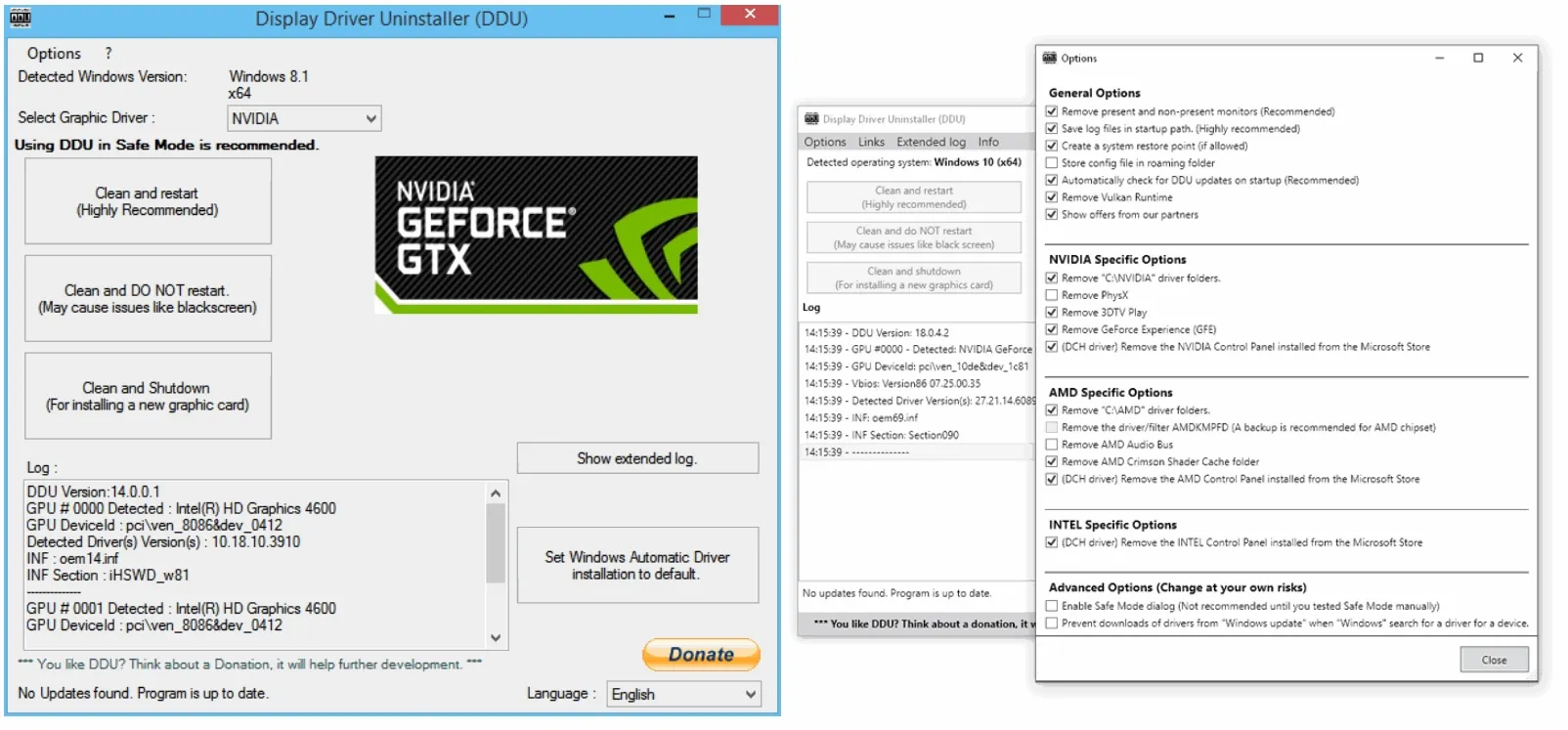
Also IMO we see far more issues with display drivers causing crashes than any other driver. You can prove whether or not it's the display driver very quickly by using DDU to uninstall both the display driver and its software. DDU has to be run in safe mode anyway and you're already there. Once uninstalled, boot back into normal boot. If it doesn't crash, that's your culprit.

Drivers and Services Disabled in Safe Mode
Most non-essential and third-party services and drivers are disabled.
Drivers and Services Disabled in Safe Mode

Most non-essential and third-party services and drivers are disabled.

Disabled Components:

Display Drivers:
Vendor-specific GPU drivers (NVIDIA, AMD, Intel)

Audio Drivers and Services: Windows Audio Service (disabled, no sound)

  • Networking Stack (in Safe Mode without networking):
    • Network adapter drivers
    • DNS client, DHCP, etc.
  • Windows Installer Service: (though you can enable it manually)
  • Third-Party Software Drivers:
    • Antivirus software
    • Virtualization services (e.g., VMware tools, Hyper-V services)
    • Printer and scanner drivers
    • USB device drivers for specialized hardware (e.g., gamepads, fingerprint readers)
  • Background Services:
    • Windows Update
    • Task Scheduler
    • Windows Defender (Real-time protection)
  • Shell Extensions and Explorer Add-ins
 

My Computers

System One System Two

  • OS
    Windows 11 Pro 25H2 26200.8655
    Computer type
    PC/Desktop
    Manufacturer/Model
    Dell Optiplex 7080
    CPU
    i9-10900 10 core 20 threads
    Motherboard
    DELL 0J37VM
    Memory
    32 gb
    Graphics Card(s)
    none-Intel UHD Graphics 630
    Sound Card
    Integrated Realtek
    Monitor(s) Displays
    Benq 27
    Screen Resolution
    2560x1440
    Hard Drives
    2x1tb Solidigm m.2 nvme /External drives 512gb Samsung m.2 sata+2tb Kingston m2.nvme
    PSU
    500w
    Case
    MT
    Cooling
    Dell Premium
    Keyboard
    Logitech wired
    Mouse
    Logitech wireless
    Internet Speed
    so slow I'm too embarrassed to tell
    Browser
    #1 Edge #2 Firefox
    Antivirus
    Defender+MWB Premium
  • Operating System
    Windows 11 Pro 24H2 26200.8457
    Computer type
    PC/Desktop
    Manufacturer/Model
    Beelink Mini PC SER5
    CPU
    AMD Ryzen 7 6800U
    Memory
    32 gb
    Graphics card(s)
    integrated
    Sound Card
    integrated
    Monitor(s) Displays
    Benq 27
    Screen Resolution
    2560x1440
    Hard Drives
    1TB Crucial nvme
    Keyboard
    Logitech wired
    Mouse
    Logitech wireless
    Internet Speed
    still too embarrassed to tell
    Browser
    Firefox
    Antivirus
    Defender
    Other Info
    System 3 is non compliant Dell 9020 i7-4770/24gb ram Win11 PRO 26200.8457
glasskuter - Thanks for the detailed response. All drivers are up-to-date (performed by the Fortect software) but I will follow your suggestion to run DDU and report back.
 

My Computer

System One

  • OS
    win 11
    Computer type
    PC/Desktop
    Manufacturer/Model
    Home build
    CPU
    Ryzen 5600G
    Motherboard
    B450 Tomahawk Max
    Memory
    32 GB DDR4
    Graphics Card(s)
    on board
    Monitor(s) Displays
    LG 27MR400
    Screen Resolution
    1280 x 1024
    Hard Drives
    SSD
    Internet Speed
    3MB/s
    Browser
    Opera
    Antivirus
    Windows
Please temporarily reboot the computer into normal boot > run the V2 log collector > post a share link


My Computer

System One

  • OS
    Windows 10
    Computer type
    Laptop
    Manufacturer/Model
    HP
    CPU
    Intel(R) Core(TM) i7-4800MQ CPU @ 2.70GHz
    Motherboard
    Product : 190A Version : KBC Version 94.56
    Memory
    16 GB Total: Manufacturer : Samsung MemoryType : DDR3 FormFactor : SODIMM Capacity : 8GB Speed : 1600
    Graphics Card(s)
    NVIDIA Quadro K3100M; Intel(R) HD Graphics 4600
    Sound Card
    IDT High Definition Audio CODEC; PNP Device ID HDAUDIO\FUNC_01&VEN_111D&DEV_76E0
    Hard Drives
    Model Hitachi HTS727575A9E364
    Antivirus
    Microsoft Defender
    Other Info
    Mobile Workstation
OK, ran this DDU thing. Screen looks like it's in safe mode but without the "safe mode" text in the 4 corners.
Unfortunately, still shutting off after a few minutes, sorry.
 

My Computer

System One

  • OS
    win 11
    Computer type
    PC/Desktop
    Manufacturer/Model
    Home build
    CPU
    Ryzen 5600G
    Motherboard
    B450 Tomahawk Max
    Memory
    32 GB DDR4
    Graphics Card(s)
    on board
    Monitor(s) Displays
    LG 27MR400
    Screen Resolution
    1280 x 1024
    Hard Drives
    SSD
    Internet Speed
    3MB/s
    Browser
    Opera
    Antivirus
    Windows
OK, ran it but can't find the log file.
 

My Computer

System One

  • OS
    win 11
    Computer type
    PC/Desktop
    Manufacturer/Model
    Home build
    CPU
    Ryzen 5600G
    Motherboard
    B450 Tomahawk Max
    Memory
    32 GB DDR4
    Graphics Card(s)
    on board
    Monitor(s) Displays
    LG 27MR400
    Screen Resolution
    1280 x 1024
    Hard Drives
    SSD
    Internet Speed
    3MB/s
    Browser
    Opera
    Antivirus
    Windows
Well, it was worth a shot but we're spinning our wheels here. Use these instructions for gathering your logfiles. Put all the files in a folder, zip the folder, and upload the zipped folder to any cloud provider. Then post a SHARED link to the file in this thread. @zbook will look at the logs. Zbook, be sure and read this entire thread of everything he's tried thus far.
 

My Computers

System One System Two

  • OS
    Windows 11 Pro 25H2 26200.8655
    Computer type
    PC/Desktop
    Manufacturer/Model
    Dell Optiplex 7080
    CPU
    i9-10900 10 core 20 threads
    Motherboard
    DELL 0J37VM
    Memory
    32 gb
    Graphics Card(s)
    none-Intel UHD Graphics 630
    Sound Card
    Integrated Realtek
    Monitor(s) Displays
    Benq 27
    Screen Resolution
    2560x1440
    Hard Drives
    2x1tb Solidigm m.2 nvme /External drives 512gb Samsung m.2 sata+2tb Kingston m2.nvme
    PSU
    500w
    Case
    MT
    Cooling
    Dell Premium
    Keyboard
    Logitech wired
    Mouse
    Logitech wireless
    Internet Speed
    so slow I'm too embarrassed to tell
    Browser
    #1 Edge #2 Firefox
    Antivirus
    Defender+MWB Premium
  • Operating System
    Windows 11 Pro 24H2 26200.8457
    Computer type
    PC/Desktop
    Manufacturer/Model
    Beelink Mini PC SER5
    CPU
    AMD Ryzen 7 6800U
    Memory
    32 gb
    Graphics card(s)
    integrated
    Sound Card
    integrated
    Monitor(s) Displays
    Benq 27
    Screen Resolution
    2560x1440
    Hard Drives
    1TB Crucial nvme
    Keyboard
    Logitech wired
    Mouse
    Logitech wireless
    Internet Speed
    still too embarrassed to tell
    Browser
    Firefox
    Antivirus
    Defender
    Other Info
    System 3 is non compliant Dell 9020 i7-4770/24gb ram Win11 PRO 26200.8457
OK, ran it but can't find the log file.

It can run as many times as needed.

See the completion pop up.

The link is on the desktop.
 
Last edited:

My Computer

System One

  • OS
    Windows 10
    Computer type
    Laptop
    Manufacturer/Model
    HP
    CPU
    Intel(R) Core(TM) i7-4800MQ CPU @ 2.70GHz
    Motherboard
    Product : 190A Version : KBC Version 94.56
    Memory
    16 GB Total: Manufacturer : Samsung MemoryType : DDR3 FormFactor : SODIMM Capacity : 8GB Speed : 1600
    Graphics Card(s)
    NVIDIA Quadro K3100M; Intel(R) HD Graphics 4600
    Sound Card
    IDT High Definition Audio CODEC; PNP Device ID HDAUDIO\FUNC_01&VEN_111D&DEV_76E0
    Hard Drives
    Model Hitachi HTS727575A9E364
    Antivirus
    Microsoft Defender
    Other Info
    Mobile Workstation
Back
Top Bottom