
Solved Very Minor Desktop Icon issue


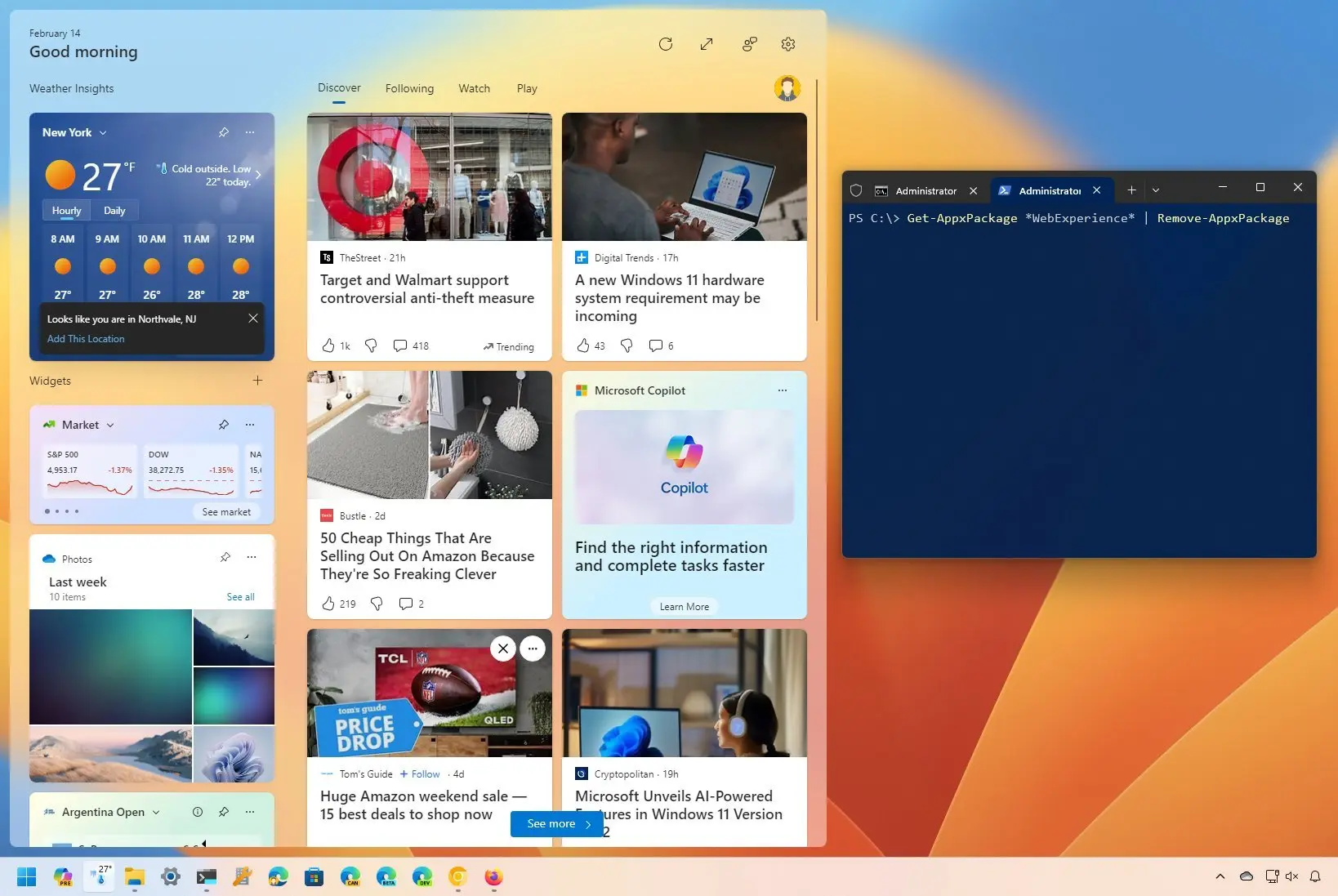
The reply after mine with instructions on uninstalling the Widgets feature of W11 worked for me:
Completely uninstalling the Widgets feature of W11 is the only solution I have found. No more problems with the icons
I don't care about widgets :rolleyes:
 

My Computer My Computer

At a glance

Windows 11
OS
Windows 11
For all of us using Edge but not widgets, I think is better to disable the latter. Download Winaero Tweaker and have a look at the available tweaks.
 

My Computers My Computers

  • At a glance

    Windows 11 Pro 23H2 (5699), 25H2 (9168)Mobile DualCore Intel Core 2 Duo T7250, 2000 MHz4GBMobile Intel(R) GMA 4500M (Mobile 4 series)
    OS
    Windows 11 Pro 23H2 (5699), 25H2 (9168)
    Computer type
    Laptop
    Manufacturer/Model
    Acer Extensa 5630EZ
    CPU
    Mobile DualCore Intel Core 2 Duo T7250, 2000 MHz
    Motherboard
    Acer Extensa 5630
    Memory
    4GB
    Graphics Card(s)
    Mobile Intel(R) GMA 4500M (Mobile 4 series)
    Sound Card
    Realtek ALC268 @ Intel 82801IB ICH9 - High Definition Audio Controller
    Monitor(s) Displays
    1
    Screen Resolution
    1280x800
    Hard Drives
    Samsung SSD 850 EVO 250GB SATA Device (250 GB, SATA-III)
    Internet Speed
    802.11g wireless 54 Mbps
    Browser
    MICROSOFT EDGE
    Antivirus
    WINDOWS DEFENDER
    Other Info
    Legacy MBR installation, no TPM, no Secure Boot, no WDDM 2.0 graphics drivers, no SSE4.2, cannot get more unsupported ;) This is only my test laptop. I had installed Windows 11 here before upgrading my main PC. For my main PC I use everyday see my 2nd system specs.
  • At a glance

    Windows 11 Pro v25H2 (build 26200.9168)Intel Core-i7 3770 3.40GHz s1155 (3rd generat...2x Kingston Hyper-X Blu 8GB DDR3-1600GIGABYTE GeForce RTX 3050 WINDFORCE OC V2 6GB...
    Operating System
    Windows 11 Pro v25H2 (build 26200.9168)
    Computer type
    PC/Desktop
    Manufacturer/Model
    Custom-built PC
    CPU
    Intel Core-i7 3770 3.40GHz s1155 (3rd generation)
    Motherboard
    Asus P8H61 s1155 ATX
    Memory
    2x Kingston Hyper-X Blu 8GB DDR3-1600
    Graphics card(s)
    GIGABYTE GeForce RTX 3050 WINDFORCE OC V2 6GB (GV-N3050WF2OCV2-6GD)
    Sound Card
    Realtek HD audio (ALC887)
    Monitor(s) Displays
    Sony Bravia KDL-19L4000 19" LCD TV via VGA
    Screen Resolution
    1440x900 32-bit 60Hz
    Hard Drives
    WD Blue SA510 2.5 1000GB SSD as system disk, Western Digital Caviar Purple 4TB SATA III (WD40PURZ) as second
    PSU
    Thermaltake Litepower RGB 550W Full Wired
    Case
    SUPERCASE MIDI-TOWER
    Cooling
    Deepcool Gamma Archer CPU cooler, 1x 8cm fan at the back
    Keyboard
    Mitsumi 101-key PS/2
    Mouse
    Microsoft Compact Optical Mouse
    Internet Speed
    802.11ac 5GHz wireless 260Mpbs
    Browser
    Microsoft Edge, Mozilla Firefox
    Antivirus
    Microsoft Windows Defender
    Other Info
    Legacy BIOS (MBR) installation, no TPM, no Secure Boot, WDDM 3.0 graphics drivers, WEI score 7.4
Hi all, having a slightly odd issue on Windows 11 that is very minor but wanted to see if it was anything to be remotely concerned about in case something wasnt setup right.

Whenever I leave my PC for a length of time, maybe 15-30 minutes, about the time you'd expect a screensaver or power management to kick in, when I return, my Desktop icons do not highlight when i hover over them, and mouse clicks to them will not respond. However, if I click on the taskbar or load up another app, everything is then 100% fine and the system works with no issues and all icons respond normally.

I have most screensaver/sleep/power management things turned off I believe, but it's a curious issue. There's nothing untoward in event logs, and a single click on a bar or loading an app or anything like that will resolve it fine. I'd read things about invisible windows from the Windows 11 Search function in previous patches, and wondered if it was related, but I've turned off the search box on the taskbar. I havent established EXACTLY what makes the icons start working again, but just clicking on the taskbar seems enough.

Is this something anyone has experienced before?
I honestly believe it's the widget window. If I move my icons outside the window footprint, they work fine. Make sure your widget window is minimalized. For me, when maxed, the window takes up the full screen and the icons won't work anywhere you put them. I'm going to use this work around until it gets fixed...
 

My Computer My Computer

At a glance

win 11
OS
win 11
You people are lifesavers. I have been trying to figure out for a week and a half as to why my desktop froze for 10 seconds after being left idle for 25-30 minutes. Go figure it is a mandatory half baked (ie useless) program from Microsoft that out of nowhere started causing the issue. I noticed that the location icon was suddenly always up on my PC and so I turned location settings off for widgets. Then sometime later I noticed the freezing issue. Who would have guessed the 2 were related.

I tried everything; sfc/scannow, deleting the file explorer cache and turning off frequently used folders, creating a new profile, messing with the display scale (I really thought I was on to something there), turning off all non Microsoft services and disabling startup services. I thought for sure that the only way I would fix the issue was going to be to reinstall windows.

Nope it is a Microsoft program that was poorly implemented to begin with causing the issue, go figure. Even funnier that it is so far only affecting my gaming PC and not my Surface Pro or other PC. Uninstalling Widgets using Powershell seems to have worked like a charm.
 

My Computer My Computer

At a glance

Windows 11AMD 3800X32GBasus - rtx 3080 rog strix oc 10gb
OS
Windows 11
Computer type
PC/Desktop
Manufacturer/Model
Custom
CPU
AMD 3800X
Motherboard
Asus X570-Pro
Memory
32GB
Graphics Card(s)
asus - rtx 3080 rog strix oc 10gb
Monitor(s) Displays
lg27gp837
Screen Resolution
1440P
Hard Drives
SABRENT 4TB Rocket 4 Plus NVMe 4.0 Gen4
Samsung 870 QVO 8TB V-NAND SSD SATA 2.5" (MZ-77Q8T0)
Seagate Exos X20 20TB 6Gb/s SATA (512e/4Kn) HDD [ST20000NM007D]
PSU
EVGA SuperNOVA 1300 G2 80+ GOLD, 1300W
Case
Phanteks 500A
Mouse
G502 Lightspeed Wireless Optical Gaming Mouse
Internet Speed
1GB
Browser
Edge
Wow glad I found this. This has been going on for months with mine. The IT guy at work said I didn't have enough memory. I thought I had a virus or maybe my Norton was doing something. Nooo, it's freakin Windows. I moved my most used icons to the far right side of the screen and now no more freezing. Thanks all. I hope they fix this issue soon, it's been ridiculous.
 

My Computer My Computer

At a glance

Windows 11
OS
Windows 11
hi guys, i'm new and i'm italian, now i don't know how many people this is happening to, however i'm following you and i tried to remove the widget as Duckworth showed us, the situation has improved but sometimes, random, i have the frozen desktop icons, I repeat, it doesn't happen often but it does happen. So I don't think it's just a widget issue but I can assure you that it's been happening to me for a few months and I think after an update.
 

My Computer My Computer

At a glance

windows 11 pro 22H2 22621.1848 Windows Featur...i7 10700fCrucial Ballistix 3000 MHz, DDR4 32 Gb(8GB x4...MSI geforce RTX 3070 Ti ventus 3x da 8giga
OS
windows 11 pro 22H2 22621.1848 Windows Feature Experience Pack 1000.22642.1000.0
Computer type
PC/Desktop
Manufacturer/Model
misto
CPU
i7 10700f
Motherboard
Asus Rog Strix B460-H gaming
Memory
Crucial Ballistix 3000 MHz, DDR4 32 Gb(8GB x4), CL15
Graphics Card(s)
MSI geforce RTX 3070 Ti ventus 3x da 8giga
Sound Card
realtek
Monitor(s) Displays
LG 27GP850 UltraGear Gaming Monitor 27" QHD NanoIPS 1ms HDR 400
Screen Resolution
UHD 2560x1440
Hard Drives
Samsung SSD 860 EVO 500GB (500 GB, SATA-III) + SSD Samsung 760 + Toshiba P300 3TB 7200 RPM
PSU
NZXT C850 Certificato 80+ Gold da 850 Watt
Case
Cooler Master MasterCase H500
Cooling
Be Quiet! BK022 Dark Rock Pro 4, 250Watt TDP
Keyboard
meccanica Rog Claymore
Mouse
Roccat kone AIMO
Browser
firefox
Antivirus
kaspersky plus
You people are lifesavers. I have been trying to figure out for a week and a half as to why my desktop froze for 10 seconds after being left idle for 25-30 minutes. Go figure it is a mandatory half baked (ie useless) program from Microsoft that out of nowhere started causing the issue. I noticed that the location icon was suddenly always up on my PC and so I turned location settings off for widgets. Then sometime later I noticed the freezing issue. Who would have guessed the 2 were related.

I tried everything; sfc/scannow, deleting the file explorer cache and turning off frequently used folders, creating a new profile, messing with the display scale (I really thought I was on to something there), turning off all non Microsoft services and disabling startup services. I thought for sure that the only way I would fix the issue was going to be to reinstall windows.

Nope it is a Microsoft program that was poorly implemented to begin with causing the issue, go figure. Even funnier that it is so far only affecting my gaming PC and not my Surface Pro or other PC. Uninstalling Widgets using Powershell seems to have worked like a charm.

The issue in the OP happens in my case when the location icon comes up temporarily in the systray which happens after leaving the PC for a while.

Hovering over the location icon shows that Web Experience Pack is using the location. When it's done, the issue is gone.
 

My Computer My Computer

At a glance

Windows Pro 11 23H2 Build 22631.3737i5-12600KTranscend 16GBZotac 4070Ti Trinity
OS
Windows Pro 11 23H2 Build 22631.3737
Computer type
PC/Desktop
Manufacturer/Model
Custom built
CPU
i5-12600K
Motherboard
Gigabyte Z690 UD DDR4
Memory
Transcend 16GB
Graphics Card(s)
Zotac 4070Ti Trinity
Sound Card
Internal: Realtek® ALC892 codec
Monitor(s) Displays
Asus VZ239-H
Screen Resolution
1080p
Hard Drives
Kingston 500GB nVME
Case
Fractal Focus 2 RGB White
Cooling
Xilence LQ240PRO Watercooling
Browser
Edge Chromium
I think this issue got fixed in yesterdays update. Anyone else noticed? Build 22621. 1928
 

My Computer My Computer

At a glance

Windows 11Ryzen 7 5700X32GB 3600MHZ CL16RTX3070TI
OS
Windows 11
Computer type
PC/Desktop
CPU
Ryzen 7 5700X
Motherboard
ASUS Crosshair VII Hero
Memory
32GB 3600MHZ CL16
Graphics Card(s)
RTX3070TI
Monitor(s) Displays
LG27GP850-B
Screen Resolution
2560x1440
PSU
Corsair RM750x
Case
Fractal Design Meshify 2
Cooling
Noctua NH-D15s
Keyboard
ASUS Strix Flare
Mouse
Glorious Model D- Wireless
Browser
MS Edge
I think this issue got fixed in yesterdays update. Anyone else noticed? Build 22621. 1928
Actually i was wrong. The issue is still happening.
 

My Computer My Computer

At a glance

Windows 11Ryzen 7 5700X32GB 3600MHZ CL16RTX3070TI
OS
Windows 11
Computer type
PC/Desktop
CPU
Ryzen 7 5700X
Motherboard
ASUS Crosshair VII Hero
Memory
32GB 3600MHZ CL16
Graphics Card(s)
RTX3070TI
Monitor(s) Displays
LG27GP850-B
Screen Resolution
2560x1440
PSU
Corsair RM750x
Case
Fractal Design Meshify 2
Cooling
Noctua NH-D15s
Keyboard
ASUS Strix Flare
Mouse
Glorious Model D- Wireless
Browser
MS Edge
Windows Pro users can use GPE to disable Widgets at Computer Configuration/ Administrative Templates/ Windows Components/ Widgets, just set the policy to disable.
Not sure if this can be implemented on Home or not.
This just seems a better way to deal with issues if you don't want/ need Widgets as the setting stays regardless of updates and you don't need to be concerned with the 'feature' being re installed at some point despite your choice to maybe uninstall it.
 

My Computer My Computer

At a glance

Windows 11 Pro 22H2, build: 22621.521Intel i7-12700K 3.6GHz Base (5.0GHz Turbo)64GB DDR 3600MhzAsus Tuff RTX 3080 10GB OC
OS
Windows 11 Pro 22H2, build: 22621.521
Computer type
PC/Desktop
Manufacturer/Model
Scan 3XS Custom 1700
CPU
Intel i7-12700K 3.6GHz Base (5.0GHz Turbo)
Motherboard
Asus ProArt Creator B660 D4
Memory
64GB DDR 3600Mhz
Graphics Card(s)
Asus Tuff RTX 3080 10GB OC
Sound Card
Onboard Realtek
Monitor(s) Displays
Gigabyte G32QC 32inch 16:9 curved @2560 x 1440p 165Hz Freesync Premium Pro/ Dell SE2422H 24inch 16:9 1920 x 1080p 75Hz Freesync
Screen Resolution
2560 x 1440p & 1920 x 1080p
Hard Drives
WD SN570 1TB NVME (Boot), Samsung 870QVO 1TB (SSD), SanDisk 3D Ultra 500Gb (SSD) x2, Seagate 3Tb Expansion Desk (Ext HDD), 2x Toshiba 1Tb P300 (Ext HDD)
PSU
Corsair RM1000X Modular
Case
Corsair 4000D Airflow Desktop
Cooling
Corsair Hydro H150i RGB Pro XT 360mm Liquid Cooler, 3 x 120mm fans, 1x Exhaust
Keyboard
Microsoft Ergonomic
Mouse
Logitech G402
Internet Speed
800Mbs
Browser
Edge Chromium
Antivirus
Defender, Malwarebytes
yes it is true Zinoviev, problem not solved even if uninstalling the widget the situation is improved but not solved.
 

My Computer My Computer

At a glance

windows 11 pro 22H2 22621.1848 Windows Featur...i7 10700fCrucial Ballistix 3000 MHz, DDR4 32 Gb(8GB x4...MSI geforce RTX 3070 Ti ventus 3x da 8giga
OS
windows 11 pro 22H2 22621.1848 Windows Feature Experience Pack 1000.22642.1000.0
Computer type
PC/Desktop
Manufacturer/Model
misto
CPU
i7 10700f
Motherboard
Asus Rog Strix B460-H gaming
Memory
Crucial Ballistix 3000 MHz, DDR4 32 Gb(8GB x4), CL15
Graphics Card(s)
MSI geforce RTX 3070 Ti ventus 3x da 8giga
Sound Card
realtek
Monitor(s) Displays
LG 27GP850 UltraGear Gaming Monitor 27" QHD NanoIPS 1ms HDR 400
Screen Resolution
UHD 2560x1440
Hard Drives
Samsung SSD 860 EVO 500GB (500 GB, SATA-III) + SSD Samsung 760 + Toshiba P300 3TB 7200 RPM
PSU
NZXT C850 Certificato 80+ Gold da 850 Watt
Case
Cooler Master MasterCase H500
Cooling
Be Quiet! BK022 Dark Rock Pro 4, 250Watt TDP
Keyboard
meccanica Rog Claymore
Mouse
Roccat kone AIMO
Browser
firefox
Antivirus
kaspersky plus
Sorry for asking again, just to confirm, using a local account instead of a Microsoft Account doesn't disable widgets? I haven't seen the issue you describe as I have a local account and widgets don't load.
 

My Computers My Computers

  • At a glance

    Windows 11 Pro 23H2 (5699), 25H2 (9168)Mobile DualCore Intel Core 2 Duo T7250, 2000 MHz4GBMobile Intel(R) GMA 4500M (Mobile 4 series)
    OS
    Windows 11 Pro 23H2 (5699), 25H2 (9168)
    Computer type
    Laptop
    Manufacturer/Model
    Acer Extensa 5630EZ
    CPU
    Mobile DualCore Intel Core 2 Duo T7250, 2000 MHz
    Motherboard
    Acer Extensa 5630
    Memory
    4GB
    Graphics Card(s)
    Mobile Intel(R) GMA 4500M (Mobile 4 series)
    Sound Card
    Realtek ALC268 @ Intel 82801IB ICH9 - High Definition Audio Controller
    Monitor(s) Displays
    1
    Screen Resolution
    1280x800
    Hard Drives
    Samsung SSD 850 EVO 250GB SATA Device (250 GB, SATA-III)
    Internet Speed
    802.11g wireless 54 Mbps
    Browser
    MICROSOFT EDGE
    Antivirus
    WINDOWS DEFENDER
    Other Info
    Legacy MBR installation, no TPM, no Secure Boot, no WDDM 2.0 graphics drivers, no SSE4.2, cannot get more unsupported ;) This is only my test laptop. I had installed Windows 11 here before upgrading my main PC. For my main PC I use everyday see my 2nd system specs.
  • At a glance

    Windows 11 Pro v25H2 (build 26200.9168)Intel Core-i7 3770 3.40GHz s1155 (3rd generat...2x Kingston Hyper-X Blu 8GB DDR3-1600GIGABYTE GeForce RTX 3050 WINDFORCE OC V2 6GB...
    Operating System
    Windows 11 Pro v25H2 (build 26200.9168)
    Computer type
    PC/Desktop
    Manufacturer/Model
    Custom-built PC
    CPU
    Intel Core-i7 3770 3.40GHz s1155 (3rd generation)
    Motherboard
    Asus P8H61 s1155 ATX
    Memory
    2x Kingston Hyper-X Blu 8GB DDR3-1600
    Graphics card(s)
    GIGABYTE GeForce RTX 3050 WINDFORCE OC V2 6GB (GV-N3050WF2OCV2-6GD)
    Sound Card
    Realtek HD audio (ALC887)
    Monitor(s) Displays
    Sony Bravia KDL-19L4000 19" LCD TV via VGA
    Screen Resolution
    1440x900 32-bit 60Hz
    Hard Drives
    WD Blue SA510 2.5 1000GB SSD as system disk, Western Digital Caviar Purple 4TB SATA III (WD40PURZ) as second
    PSU
    Thermaltake Litepower RGB 550W Full Wired
    Case
    SUPERCASE MIDI-TOWER
    Cooling
    Deepcool Gamma Archer CPU cooler, 1x 8cm fan at the back
    Keyboard
    Mitsumi 101-key PS/2
    Mouse
    Microsoft Compact Optical Mouse
    Internet Speed
    802.11ac 5GHz wireless 260Mpbs
    Browser
    Microsoft Edge, Mozilla Firefox
    Antivirus
    Microsoft Windows Defender
    Other Info
    Legacy BIOS (MBR) installation, no TPM, no Secure Boot, WDDM 3.0 graphics drivers, WEI score 7.4
Windows Pro users can use GPE to disable Widgets at Computer Configuration/ Administrative Templates/ Windows Components/ Widgets, just set the policy to disable.
Not sure if this can be implemented on Home or not.
This just seems a better way to deal with issues if you don't want/ need Widgets as the setting stays regardless of updates and you don't need to be concerned with the 'feature' being re installed at some point despite your choice to maybe uninstall it.
This seem to have fixed the problem for me. Thanks a lot to all of you for your precious support.
 

My Computer My Computer

At a glance

WindowsIntel i7-12800HX32 GB DDR5 4800 MHz dual-channelNVIDIA® GeForce RTX™ 3070 Ti
OS
Windows
Computer type
Laptop
Manufacturer/Model
Lenovo Legion 7i
CPU
Intel i7-12800HX
Memory
32 GB DDR5 4800 MHz dual-channel
Graphics Card(s)
NVIDIA® GeForce RTX™ 3070 Ti
Sound Card
Steinberg UR44
Hard Drives
1 TB SSD (M.2 NVMe PCIe 4.0 x4
2 TB SSD Samsung 980 PRO NNMe
Browser
Firefox
Antivirus
Windows Defender + Malwarebytes
Sorry for asking again, just to confirm, using a local account instead of a Microsoft Account doesn't disable widgets? I haven't seen the issue you describe as I have a local account and widgets don't load.
Widgets are functional, even with a local account. Some features of widgets might need a MS account, but the widget window itself is accessible and it does indeed display up to date content like news, weather etc... So yeah the widgets work even on a local account. Maybe yours are disabled for some other reason ?

I ended up uninstalling the widgets using powershell (The tutorial in marodor50's post) and the issue is gone completely.
 

My Computer My Computer

At a glance

Windows 11Ryzen 7 6800H16 GB DDR5 (2x8)RTX 3070 Mobile
OS
Windows 11
Computer type
Laptop
Manufacturer/Model
Lenovo Legion 5
CPU
Ryzen 7 6800H
Memory
16 GB DDR5 (2x8)
Graphics Card(s)
RTX 3070 Mobile
Screen Resolution
1920x1080 IPS 165hz G-Sync (Integrated)
Hard Drives
980 Pro 1TB (System), 970 Evo 2 TB (DATA)
Mouse
Cooler Master MM710
Windows Pro users can use GPE to disable Widgets at Computer Configuration/ Administrative Templates/ Windows Components/ Widgets, just set the policy to disable.
Not sure if this can be implemented on Home or not.
This just seems a better way to deal with issues if you don't want/ need Widgets as the setting stays regardless of updates and you don't need to be concerned with the 'feature' being re installed at some point despite your choice to maybe uninstall it.
This also fixed my issues and was a simple thing to do. Thank you. Finally the annoyance is gone.
 

My Computer My Computer

At a glance

Windows 11Ryzen 7 5700X32GB 3600MHZ CL16RTX3070TI
OS
Windows 11
Computer type
PC/Desktop
CPU
Ryzen 7 5700X
Motherboard
ASUS Crosshair VII Hero
Memory
32GB 3600MHZ CL16
Graphics Card(s)
RTX3070TI
Monitor(s) Displays
LG27GP850-B
Screen Resolution
2560x1440
PSU
Corsair RM750x
Case
Fractal Design Meshify 2
Cooling
Noctua NH-D15s
Keyboard
ASUS Strix Flare
Mouse
Glorious Model D- Wireless
Browser
MS Edge

My Computer My Computer

At a glance

Windows Pro 11 23H2 Build 22631.3737i5-12600KTranscend 16GBZotac 4070Ti Trinity
OS
Windows Pro 11 23H2 Build 22631.3737
Computer type
PC/Desktop
Manufacturer/Model
Custom built
CPU
i5-12600K
Motherboard
Gigabyte Z690 UD DDR4
Memory
Transcend 16GB
Graphics Card(s)
Zotac 4070Ti Trinity
Sound Card
Internal: Realtek® ALC892 codec
Monitor(s) Displays
Asus VZ239-H
Screen Resolution
1080p
Hard Drives
Kingston 500GB nVME
Case
Fractal Focus 2 RGB White
Cooling
Xilence LQ240PRO Watercooling
Browser
Edge Chromium
I uninstalled widgets too seems that problem dissapeared. Thanks!
 

My Computer My Computer

At a glance

Windows 11 22H2AMD Ryzen 7 5900XFury Beast RGB DDR4 4x8GB 3600mhzMSI Nvidia Geforce RTX 2070 SUPER
OS
Windows 11 22H2
Computer type
PC/Desktop
Manufacturer/Model
Allways built myself
CPU
AMD Ryzen 7 5900X
Motherboard
MSI X570 Tomahawk wifi
Memory
Fury Beast RGB DDR4 4x8GB 3600mhz
Graphics Card(s)
MSI Nvidia Geforce RTX 2070 SUPER
Sound Card
Built In REALTEK
Monitor(s) Displays
AOC 32" Curved 144HZ
Screen Resolution
1920x1080
Hard Drives
Samsung 980 PRO NVME 1TB
Samsung 970 PRO NVME 500GB
Samsung 850 EVO SSD 250GB
PSU
Corsair RM850 850W (2019)
Case
Lian Li Dynamic EVO
Cooling
NZXT Kraken Z73
Keyboard
SteelSeries Apex PRO
Mouse
XTRFY XG-M4-RGB
Internet Speed
500Mbit down and 100mbit up
Browser
Chrome
Antivirus
Total AV
Other Info
Cooling Fans: Lian Li UNI FAN SL-INFINITY 10 pieces
Yes, if you don't use Widgets, you better disable/uninstall them to free resources as well as prevent such bugs. You can always use the good old gadgets by installing 8gadgetpack.
 

My Computers My Computers

  • At a glance

    Windows 11 Pro 23H2 (5699), 25H2 (9168)Mobile DualCore Intel Core 2 Duo T7250, 2000 MHz4GBMobile Intel(R) GMA 4500M (Mobile 4 series)
    OS
    Windows 11 Pro 23H2 (5699), 25H2 (9168)
    Computer type
    Laptop
    Manufacturer/Model
    Acer Extensa 5630EZ
    CPU
    Mobile DualCore Intel Core 2 Duo T7250, 2000 MHz
    Motherboard
    Acer Extensa 5630
    Memory
    4GB
    Graphics Card(s)
    Mobile Intel(R) GMA 4500M (Mobile 4 series)
    Sound Card
    Realtek ALC268 @ Intel 82801IB ICH9 - High Definition Audio Controller
    Monitor(s) Displays
    1
    Screen Resolution
    1280x800
    Hard Drives
    Samsung SSD 850 EVO 250GB SATA Device (250 GB, SATA-III)
    Internet Speed
    802.11g wireless 54 Mbps
    Browser
    MICROSOFT EDGE
    Antivirus
    WINDOWS DEFENDER
    Other Info
    Legacy MBR installation, no TPM, no Secure Boot, no WDDM 2.0 graphics drivers, no SSE4.2, cannot get more unsupported ;) This is only my test laptop. I had installed Windows 11 here before upgrading my main PC. For my main PC I use everyday see my 2nd system specs.
  • At a glance

    Windows 11 Pro v25H2 (build 26200.9168)Intel Core-i7 3770 3.40GHz s1155 (3rd generat...2x Kingston Hyper-X Blu 8GB DDR3-1600GIGABYTE GeForce RTX 3050 WINDFORCE OC V2 6GB...
    Operating System
    Windows 11 Pro v25H2 (build 26200.9168)
    Computer type
    PC/Desktop
    Manufacturer/Model
    Custom-built PC
    CPU
    Intel Core-i7 3770 3.40GHz s1155 (3rd generation)
    Motherboard
    Asus P8H61 s1155 ATX
    Memory
    2x Kingston Hyper-X Blu 8GB DDR3-1600
    Graphics card(s)
    GIGABYTE GeForce RTX 3050 WINDFORCE OC V2 6GB (GV-N3050WF2OCV2-6GD)
    Sound Card
    Realtek HD audio (ALC887)
    Monitor(s) Displays
    Sony Bravia KDL-19L4000 19" LCD TV via VGA
    Screen Resolution
    1440x900 32-bit 60Hz
    Hard Drives
    WD Blue SA510 2.5 1000GB SSD as system disk, Western Digital Caviar Purple 4TB SATA III (WD40PURZ) as second
    PSU
    Thermaltake Litepower RGB 550W Full Wired
    Case
    SUPERCASE MIDI-TOWER
    Cooling
    Deepcool Gamma Archer CPU cooler, 1x 8cm fan at the back
    Keyboard
    Mitsumi 101-key PS/2
    Mouse
    Microsoft Compact Optical Mouse
    Internet Speed
    802.11ac 5GHz wireless 260Mpbs
    Browser
    Microsoft Edge, Mozilla Firefox
    Antivirus
    Microsoft Windows Defender
    Other Info
    Legacy BIOS (MBR) installation, no TPM, no Secure Boot, WDDM 3.0 graphics drivers, WEI score 7.4
Whaaaat? Neither you nor the OP has completed your user profile. We do not know what version of 11 you are running. Are you running an insider build? If so, that could be your problem. We need to know what we are working with before we can give answers that might apply to you.
Yes, it happens for me too
It seems that the widget bar moves forward when "windows web experience pack" uses location services... only for the left side of the screen
 

My Computer My Computer

At a glance

Windows 11 Home 24H2 26100.4652Intel Core i7-1065G7 @1.30GHzIntel and NVIDIA GeForce MX330
OS
Windows 11 Home 24H2 26100.4652
Computer type
Laptop
Manufacturer/Model
Asus Vivobook X512JP 15"
CPU
Intel Core i7-1065G7 @1.30GHz
Graphics Card(s)
Intel and NVIDIA GeForce MX330
Sound Card
Realtek
yup "windows web experience pack" is definitely the issue.
I sent in a feedback hub report on it.
 

My Computers My Computers

  • At a glance

    Windows 11 Pro (x64)(v25H2)(26200.9168)AMD Ryzen 9 3900X 12-Core/24-threads64GB, 2x G.Skill 32GB (PC3200)(DDR4-2137)ASUS PRIME GeForce RTX 5070 12GB OC Edition, ...
    OS
    Windows 11 Pro (x64)(v25H2)(26200.9168)
    Computer type
    PC/Desktop
    Manufacturer/Model
    (custom-build)[Self-built](June 2020)
    CPU
    AMD Ryzen 9 3900X 12-Core/24-threads
    Motherboard
    Asus PRIME X570-PRO (BIOS_r5044 [01/04/2026])
    Memory
    64GB, 2x G.Skill 32GB (PC3200)(DDR4-2137)
    Graphics Card(s)
    ASUS PRIME GeForce RTX 5070 12GB OC Edition, GPU by NVIDIA.
    Sound Card
    Realtek® ALC1220A 8-Channel High Definition Audio CODEC
    Monitor(s) Displays
    24" DELL Gaming Monitor - G2422HS - DisplayPort used
    Screen Resolution
    1920x1080p at 165Hz (16:9 Aspect Ratio)
    Hard Drives
    2TB Samsung 980 Pro (NVMe)(SSD)
    4TB Samsung 990 Pro (NVMe)(SSD)
    2TB Samsung 870 EVO (SSD)

    NVMe 2TB
    -- OS(Win11 Pro x64),
    -- programs,
    -- programming(MS Visual Studios 2022 Community Ed.),
    -- music

    NVMe 4TB
    video game installs.

    #3 FILE Server!
    PSU
    Thermaltake TOUGHPOWER DPS G RGB Titanium Certified 1250Watt
    Case
    Corsair Graphite Series 780T Full Tower PC Case
    Cooling
    AMD Wraith cooler (stock) & 3x Corsair case fans
    Keyboard
    Redragon K580 VATA RGB LED Backlit Mechanical Gaming Keyboard (brown switches).
    Mouse
    Redragon M602 RGB Wired USB Gaming mouse
    Internet Speed
    2,100Mbps Download, 300Mbps Upload
    Browser
    Firefox & Google Chrome
    Antivirus
    n/a aka "ABOVE TOP SECRET!" lol ;)
    Other Info
    My System is the ULTIMATE GAMING RIG ^_^
    TP-Link BE9300 Tri-Band Wi-Fi 7 Wireless 2.5Gigabit Router
    Model Archer BE550 (v1.0)
    Arris S34 Cable Modem

    printer/scanner/copier: Brother DCP-7065DN

    Nvidia GFX Drivers: (v610.88)
    Realtek UAD Drivers: (v6.0.10013.1)
    Realtek LAN Drivers:(v1125.30.50.508)(2026-06-21)
    Intel LAN Drivers: (v14.01.24.00)(2025-10-03)
  • At a glance

    Windows 11 Pro x64AMD Ryzen 7 5800H32GB GSkill DDR4 2x 16GB sticksRyzen 7 5800H integrated AMD Radeon Graphics ...
    Operating System
    Windows 11 Pro x64
    Computer type
    Laptop
    Manufacturer/Model
    DELL G15 Ryzen edition, model 5515
    CPU
    AMD Ryzen 7 5800H
    Motherboard
    DELL G15 Ryzen edition
    Memory
    32GB GSkill DDR4 2x 16GB sticks
    Graphics card(s)
    Ryzen 7 5800H integrated AMD Radeon Graphics and Nvidia GeForce 3060 6GB
    Sound Card
    Realtek ALC3254 with Nahimic 3D Audio for Gamers
    Monitor(s) Displays
    built-in
    Screen Resolution
    1920x1080
    Hard Drives
    512GB NVMe SSD, 1TB Samsung 970 EVO NVMe SSD
    PSU
    unknown
    Case
    laptop
    Keyboard
    built-in
    Mouse
    Logitech B100 USB
    Internet Speed
    2,100Mbps download, 300Mbps upload
    Browser
    Firefox & Google Chrome

Latest Support Threads

Back
Top Bottom




