When moving pictures to the desktop the shortcuts are displaced, how to fix this?


Maxim

New member
Local time
11:41 PM
Posts
8
OS
Windows 11
When moving pictures to the desktop the shortcuts are displaced, how to fix this?

Video :cool:
 
Last edited:

My Computer My Computer

At a glance

Windows 11
OS
Windows 11
I think the Auto Arrange Icons is enabled

Right-click the Desktop, select View. Make sure Auto arrange icons is unchecked. Make sure Align icons to grid is unchecked as well. Reboot and see if the issue is resolved.
 

My Computer My Computer

At a glance

Windows 11AMD Ryzen 7 5700GMicron Technology DDR4-3200 16GBNVIDIA GeForce RTX 3060
OS
Windows 11
Computer type
PC/Desktop
Manufacturer/Model
HP Pavilion
CPU
AMD Ryzen 7 5700G
Motherboard
Erica6
Memory
Micron Technology DDR4-3200 16GB
Graphics Card(s)
NVIDIA GeForce RTX 3060
Sound Card
Realtek ALC671
Monitor(s) Displays
Samsung SyncMaster U28E590
Screen Resolution
3840 x 2160
Hard Drives
SAMSUNG MZVLQ1T0HALB-000H1
I think the Auto Arrange Icons is enabled

Right-click the Desktop, select View. Make sure Auto arrange icons is unchecked. Make sure Align icons to grid is unchecked as well. Reboot and see if the issue is resolved.
I have “Organize icons automatically” turned off. I can't turn off “Align icons to grid” because I need it.
 

My Computer My Computer

At a glance

Windows 11
OS
Windows 11
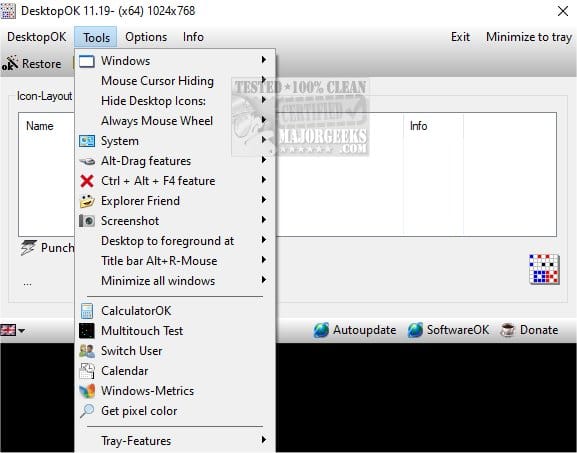
Use 3rd party tool DesktopOK, a small utility where you click an icon to save your desktop layout. When you need to restore your desktop to as-it-was you open DesktopOK and click on the Restore tab. One click is all it takes.


My Computers My Computers

  • At a glance

    Windows 11 ProAMD Ryzen 9 8945HS32GB DDR5 SO-DIMMIntegrated AMD Radeon 780M (4.00 GHz)
    OS
    Windows 11 Pro
    Computer type
    PC/Desktop
    Manufacturer/Model
    GMKtec K11
    CPU
    AMD Ryzen 9 8945HS
    Memory
    32GB DDR5 SO-DIMM
    Graphics Card(s)
    Integrated AMD Radeon 780M (4.00 GHz)
    Monitor(s) Displays
    Benq 2250HM
    Screen Resolution
    1920 x 1080
    Hard Drives
    1 TB PCIe 4.0 NVMe M.2 SSD
  • At a glance

    Windows 11 HomeIntel® Core™ Ultra 7 - 255H processor16 GB LPDDR5 SDRAMIntel Arc 140T onboard graphics
    Operating System
    Windows 11 Home
    Computer type
    Laptop
    Manufacturer/Model
    ASUS Zenbook 14 OLED 14" Laptop - UX3405CA-QL192W
    CPU
    Intel® Core™ Ultra 7 - 255H processor
    Memory
    16 GB LPDDR5 SDRAM
    Graphics card(s)
    Intel Arc 140T onboard graphics
    Screen Resolution
    1920 x 1200 (16:10 WUXGA resolution) OLED Touchscreen
    Hard Drives
    1TB SSD
Use 3rd party tool DesktopOK, a small utility where you click an icon to save your desktop layout. When you need to restore your desktop to as-it-was you open DesktopOK and click on the Restore tab. One click is all it takes.

This program has flaws, it doesn't restore correctly. Video 😐
 

My Computer My Computer

At a glance

Windows 11
OS
Windows 11

My Computer My Computer

At a glance

Windows 11 Pro 24H2i7 Ultra16GBIntel
OS
Windows 11 Pro 24H2
Computer type
Laptop
Manufacturer/Model
LG
CPU
i7 Ultra
Memory
16GB
Graphics Card(s)
Intel
Sound Card
Intel Realtek
Monitor(s) Displays
Laptop 17" & TB4 Dell 27" QHD Ultrasharp w/integral TB4 hub
Screen Resolution
2560x1600
Hard Drives
1TB SSD, 5 external WDs
Mouse
Logitech Master MX 3S
Browser
Vivaldi
Antivirus
Kaspersky Premium Suite

My Computer My Computer

At a glance

Windows 11
OS
Windows 11
Back
Top Bottom