Solved Why am I not getting the latest Windows 11 update (23H2) on my laptop?


Hello again,

Thank you very much for your instructions! :)

Here are the results.

First, I've run DISM

dism.png


Then, I have run SFC

sfc.png

Then I've rebooted my laptop and opened the Reliability Monitor:
reliability.png


What do you advise me to do next?

Thank you :)

PS: I've also downloaded the PC Health Check App but it only told me that my laptop is compatible with Windows 11, which I am already using. I didn't find any tests to run from this App
 

My Computer My Computer

At a glance

Windows 11 HomeIntel Core i7 1260P32 GBIntel Iris Xᵉ Graphics
OS
Windows 11 Home
Computer type
Laptop
Manufacturer/Model
HP Envy 17
CPU
Intel Core i7 1260P
Motherboard
Intel Integrated SoC
Memory
32 GB
Graphics Card(s)
Intel Iris Xᵉ Graphics
Sound Card
Realtek Audio
Monitor(s) Displays
17" 4K UHD IPS
Screen Resolution
3840 x 2160
Hard Drives
1 TB PCIe NVMe
Internet Speed
1 Gbit / 100 Mbps
Browser
MS Edge
What do you advise me to do next?
Check your laptop manufacturer's website and update all drivers starting with chipset drivers.
Reboot system if updating chipset drivers and reboot when done updating all drivers again.

Hint:
I keep a folder on my PC called "drivers" where I download manufacturer's drivers and name them so that driver version is included in file name,
Next time when I go online to check if there are newer drivers I compare versions of those online with versions in my drivers folder.

This is better and simpler than comparing online versions with versions in device manager, because versions in device manager might not be correct.
 

My Computer My Computer

At a glance

Windows 11 Pro 23H2Intel i3 8100 @3.6Ghz1 x 16GB DDR4 @2400 MHzNvidia GeForce GT 1030 2GB SDDR4
OS
Windows 11 Pro 23H2
Computer type
PC/Desktop
Manufacturer/Model
MSI / MS-7B29
CPU
Intel i3 8100 @3.6Ghz
Motherboard
H310M PRO-VDH (MS-7B29)
Memory
1 x 16GB DDR4 @2400 MHz
Graphics Card(s)
Nvidia GeForce GT 1030 2GB SDDR4
Sound Card
Realtek VEN_10EC&DEV_0887 / NVIDIA VEN_10DE&DEV_0081
Monitor(s) Displays
Acer V226HQL
Screen Resolution
1920 x 1080
Hard Drives
SSD 500 GB Crucial MX500 / HDD 1 TB TOSHIBA DT01ACA100
PSU
ATX, details unknown
Case
Everest 551B
Cooling
details unknown
Keyboard
Mechanical Gaming Hydra R7 - Rampage
Mouse
Logitech G703
Internet Speed
Down: 28Mbps / Up: 19Mbps
Browser
Microsoft Edge
Antivirus
Microsoft Defender Antivirus
Other Info
Bluetooth: TP Link 5.0 Nano USB adapter UB500
WLAN: D-Link 150 Pico USB adapter, N standard
Web camera: Logitech C270 HD 720p @30fps
Microphone: Trust MICO, model 23790
You seem to have an issue with ICC Profile Tool. You have Photoshop installed?

Also don't use other drivers than the laptop manufacturer provides, unless they don't have drivers available for Windows 11 and they are really old and also if you have issues with a certain driver version.

Laptop vendors use custom drivers and the latest drivers from the chip manufacturers are not optimized for specific hardware configurations and therefore may cause more issues than they solve.
 

My Computers My Computers

  • At a glance

    Win 11 Pro 25H2 26200.8457 / Linux Mint 22.3Ryzen 7 2700U Pro32GBiGPU Vega 10
    OS
    Win 11 Pro 25H2 26200.8457 / Linux Mint 22.3
    Computer type
    Laptop
    Manufacturer/Model
    Lenovo A485
    CPU
    Ryzen 7 2700U Pro
    Motherboard
    Lenovo (WiFi/BT module upgraded to Intel Wireless-AC-9260)
    Memory
    32GB
    Graphics Card(s)
    iGPU Vega 10
    Sound Card
    Realtek
    Monitor(s) Displays
    14" FHD (built-in) + 14" Lenovo Thinkvision M14t (touch+pen) + 32" Asus PB328
    Screen Resolution
    FHD + FHD + 1440p
    Hard Drives
    Intel 660p m.2 nVME PCIe3.0 x2 512GB
    PSU
    125W(Dock)/65W(Travel Adapter)
    Keyboard
    Thinkpad / Logitech MX Keys
    Mouse
    Logitech MX Master 2S
    Internet Speed
    1/1Gbit
    Browser
    Firefox
    Antivirus
    Windows Defender
    Other Info
    SecureBoot: Enabled
    TPM2.0: Enabled
    AMD-V: Enabled
  • At a glance

    Win 11 Pro 25H2 26200.8521(RP)i7-7700k @4.8GHz32GB 2x16GB 2133MHz CL15EVGA GTX1080Ti FTW 11GB
    Operating System
    Win 11 Pro 25H2 26200.8521(RP)
    Computer type
    PC/Desktop
    Manufacturer/Model
    Custom
    CPU
    i7-7700k @4.8GHz
    Motherboard
    Asus PRIME Z270-A
    Memory
    32GB 2x16GB 2133MHz CL15
    Graphics card(s)
    EVGA GTX1080Ti FTW 11GB
    Sound Card
    Integrated
    Monitor(s) Displays
    32" 10-bit Asus PB328Q
    Screen Resolution
    WQHD 2560x1440
    Hard Drives
    512GB ADATA SX8000NP NVMe PCIe Gen 3 x4
    PSU
    850W
    Case
    Fractal Design Define 7
    Cooling
    Noctua NH-D15 chromax.black
    Keyboard
    Logitech MX Keys
    Mouse
    Logitech MX Master 2S
    Internet Speed
    1/1Gbit
    Browser
    Firefox
    Antivirus
    Windows Defender
    Other Info
    AC WiFi Card
Hello again

Thank you for your replies and support, so far

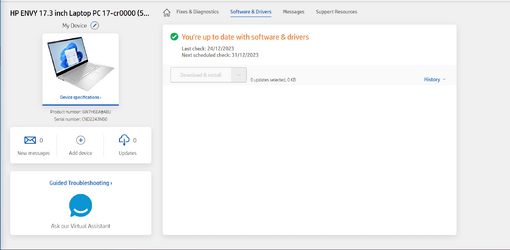
I used HP Support Assistant, installed on my laptop and I also went on the HP website, logged into my account -my laptop is registered- and checked for updates. Both of these methods showed me that I am up to date.

HP1.png

HPassistant.png


On HP website, I can see that there is a very recent BIOS from December 2, vF21, I am currently running vF20 but I will not risk installing it, since HP says I do not need any updates. There are a lot of other drivers shown below, on HP website, but I do not know how to find the version I am currently using and compare against the drivers on the website. I think I am up to date, though, as the site and the HP App say.


The ICC Profile Tool is the utility HP Display Control which sets the display mode, accordingly.

The truth is that, few days after buying this laptop last year, I performed a clean installation of Windows 11 Home. Then I tried to install some of the HP Utilities again from the website.

Who knows, maybe something went wrong back then. I have not faced any issue with my laptop, though, it appears to work perfectly.

Anyways, I do not have time to chase this matter now.

Later in time, I will try to clean install Windows 11 Home again, I will make sure to ask here first.

Thank you very much, all the best to all of you :)
 

Attachments

  • HPassistant.png
    HPassistant.png
    59.2 KB · Views: 2

My Computer My Computer

At a glance

Windows 11 HomeIntel Core i7 1260P32 GBIntel Iris Xᵉ Graphics
OS
Windows 11 Home
Computer type
Laptop
Manufacturer/Model
HP Envy 17
CPU
Intel Core i7 1260P
Motherboard
Intel Integrated SoC
Memory
32 GB
Graphics Card(s)
Intel Iris Xᵉ Graphics
Sound Card
Realtek Audio
Monitor(s) Displays
17" 4K UHD IPS
Screen Resolution
3840 x 2160
Hard Drives
1 TB PCIe NVMe
Internet Speed
1 Gbit / 100 Mbps
Browser
MS Edge
@Joanne

Well, it looks like your hardware is compatible, at least.


Are you sure you weren't a naughty girl this year? Do you see any coal dust by the fireplace? :D


Make a full backup, then try the 23H2 Enablement package, or the In-Place Upgrade.
The Enablement Package is by far the easier of the two. :-)
If things don't work out... just restore from the backup.


In-Place Upgrade (use Option #2)...


Once you have a full backup, and have made the backup software's bootable rescue media...
you can pretty much try... anything.
Then... even if Windows won't boot, you can still access your backup(s) (and perform a restore).


Backup software1.png
 
Last edited:

My Computers My Computers

  • At a glance

    Win 11 Home ♦♦♦26200.8655 ♦♦♦♦♦♦♦25H2AMD Ryzen 7 3700XG.Skill (F4-3200C14D-16GTZKW)EVGA RTX 2070 (08G-P4-2171-KR)
    OS
    Win 11 Home ♦♦♦26200.8655 ♦♦♦♦♦♦♦25H2
    Computer type
    PC/Desktop
    Manufacturer/Model
    Built by Ghot® [May 2020]
    CPU
    AMD Ryzen 7 3700X
    Motherboard
    Asus Pro WS X570-ACE (BIOS 5302)
    Memory
    G.Skill (F4-3200C14D-16GTZKW)
    Graphics Card(s)
    EVGA RTX 2070 (08G-P4-2171-KR)
    Sound Card
    Realtek ALC1220P / ALC S1220A
    Monitor(s) Displays
    Dell U3011 30"
    Screen Resolution
    2560 x 1600
    Hard Drives
    2x Samsung 860 EVO 500GB,
    WD 4TB Black FZBX - SATA III,
    WD 8TB Black FZBX - SATA III,
    DRW-24B1ST CD/DVD Burner
    PSU
    PC Power & Cooling 750W Quad EPS12V
    Case
    Cooler Master ATCS 840 Tower
    Cooling
    CM Hyper 212 EVO (push/pull)
    Keyboard
    Ducky DK9008 Shine II Blue LED
    Mouse
    Logitech Optical M-100
    Internet Speed
    300/300
    Browser
    Firefox (latest)
    Antivirus
    Bitdefender Total Security
    Other Info
    Speakers: Klipsch Pro Media 2.1
  • At a glance

    Windows XP Pro 32bit w/SP3AMD Athlon 64 X2 5000+ (OC'd @ 3.2Ghz)TWIN2X2048-6400C4DHX (2 x 1GB, DDR2 800)EVGA 256-P2-N758-TR GeForce 8600GT SSC
    Operating System
    Windows XP Pro 32bit w/SP3
    Computer type
    PC/Desktop
    Manufacturer/Model
    Built by Ghot® (not in use)
    CPU
    AMD Athlon 64 X2 5000+ (OC'd @ 3.2Ghz)
    Motherboard
    ASUS M2N32-SLI Deluxe Wireless Edition
    Memory
    TWIN2X2048-6400C4DHX (2 x 1GB, DDR2 800)
    Graphics card(s)
    EVGA 256-P2-N758-TR GeForce 8600GT SSC
    Sound Card
    Onboard
    Monitor(s) Displays
    ViewSonic G90FB Black 19" Professional (CRT)
    Screen Resolution
    up to 2048 x 1536
    Hard Drives
    WD 36GB 10,000rpm Raptor SATA
    Seagate 80GB 7200rpm SATA
    Lite-On LTR-52246S CD/RW
    Lite-On LH-18A1P CD/DVD Burner
    PSU
    PC Power & Cooling Silencer 750 Quad EPS12V
    Case
    Generic Beige case, 80mm fans
    Cooling
    ZALMAN 9500A 92mm CPU Cooler
    Keyboard
    Logitech Classic Keybooard 200
    Mouse
    Logitech Optical M-BT96a
    Internet Speed
    300/300
    Browser
    Firefox 3.x ??
    Antivirus
    Symantec (Norton)
    Other Info
    Still assembled, still runs. Haven't turned it on for 15 years?
Hi @Ghot

Thank you for your suggestion, I've updated!

After the update, I have rebooted twice and checked for updates.

No new update and no change I can observe on my system. My start menu looks the same, I do not know what has been changed, I cannot see anything.

Anyways, thank you, I hope my laptop will keep functioning properly.

version.png

update.png
 

My Computer My Computer

At a glance

Windows 11 HomeIntel Core i7 1260P32 GBIntel Iris Xᵉ Graphics
OS
Windows 11 Home
Computer type
Laptop
Manufacturer/Model
HP Envy 17
CPU
Intel Core i7 1260P
Motherboard
Intel Integrated SoC
Memory
32 GB
Graphics Card(s)
Intel Iris Xᵉ Graphics
Sound Card
Realtek Audio
Monitor(s) Displays
17" 4K UHD IPS
Screen Resolution
3840 x 2160
Hard Drives
1 TB PCIe NVMe
Internet Speed
1 Gbit / 100 Mbps
Browser
MS Edge
Good job. :-)
Now start using backup software. :-)


Charlie Brown and Snoopy.gif
 

My Computers My Computers

  • At a glance

    Win 11 Home ♦♦♦26200.8655 ♦♦♦♦♦♦♦25H2AMD Ryzen 7 3700XG.Skill (F4-3200C14D-16GTZKW)EVGA RTX 2070 (08G-P4-2171-KR)
    OS
    Win 11 Home ♦♦♦26200.8655 ♦♦♦♦♦♦♦25H2
    Computer type
    PC/Desktop
    Manufacturer/Model
    Built by Ghot® [May 2020]
    CPU
    AMD Ryzen 7 3700X
    Motherboard
    Asus Pro WS X570-ACE (BIOS 5302)
    Memory
    G.Skill (F4-3200C14D-16GTZKW)
    Graphics Card(s)
    EVGA RTX 2070 (08G-P4-2171-KR)
    Sound Card
    Realtek ALC1220P / ALC S1220A
    Monitor(s) Displays
    Dell U3011 30"
    Screen Resolution
    2560 x 1600
    Hard Drives
    2x Samsung 860 EVO 500GB,
    WD 4TB Black FZBX - SATA III,
    WD 8TB Black FZBX - SATA III,
    DRW-24B1ST CD/DVD Burner
    PSU
    PC Power & Cooling 750W Quad EPS12V
    Case
    Cooler Master ATCS 840 Tower
    Cooling
    CM Hyper 212 EVO (push/pull)
    Keyboard
    Ducky DK9008 Shine II Blue LED
    Mouse
    Logitech Optical M-100
    Internet Speed
    300/300
    Browser
    Firefox (latest)
    Antivirus
    Bitdefender Total Security
    Other Info
    Speakers: Klipsch Pro Media 2.1
  • At a glance

    Windows XP Pro 32bit w/SP3AMD Athlon 64 X2 5000+ (OC'd @ 3.2Ghz)TWIN2X2048-6400C4DHX (2 x 1GB, DDR2 800)EVGA 256-P2-N758-TR GeForce 8600GT SSC
    Operating System
    Windows XP Pro 32bit w/SP3
    Computer type
    PC/Desktop
    Manufacturer/Model
    Built by Ghot® (not in use)
    CPU
    AMD Athlon 64 X2 5000+ (OC'd @ 3.2Ghz)
    Motherboard
    ASUS M2N32-SLI Deluxe Wireless Edition
    Memory
    TWIN2X2048-6400C4DHX (2 x 1GB, DDR2 800)
    Graphics card(s)
    EVGA 256-P2-N758-TR GeForce 8600GT SSC
    Sound Card
    Onboard
    Monitor(s) Displays
    ViewSonic G90FB Black 19" Professional (CRT)
    Screen Resolution
    up to 2048 x 1536
    Hard Drives
    WD 36GB 10,000rpm Raptor SATA
    Seagate 80GB 7200rpm SATA
    Lite-On LTR-52246S CD/RW
    Lite-On LH-18A1P CD/DVD Burner
    PSU
    PC Power & Cooling Silencer 750 Quad EPS12V
    Case
    Generic Beige case, 80mm fans
    Cooling
    ZALMAN 9500A 92mm CPU Cooler
    Keyboard
    Logitech Classic Keybooard 200
    Mouse
    Logitech Optical M-BT96a
    Internet Speed
    300/300
    Browser
    Firefox 3.x ??
    Antivirus
    Symantec (Norton)
    Other Info
    Still assembled, still runs. Haven't turned it on for 15 years?
Why am I not getting the latest Windows 11 update, which is 23H2, on my HP Envy laptop?
You can see the specifications of my device in the screenshot.

You could always download the ISO and do an in-place upgrade?
In-Place Upgrade (use Option #2)...

This is my personal laptop and the only device I am currently using, so it would be a disaster if something would happen to it.

I will not force any update, I will just wait.
Your specs show that you are already on 22H2, so you already have all the 23H2 features installed, they came in the recent cumulative updates, but some will be dormant. The feature update from 22H2 to 23H2 is done by installing a small Enablement Package that installs like a CU and enables the dormant features.

An in-place upgrade is totally unnecessary, all you need to get 23H2 is to manually install the Enablement Package.


Or you could just wait for Window Update to offer it to you. For all my 22H2 machines it was not offered as an optional update until I turned off 'Get the latest updates as soon as they're available' in Settings > Windows Update.
 

My Computers My Computers

  • At a glance

    Windows 11 HomeAMD Athlon Silver 3050U8GBRadeon Graphics
    OS
    Windows 11 Home
    Computer type
    Laptop
    Manufacturer/Model
    Acer Aspire 3 A315-23-R9VY
    CPU
    AMD Athlon Silver 3050U
    Memory
    8GB
    Graphics Card(s)
    Radeon Graphics
    Monitor(s) Displays
    laptop screen
    Screen Resolution
    1366x768 native resolution, up to 2560x1440 with Radeon Virtual Super Resolution
    Hard Drives
    1TB Samsung EVO 870 SSD (from April 2026: 250GB EVO 850)
    Internet Speed
    150 Mbps
    Browser
    Edge, Firefox
    Antivirus
    Defender
    Other Info
    fully 'Windows 11 ready' laptop. Windows 10 C: partition migrated from my old unsupported 'main machine' then upgraded to 11. A test migration ran Insider builds for 2 months. When 11 was released on 5th October 2021 it was re-imaged back to 10 and was offered the upgrade in Windows Update on 20th October. Windows Update offered the 22H2 Feature Update on 20th September 2022. It got the 23H2 Feature Update on 4th November 2023 through Windows Update, 24H2 on 3rd October 2024 through Windows Update by setting the Target Release Version for 24H2, and 25H2 on 30th September 2025 through Windows Update by setting the Target Release Version for 25H2.

    UPDATE - 11 April 2026: due to mechanical deterioration this PC has been retired from active duty. The OS with all software and files has been migrated to my System Seven in 'Other systems' to carry on as my general purpose 'main machine'.
  • At a glance

    Windows 11 ProIntel® Core™ i5-520M8GB(integrated graphics) Intel HD Graphics
    Operating System
    Windows 11 Pro
    Computer type
    Laptop
    Manufacturer/Model
    Dell Latitude E4310
    CPU
    Intel® Core™ i5-520M
    Motherboard
    0T6M8G
    Memory
    8GB
    Graphics card(s)
    (integrated graphics) Intel HD Graphics
    Screen Resolution
    1366x768
    Hard Drives
    500GB Crucial MX500 SSD
    Browser
    Firefox, Edge
    Antivirus
    Defender
    Other Info
    unsupported machine: Legacy bios, MBR, TPM 1.2, upgraded from W10 to W11 using W10/W11 hybrid install media workaround.

    In-place upgrade to 22H2 using ISO and a workaround.
    Feature Update to 23H2 by manually installing the Enablement Package.
    In-place upgrade to 24H2 using hybrid 23H2/24H2 install media.
    Upgraded to 25H2 by Enablement Package.

    Also running Insider Dev, and Canary builds and Windows 10 as native boot .vhdx.
  • My SYSTEM THREE is a Dell Latitude 5410, i7-10610U, 32GB RAM, 512GB NVMe ssd, supported device running Windows 11 Pro.

    My SYSTEM FOUR is a 2-in-1 convertible Lenovo Yoga 11e 20DA, Celeron N2930, 8GB RAM, 256GB ssd. Unsupported device: currently running Win10 Pro, plus Win11 Pro RTM and Insider Dev, Beta, and RP 24H2 as native boot vhdx.

    My SYSTEM FIVE is a Dell Latitude 3190 2-in-1, Pentium Silver N5030, 8GB RAM, 1TB NVMe ssd, supported device running Windows 11 Pro, plus Insider Beta, Dev, and Canary builds (and a few others) as a native boot .vhdx.

    My SYSTEM SIX is a Dell Latitude 5550, Core Ultra 7 165H, 64GB RAM, 1TB NVMe SSD, supported device, Windows 11 Pro 24H2, Hyper-V host machine. Updated to 25H2 on 30th September 2025.

    My SYSTEM SEVEN is a Lenovo Thinkpad T580, Intel Core i7-8650U, 16GB RAM, 512GB NVMe SSD + 2nd 512GB NVMe SSD, a supported device for Windows 11. This is my current general purpose 'main machine'. The installed Windows 11 Home from my System One has been migrated to this machine.

My Computer My Computer

At a glance

Windows 11 Pro 23H2Intel i3 8100 @3.6Ghz1 x 16GB DDR4 @2400 MHzNvidia GeForce GT 1030 2GB SDDR4
OS
Windows 11 Pro 23H2
Computer type
PC/Desktop
Manufacturer/Model
MSI / MS-7B29
CPU
Intel i3 8100 @3.6Ghz
Motherboard
H310M PRO-VDH (MS-7B29)
Memory
1 x 16GB DDR4 @2400 MHz
Graphics Card(s)
Nvidia GeForce GT 1030 2GB SDDR4
Sound Card
Realtek VEN_10EC&DEV_0887 / NVIDIA VEN_10DE&DEV_0081
Monitor(s) Displays
Acer V226HQL
Screen Resolution
1920 x 1080
Hard Drives
SSD 500 GB Crucial MX500 / HDD 1 TB TOSHIBA DT01ACA100
PSU
ATX, details unknown
Case
Everest 551B
Cooling
details unknown
Keyboard
Mechanical Gaming Hydra R7 - Rampage
Mouse
Logitech G703
Internet Speed
Down: 28Mbps / Up: 19Mbps
Browser
Microsoft Edge
Antivirus
Microsoft Defender Antivirus
Other Info
Bluetooth: TP Link 5.0 Nano USB adapter UB500
WLAN: D-Link 150 Pico USB adapter, N standard
Web camera: Logitech C270 HD 720p @30fps
Microphone: Trust MICO, model 23790

My Computer My Computer

At a glance

Windows XP (Stable, iconic) 7/8.1/10/ Tiny11 ...Intel i7 4790K32GB DDR3 1600 MHzATI Radeon HD 7770 2GB GDDR5
OS
Windows XP (Stable, iconic) 7/8.1/10/ Tiny11 25H2
Computer type
PC/Desktop
Manufacturer/Model
Alienware PC
CPU
Intel i7 4790K
Motherboard
ASROCK Z97 EXTREME4
Memory
32GB DDR3 1600 MHz
Graphics Card(s)
ATI Radeon HD 7770 2GB GDDR5
Sound Card
Onboard
Monitor(s) Displays
SAMSUNG UE57 Series 28-Inch 4K UHD
Hard Drives
SAMSUNG 860 EVO 250 gigabyte SSD
PSU
EVGA 850 watt
Case
Alienware Area 51 Black Tower Case
Keyboard
HyperX - Alloy Elite 2 Mechanical Gaming Keyboard.
Mouse
Microsoft Wireless
Internet Speed
1.2 GHz
Browser
Chrome..Edge..Firefox
The so-called clean install was not necessary in the first place, even more unnecessary to do it yet again on a Laptop that is working well.

The only minor thing is the ICC profile Tool.
"The ICC Profile Tool is the utility HP Display Control which sets the display mode, accordingly."

Uninstall the HP Display Control app, Restart your Laptop.

Go back to Windows Updates, maybe wait a few weeks and see if you get that 23H2 update.
Look in the Reliability chart again see if that error persists, it should be gone.

This is speculation/guesswork of course, but you won't lose anything. Maybe install the HP Display Control App when they have updated it, what they show now is dated March 2023 way before the 23H2 Windows update.

F21 BIOS update is dated 2 Dec 2023, this may take a couple of months to appear in the manufacturers update app.
It is the same scenario for my Laptop BIOS/UEFI which is a different brand.
 

My Computer My Computer

At a glance

Windows 11
OS
Windows 11
Thank you, all, solid advice you provide here!

I've removed the HP Display Control app and its related service, hope my Reliability Monitor will clear now. I thought this App was actually doing something but I've set the various display profiles it offered and nothing was changing on my laptop's screen. So, I've removed it.

Is there a way to reset my Reliability Monitor?

Thank you
 

My Computer My Computer

At a glance

Windows 11 HomeIntel Core i7 1260P32 GBIntel Iris Xᵉ Graphics
OS
Windows 11 Home
Computer type
Laptop
Manufacturer/Model
HP Envy 17
CPU
Intel Core i7 1260P
Motherboard
Intel Integrated SoC
Memory
32 GB
Graphics Card(s)
Intel Iris Xᵉ Graphics
Sound Card
Realtek Audio
Monitor(s) Displays
17" 4K UHD IPS
Screen Resolution
3840 x 2160
Hard Drives
1 TB PCIe NVMe
Internet Speed
1 Gbit / 100 Mbps
Browser
MS Edge
The weird thing in the title of this thread happens to me too, several times. 23H2 requires me to download/install/restart but it never appears in the 'Update History'. I just go through the motions and do nothing else 🤷‍♂️

Well, I trust that one day MS will have improved 23H2 so much that it will install on my machines too (y)
 
Last edited:

My Computer My Computer

At a glance

Windows 10 Pro
OS
Windows 10 Pro

Latest Support Threads

Back
Top Bottom