Wifi won't turn on/scan


Ubuntu has always had the wifi drivers when I have installed it. I have just booted from a USB and confirmed this on one laptop. Am now making a 32-bit bootable USB to test on two other laptops.
It's a possibility that it's not a driver but the Wi-Fi card or even the router. IMHO, it would be easier to buy a USB Wi-Fi adapter and use it to see if the trouble is with the laptop or the router.
 

My Computers My Computers

  • At a glance

    Windows 11 Pro 25H2Intel Core i7-10700K16GB (8GB PC4-19200 DDR4 SDRAM x2)NVIDIA GeForce GTX 1050 TI
    OS
    Windows 11 Pro 25H2
    Computer type
    PC/Desktop
    Manufacturer/Model
    PowerSpec B746
    CPU
    Intel Core i7-10700K
    Motherboard
    ASRock Z490 Phantom Gaming 4/ax
    Memory
    16GB (8GB PC4-19200 DDR4 SDRAM x2)
    Graphics Card(s)
    NVIDIA GeForce GTX 1050 TI
    Sound Card
    Realtek Audio
    Monitor(s) Displays
    #1. LG ULTRAWIDE 34" #2. AOC Q32G2WG3 32"
    Screen Resolution
    #1. 3440 X 1440 #2. 1920 x 1080
    Hard Drives
    NVMe WDC WDS100T2B0C-00PXH0 1TB
    Samsung SSD 860 EVO 1TB
    PSU
    750 Watts (62.5A)
    Case
    PowerSpec/Lian Li ATX 205
    Keyboard
    Logitech K270
    Mouse
    Logitech M185
    Browser
    Microsoft Edge and Firefox
    Antivirus
    Webroot SecureAnywhere CE 26.1
  • At a glance

    Windows 11 Canary ChannelIntel Core i5-8400 CPU @ 2.80GHz16 MB DDR 4-2666
    Operating System
    Windows 11 Canary Channel
    Computer type
    PC/Desktop
    Manufacturer/Model
    PowerSpec G156
    CPU
    Intel Core i5-8400 CPU @ 2.80GHz
    Motherboard
    AsusTeK Prime B360M-A
    Memory
    16 MB DDR 4-2666
    Monitor(s) Displays
    23" Speptre HDMI 75Hz
    Screen Resolution
    1920x1080
    Hard Drives
    Samsung 970 EVO 500GB NVMe
    Keyboard
    Logitek K270
    Mouse
    Logitek M185
    Browser
    Firefox, Edge and Edge Canary
    Antivirus
    Windows Defender
Not having any issues with any other devices connecting to the router. I don't see any other networks around me either. It doesn't scan at all.
 

My Computer My Computer

At a glance

Windows 11i7 1185G732GBIris Xe
OS
Windows 11
Computer type
Laptop
Manufacturer/Model
Dell XPS 13 9310
CPU
i7 1185G7
Memory
32GB
Graphics Card(s)
Iris Xe
Hard Drives
Micron 2300 NVMe 1024GB
Not having any issues with any other devices connecting to the router. I don't see any other networks around me either. It doesn't scan at all.
To me it sounds more and more like it's the Wi-Fi adapter.
 

My Computers My Computers

  • At a glance

    Windows 11 Pro 25H2Intel Core i7-10700K16GB (8GB PC4-19200 DDR4 SDRAM x2)NVIDIA GeForce GTX 1050 TI
    OS
    Windows 11 Pro 25H2
    Computer type
    PC/Desktop
    Manufacturer/Model
    PowerSpec B746
    CPU
    Intel Core i7-10700K
    Motherboard
    ASRock Z490 Phantom Gaming 4/ax
    Memory
    16GB (8GB PC4-19200 DDR4 SDRAM x2)
    Graphics Card(s)
    NVIDIA GeForce GTX 1050 TI
    Sound Card
    Realtek Audio
    Monitor(s) Displays
    #1. LG ULTRAWIDE 34" #2. AOC Q32G2WG3 32"
    Screen Resolution
    #1. 3440 X 1440 #2. 1920 x 1080
    Hard Drives
    NVMe WDC WDS100T2B0C-00PXH0 1TB
    Samsung SSD 860 EVO 1TB
    PSU
    750 Watts (62.5A)
    Case
    PowerSpec/Lian Li ATX 205
    Keyboard
    Logitech K270
    Mouse
    Logitech M185
    Browser
    Microsoft Edge and Firefox
    Antivirus
    Webroot SecureAnywhere CE 26.1
  • At a glance

    Windows 11 Canary ChannelIntel Core i5-8400 CPU @ 2.80GHz16 MB DDR 4-2666
    Operating System
    Windows 11 Canary Channel
    Computer type
    PC/Desktop
    Manufacturer/Model
    PowerSpec G156
    CPU
    Intel Core i5-8400 CPU @ 2.80GHz
    Motherboard
    AsusTeK Prime B360M-A
    Memory
    16 MB DDR 4-2666
    Monitor(s) Displays
    23" Speptre HDMI 75Hz
    Screen Resolution
    1920x1080
    Hard Drives
    Samsung 970 EVO 500GB NVMe
    Keyboard
    Logitek K270
    Mouse
    Logitek M185
    Browser
    Firefox, Edge and Edge Canary
    Antivirus
    Windows Defender
Are you sure you didn't disconnect the antennas for the WiFi card by mistake and then forget to reconnect them?
 

My Computers My Computers

  • At a glance

    Windows 11 Pro 25H2 (26200.6901)AMD Ryzen 7 6800H with Radeon 680M GPU (486MB...Crucial DDR5-4800 (2400MHz) 32GB (2 x 16GB)NVIDIA RTX 3060 Laptop (6GB RAM)
    OS
    Windows 11 Pro 25H2 (26200.6901)
    Computer type
    Laptop
    Manufacturer/Model
    ASUS TUF Gaming A15 (2022)
    CPU
    AMD Ryzen 7 6800H with Radeon 680M GPU (486MB RAM)
    Memory
    Crucial DDR5-4800 (2400MHz) 32GB (2 x 16GB)
    Graphics Card(s)
    NVIDIA RTX 3060 Laptop (6GB RAM)
    Sound Card
    n/a
    Monitor(s) Displays
    15.6-inch
    Screen Resolution
    1920x1080 300Hz
    Hard Drives
    2 x Samsung 990 Evo Plus (2TB M.2 NVME SSD)
    PSU
    n/a
    Mouse
    Wireless Mouse M510
    Internet Speed
    2100Mbps/300Mbps
    Browser
    Firefox
    Antivirus
    Malwarebytes
  • At a glance

    Windows 11 Pro 25H2 (26200.8246)AMD Ryzen 7 5700X3DG.SKILL Flare X 32GB (2x16GB) DDR4ASUS ROG-STRIX-RTX3060TI-08G-V2-GAMING (RTX 3...
    Operating System
    Windows 11 Pro 25H2 (26200.8246)
    Computer type
    PC/Desktop
    Manufacturer/Model
    Custom build
    CPU
    AMD Ryzen 7 5700X3D
    Motherboard
    ASUS ROG Strix B550-F Gaming WiFi II
    Memory
    G.SKILL Flare X 32GB (2x16GB) DDR4
    Graphics card(s)
    ASUS ROG-STRIX-RTX3060TI-08G-V2-GAMING (RTX 3060-Ti, 8GB RAM)
    Monitor(s) Displays
    Samsung G50D IPS 27"
    Screen Resolution
    1440p/180Hz
    Hard Drives
    SAMSUNG 990 EVO Plus (2TB] M.2 NVME SSD
    SAMSUNG 990 EVO Plus (4TB) M.2 NVME SSD
    PSU
    Corsair RM750x (750 watts)
    Case
    Cooler Master MasterCase 5
    Cooling
    Scythe Mugen 6
    Keyboard
    Logitech K520 (MK540 keyboard/mouse combo)
    Mouse
    Logitech M310 (MK540 keyboard/mouse combo)
    Internet Speed
    2100 Mbps down / 300 Mbps up
    Browser
    Firefox, Edge, Chrome
    Antivirus
    Malwarebytes (Premium)
    Other Info
    ASUS Blu-ray Burner BW-16D1HT (SATA) || Western Digital Easystore 20TB USB 3.0 external hard drive used with Acronis True Image 2025 backup software || HP OfficeJet Pro 6975 Printer/Scanner
I've recently faced the exact same problem originally posted. I gave my laptop to the service where they replaced termopaste. Wifi works from the adapter, but not from the wifi card.

The guy from the service told he called to some guy who works in Dell and they answered this is a problem with BIOS update, so once he disconnected processor from power, some BIOS settings got reset and this problem got revealed. He said we should wait for new BIOS update which should fix the problem. To be honest I have no idea if it's the truth or just an excuse.

Has anybody found a solution for this problem?
 

My Computer My Computer

At a glance

Windows 1032
OS
Windows 10
Computer type
Laptop
Manufacturer/Model
Dell XPS 13 9310
Memory
32
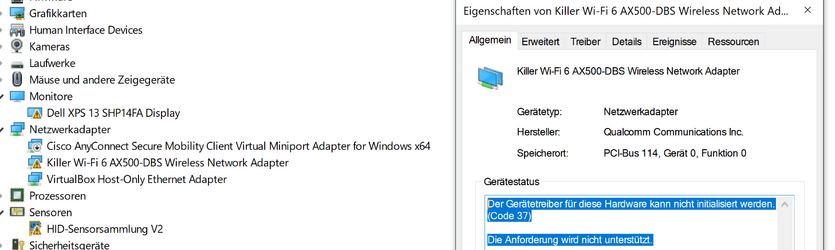
I am currently facing the exact same problem. Yesterday I replaced the thermal paste on my XPS 13 9310 (i7, 32GB) and after putting the device back together, the WiFi module (Killer Wi-Fi 6 AX500-DBS) doesn't seem to be detected. Like some of you said before, it is listed as {none} in the BIOS, but still very much present in Device Manager.

I tried running Ubuntu 23.04 from a USB stick, but no luck there; no WiFi device found. I'll try Ubuntu 20.04 next.

I also tried downgrading my BIOS from 3.15.0 to 3.14.0, but that did not seem to do anything.

The weird thing is, is that Bluetooth is working just fine; I'm currently using my BT mouse...

Also, the WiFi module cannot be replaced, since it is soldered to the motherboard. I have dis- and re-connected the 2 cables from the little chip (under the tiny metal cover with 1 screw) to no avail.

Specs:
XPS 13 9310
i7
32GB
Killer Wi-Fi AX500-DBS

EDIT:
I just tried Ubuntu 20.04 and the WiFi module was happily recognized and fully functional (did some google searches, youtube and speedtest, all perfect). After booting back to Windows 11, WiFi is sadly still not functional and now also Bluetooth doesn't work. I'm pretty happy that the WiFi module doesn't seem to be broken, but this situation is downright frustrating. The investigation continues...

EDIT 2:
Just tried a reset of the BIOS to Factory Defaults and rebooted to Windows 11. Still no WiFi, but Bluetooth is working again. Not sure if it was just the reboot or the Factory Defauls...

 
Last edited:

My Computer My Computer

At a glance

Windows 11i732 GBi7
OS
Windows 11
Computer type
Laptop
Manufacturer/Model
Dell XPS 13 9310
CPU
i7
Motherboard
Dell
Memory
32 GB
Graphics Card(s)
i7
Screen Resolution
4K
Same issue for me:
XPS13 9310, i7 32 gb, AX500-DBS
Bios: Wifi not recognized
Windows 10: recognized but cannot be turned
Ubuntu: works perfectly fine
Issue occur since update to Bios 3.16.

Clean windows (10 & 11) resulted in the same failure.
Also no success with bios reset.

Hope Dell will solve this soon, maybe through another Bios update.
 

My Computer My Computer

At a glance

Win 10 Proi7 118532 GB
OS
Win 10 Pro
Computer type
Laptop
Manufacturer/Model
Dell XPS 9310
CPU
i7 1185
Memory
32 GB
Screen Resolution
4K+
Same issue for me:
XPS13 9310, i7 32 gb, AX500-DBS
Bios: Wifi not recognized
Windows 10: recognized but cannot be turned
Ubuntu: works perfectly fine
Issue occur since update to Bios 3.16.

Clean windows (10 & 11) resulted in the same failure.
Also no success with bios reset.

Hope Dell will solve this soon, maybe through another Bios update.
Have you tried a wifi dongle? It's a fascinating conundrum and I will follow this thread with interest. Can you connect to your router via ethernet?
 

My Computers My Computers

  • At a glance

    Windows 11 Pro 25H2 26200.8973AMD Ryzen 7 5825U with Radeon Graphics16GB
    OS
    Windows 11 Pro 25H2 26200.8973
    Computer type
    Laptop
    Manufacturer/Model
    Acemagic LX15PRO
    CPU
    AMD Ryzen 7 5825U with Radeon Graphics
    Motherboard
    BIOS CT_BI_AMI_LX15PRO_AB8139_A-004
    Memory
    16GB
    Screen Resolution
    1920 x 1080
    Hard Drives
    SSD 2TB
    Internet Speed
    30 Mbps
    Browser
    Brave
    Antivirus
    Webroot SecureAnywhere Complete beta
  • At a glance

    Windows 11 Pro 23H2 22631.2506Atom N450 1.66GHz2GB
    Operating System
    Windows 11 Pro 23H2 22631.2506
    Computer type
    Laptop
    Manufacturer/Model
    HP Mini 210-1090NR PC (bought in late 2009!)
    CPU
    Atom N450 1.66GHz
    Memory
    2GB
    Browser
    Brave
    Antivirus
    Webroot
  • Acer Swift SF114-34 laptop
    OS Windows 11 Pro 26200.8894
    CPU Pentium Silver N6000
    RAM 4GB
    BIOS v1.17
    SSD Samsung 970 EVO Plus SSD 2TB (an upgrade)
Have you tried a wifi dongle? It's a fascinating conundrum and I will follow this thread with interest. Can you connect to your router via ethernet?
yes,
an external usb-wifi dongle works fine of course.

The strange thing is that using Linux also the internal card works fine as well.
It seems to be an Windows-only issue. I also tried diffrent driver versions (1.0.0.1274/1.0.0.1606/1.0.0.1769) without any success.
 

My Computer My Computer

At a glance

Win 10 Proi7 118532 GB
OS
Win 10 Pro
Computer type
Laptop
Manufacturer/Model
Dell XPS 9310
CPU
i7 1185
Memory
32 GB
Screen Resolution
4K+
Can you start Windows in 'Safe Mode with Networking'? I wonder if there is a conflict with some program?
 

My Computers My Computers

  • At a glance

    Windows 11 Pro 25H2 26200.8973AMD Ryzen 7 5825U with Radeon Graphics16GB
    OS
    Windows 11 Pro 25H2 26200.8973
    Computer type
    Laptop
    Manufacturer/Model
    Acemagic LX15PRO
    CPU
    AMD Ryzen 7 5825U with Radeon Graphics
    Motherboard
    BIOS CT_BI_AMI_LX15PRO_AB8139_A-004
    Memory
    16GB
    Screen Resolution
    1920 x 1080
    Hard Drives
    SSD 2TB
    Internet Speed
    30 Mbps
    Browser
    Brave
    Antivirus
    Webroot SecureAnywhere Complete beta
  • At a glance

    Windows 11 Pro 23H2 22631.2506Atom N450 1.66GHz2GB
    Operating System
    Windows 11 Pro 23H2 22631.2506
    Computer type
    Laptop
    Manufacturer/Model
    HP Mini 210-1090NR PC (bought in late 2009!)
    CPU
    Atom N450 1.66GHz
    Memory
    2GB
    Browser
    Brave
    Antivirus
    Webroot
  • Acer Swift SF114-34 laptop
    OS Windows 11 Pro 26200.8894
    CPU Pentium Silver N6000
    RAM 4GB
    BIOS v1.17
    SSD Samsung 970 EVO Plus SSD 2TB (an upgrade)
Unfortunately, no improvements. Anyway, the driver does not seem to load even though I started safe mode with network.
 

Attachments

  • Unbenannt.PNG
    Unbenannt.PNG
    69.5 KB · Views: 2

My Computer My Computer

At a glance

Win 10 Proi7 118532 GB
OS
Win 10 Pro
Computer type
Laptop
Manufacturer/Model
Dell XPS 9310
CPU
i7 1185
Memory
32 GB
Screen Resolution
4K+
Unfortunately, no improvements. Anyway, the driver does not seem to load even though I started safe mode with network.
Wi-Fi in safe mode doesn't work on a lot of computers. It depends on the motherboard. I once had a problem and needed to use Wi-Fi while in safe mode but I never got it to work. The router was too far away to use a ethernet cable. I even bought a USB Wi-Fi card that I was told would work but it didn't. If I remember correctly the Bios has to recognized the Wi-Fi card so the driver can be loaded.
 

My Computers My Computers

  • At a glance

    Windows 11 Pro 25H2Intel Core i7-10700K16GB (8GB PC4-19200 DDR4 SDRAM x2)NVIDIA GeForce GTX 1050 TI
    OS
    Windows 11 Pro 25H2
    Computer type
    PC/Desktop
    Manufacturer/Model
    PowerSpec B746
    CPU
    Intel Core i7-10700K
    Motherboard
    ASRock Z490 Phantom Gaming 4/ax
    Memory
    16GB (8GB PC4-19200 DDR4 SDRAM x2)
    Graphics Card(s)
    NVIDIA GeForce GTX 1050 TI
    Sound Card
    Realtek Audio
    Monitor(s) Displays
    #1. LG ULTRAWIDE 34" #2. AOC Q32G2WG3 32"
    Screen Resolution
    #1. 3440 X 1440 #2. 1920 x 1080
    Hard Drives
    NVMe WDC WDS100T2B0C-00PXH0 1TB
    Samsung SSD 860 EVO 1TB
    PSU
    750 Watts (62.5A)
    Case
    PowerSpec/Lian Li ATX 205
    Keyboard
    Logitech K270
    Mouse
    Logitech M185
    Browser
    Microsoft Edge and Firefox
    Antivirus
    Webroot SecureAnywhere CE 26.1
  • At a glance

    Windows 11 Canary ChannelIntel Core i5-8400 CPU @ 2.80GHz16 MB DDR 4-2666
    Operating System
    Windows 11 Canary Channel
    Computer type
    PC/Desktop
    Manufacturer/Model
    PowerSpec G156
    CPU
    Intel Core i5-8400 CPU @ 2.80GHz
    Motherboard
    AsusTeK Prime B360M-A
    Memory
    16 MB DDR 4-2666
    Monitor(s) Displays
    23" Speptre HDMI 75Hz
    Screen Resolution
    1920x1080
    Hard Drives
    Samsung 970 EVO 500GB NVMe
    Keyboard
    Logitek K270
    Mouse
    Logitek M185
    Browser
    Firefox, Edge and Edge Canary
    Antivirus
    Windows Defender
Wifi does not work for me when I select 'safe mode with networking'. I get the message, 'You're connected using a virtual network adaptor that we can't test'.

But, if I boot into Macrium Reflect System Recovery, the wifi works perfectly. You could try this and use the file explorer in MR (Macrium PEExplorer)to see the details of the driver used.
 

My Computers My Computers

  • At a glance

    Windows 11 Pro 25H2 26200.8973AMD Ryzen 7 5825U with Radeon Graphics16GB
    OS
    Windows 11 Pro 25H2 26200.8973
    Computer type
    Laptop
    Manufacturer/Model
    Acemagic LX15PRO
    CPU
    AMD Ryzen 7 5825U with Radeon Graphics
    Motherboard
    BIOS CT_BI_AMI_LX15PRO_AB8139_A-004
    Memory
    16GB
    Screen Resolution
    1920 x 1080
    Hard Drives
    SSD 2TB
    Internet Speed
    30 Mbps
    Browser
    Brave
    Antivirus
    Webroot SecureAnywhere Complete beta
  • At a glance

    Windows 11 Pro 23H2 22631.2506Atom N450 1.66GHz2GB
    Operating System
    Windows 11 Pro 23H2 22631.2506
    Computer type
    Laptop
    Manufacturer/Model
    HP Mini 210-1090NR PC (bought in late 2009!)
    CPU
    Atom N450 1.66GHz
    Memory
    2GB
    Browser
    Brave
    Antivirus
    Webroot
  • Acer Swift SF114-34 laptop
    OS Windows 11 Pro 26200.8894
    CPU Pentium Silver N6000
    RAM 4GB
    BIOS v1.17
    SSD Samsung 970 EVO Plus SSD 2TB (an upgrade)
Any update on this? The same just happened to me and I Have tried everything!
 

My Computer My Computer

At a glance

Windows 11
OS
Windows 11
Computer type
Laptop
Manufacturer/Model
Dell XPS 13 9310
Any update on this? The same just happened to me and I Have tried everything!
This is an old thread. You should start a new one. You will get more help that way.
 

My Computers My Computers

  • At a glance

    Windows 11 Pro 25H2 (26200.6901)AMD Ryzen 7 6800H with Radeon 680M GPU (486MB...Crucial DDR5-4800 (2400MHz) 32GB (2 x 16GB)NVIDIA RTX 3060 Laptop (6GB RAM)
    OS
    Windows 11 Pro 25H2 (26200.6901)
    Computer type
    Laptop
    Manufacturer/Model
    ASUS TUF Gaming A15 (2022)
    CPU
    AMD Ryzen 7 6800H with Radeon 680M GPU (486MB RAM)
    Memory
    Crucial DDR5-4800 (2400MHz) 32GB (2 x 16GB)
    Graphics Card(s)
    NVIDIA RTX 3060 Laptop (6GB RAM)
    Sound Card
    n/a
    Monitor(s) Displays
    15.6-inch
    Screen Resolution
    1920x1080 300Hz
    Hard Drives
    2 x Samsung 990 Evo Plus (2TB M.2 NVME SSD)
    PSU
    n/a
    Mouse
    Wireless Mouse M510
    Internet Speed
    2100Mbps/300Mbps
    Browser
    Firefox
    Antivirus
    Malwarebytes
  • At a glance

    Windows 11 Pro 25H2 (26200.8246)AMD Ryzen 7 5700X3DG.SKILL Flare X 32GB (2x16GB) DDR4ASUS ROG-STRIX-RTX3060TI-08G-V2-GAMING (RTX 3...
    Operating System
    Windows 11 Pro 25H2 (26200.8246)
    Computer type
    PC/Desktop
    Manufacturer/Model
    Custom build
    CPU
    AMD Ryzen 7 5700X3D
    Motherboard
    ASUS ROG Strix B550-F Gaming WiFi II
    Memory
    G.SKILL Flare X 32GB (2x16GB) DDR4
    Graphics card(s)
    ASUS ROG-STRIX-RTX3060TI-08G-V2-GAMING (RTX 3060-Ti, 8GB RAM)
    Monitor(s) Displays
    Samsung G50D IPS 27"
    Screen Resolution
    1440p/180Hz
    Hard Drives
    SAMSUNG 990 EVO Plus (2TB] M.2 NVME SSD
    SAMSUNG 990 EVO Plus (4TB) M.2 NVME SSD
    PSU
    Corsair RM750x (750 watts)
    Case
    Cooler Master MasterCase 5
    Cooling
    Scythe Mugen 6
    Keyboard
    Logitech K520 (MK540 keyboard/mouse combo)
    Mouse
    Logitech M310 (MK540 keyboard/mouse combo)
    Internet Speed
    2100 Mbps down / 300 Mbps up
    Browser
    Firefox, Edge, Chrome
    Antivirus
    Malwarebytes (Premium)
    Other Info
    ASUS Blu-ray Burner BW-16D1HT (SATA) || Western Digital Easystore 20TB USB 3.0 external hard drive used with Acronis True Image 2025 backup software || HP OfficeJet Pro 6975 Printer/Scanner
I'd say: buy an active USB-C hub and use that when you're in the office. When you're on road you can use one USB-C port for charging, the other for networking. Shouldn't cost more than US$60 for both items. Issues like yours need to balance time and effort against cost: the time factor is already pretty massive, IMO anyway.
HTH,
--Ed--

PS: you might even want to consider a Thunderbolt 3 or 4 dock. This will give you power, plus added ports galore.
 

My Computers My Computers

  • At a glance

    Windows 11i7-8650U (8th Gen/Kaby Lake)16 GBIntel UHD Graphics 620
    OS
    Windows 11
    Computer type
    Laptop
    Manufacturer/Model
    Lenovo X380 Yoga
    CPU
    i7-8650U (8th Gen/Kaby Lake)
    Motherboard
    20LH000MUS (U3E1)
    Memory
    16 GB
    Graphics Card(s)
    Intel UHD Graphics 620
    Sound Card
    Integrated Conexant SmartAudio HD
    Monitor(s) Displays
    FlexView Display
    Screen Resolution
    1920x1080
    Hard Drives
    Toshiba 1 TB PCIe x3 NVMe SSD
    external 5TB Seagate USB-C attached HDD
    PSU
    Lenovo integrated 65W power brick
    Case
    Laptop
    Cooling
    Laptop
    Keyboard
    Integrated Lenovo ThinkPad keyboard
    Mouse
    touchscreen, touchpad
    Internet Speed
    GbE (Spectrum/Charter)
    Browser
    all of em
    Antivirus
    Defender
    Other Info
    Purchased early 2019 as Windows Insider test PC
  • At a glance

    Windows 11Ryzen 5800X128 GB (4x32 DDR5-5600)NVIDIA 3070Ti
    Operating System
    Windows 11
    Computer type
    PC/Desktop
    Manufacturer/Model
    DIY
    CPU
    Ryzen 5800X
    Motherboard
    Asrock B550 Extreme4
    Memory
    128 GB (4x32 DDR5-5600)
    Graphics card(s)
    NVIDIA 3070Ti
    Sound Card
    built-in
    Monitor(s) Displays
    2xDell 2707
    Screen Resolution
    1980x1200
    Hard Drives
    2XNVMe, multiple HDDs from 3 to 12 TB
    PSU
    Seasonic 650
    Case
    NZXT Flo 6
    Cooling
    dual-fan air cooler
    Keyboard
    Logitech Wave
    Mouse
    Logitech Logi
    Internet Speed
    GbE
    Browser
    all of 'em
    Antivirus
    Defender
    Other Info
    temperamental UEFI
Show hidden devices in device manager. Uninstall ALL network adapters. Power off. Disconnect and reconnect wifi card antennas. Power on. See if windows recognizes it upon reboot after reconnecting antennas.
 

My Computer My Computer

At a glance

Windows 11 Pro
OS
Windows 11 Pro
I'll try that
Show hidden devices in device manager. Uninstall ALL network adapters. Power off. Disconnect and reconnect wifi card antennas. Power on. See if windows recognizes it upon reboot after reconnecting antennas.
 

My Computer My Computer

At a glance

Windows 11
OS
Windows 11
Computer type
Laptop
Manufacturer/Model
Dell XPS 13 9310
I'd say: buy an active USB-C hub and use that when you're in the office. When you're on road you can use one USB-C port for charging, the other for networking. Shouldn't cost more than US$60 for both items. Issues like yours need to balance time and effort against cost: the time factor is already pretty massive, IMO anyway.
HTH,
--Ed--

PS: you might even want to consider a Thunderbolt 3 or 4 dock. This will give you power, plus added ports galore.
I'm doing that right now but at the same time it's a temporary solution, I can't go visit my clients with a wifi card attached.
 

My Computer My Computer

At a glance

Windows 11
OS
Windows 11
Computer type
Laptop
Manufacturer/Model
Dell XPS 13 9310
Back
Top Bottom