windows 11 22H2 context menu mouse problems?


Flourgrader

Well-known member
Local time
7:41 AM
Posts
25
OS
Windows 10_&_11
Hi Guys,
Can someone give me some advice please?
I have installed windows 11 22H2
and done all the updates.
My problem is the right mouse button is not functioning 100%
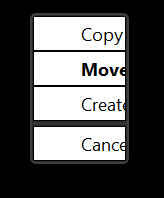
The copy and move do not appear on screen when trying to
move or copy files.
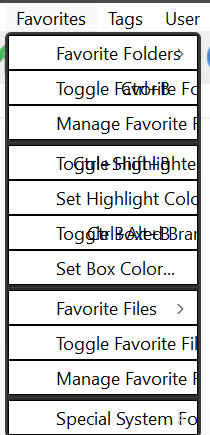
Also all my context menus are underscored.
please see attached file.
I would like to fix this too,
I have tried repairing windows with the usual tools.
re installed mouse driver.
Run:
sfc /scannow
DISM /Online /Cleanup-Image /CheckHealth
DISM /Online /Cleanup-Image /ScanHealth
Windows says no problems.
I am thinking I might need a registry change to fix these problems ?
Any advice is welcome?
Thank You :-)
 
Windows Build/Version
Windows 11 22H2 (OS Build 22621.675)

Attachments

  • UnderScored_Menu.jpg
    UnderScored_Menu.jpg
    28.8 KB · Views: 5

My Computer

System One

  • OS
    Windows 10_&_11
    Computer type
    PC/Desktop
    Manufacturer/Model
    Home_Made
    CPU
    Intel Core i7-8700K
    Motherboard
    ASUS ROG MAXIMUS X HERO
    Memory
    32 GB
    Graphics Card(s)
    Nvidia Geforce
    Screen Resolution
    4K
    Hard Drives
    8 H/D
so when you right-click drag a file to another location you don't get this menu?

1666724661405.png
 

My Computers

System One System Two

  • OS
    Win 11 Pro 25H2 26200.8655
    Computer type
    PC/Desktop
    Manufacturer/Model
    Self Built
    CPU
    Intel® Core™ i7-14700K
    Motherboard
    ASUS TUF Z690-PLUS WIFI BIOS 4505 11/29/25
    Memory
    G.SKILL Ripjaws S5 Series 64GB (2 x 32GB) DDR5
    Graphics Card(s)
    ASUS GeForce RTX 4070 Super 12GB
    Sound Card
    Sound Blaster AE-5 Plus
    Monitor(s) Displays
    ASUS TUF Gaming 27" 2K HDR Gaming
    Screen Resolution
    2560 x 1440
    Hard Drives
    Samsung 990 Pro 1TB NVMe (Win 11 25H2)
    SK hynix P41 500GB NVMe 25H2 DEV/Games
    SK hynix P41 2TB NVMe (x3)
    Crucial P3 Plus 4TB
    PSU
    Corsair RM850x Shift
    Case
    Antec Dark Phantom DP502 FLUX
    Cooling
    Corsair Nautilus 360 RS AIO
    Keyboard
    Logitech MK 320
    Mouse
    Razer Basilisk V3
    Internet Speed
    350Mbs
    Browser
    Firefox
    Antivirus
    Winows Security
    Other Info
    MR 8.1 Home

    System 3 Specs
    Win 11 Pro 25H2 26200.8655
    ASUS PRIME Z370-P II BIOS 3004 7/12/21
    Intel Core i7-8700 CPU @ 3.20GHz
    32GB DDR4 RAM (4x8)
    iGPU Intel UHD Graphics 630
  • Operating System
    Win 11 Pro 25H2 26200.8655
    Computer type
    PC/Desktop
    Manufacturer/Model
    Self Built
    CPU
    Intel Core i7-11700F
    Motherboard
    Asus TUF Gaming Z590 Plus WiFi (BIOS 2803)
    Memory
    64 GB DDR4
    Graphics card(s)
    MSI GeForce RTX 3060 Ventus 2X 12GB
    Sound Card
    SoundBlaster Audigy Fx V2
    Monitor(s) Displays
    Samsung F27T350
    Screen Resolution
    1920x1080
    Hard Drives
    Samsung 980 Pro 1TB
    Samsung 970 EVO Plus 2TB
    Samsung 870 EVO 500GB SSD
    PSU
    Corsair HX750
    Case
    Cougar MX330-G Window
    Cooling
    Thermalright Frozen Edge 240 Black AIO
    Internet Speed
    350Mbps
    Browser
    Firefox
    Antivirus
    Windows Security
No.
I get nothing.
And my screenshot supplied with previous thread has grid marks
round the context menu items, which does not happen on the other PC.
I have set the same windows ISO up on another PC
without any problems.
curious why that is ?
Only Big difference between the 2 PC is the one with the problem has a 4K monitor attached?
 

My Computer

System One

  • OS
    Windows 10_&_11
    Computer type
    PC/Desktop
    Manufacturer/Model
    Home_Made
    CPU
    Intel Core i7-8700K
    Motherboard
    ASUS ROG MAXIMUS X HERO
    Memory
    32 GB
    Graphics Card(s)
    Nvidia Geforce
    Screen Resolution
    4K
    Hard Drives
    8 H/D
Hi Guys,
Can someone give me some advice please?
I have installed windows 11 22H2
and done all the updates.
My problem is the right mouse button is not functioning 100%
The copy and move do not appear on screen when trying to
move or copy files.
Also all my context menus are underscored.
please see attached file.
I would like to fix this too,
I have tried repairing windows with the usual tools.
re installed mouse driver.
Run:
sfc /scannow
DISM /Online /Cleanup-Image /CheckHealth
DISM /Online /Cleanup-Image /ScanHealth
Windows says no problems.
I am thinking I might need a registry change to fix these problems ?
Any advice is welcome?
Thank You :-)
AH huh, so I'm not the only one with the right click show more options menu problems with 22H2. My little Surface laptop has the ugly white show more options menus also and some like the right click for bluetooth and safely remove hardware don't function. Keep hoping for a fix with each update but no luck so far at 22621.755. If I roll back to 21H2 all works fine.Screenshot (2).png
 

My Computers

System One System Two

  • OS
    Windows 11 25H2
    Computer type
    Laptop
    Manufacturer/Model
    Alienware 18 Area-51
    CPU
    Intel Core Ultra 9 275HX (24-Core)
    Motherboard
    Alienware
    Memory
    64GB DDR5 6400MT/s
    Graphics Card(s)
    NVIDIA GeForce RTX 5080 and Intel UHD Graphics
    Sound Card
    Onboard, Realtek high-performance Audio chips (ALC3329 & ALC1708))
    Monitor(s) Displays
    300HZ 18-inch QHD 500 nit Comfort View+
    Screen Resolution
    2560 x 1600
    Hard Drives
    2TB NVMe M.2 PCIe Gen 5 SSD
    Case
    Magnesium Alloy
    Cooling
    Advanced Cryo-Tech Quad-Fan Cooling system & large vapor chamber
    Keyboard
    Cherry MX ultra low profile mechanical keyboard with per key AlienFX RGB lighting
    Mouse
    Logitech MX Master 4
    Browser
    Vivaldi (main), Firefox, Chrome, Edge
    Antivirus
    MS Defender and Malwarebytes Free
  • Operating System
    Windows 11 25H2
    Computer type
    Laptop
    Manufacturer/Model
    Microsoft Surface Laptop 7
    CPU
    Qualcomm Snapdragon X Elite (12 Core) ARM based CPU
    Motherboard
    Microsoft Corp.
    Memory
    16GB LPDDR5
    Graphics card(s)
    Qualcomm Adreno X1-85
    Sound Card
    Omnisonic speakers with Dolby Atmos spatial sound
    Monitor(s) Displays
    120 Hz 13.8-inch 600 nit PixelSense Flow touchscreen
    Screen Resolution
    2304x1536
    Hard Drives
    1TB NVMe Gen 4 SSD
    Case
    Anodized Aluminum
    Cooling
    Traditional active cooling fan system
    Keyboard
    Mechanical QWERTY, backlit when in use
    Mouse
    Logitech MX Master 4 and Surface Arc Mouse
    Browser
    Vivaldi (main), Firefox, Chrome, Edge
    Antivirus
    MS Defender and Malwarebytes Free
Surprise,Surprise,
I thought I was the only one.
If it helps anyone, here are some more of my settings
Windows 11 version 22H2 (OS Build 22621.675)
I have installed the latest Geforce driver for
my graphic card without any success.
Sometimes I do see part of a menu on right click.
See screenshot attached. but more often than not I see nothing!
Most of these problems seem to be when working in explorer.
I tried xyplorer but get the same results.
So far most of my applications drop down menu have grid boxes round them too!
on right mouse click.... Hope I haven't Jinks it,saying that.
Anyone else got this problem ?
Chhers
 

Attachments

  • part_menu.jpg
    part_menu.jpg
    3.4 KB · Views: 3

My Computer

System One

  • OS
    Windows 10_&_11
    Computer type
    PC/Desktop
    Manufacturer/Model
    Home_Made
    CPU
    Intel Core i7-8700K
    Motherboard
    ASUS ROG MAXIMUS X HERO
    Memory
    32 GB
    Graphics Card(s)
    Nvidia Geforce
    Screen Resolution
    4K
    Hard Drives
    8 H/D
Hi Guys,
To those who are watching this thread,
I can update you with the latest info.
I Updated windows 11 to version:
Windows 11 version 22H2 (OS Build 22621.755)
The situation did not get better.
If anything, it got worse!!
See screen shot update.
If I get a solution to the problem I will post.
TY........
 

Attachments

  • part_menu_overwriten.jpg
    part_menu_overwriten.jpg
    20 KB · Views: 3

My Computer

System One

  • OS
    Windows 10_&_11
    Computer type
    PC/Desktop
    Manufacturer/Model
    Home_Made
    CPU
    Intel Core i7-8700K
    Motherboard
    ASUS ROG MAXIMUS X HERO
    Memory
    32 GB
    Graphics Card(s)
    Nvidia Geforce
    Screen Resolution
    4K
    Hard Drives
    8 H/D
Hi Guys,
Here is an update:
I have fixed it:
The problem was some settings in the Windows Theme.
After changing to another one all is fine.
:-):-):-)
 

My Computer

System One

  • OS
    Windows 10_&_11
    Computer type
    PC/Desktop
    Manufacturer/Model
    Home_Made
    CPU
    Intel Core i7-8700K
    Motherboard
    ASUS ROG MAXIMUS X HERO
    Memory
    32 GB
    Graphics Card(s)
    Nvidia Geforce
    Screen Resolution
    4K
    Hard Drives
    8 H/D
Hi Guys,
Here is an update:
I have fixed it:
The problem was some settings in the Windows Theme.
After changing to another one all is fine.
:-):-):-)
You just changed the theme and it cleared up? Does it display properly now for all themes?
 

My Computers

System One System Two

  • OS
    Windows 11 25H2
    Computer type
    Laptop
    Manufacturer/Model
    Alienware 18 Area-51
    CPU
    Intel Core Ultra 9 275HX (24-Core)
    Motherboard
    Alienware
    Memory
    64GB DDR5 6400MT/s
    Graphics Card(s)
    NVIDIA GeForce RTX 5080 and Intel UHD Graphics
    Sound Card
    Onboard, Realtek high-performance Audio chips (ALC3329 & ALC1708))
    Monitor(s) Displays
    300HZ 18-inch QHD 500 nit Comfort View+
    Screen Resolution
    2560 x 1600
    Hard Drives
    2TB NVMe M.2 PCIe Gen 5 SSD
    Case
    Magnesium Alloy
    Cooling
    Advanced Cryo-Tech Quad-Fan Cooling system & large vapor chamber
    Keyboard
    Cherry MX ultra low profile mechanical keyboard with per key AlienFX RGB lighting
    Mouse
    Logitech MX Master 4
    Browser
    Vivaldi (main), Firefox, Chrome, Edge
    Antivirus
    MS Defender and Malwarebytes Free
  • Operating System
    Windows 11 25H2
    Computer type
    Laptop
    Manufacturer/Model
    Microsoft Surface Laptop 7
    CPU
    Qualcomm Snapdragon X Elite (12 Core) ARM based CPU
    Motherboard
    Microsoft Corp.
    Memory
    16GB LPDDR5
    Graphics card(s)
    Qualcomm Adreno X1-85
    Sound Card
    Omnisonic speakers with Dolby Atmos spatial sound
    Monitor(s) Displays
    120 Hz 13.8-inch 600 nit PixelSense Flow touchscreen
    Screen Resolution
    2304x1536
    Hard Drives
    1TB NVMe Gen 4 SSD
    Case
    Anodized Aluminum
    Cooling
    Traditional active cooling fan system
    Keyboard
    Mechanical QWERTY, backlit when in use
    Mouse
    Logitech MX Master 4 and Surface Arc Mouse
    Browser
    Vivaldi (main), Firefox, Chrome, Edge
    Antivirus
    MS Defender and Malwarebytes Free
Never mind, sure enough that fixed it.
 

My Computers

System One System Two

  • OS
    Windows 11 25H2
    Computer type
    Laptop
    Manufacturer/Model
    Alienware 18 Area-51
    CPU
    Intel Core Ultra 9 275HX (24-Core)
    Motherboard
    Alienware
    Memory
    64GB DDR5 6400MT/s
    Graphics Card(s)
    NVIDIA GeForce RTX 5080 and Intel UHD Graphics
    Sound Card
    Onboard, Realtek high-performance Audio chips (ALC3329 & ALC1708))
    Monitor(s) Displays
    300HZ 18-inch QHD 500 nit Comfort View+
    Screen Resolution
    2560 x 1600
    Hard Drives
    2TB NVMe M.2 PCIe Gen 5 SSD
    Case
    Magnesium Alloy
    Cooling
    Advanced Cryo-Tech Quad-Fan Cooling system & large vapor chamber
    Keyboard
    Cherry MX ultra low profile mechanical keyboard with per key AlienFX RGB lighting
    Mouse
    Logitech MX Master 4
    Browser
    Vivaldi (main), Firefox, Chrome, Edge
    Antivirus
    MS Defender and Malwarebytes Free
  • Operating System
    Windows 11 25H2
    Computer type
    Laptop
    Manufacturer/Model
    Microsoft Surface Laptop 7
    CPU
    Qualcomm Snapdragon X Elite (12 Core) ARM based CPU
    Motherboard
    Microsoft Corp.
    Memory
    16GB LPDDR5
    Graphics card(s)
    Qualcomm Adreno X1-85
    Sound Card
    Omnisonic speakers with Dolby Atmos spatial sound
    Monitor(s) Displays
    120 Hz 13.8-inch 600 nit PixelSense Flow touchscreen
    Screen Resolution
    2304x1536
    Hard Drives
    1TB NVMe Gen 4 SSD
    Case
    Anodized Aluminum
    Cooling
    Traditional active cooling fan system
    Keyboard
    Mechanical QWERTY, backlit when in use
    Mouse
    Logitech MX Master 4 and Surface Arc Mouse
    Browser
    Vivaldi (main), Firefox, Chrome, Edge
    Antivirus
    MS Defender and Malwarebytes Free

My Computers

System One System Two

  • OS
    Win11 Pro 24H2
    Computer type
    PC/Desktop
    Manufacturer/Model
    Lenovo M90q
    CPU
    i5 12500
    Motherboard
    Lenovo
    Memory
    32GB
    Graphics Card(s)
    Intel CPU integrated
    Sound Card
    Intel MB intergrated
    Monitor(s) Displays
    Dell 4k IPS
    Screen Resolution
    3840 x 2160
    Hard Drives
    500GB NVMe Samsung 980 Pro
    2 TB NVMe Samsung 990 Pro
    1 TB Crucial MX500
    PSU
    Lenovo
    Case
    Lenovo
    Cooling
    Air
    Keyboard
    Logitech BT
    Mouse
    Logitech BT
    Internet Speed
    FTTP
    Browser
    Firefox
    Antivirus
    MS Defender and Malwarebytes
  • Operating System
    Win 11 Pro
    Computer type
    Laptop
    Manufacturer/Model
    Surface Pro 8
    CPU
    i5-1135G7
    Motherboard
    MS
    Memory
    16GB
    Graphics card(s)
    Intel Iris XE
    Sound Card
    ATI/AMD Renoir
    Monitor(s) Displays
    UHD
    Screen Resolution
    2880 x 1920
    Hard Drives
    2TB NVMe
    PSU
    MS
    Case
    Microsoft
    Cooling
    Air
    Keyboard
    Built In
    Mouse
    Touchpad
    Internet Speed
    FTTP
    Browser
    Firefox
    Antivirus
    MS Defender and Malwarebytes
Sorry to jump in on an old thread but exactly what did you change in the theme
Just go into the themes option under personalization and select a different theme like one of the defaults. When the new theme takes effect that should clear up the menu display problem then you can change back to using whatever custom theme you set up.
 

My Computers

System One System Two

  • OS
    Windows 11 25H2
    Computer type
    Laptop
    Manufacturer/Model
    Alienware 18 Area-51
    CPU
    Intel Core Ultra 9 275HX (24-Core)
    Motherboard
    Alienware
    Memory
    64GB DDR5 6400MT/s
    Graphics Card(s)
    NVIDIA GeForce RTX 5080 and Intel UHD Graphics
    Sound Card
    Onboard, Realtek high-performance Audio chips (ALC3329 & ALC1708))
    Monitor(s) Displays
    300HZ 18-inch QHD 500 nit Comfort View+
    Screen Resolution
    2560 x 1600
    Hard Drives
    2TB NVMe M.2 PCIe Gen 5 SSD
    Case
    Magnesium Alloy
    Cooling
    Advanced Cryo-Tech Quad-Fan Cooling system & large vapor chamber
    Keyboard
    Cherry MX ultra low profile mechanical keyboard with per key AlienFX RGB lighting
    Mouse
    Logitech MX Master 4
    Browser
    Vivaldi (main), Firefox, Chrome, Edge
    Antivirus
    MS Defender and Malwarebytes Free
  • Operating System
    Windows 11 25H2
    Computer type
    Laptop
    Manufacturer/Model
    Microsoft Surface Laptop 7
    CPU
    Qualcomm Snapdragon X Elite (12 Core) ARM based CPU
    Motherboard
    Microsoft Corp.
    Memory
    16GB LPDDR5
    Graphics card(s)
    Qualcomm Adreno X1-85
    Sound Card
    Omnisonic speakers with Dolby Atmos spatial sound
    Monitor(s) Displays
    120 Hz 13.8-inch 600 nit PixelSense Flow touchscreen
    Screen Resolution
    2304x1536
    Hard Drives
    1TB NVMe Gen 4 SSD
    Case
    Anodized Aluminum
    Cooling
    Traditional active cooling fan system
    Keyboard
    Mechanical QWERTY, backlit when in use
    Mouse
    Logitech MX Master 4 and Surface Arc Mouse
    Browser
    Vivaldi (main), Firefox, Chrome, Edge
    Antivirus
    MS Defender and Malwarebytes Free
Just go into the themes option under personalization and select a different theme like one of the defaults. When the new theme takes effect that should clear up the menu display problem then you can change back to using whatever custom theme you set up.
Thank you - that worked. I have no idea why. Must be some more MSoft wizardry.
 

My Computers

System One System Two

  • OS
    Win11 Pro 24H2
    Computer type
    PC/Desktop
    Manufacturer/Model
    Lenovo M90q
    CPU
    i5 12500
    Motherboard
    Lenovo
    Memory
    32GB
    Graphics Card(s)
    Intel CPU integrated
    Sound Card
    Intel MB intergrated
    Monitor(s) Displays
    Dell 4k IPS
    Screen Resolution
    3840 x 2160
    Hard Drives
    500GB NVMe Samsung 980 Pro
    2 TB NVMe Samsung 990 Pro
    1 TB Crucial MX500
    PSU
    Lenovo
    Case
    Lenovo
    Cooling
    Air
    Keyboard
    Logitech BT
    Mouse
    Logitech BT
    Internet Speed
    FTTP
    Browser
    Firefox
    Antivirus
    MS Defender and Malwarebytes
  • Operating System
    Win 11 Pro
    Computer type
    Laptop
    Manufacturer/Model
    Surface Pro 8
    CPU
    i5-1135G7
    Motherboard
    MS
    Memory
    16GB
    Graphics card(s)
    Intel Iris XE
    Sound Card
    ATI/AMD Renoir
    Monitor(s) Displays
    UHD
    Screen Resolution
    2880 x 1920
    Hard Drives
    2TB NVMe
    PSU
    MS
    Case
    Microsoft
    Cooling
    Air
    Keyboard
    Built In
    Mouse
    Touchpad
    Internet Speed
    FTTP
    Browser
    Firefox
    Antivirus
    MS Defender and Malwarebytes
Thank you - that worked. I have no idea why. Must be some more MSoft wizardry.
Glad your back to normal display, that one had me stumped and frustrated for a while trying all kinds of stuff lol. Then the thread starter discovered that simple fix and I was like duh!
 

My Computers

System One System Two

  • OS
    Windows 11 25H2
    Computer type
    Laptop
    Manufacturer/Model
    Alienware 18 Area-51
    CPU
    Intel Core Ultra 9 275HX (24-Core)
    Motherboard
    Alienware
    Memory
    64GB DDR5 6400MT/s
    Graphics Card(s)
    NVIDIA GeForce RTX 5080 and Intel UHD Graphics
    Sound Card
    Onboard, Realtek high-performance Audio chips (ALC3329 & ALC1708))
    Monitor(s) Displays
    300HZ 18-inch QHD 500 nit Comfort View+
    Screen Resolution
    2560 x 1600
    Hard Drives
    2TB NVMe M.2 PCIe Gen 5 SSD
    Case
    Magnesium Alloy
    Cooling
    Advanced Cryo-Tech Quad-Fan Cooling system & large vapor chamber
    Keyboard
    Cherry MX ultra low profile mechanical keyboard with per key AlienFX RGB lighting
    Mouse
    Logitech MX Master 4
    Browser
    Vivaldi (main), Firefox, Chrome, Edge
    Antivirus
    MS Defender and Malwarebytes Free
  • Operating System
    Windows 11 25H2
    Computer type
    Laptop
    Manufacturer/Model
    Microsoft Surface Laptop 7
    CPU
    Qualcomm Snapdragon X Elite (12 Core) ARM based CPU
    Motherboard
    Microsoft Corp.
    Memory
    16GB LPDDR5
    Graphics card(s)
    Qualcomm Adreno X1-85
    Sound Card
    Omnisonic speakers with Dolby Atmos spatial sound
    Monitor(s) Displays
    120 Hz 13.8-inch 600 nit PixelSense Flow touchscreen
    Screen Resolution
    2304x1536
    Hard Drives
    1TB NVMe Gen 4 SSD
    Case
    Anodized Aluminum
    Cooling
    Traditional active cooling fan system
    Keyboard
    Mechanical QWERTY, backlit when in use
    Mouse
    Logitech MX Master 4 and Surface Arc Mouse
    Browser
    Vivaldi (main), Firefox, Chrome, Edge
    Antivirus
    MS Defender and Malwarebytes Free

Latest Support Threads

Back
Top Bottom