Audio Services Windows not activated - Please help


baki

Member
Local time
6:52 PM
Posts
5
OS
Windows 11
Hello everybody. My computer was working perfectly well until the last quality update of windows 11. (Update to windows 11 was fine, but the one from 10days ago totally messed up my machine)
Actual version : Version 21H2 (22000.258)
PC : Acer Nitro N50-600
Bios version : R01-C2
I have a lot of different problems, for instance I can't open device manager. The path is not found. I have to use the executer each time. Same for control pannel and some options in the settings...

But my main problem is audio. Unfortunately, I cannot have any sound from anywhere. I tried : Mini jack directly to audio card (which give me a really annoying noise, I feel like I here my motherboard screaming), Bluetooth connexion, USB-audio device. Nothing's working.
This is what I tried :
- Disabled/Delete/update audio devices + reboot > doesn't change anything
- Updating all drivers + reboot
- Go on service.msc, change the audio services connexion to local, and to local system too + reboot > doesn't work
- On service again, trying to put every dependances services in auto mode > doesn't work
- System restore : I cannot do that it says "the system restore cannot happen".

I feel like I'm totally stuck waiting for the next windows update, I'm not even sure if it will resolve my problem.
So if you have any new idea for me it's welcomed.
Thank you in advance.
 
Windows Build/Version
21H2 22000.258

My Computer My Computer

At a glance

Windows 11i7-9700 @ 3.00GHz16GB DDR4Nvidia Geforce GTX 1660
OS
Windows 11
Computer type
PC/Desktop
Manufacturer/Model
acer nitro n50-600
CPU
i7-9700 @ 3.00GHz
Motherboard
??
Memory
16GB DDR4
Graphics Card(s)
Nvidia Geforce GTX 1660
Sound Card
Nvidia + Realtek?
Monitor(s) Displays
2 x benq pd2700u
Screen Resolution
4k
Mouse
logitech hero
Internet Speed
1gb/s
Any idea please? It has been literally three weeks since I cannot use properly my computer....
 

My Computer My Computer

At a glance

Windows 11i7-9700 @ 3.00GHz16GB DDR4Nvidia Geforce GTX 1660
OS
Windows 11
Computer type
PC/Desktop
Manufacturer/Model
acer nitro n50-600
CPU
i7-9700 @ 3.00GHz
Motherboard
??
Memory
16GB DDR4
Graphics Card(s)
Nvidia Geforce GTX 1660
Sound Card
Nvidia + Realtek?
Monitor(s) Displays
2 x benq pd2700u
Screen Resolution
4k
Mouse
logitech hero
Internet Speed
1gb/s
Hello and welcome!

Definitely your system isn't in good condition even besides the problems with audio system, I suppose it's a result of the "dark past" of upgrade from Windows 10 to 11. If you have a spare HDD/SSD, can you try to perform a fresh installation of Windows 11 and check whether that problems will happen or not, as I hope?
 

My Computer My Computer

At a glance

Windows 11 Pro 25H2AMD Rysen 5 4600H32 GB (2 x 16 GB Samsung SO-DIMM DDR4-3200)GeForce GTX 1650 Ti, 4 GB GDDR6
OS
Windows 11 Pro 25H2
Computer type
Laptop
Manufacturer/Model
Lenovo Legion 5-15ARH05
CPU
AMD Rysen 5 4600H
Memory
32 GB (2 x 16 GB Samsung SO-DIMM DDR4-3200)
Graphics Card(s)
GeForce GTX 1650 Ti, 4 GB GDDR6
Screen Resolution
1920x1080
Hard Drives
SSD M.2 512 GB SAMSUNG MZALQ512; SSD M.2 1 TB Seagate FireCuda 530
Mouse
Logitech M650L in Bluetooth mode
Have you checked the device drivers to see if they are installed?

You could also just go into Device Manager and delete the Audio under Sound, Video and Audio then restart. THis will force them to reinstall
 

My Computer My Computer

At a glance

Win11 26100.332312th Gen Intel(R) Core(TM) i7-1270P 2.20 GHz16Gb
OS
Win11 26100.3323
Computer type
Laptop
Manufacturer/Model
Dell Latitude 7430
CPU
12th Gen Intel(R) Core(TM) i7-1270P 2.20 GHz
Motherboard
Dell
Memory
16Gb
Hi @Slavic
Do you know how can I perform a fresh installation, ideally without losing my files? Because when I got on "restore" or "reset" this computer and I try to reinstall windows, it stucks and at the end nothing happens, no reset, no restore. I tried "install windows by cloud" and also in local...
Hello and welcome!

Definitely your system isn't in good condition even besides the problems with audio system, I suppose it's a result of the "dark past" of upgrade from Windows 10 to 11. If you have a spare HDD/SSD, can you try to perform a fresh installation of Windows 11 and check whether that problems will happen or not, as I hope?
Have you checked the device drivers to see if they are installed?

You could also just go into Device Manager and delete the Audio under Sound, Video and Audio then restart. THis will force them to reinstall
Hi @wimorrison yes I did that, unfortunately nothing changes.
 

My Computer My Computer

At a glance

Windows 11i7-9700 @ 3.00GHz16GB DDR4Nvidia Geforce GTX 1660
OS
Windows 11
Computer type
PC/Desktop
Manufacturer/Model
acer nitro n50-600
CPU
i7-9700 @ 3.00GHz
Motherboard
??
Memory
16GB DDR4
Graphics Card(s)
Nvidia Geforce GTX 1660
Sound Card
Nvidia + Realtek?
Monitor(s) Displays
2 x benq pd2700u
Screen Resolution
4k
Mouse
logitech hero
Internet Speed
1gb/s
Also, as Slavic says, even If I fix the audio, I should try to do a fresh install. I can't alway use Win+R to type execute command everytime I want to use device manager, or any pannel control board :/

But then again, how to reinstall as the reset feature in the parameters doesn't work for me..?
 

My Computer My Computer

At a glance

Windows 11i7-9700 @ 3.00GHz16GB DDR4Nvidia Geforce GTX 1660
OS
Windows 11
Computer type
PC/Desktop
Manufacturer/Model
acer nitro n50-600
CPU
i7-9700 @ 3.00GHz
Motherboard
??
Memory
16GB DDR4
Graphics Card(s)
Nvidia Geforce GTX 1660
Sound Card
Nvidia + Realtek?
Monitor(s) Displays
2 x benq pd2700u
Screen Resolution
4k
Mouse
logitech hero
Internet Speed
1gb/s
I would try a repair install without data loss using iso.


This should be the list of drivers for your model if need to reinstall.


I would also search this forum, at a later date, on how to create images of your drive that can get you out of these issues easily. Macrium Reflect is the favourite here.
 

My Computers My Computers

  • At a glance

    Win 11 ProAMD Ryzen™ 7 7730U24GB Dual-Channel DDR4 @ 1596MHz (22-22-22-52)512MB ATI AMD Radeon Graphics (ASUStek Comput...
    OS
    Win 11 Pro
    Computer type
    Laptop
    Manufacturer/Model
    ASUS Vivobook
    CPU
    AMD Ryzen™ 7 7730U
    Motherboard
    M1605YA
    Memory
    24GB Dual-Channel DDR4 @ 1596MHz (22-22-22-52)
    Graphics Card(s)
    512MB ATI AMD Radeon Graphics (ASUStek Computer Inc)
    Monitor(s) Displays
    Generic PnP Monitor (1920x1200@60Hz) - P1 PLUS (1920x1080@59Hz)
    Screen Resolution
    1920 X 1200
    Hard Drives
    953GB Western Digital WD
    PSU
    45 Watts
    Mouse
    Lenovo Bluetooth.
    Internet Speed
    500 Mbps
    Browser
    Edge
    Antivirus
    Defender
  • At a glance

    Windows 11AMD Ryzen 7 5800H / 3.2 GHz32 GB DDR4 SDRAM 3200 MHzNVIDIA GeForce RTX 3060 6 GB GDDR6 SDRAM
    Operating System
    Windows 11
    Computer type
    Laptop
    Manufacturer/Model
    ACER NITRO
    CPU
    AMD Ryzen 7 5800H / 3.2 GHz
    Motherboard
    CZ Scala_CAS (FP6)
    Memory
    32 GB DDR4 SDRAM 3200 MHz
    Graphics card(s)
    NVIDIA GeForce RTX 3060 6 GB GDDR6 SDRAM
    Sound Card
    Realtek Audio. NVIDIA High Definition Audio
    Monitor(s) Displays
    15.6" LED backlight 1920 x 1080 (Full HD) 144 Hz
    Screen Resolution
    1920 x 1080 (Full HD)
    Hard Drives
    Samsung 970 Evo Plus 2TB NVMe M.2
    PSU
    180 Watt, 19.5 V
    Mouse
    Lenovo Bluetooth
    Internet Speed
    500 Mbps
    Browser
    Edge
    Antivirus
    Defender
Also, as Slavic says, even If I fix the audio, I should try to do a fresh install. I can't alway use Win+R to type execute command everytime I want to use device manager, or any pannel control board :/

But then again, how to reinstall as the reset feature in the parameters doesn't work for me..?
I'd suggest to make an upgrade plan depending on your resources.

First of all, it would be reasonable to make a full system backup in current OS state (even with problems) because it will allow you to extract the files and settings if something will go wrong. As you may see, a lot of people here like Macrium Reflect (free version is enough), but also you need to have an external drive for this system image. If you don't have such, it's possible to attach or use an additional HDD, but not use it for installation.

After that, you need to plan a fresh installation. Create a flash drive with Windows 11 and prepare the drive for this. The best solution, if you have a spare HDD or SSD which you can connect to PC either in addition to your main drive (but with an option to make a bootable in BIOS) or, if no such drive is available, you can use a free partition on your current drive. Not the best choice, but anyway. If you don't have anyting similar, then free some space on your system drive, compress it (using defragmenter, for example), shrink drive and create a new partition.
The last cases are the OS upgrade with keeping user's files but not old OS (files will be moved to C:\Windows.old) or completely reformat current drive during installation (because you already have a full backup and bootable flash drive for restoration, if need).

But I suggest to perform the test installation of Windows 11 which will allow to see the hardware compatibility, test different device drivers etc. With an option to make this installation your main, if all will be OK. It's a most careful approach, but you heed some resources for this.
 

My Computer My Computer

At a glance

Windows 11 Pro 25H2AMD Rysen 5 4600H32 GB (2 x 16 GB Samsung SO-DIMM DDR4-3200)GeForce GTX 1650 Ti, 4 GB GDDR6
OS
Windows 11 Pro 25H2
Computer type
Laptop
Manufacturer/Model
Lenovo Legion 5-15ARH05
CPU
AMD Rysen 5 4600H
Memory
32 GB (2 x 16 GB Samsung SO-DIMM DDR4-3200)
Graphics Card(s)
GeForce GTX 1650 Ti, 4 GB GDDR6
Screen Resolution
1920x1080
Hard Drives
SSD M.2 512 GB SAMSUNG MZALQ512; SSD M.2 1 TB Seagate FireCuda 530
Mouse
Logitech M650L in Bluetooth mode

If you're still on 22000.258 you're a few builds behind. Build 22000.348 was made available to everyone on Nov 22. Check Windows Update to see if its available to you.

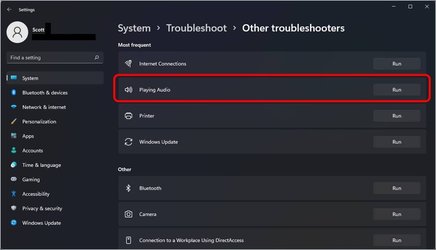
You can also try the troubleshooter. Settings>System>Troubleshoot>Other troubleshooters
Audio Trouble.jpg
 
Last edited:

My Computers My Computers

  • At a glance

    Win 11 Pro 25H2 26200.8737Intel® Core™ i7-14700KG.SKILL Ripjaws S5 Series 64GB (2 x 32GB) DDR5ASUS GeForce RTX 4070 Super 12GB
    OS
    Win 11 Pro 25H2 26200.8737
    Computer type
    PC/Desktop
    Manufacturer/Model
    Self Built
    CPU
    Intel® Core™ i7-14700K
    Motherboard
    ASUS TUF Z690-PLUS WIFI BIOS 4505 11/29/25
    Memory
    G.SKILL Ripjaws S5 Series 64GB (2 x 32GB) DDR5
    Graphics Card(s)
    ASUS GeForce RTX 4070 Super 12GB
    Sound Card
    Sound Blaster AE-5 Plus
    Monitor(s) Displays
    ASUS TUF Gaming 27" 2K HDR Gaming
    Screen Resolution
    2560 x 1440
    Hard Drives
    Samsung 990 Pro 1TB NVMe (Win 11 25H2)
    SK hynix P41 500GB NVMe 25H2 DEV/Games
    SK hynix P41 2TB NVMe (x3)
    Crucial P3 Plus 4TB
    PSU
    Corsair RM850x Shift
    Case
    Antec Dark Phantom DP502 FLUX
    Cooling
    Corsair Nautilus 360 RS AIO
    Keyboard
    Logitech MK 320
    Mouse
    Razer Basilisk V3
    Internet Speed
    750Mbs
    Browser
    Firefox
    Antivirus
    Winows Security
    Other Info
    MR 8.1 Home
  • At a glance

    Win 11 Pro 25H2 26200.8737Intel Core i7-11700F64 GB DDR4MSI GeForce RTX 3060 Ventus 2X 12GB
    Operating System
    Win 11 Pro 25H2 26200.8737
    Computer type
    PC/Desktop
    Manufacturer/Model
    Self Built
    CPU
    Intel Core i7-11700F
    Motherboard
    Asus TUF Gaming Z590 Plus WiFi (BIOS 2803)
    Memory
    64 GB DDR4
    Graphics card(s)
    MSI GeForce RTX 3060 Ventus 2X 12GB
    Sound Card
    SoundBlaster Audigy Fx V2
    Monitor(s) Displays
    Samsung F27T350
    Screen Resolution
    1920x1080
    Hard Drives
    Samsung 980 Pro 1TB
    Samsung 970 EVO Plus 2TB
    Samsung 870 EVO 500GB SSD
    PSU
    Corsair HX750
    Case
    Cougar MX330-G Window
    Cooling
    Thermalright Frozen Edge 240 Black AIO
    Internet Speed
    350Mbps
    Browser
    Firefox
    Antivirus
    Windows Security
  • System Three
    Win 11 Pro 25H2 26200.8737
    ASUS PRIME Z370-P II BIOS 3004 7/12/21
    Intel Core i7-8700 CPU @ 3.20GHz
    32GB DDR4 RAM (4x8)
    iGPU Intel UHD Graphics 630
    Mid-Tower Desktop

Latest Support Threads

Back
Top Bottom