How to change icon for certain file types?


raphaelmsx

Well-known member
Local time
8:20 PM
Posts
17
OS
Windows 11
Hi!

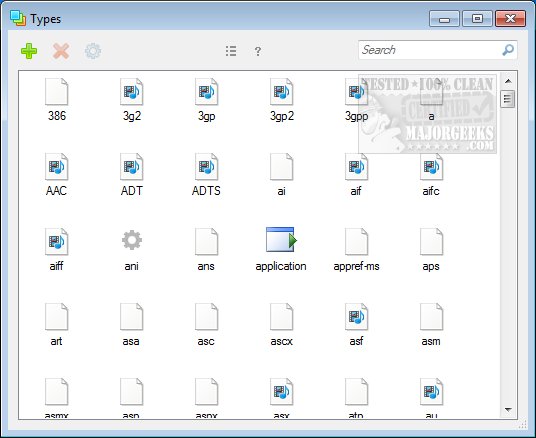
In Windows 10 I just used nirsoft filetypesman and worked like a charm, now on Windows 11 (25H2), it throws an error: "The system cannot find the file specified", so I tried another program, Types, but it doesn't change the icons...

What can I do?
 

My Computer

System One

  • OS
    Windows 11
Hi!

In Windows 10 I just used nirsoft filetypesman and worked like a charm, now on Windows 11 (25H2), it throws an error: "The system cannot find the file specified", so I tried another program, Types, but it doesn't change the icons...

What can I do?


This is a job for @davidvkimball [insert super hero music]


My Computers

System One System Two

  • OS
    Win 11 Home ♦♦♦26200.8655 ♦♦♦♦♦♦♦25H2
    Computer type
    PC/Desktop
    Manufacturer/Model
    Built by Ghot® [May 2020]
    CPU
    AMD Ryzen 7 3700X
    Motherboard
    Asus Pro WS X570-ACE (BIOS 5302)
    Memory
    G.Skill (F4-3200C14D-16GTZKW)
    Graphics Card(s)
    EVGA RTX 2070 (08G-P4-2171-KR)
    Sound Card
    Realtek ALC1220P / ALC S1220A
    Monitor(s) Displays
    Dell U3011 30"
    Screen Resolution
    2560 x 1600
    Hard Drives
    2x Samsung 860 EVO 500GB,
    WD 4TB Black FZBX - SATA III,
    WD 8TB Black FZBX - SATA III,
    DRW-24B1ST CD/DVD Burner
    PSU
    PC Power & Cooling 750W Quad EPS12V
    Case
    Cooler Master ATCS 840 Tower
    Cooling
    CM Hyper 212 EVO (push/pull)
    Keyboard
    Ducky DK9008 Shine II Blue LED
    Mouse
    Logitech Optical M-100
    Internet Speed
    300/300
    Browser
    Firefox (latest)
    Antivirus
    Bitdefender Total Security
    Other Info
    Speakers: Klipsch Pro Media 2.1
  • Operating System
    Windows XP Pro 32bit w/SP3
    Computer type
    PC/Desktop
    Manufacturer/Model
    Built by Ghot® (not in use)
    CPU
    AMD Athlon 64 X2 5000+ (OC'd @ 3.2Ghz)
    Motherboard
    ASUS M2N32-SLI Deluxe Wireless Edition
    Memory
    TWIN2X2048-6400C4DHX (2 x 1GB, DDR2 800)
    Graphics card(s)
    EVGA 256-P2-N758-TR GeForce 8600GT SSC
    Sound Card
    Onboard
    Monitor(s) Displays
    ViewSonic G90FB Black 19" Professional (CRT)
    Screen Resolution
    up to 2048 x 1536
    Hard Drives
    WD 36GB 10,000rpm Raptor SATA
    Seagate 80GB 7200rpm SATA
    Lite-On LTR-52246S CD/RW
    Lite-On LH-18A1P CD/DVD Burner
    PSU
    PC Power & Cooling Silencer 750 Quad EPS12V
    Case
    Generic Beige case, 80mm fans
    Cooling
    ZALMAN 9500A 92mm CPU Cooler
    Keyboard
    Logitech Classic Keybooard 200
    Mouse
    Logitech Optical M-BT96a
    Internet Speed
    300/300
    Browser
    Firefox 3.x ??
    Antivirus
    Symantec (Norton)
    Other Info
    Still assembled, still runs. Haven't turned it on for 15 years?
This is a job for @davidvkimball [insert super hero music]


Thanks, but I want to change the icon to some file types (mp3, flac, etc...), not folders.
 

My Computer

System One

  • OS
    Windows 11
Thanks, but I want to change the icon to some file types (mp3, flac, etc...), not folders.


That guy knows icons, for anything.
It will take him a few days to respond. He will have gotten an email alert when I "mentioned" him above.

All my .mp3's have a blank white sheet for an icon.
He will probably also know what icon programs work on Win 11.

Maybe @Edwin can help. He changes pretty much everything in the Win 11 GUI.
 

My Computers

System One System Two

  • OS
    Win 11 Home ♦♦♦26200.8655 ♦♦♦♦♦♦♦25H2
    Computer type
    PC/Desktop
    Manufacturer/Model
    Built by Ghot® [May 2020]
    CPU
    AMD Ryzen 7 3700X
    Motherboard
    Asus Pro WS X570-ACE (BIOS 5302)
    Memory
    G.Skill (F4-3200C14D-16GTZKW)
    Graphics Card(s)
    EVGA RTX 2070 (08G-P4-2171-KR)
    Sound Card
    Realtek ALC1220P / ALC S1220A
    Monitor(s) Displays
    Dell U3011 30"
    Screen Resolution
    2560 x 1600
    Hard Drives
    2x Samsung 860 EVO 500GB,
    WD 4TB Black FZBX - SATA III,
    WD 8TB Black FZBX - SATA III,
    DRW-24B1ST CD/DVD Burner
    PSU
    PC Power & Cooling 750W Quad EPS12V
    Case
    Cooler Master ATCS 840 Tower
    Cooling
    CM Hyper 212 EVO (push/pull)
    Keyboard
    Ducky DK9008 Shine II Blue LED
    Mouse
    Logitech Optical M-100
    Internet Speed
    300/300
    Browser
    Firefox (latest)
    Antivirus
    Bitdefender Total Security
    Other Info
    Speakers: Klipsch Pro Media 2.1
  • Operating System
    Windows XP Pro 32bit w/SP3
    Computer type
    PC/Desktop
    Manufacturer/Model
    Built by Ghot® (not in use)
    CPU
    AMD Athlon 64 X2 5000+ (OC'd @ 3.2Ghz)
    Motherboard
    ASUS M2N32-SLI Deluxe Wireless Edition
    Memory
    TWIN2X2048-6400C4DHX (2 x 1GB, DDR2 800)
    Graphics card(s)
    EVGA 256-P2-N758-TR GeForce 8600GT SSC
    Sound Card
    Onboard
    Monitor(s) Displays
    ViewSonic G90FB Black 19" Professional (CRT)
    Screen Resolution
    up to 2048 x 1536
    Hard Drives
    WD 36GB 10,000rpm Raptor SATA
    Seagate 80GB 7200rpm SATA
    Lite-On LTR-52246S CD/RW
    Lite-On LH-18A1P CD/DVD Burner
    PSU
    PC Power & Cooling Silencer 750 Quad EPS12V
    Case
    Generic Beige case, 80mm fans
    Cooling
    ZALMAN 9500A 92mm CPU Cooler
    Keyboard
    Logitech Classic Keybooard 200
    Mouse
    Logitech Optical M-BT96a
    Internet Speed
    300/300
    Browser
    Firefox 3.x ??
    Antivirus
    Symantec (Norton)
    Other Info
    Still assembled, still runs. Haven't turned it on for 15 years?
Maybe @Edwin can help. He changes pretty much everything in the Win 11 GUI.
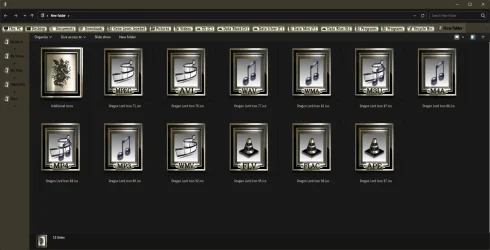
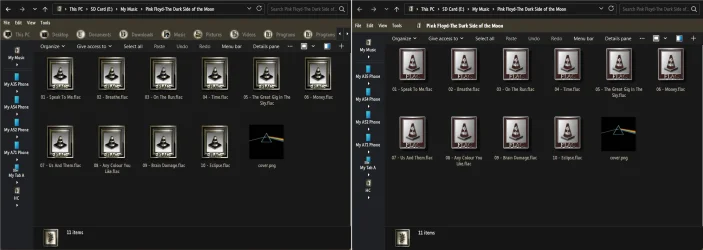
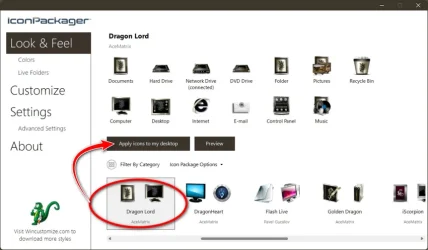
I use an Icon Packager, it does the dirty work for me! :cool: Beyond that, I haven't a clue!

11697.webp
 

My Computers

System One System Two

  • OS
    Windows 11 Pro
    Computer type
    PC/Desktop
    Manufacturer/Model
    ASUS ROG Strix
  • Operating System
    Windows 11 Pro
    Computer type
    Laptop
    Manufacturer/Model
    ASUS VivoBook

My Computers

System One System Two

  • OS
    Windows 11 Pro
    Computer type
    PC/Desktop
    Manufacturer/Model
    ASUS ROG Strix
  • Operating System
    Windows 11 Pro
    Computer type
    Laptop
    Manufacturer/Model
    ASUS VivoBook
What are all the exact steps you are performing with that task?
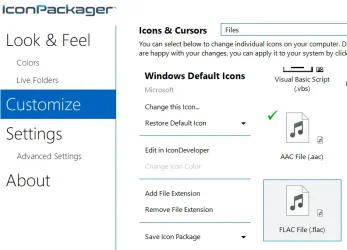
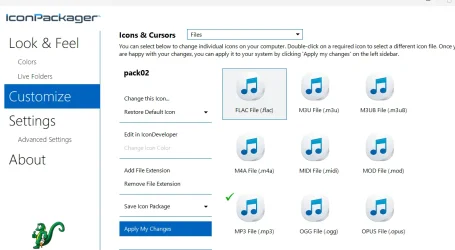
Customize -> Icons & Cursor -> Files -> right click on the file type I want to change -> Change the Icon -> c:\users\myself\icons\icon.ico -> click ok -> click Apply My Changes
 

My Computer

System One

  • OS
    Windows 11
Customize -> Icons & Cursor -> Files -> right click on the file type I want to change -> Change the Icon -> c:\users\myself\icons\icon.ico -> click ok -> click Apply My Changes
... and then Re-load the Package.

Works for me, anyway...

11703.webp
 

My Computers

System One System Two

  • OS
    Windows 11 Pro
    Computer type
    PC/Desktop
    Manufacturer/Model
    ASUS ROG Strix
  • Operating System
    Windows 11 Pro
    Computer type
    Laptop
    Manufacturer/Model
    ASUS VivoBook

My Computers

System One System Two

  • OS
    Windows 11 Pro
    Computer type
    PC/Desktop
    Manufacturer/Model
    ASUS ROG Strix
  • Operating System
    Windows 11 Pro
    Computer type
    Laptop
    Manufacturer/Model
    ASUS VivoBook
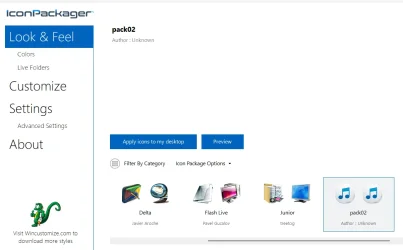
I thought you didn't need to create a package, but then I created, it's showing my custom icons on "Customize" but not on "Look & Feel", so I clicked anyway on "Apply icons...", but it does nothing.
1766845584554.webp
1766845618011.webp
 

My Computer

System One

  • OS
    Windows 11
Hi, I'm back again with this unresolved problem, but with updates.

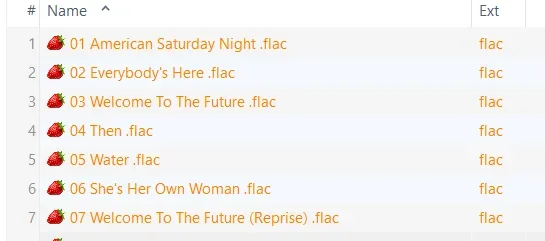
I use Strawberry Music Player, but hate the strawberry icon that it replaces for audio file types.

In my Win10 PC, I simply use Nirsoft FileTypesMan to change the icon type and it works fine.

I have installed Win11 25H2 26200.7840 in a fresh VM, and also FileTypesMan and Types, but not Strawberry yet.

With Types, I can change the icon for any file type, with FileTypesMan I can't, it always returns: "Error 2: The system cannot the file specified"

After installing Strawberry, using Types, I can still change the icon for a given file type, except now I can't for Strawberry audio files (mp3, flac...). It does not give any errors, in Types itself the icon appears changed, but it really does not change.

What can I do?

Thanks.
 

My Computer

System One

  • OS
    Windows 11

My Computer

System One

  • OS
    Win 10 Pro 19045.6937 Win 11 25H2 VM
    Computer type
    Laptop
    Manufacturer/Model
    Dell Precicion 15 Workstation
    CPU
    Xeon W-10885M
    Motherboard
    Dell
    Memory
    64GB ECC DDR4 128GB max
    Graphics Card(s)
    Intel 1080p + Quadro RTX 5000 Max-Q 16GB 4K
    Sound Card
    onboard Realtec
    Monitor(s) Displays
    NA
    Screen Resolution
    1080p to 4k
    Hard Drives
    1 TB Samsung 9100 M2 SSD main
    2 TB Samsung 9100 M2 SSD storage
    500 GB Corsair T500 storage M2 SSD (6 TB max)
    PSU
    NA
    Case
    NA
    Cooling
    NA
    Keyboard
    backlit
    Mouse
    Logitec M720 Bluetooth Free scroll
    Internet Speed
    slow
    Browser
    Pale Moon 33.9.x.x - x64 AVX2 build
    Antivirus
    Windows Defender
I would use resource hacker.
That's what i used to change the default "smashed cat" ico in irfanview and that stupid traffic cone icon in VLC.
It's not self explanatory so if you need some help I can give you a step by step with some pics if you like.
A total shutdown \ Power up is sometimes required for the changes to be made. other times a simple reboot will do
Just remember to click File > Save after you've made the changes.


Edit: A Brad Paisley Playlist? :-)
 
Last edited:

My Computer

System One

  • OS
    windows 10 21h2
Hi!

In Windows 10 I just used nirsoft filetypesman and worked like a charm, now on Windows 11 (25H2), it throws an error: "The system cannot find the file specified", so I tried another program, Types, but it doesn't change the icons...

What can I do?
when does it produce that error? i use it to change the icon for multiple file types and have never had an issue...
 

My Computer

System One

  • OS
    Windows 11 Pro
when does it produce that error? i use it to change the icon for multiple file types and have never had an issue...

Yes, like I said before, it works perfectly in Win10, but not in Win11.

I even contacted Nir Sofer (from Nirsoft), and even him couldn't figure out what was wrong here.

I tested both on a physical and virtual machine with Windows 11 25H2 26200.7840, really after just installing the operating system itself, not installing/modifying anything else, to no avail.
 

My Computer

System One

  • OS
    Windows 11
I would use resource hacker.
That's what i used to change the default "smashed cat" ico in irfanview and that stupid traffic cone icon in VLC.
It's not self explanatory so if you need some help I can give you a step by step with some pics if you like.
A total shutdown \ Power up is sometimes required for the changes to be made. other times a simple reboot will do
Just remember to click File > Save after you've made the changes.


Edit: A Brad Paisley Playlist? :-)

Wow, nice program!

I could change the program icon (strawberry.exe) really easily!

For the filetypes (.mp3, .flac...), I couldn't figure out how to do it in Resource Hacker...

But later, I discovered there's a strawberry.ico in the Strawberry folder, I just replaced with my custom icon, and it worked!

Thanks!
 

My Computer

System One

  • OS
    Windows 11

Latest Support Threads

Back
Top Bottom