Solved How to pin system apps to Start?


MK77P

Well-known member
Member
Local time
9:40 PM
Posts
155
OS
Windows 11
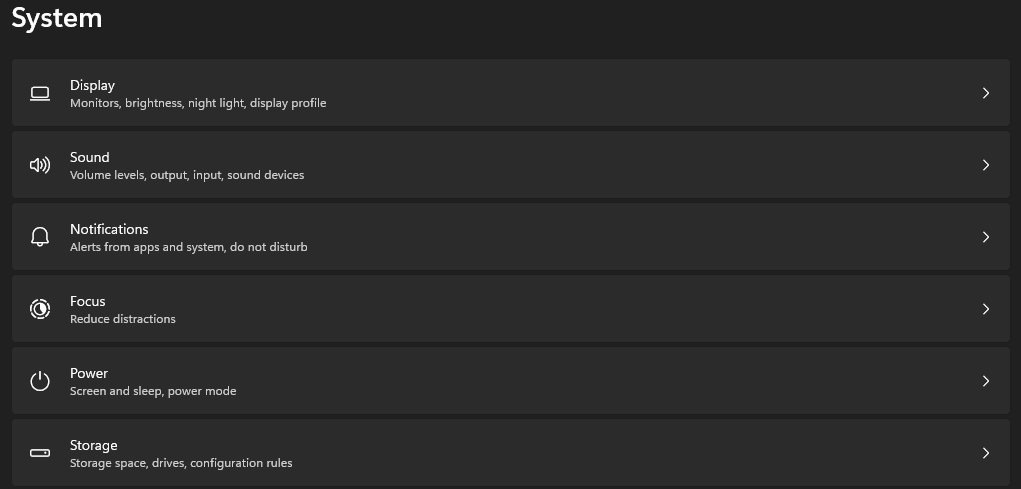
I'm trying to pin Storage to the Start but I see that right click "pin to start" is no longer available for such apps in Windows 11, is there a way to pin such apps to the Start?
 

My Computer

System One

  • OS
    Windows 11
    Computer type
    PC/Desktop
    Manufacturer/Model
    Custom
    CPU
    Intel Core i5-14600KF
    Motherboard
    MSI PRO Z690-A WIFI DDR4
    Memory
    CORSAIR VENGEANCE RGB PRO SL 32GB (2x16GB) DDR4 3200MHz CL16
    Graphics Card(s)
    GIGABYTE 4080 Gaming OC
    Screen Resolution
    1920 x 1080
    Hard Drives
    Kingston NV3 1TB, Kingston KC600 1TB, SAMSUNG 860 EVO 500GB
    PSU
    Lian Li Edge EG0850G 850W Gold
    Cooling
    ARCTIC Liquid Freezer III 360
    Keyboard
    Logitech G513 Carbon LIGHTSYNC RGB Mechanical
    Mouse
    Steelseries Prime
    Browser
    Firefox
Unsure what you are referring to by app called Storage.
Do you mean this:
Code:
ms-settings:storagesense
or
Code:
ms-settings:storagepolicies
or something else?
You can run this and pin whatever you want:
Code:
explorer.exe shell:AppsFolder
 

My Computers

System One System Two

  • OS
    All Branches but Release
    Computer type
    Laptop
    Manufacturer/Model
    Acer Nitro ANV15-51
    CPU
    AMD Ryzen 7 7735HS 3200-4500 Mhz 8 cores x 2
    Motherboard
    Sportage_RBH
    Memory
    32 GB DDR5
    Graphics Card(s)
    Radeon Graphic / NVIDIA GeForce RTX 4060 8 GB GDDR6
    Sound Card
    AMD/Realtek(R) Audio
    Monitor(s) Displays
    Integrated Monitor (15.3"vis)
    Screen Resolution
    FHD 1920X1080 16:9 144Hz
    Hard Drives
    KINGSTON OM8SEP4512Q-AA 1TB
    Western Digital 256GB
    PSU
    19V DC 6.32 A 120 W
    Cooling
    Dual Fans
    Mouse
    MS Bluetooth
    Internet Speed
    Fiber 1GB Cox -us & 1GB Orange-fr
    Browser
    Edge Canary- Firefox Nightly-Chrome Dev-Chrome Dev
    Antivirus
    Windows Defender
  • Operating System
    Windows 11 Beta
    Computer type
    Laptop
    Manufacturer/Model
    Asus X751BP
    CPU
    AMD A9-9420
    Memory
    8 GB of DDR4
    Graphics card(s)
    AMD Radeon R5
    Screen Resolution
    1600x900
    Hard Drives
    Seagate 1 TB
Unsure what you are referring to by app called Storage.
Do you mean this:
Code:
ms-settings:storagesense
or
Code:
ms-settings:storagepolicies
or something else?
Storage in Settings.

Untitled.png
 

My Computer

System One

  • OS
    Windows 11
    Computer type
    PC/Desktop
    Manufacturer/Model
    Custom
    CPU
    Intel Core i5-14600KF
    Motherboard
    MSI PRO Z690-A WIFI DDR4
    Memory
    CORSAIR VENGEANCE RGB PRO SL 32GB (2x16GB) DDR4 3200MHz CL16
    Graphics Card(s)
    GIGABYTE 4080 Gaming OC
    Screen Resolution
    1920 x 1080
    Hard Drives
    Kingston NV3 1TB, Kingston KC600 1TB, SAMSUNG 860 EVO 500GB
    PSU
    Lian Li Edge EG0850G 850W Gold
    Cooling
    ARCTIC Liquid Freezer III 360
    Keyboard
    Logitech G513 Carbon LIGHTSYNC RGB Mechanical
    Mouse
    Steelseries Prime
    Browser
    Firefox
Storage in Settings.

Untitled.png
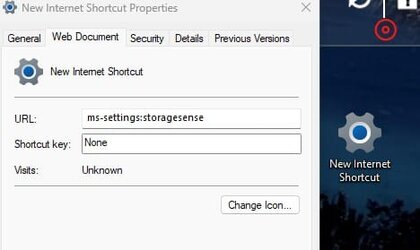
As proposed above, create a shortcut with that as a target:

ms-settings:storagesense

It will tell you it's an internet shortcut but you can rename it and that will work.
 

My Computers

System One System Two

  • OS
    All Branches but Release
    Computer type
    Laptop
    Manufacturer/Model
    Acer Nitro ANV15-51
    CPU
    AMD Ryzen 7 7735HS 3200-4500 Mhz 8 cores x 2
    Motherboard
    Sportage_RBH
    Memory
    32 GB DDR5
    Graphics Card(s)
    Radeon Graphic / NVIDIA GeForce RTX 4060 8 GB GDDR6
    Sound Card
    AMD/Realtek(R) Audio
    Monitor(s) Displays
    Integrated Monitor (15.3"vis)
    Screen Resolution
    FHD 1920X1080 16:9 144Hz
    Hard Drives
    KINGSTON OM8SEP4512Q-AA 1TB
    Western Digital 256GB
    PSU
    19V DC 6.32 A 120 W
    Cooling
    Dual Fans
    Mouse
    MS Bluetooth
    Internet Speed
    Fiber 1GB Cox -us & 1GB Orange-fr
    Browser
    Edge Canary- Firefox Nightly-Chrome Dev-Chrome Dev
    Antivirus
    Windows Defender
  • Operating System
    Windows 11 Beta
    Computer type
    Laptop
    Manufacturer/Model
    Asus X751BP
    CPU
    AMD A9-9420
    Memory
    8 GB of DDR4
    Graphics card(s)
    AMD Radeon R5
    Screen Resolution
    1600x900
    Hard Drives
    Seagate 1 TB
On desktop, right click>new>shortcut>in target box type explorer.exe ms-settings:storagesense
Next>name it Storage OK
Right click on newly created shortcut>properties>Change Icon. Choose an icon for your shortcut.
Once shortcut is created and verified working, right click on it and choose to pin to start or pin to taskbar.
You can delete shortcut from desktop if you wish.
 

My Computers

System One System Two

  • OS
    Windows 11 Pro 25H2 26200.8655
    Computer type
    PC/Desktop
    Manufacturer/Model
    Dell Optiplex 7080
    CPU
    i9-10900 10 core 20 threads
    Motherboard
    DELL 0J37VM
    Memory
    32 gb
    Graphics Card(s)
    none-Intel UHD Graphics 630
    Sound Card
    Integrated Realtek
    Monitor(s) Displays
    Benq 27
    Screen Resolution
    2560x1440
    Hard Drives
    2x1tb Solidigm m.2 nvme /External drives 512gb Samsung m.2 sata+2tb Kingston m2.nvme
    PSU
    500w
    Case
    MT
    Cooling
    Dell Premium
    Keyboard
    Logitech wired
    Mouse
    Logitech wireless
    Internet Speed
    so slow I'm too embarrassed to tell
    Browser
    #1 Edge #2 Firefox
    Antivirus
    Defender+MWB Premium
  • Operating System
    Windows 11 Pro 24H2 26200.8457
    Computer type
    PC/Desktop
    Manufacturer/Model
    Beelink Mini PC SER5
    CPU
    AMD Ryzen 7 6800U
    Memory
    32 gb
    Graphics card(s)
    integrated
    Sound Card
    integrated
    Monitor(s) Displays
    Benq 27
    Screen Resolution
    2560x1440
    Hard Drives
    1TB Crucial nvme
    Keyboard
    Logitech wired
    Mouse
    Logitech wireless
    Internet Speed
    still too embarrassed to tell
    Browser
    Firefox
    Antivirus
    Defender
    Other Info
    System 3 is non compliant Dell 9020 i7-4770/24gb ram Win11 PRO 26200.8457
On desktop, right click>new>shortcut>in target box type explorer.exe ms-settings:storagesense
Next>name it Storage OK
Right click on newly created shortcut>properties>Change Icon. Choose an icon for your shortcut.
Once shortcut is created and verified working, right click on it and choose to pin to start or pin to taskbar.
You can delete shortcut from desktop if you wish.
explorer.exe is redundant but it avoids the internet shortcut message.
 

My Computers

System One System Two

  • OS
    All Branches but Release
    Computer type
    Laptop
    Manufacturer/Model
    Acer Nitro ANV15-51
    CPU
    AMD Ryzen 7 7735HS 3200-4500 Mhz 8 cores x 2
    Motherboard
    Sportage_RBH
    Memory
    32 GB DDR5
    Graphics Card(s)
    Radeon Graphic / NVIDIA GeForce RTX 4060 8 GB GDDR6
    Sound Card
    AMD/Realtek(R) Audio
    Monitor(s) Displays
    Integrated Monitor (15.3"vis)
    Screen Resolution
    FHD 1920X1080 16:9 144Hz
    Hard Drives
    KINGSTON OM8SEP4512Q-AA 1TB
    Western Digital 256GB
    PSU
    19V DC 6.32 A 120 W
    Cooling
    Dual Fans
    Mouse
    MS Bluetooth
    Internet Speed
    Fiber 1GB Cox -us & 1GB Orange-fr
    Browser
    Edge Canary- Firefox Nightly-Chrome Dev-Chrome Dev
    Antivirus
    Windows Defender
  • Operating System
    Windows 11 Beta
    Computer type
    Laptop
    Manufacturer/Model
    Asus X751BP
    CPU
    AMD A9-9420
    Memory
    8 GB of DDR4
    Graphics card(s)
    AMD Radeon R5
    Screen Resolution
    1600x900
    Hard Drives
    Seagate 1 TB
explorer.exe is redundant but it avoids the internet shortcut message.
ms-settings:storagesense alone is not a valid path. To make sure I wasn't incorrect, I just tried it.
 

My Computers

System One System Two

  • OS
    Windows 11 Pro 25H2 26200.8655
    Computer type
    PC/Desktop
    Manufacturer/Model
    Dell Optiplex 7080
    CPU
    i9-10900 10 core 20 threads
    Motherboard
    DELL 0J37VM
    Memory
    32 gb
    Graphics Card(s)
    none-Intel UHD Graphics 630
    Sound Card
    Integrated Realtek
    Monitor(s) Displays
    Benq 27
    Screen Resolution
    2560x1440
    Hard Drives
    2x1tb Solidigm m.2 nvme /External drives 512gb Samsung m.2 sata+2tb Kingston m2.nvme
    PSU
    500w
    Case
    MT
    Cooling
    Dell Premium
    Keyboard
    Logitech wired
    Mouse
    Logitech wireless
    Internet Speed
    so slow I'm too embarrassed to tell
    Browser
    #1 Edge #2 Firefox
    Antivirus
    Defender+MWB Premium
  • Operating System
    Windows 11 Pro 24H2 26200.8457
    Computer type
    PC/Desktop
    Manufacturer/Model
    Beelink Mini PC SER5
    CPU
    AMD Ryzen 7 6800U
    Memory
    32 gb
    Graphics card(s)
    integrated
    Sound Card
    integrated
    Monitor(s) Displays
    Benq 27
    Screen Resolution
    2560x1440
    Hard Drives
    1TB Crucial nvme
    Keyboard
    Logitech wired
    Mouse
    Logitech wireless
    Internet Speed
    still too embarrassed to tell
    Browser
    Firefox
    Antivirus
    Defender
    Other Info
    System 3 is non compliant Dell 9020 i7-4770/24gb ram Win11 PRO 26200.8457
ms-settings:storagesense alone is not a valid path. To make sure I wasn't incorrect, I just tried it.
it is for me.
Can even run it directly.

Screenshot 2023-05-31 170251.jpg
 

My Computers

System One System Two

  • OS
    All Branches but Release
    Computer type
    Laptop
    Manufacturer/Model
    Acer Nitro ANV15-51
    CPU
    AMD Ryzen 7 7735HS 3200-4500 Mhz 8 cores x 2
    Motherboard
    Sportage_RBH
    Memory
    32 GB DDR5
    Graphics Card(s)
    Radeon Graphic / NVIDIA GeForce RTX 4060 8 GB GDDR6
    Sound Card
    AMD/Realtek(R) Audio
    Monitor(s) Displays
    Integrated Monitor (15.3"vis)
    Screen Resolution
    FHD 1920X1080 16:9 144Hz
    Hard Drives
    KINGSTON OM8SEP4512Q-AA 1TB
    Western Digital 256GB
    PSU
    19V DC 6.32 A 120 W
    Cooling
    Dual Fans
    Mouse
    MS Bluetooth
    Internet Speed
    Fiber 1GB Cox -us & 1GB Orange-fr
    Browser
    Edge Canary- Firefox Nightly-Chrome Dev-Chrome Dev
    Antivirus
    Windows Defender
  • Operating System
    Windows 11 Beta
    Computer type
    Laptop
    Manufacturer/Model
    Asus X751BP
    CPU
    AMD A9-9420
    Memory
    8 GB of DDR4
    Graphics card(s)
    AMD Radeon R5
    Screen Resolution
    1600x900
    Hard Drives
    Seagate 1 TB
I'm sorry. You are completely correct. Instead of making a new shortcut to your path I attempted to alter the one I had made. I apologize.
 

My Computers

System One System Two

  • OS
    Windows 11 Pro 25H2 26200.8655
    Computer type
    PC/Desktop
    Manufacturer/Model
    Dell Optiplex 7080
    CPU
    i9-10900 10 core 20 threads
    Motherboard
    DELL 0J37VM
    Memory
    32 gb
    Graphics Card(s)
    none-Intel UHD Graphics 630
    Sound Card
    Integrated Realtek
    Monitor(s) Displays
    Benq 27
    Screen Resolution
    2560x1440
    Hard Drives
    2x1tb Solidigm m.2 nvme /External drives 512gb Samsung m.2 sata+2tb Kingston m2.nvme
    PSU
    500w
    Case
    MT
    Cooling
    Dell Premium
    Keyboard
    Logitech wired
    Mouse
    Logitech wireless
    Internet Speed
    so slow I'm too embarrassed to tell
    Browser
    #1 Edge #2 Firefox
    Antivirus
    Defender+MWB Premium
  • Operating System
    Windows 11 Pro 24H2 26200.8457
    Computer type
    PC/Desktop
    Manufacturer/Model
    Beelink Mini PC SER5
    CPU
    AMD Ryzen 7 6800U
    Memory
    32 gb
    Graphics card(s)
    integrated
    Sound Card
    integrated
    Monitor(s) Displays
    Benq 27
    Screen Resolution
    2560x1440
    Hard Drives
    1TB Crucial nvme
    Keyboard
    Logitech wired
    Mouse
    Logitech wireless
    Internet Speed
    still too embarrassed to tell
    Browser
    Firefox
    Antivirus
    Defender
    Other Info
    System 3 is non compliant Dell 9020 i7-4770/24gb ram Win11 PRO 26200.8457
  • Like
Reactions: OAT
No need to apologize friend, but it's appreciated nonetheless.
 

My Computers

System One System Two

  • OS
    All Branches but Release
    Computer type
    Laptop
    Manufacturer/Model
    Acer Nitro ANV15-51
    CPU
    AMD Ryzen 7 7735HS 3200-4500 Mhz 8 cores x 2
    Motherboard
    Sportage_RBH
    Memory
    32 GB DDR5
    Graphics Card(s)
    Radeon Graphic / NVIDIA GeForce RTX 4060 8 GB GDDR6
    Sound Card
    AMD/Realtek(R) Audio
    Monitor(s) Displays
    Integrated Monitor (15.3"vis)
    Screen Resolution
    FHD 1920X1080 16:9 144Hz
    Hard Drives
    KINGSTON OM8SEP4512Q-AA 1TB
    Western Digital 256GB
    PSU
    19V DC 6.32 A 120 W
    Cooling
    Dual Fans
    Mouse
    MS Bluetooth
    Internet Speed
    Fiber 1GB Cox -us & 1GB Orange-fr
    Browser
    Edge Canary- Firefox Nightly-Chrome Dev-Chrome Dev
    Antivirus
    Windows Defender
  • Operating System
    Windows 11 Beta
    Computer type
    Laptop
    Manufacturer/Model
    Asus X751BP
    CPU
    AMD A9-9420
    Memory
    8 GB of DDR4
    Graphics card(s)
    AMD Radeon R5
    Screen Resolution
    1600x900
    Hard Drives
    Seagate 1 TB
Thank you.
 

My Computer

System One

  • OS
    Windows 11
    Computer type
    PC/Desktop
    Manufacturer/Model
    Custom
    CPU
    Intel Core i5-14600KF
    Motherboard
    MSI PRO Z690-A WIFI DDR4
    Memory
    CORSAIR VENGEANCE RGB PRO SL 32GB (2x16GB) DDR4 3200MHz CL16
    Graphics Card(s)
    GIGABYTE 4080 Gaming OC
    Screen Resolution
    1920 x 1080
    Hard Drives
    Kingston NV3 1TB, Kingston KC600 1TB, SAMSUNG 860 EVO 500GB
    PSU
    Lian Li Edge EG0850G 850W Gold
    Cooling
    ARCTIC Liquid Freezer III 360
    Keyboard
    Logitech G513 Carbon LIGHTSYNC RGB Mechanical
    Mouse
    Steelseries Prime
    Browser
    Firefox
  • Like
Reactions: OAT
As proposed above, create a shortcut with that as a target:

ms-settings:storagesense

It will tell you it's an internet shortcut but you can rename it and that will work.
I did that and created the shortcut but now how do I pin it to Start? because there is no "pin to start" when doing a right click on the shortcut.

Tried this and still nothing:
 

My Computer

System One

  • OS
    Windows 11
    Computer type
    PC/Desktop
    Manufacturer/Model
    Custom
    CPU
    Intel Core i5-14600KF
    Motherboard
    MSI PRO Z690-A WIFI DDR4
    Memory
    CORSAIR VENGEANCE RGB PRO SL 32GB (2x16GB) DDR4 3200MHz CL16
    Graphics Card(s)
    GIGABYTE 4080 Gaming OC
    Screen Resolution
    1920 x 1080
    Hard Drives
    Kingston NV3 1TB, Kingston KC600 1TB, SAMSUNG 860 EVO 500GB
    PSU
    Lian Li Edge EG0850G 850W Gold
    Cooling
    ARCTIC Liquid Freezer III 360
    Keyboard
    Logitech G513 Carbon LIGHTSYNC RGB Mechanical
    Mouse
    Steelseries Prime
    Browser
    Firefox
I did that and created the shortcut but now how do I pin it to Start? because there is no "pin to start" when doing a right click on the shortcut.

Tried this and still nothing:
Yes, MS is making it more difficult it seems. @glasskuter's way would have taken you there.
Delete that shortcut and this time, create a new one with :

explorer ms-settings:storagesense

Rename it & pin that one & delete the one on the desktop if you wish.
 

My Computers

System One System Two

  • OS
    All Branches but Release
    Computer type
    Laptop
    Manufacturer/Model
    Acer Nitro ANV15-51
    CPU
    AMD Ryzen 7 7735HS 3200-4500 Mhz 8 cores x 2
    Motherboard
    Sportage_RBH
    Memory
    32 GB DDR5
    Graphics Card(s)
    Radeon Graphic / NVIDIA GeForce RTX 4060 8 GB GDDR6
    Sound Card
    AMD/Realtek(R) Audio
    Monitor(s) Displays
    Integrated Monitor (15.3"vis)
    Screen Resolution
    FHD 1920X1080 16:9 144Hz
    Hard Drives
    KINGSTON OM8SEP4512Q-AA 1TB
    Western Digital 256GB
    PSU
    19V DC 6.32 A 120 W
    Cooling
    Dual Fans
    Mouse
    MS Bluetooth
    Internet Speed
    Fiber 1GB Cox -us & 1GB Orange-fr
    Browser
    Edge Canary- Firefox Nightly-Chrome Dev-Chrome Dev
    Antivirus
    Windows Defender
  • Operating System
    Windows 11 Beta
    Computer type
    Laptop
    Manufacturer/Model
    Asus X751BP
    CPU
    AMD A9-9420
    Memory
    8 GB of DDR4
    Graphics card(s)
    AMD Radeon R5
    Screen Resolution
    1600x900
    Hard Drives
    Seagate 1 TB
Thanks!
 

My Computer

System One

  • OS
    Windows 11
    Computer type
    PC/Desktop
    Manufacturer/Model
    Custom
    CPU
    Intel Core i5-14600KF
    Motherboard
    MSI PRO Z690-A WIFI DDR4
    Memory
    CORSAIR VENGEANCE RGB PRO SL 32GB (2x16GB) DDR4 3200MHz CL16
    Graphics Card(s)
    GIGABYTE 4080 Gaming OC
    Screen Resolution
    1920 x 1080
    Hard Drives
    Kingston NV3 1TB, Kingston KC600 1TB, SAMSUNG 860 EVO 500GB
    PSU
    Lian Li Edge EG0850G 850W Gold
    Cooling
    ARCTIC Liquid Freezer III 360
    Keyboard
    Logitech G513 Carbon LIGHTSYNC RGB Mechanical
    Mouse
    Steelseries Prime
    Browser
    Firefox
  • Like
Reactions: OAT
Back
Top Bottom