Let's install Windows 11 on incompatible hardware


it passed all the checks apart from it would not pass this , AMD A12-9720P RADEON R7, 12 COMPUTE CORES 4C+8G.

so my question is this why wont microsoft budge on the cpu, it dont make any sense at all that microsoft is pushing for people to go out and buy new laptops when most cases they dont have a cpu on the list, microsoft needs to take a step back and think very hard its very hard for people at this time some wont have spare cash to buy new laptops due to hard times since the pandemic and lose of jobs and every thing else that is going on, if some one from microsoft reads this show this to your boss.
I heard it is because of support for virtualization functions - or lack thereof on your cpu.

There have also been reports that it will be possible to install on machines with "unlisted" cpus provided there is tpm and the other min reqs are met. Though allegedly in that scenario , updates are not guaranteeed. Presumably that refers to "feature" rather than security updates.

Unless it has changed again since last time I could be bothered to look.
 

My Computers My Computers

  • At a glance

    Win7,Win11i7-97002x16gb 3600mhz
    OS
    Win7,Win11
    Computer type
    PC/Desktop
    CPU
    i7-9700
    Motherboard
    gigabyte b365m ds3h
    Memory
    2x16gb 3600mhz
    Monitor(s) Displays
    benq gw2480
    PSU
    bequiet pure power 11 400CM
    Cooling
    cryorig m9i
  • At a glance

    win7,win11i5-84002x8gb 3200
    Operating System
    win7,win11
    Computer type
    PC/Desktop
    CPU
    i5-8400
    Motherboard
    gigabyte b365m ds3h
    Memory
    2x8gb 3200
    PSU
    xfx pro 450
hi guys could you help me i install windows 11 on my VM without tpm or secure boot but it was version dev build 21996.1
when in this build run windows update i not get
Windows 11 Insider Preview Dev Build 22463

so i download this 22463 iso and run again in VM oraclebox

but i cant install it cos it showing me this message your pc is not compatible

so how can i install this build 22463 on WM skip this stupid TPM

i use this method with registry to create 3 keys to bypass but it not works

i using oracleVMvirtual box latest

thx for help

MY computer is i5 7400 GTX 1050 ti 8GB DDR4 1TB SSD

iam beginer with this so if someone has team viewer i can get it and he/she can connect to my pc thx :)
 

My Computer My Computer

At a glance

windows 10 pro / windows 11 pro testingi5 7400 3.3 GHZ turbo 3.516 GB DDR4 2400Nvidia GTX 1050 TI 4GB DX12
OS
windows 10 pro / windows 11 pro testing
Computer type
PC/Desktop
CPU
i5 7400 3.3 GHZ turbo 3.5
Motherboard
ASUS H110 m-r
Memory
16 GB DDR4 2400
Graphics Card(s)
Nvidia GTX 1050 TI 4GB DX12
Monitor(s) Displays
HP 22
Screen Resolution
1920x1080
Hard Drives
1TB WD GReen 500GB HDD
Internet Speed
300 mb/s
Browser
Chrome
Antivirus
Eset
2 I think MS will stop updates for unsupported devices. They've already indicated that they plan on doing this.
I am betting that if you have Win 11 installed (either out of the BETA or from an official ISO install) that MS will continue to provide some updates. These might just be security updates, and maybe bug fixes, but not functional updates. We will know in a few weeks.
 

My Computer My Computer

At a glance

Windows 11 ProIntel Core Ultra16GBIntel(R) Arc Graphics
OS
Windows 11 Pro
Computer type
Laptop
Manufacturer/Model
ASUS Zenbook 14 OLED
CPU
Intel Core Ultra
Memory
16GB
Graphics Card(s)
Intel(R) Arc Graphics
Sound Card
Realtek High Definition Audio(SST)
Screen Resolution
2880 x 1800
Hard Drives
500 GB NVMe SSD
Internet Speed
1,500Mbps
Browser
Firefox, Edge
Antivirus
Windows Defender
i hope that some updates will works

if no we can use installing with cab files if it will be works :D
 

My Computer My Computer

At a glance

windows 10 pro / windows 11 pro testingi5 7400 3.3 GHZ turbo 3.516 GB DDR4 2400Nvidia GTX 1050 TI 4GB DX12
OS
windows 10 pro / windows 11 pro testing
Computer type
PC/Desktop
CPU
i5 7400 3.3 GHZ turbo 3.5
Motherboard
ASUS H110 m-r
Memory
16 GB DDR4 2400
Graphics Card(s)
Nvidia GTX 1050 TI 4GB DX12
Monitor(s) Displays
HP 22
Screen Resolution
1920x1080
Hard Drives
1TB WD GReen 500GB HDD
Internet Speed
300 mb/s
Browser
Chrome
Antivirus
Eset
you all miss the point the some laptops are only a year old, in my case this laptop has no trouble in running window 11, there is no conspiracy , but take note please some hardware manufacturers are not even ready for window 11, windowsfx-10.8.4-plasma this is the new linux they have copied it to make it like windows 11, i am going to try it out and if its good then i might dump windows .
I play around from time to time with Linux builds but that's about it. Many/most programs will simply not run on Linux. The only option is to find a Linux alternative. Maybe one day.

My main machine is compatible but I will not be 'upgrading' to 11 for at least 12 months. From what I've seen there's nothing in 11 that makes me feel compelled to jump.
 

My Computers My Computers

  • At a glance

    Win11 Pro 24H2i5 1250032GBIntel CPU integrated
    OS
    Win11 Pro 24H2
    Computer type
    PC/Desktop
    Manufacturer/Model
    Lenovo M90q
    CPU
    i5 12500
    Motherboard
    Lenovo
    Memory
    32GB
    Graphics Card(s)
    Intel CPU integrated
    Sound Card
    Intel MB intergrated
    Monitor(s) Displays
    Dell 4k IPS
    Screen Resolution
    3840 x 2160
    Hard Drives
    500GB NVMe Samsung 980 Pro
    2 TB NVMe Samsung 990 Pro
    1 TB Crucial MX500
    PSU
    Lenovo
    Case
    Lenovo
    Cooling
    Air
    Keyboard
    Logitech BT
    Mouse
    Logitech BT
    Internet Speed
    FTTP
    Browser
    Firefox
    Antivirus
    MS Defender and Malwarebytes
  • At a glance

    Win 11 Proi5-1135G716GBIntel Iris XE
    Operating System
    Win 11 Pro
    Computer type
    Laptop
    Manufacturer/Model
    Surface Pro 8
    CPU
    i5-1135G7
    Motherboard
    MS
    Memory
    16GB
    Graphics card(s)
    Intel Iris XE
    Sound Card
    ATI/AMD Renoir
    Monitor(s) Displays
    UHD
    Screen Resolution
    2880 x 1920
    Hard Drives
    2TB NVMe
    PSU
    MS
    Case
    Microsoft
    Cooling
    Air
    Keyboard
    Built In
    Mouse
    Touchpad
    Internet Speed
    FTTP
    Browser
    Firefox
    Antivirus
    MS Defender and Malwarebytes
I play around from time to time with Linux builds but that's about it. Many/most programs will simply not run on Linux. The only option is to find a Linux alternative. Maybe one day.

My main machine is compatible but I will not be 'upgrading' to 11 for at least 12 months. From what I've seen there's nothing in 11 that makes me feel compelled to jump.
Linux is a good OS but it has the big issue of not supporting Windows apps. Yes, you can use wine but it's a hassle at times.
 

My Computer My Computer

At a glance

Windows 11 Home(RP) - 25H2 -26200.8737AMD Ryzen 5 5600GG.SKILL Ripjaws V Series 64GB 4x16Nvidia geforce gtx titan x
OS
Windows 11 Home(RP) - 25H2 -26200.8737
Computer type
PC/Desktop
Manufacturer/Model
Banana Junior 5600-G Series
CPU
AMD Ryzen 5 5600G
Motherboard
Asus ROG Strix B550-F
Memory
G.SKILL Ripjaws V Series 64GB 4x16
Graphics Card(s)
Nvidia geforce gtx titan x
Monitor(s) Displays
28" ASUS VP28U 4k
Screen Resolution
4K
Hard Drives
Primary SAMSUNG 970 EVO Plus
PSU
EVGA BQ 700w 80+ Bronze
Case
Zalman i3 NEO
Cooling
ARCTIC Freezer 7 X
Keyboard
Corsair
Mouse
Amazon Generic with Cord
Internet Speed
Download: 295.11 mbps Upload: 65.35 mbps T-Mobile Internet
Browser
Firefox and Edge
Antivirus
MS - Defender
Other Info
Speakers: Klipsch ProMedia 2.1
hi guys could you help me i install windows 11 on my VM without tpm or secure boot but it was version dev build 21996.1
when in this build run windows update i not get
Windows 11 Insider Preview Dev Build 22463

so i download this 22463 iso and run again in VM oraclebox

but i cant install it cos it showing me this message your pc is not compatible

so how can i install this build 22463 on WM skip this stupid TPM

i use this method with registry to create 3 keys to bypass but it not works

i using oracleVMvirtual box latest

thx for help

MY computer is i5 7400 GTX 1050 ti 8GB DDR4 1TB SSD

iam beginer with this so if someone has team viewer i can get it and he/she can connect to my pc thx :)
I would download latest Windows 11 Insider's Build. If you are not an Insider, you can find it here:


Use the x64 version.

You then must also download a version of Windows 10, found here:


Then you create a bootable USB flash drive with Windows 10 by running Media Creation Tool. Open the drive, go to the sources folder and delete install.wim (or install.esd). Open the Windows 11 ISO created by running the script from UPP and go to the sources folder. Copy the install.wim or install.esd file to the sources folder in the Windows 10 USB flash drive. Now you have a hybrid Windows 10/11 USB flash drive. When you boot the virtual machine with that you run Windows 10 Setup (no compatibility checks) but you install Windows 11 instead.

Been there, done that, succeeded.
 

My Computers My Computers

  • At a glance

    Windows 11 Pro 23H2 (5699), 25H2 (8655)Mobile DualCore Intel Core 2 Duo T7250, 2000 MHz4GBMobile Intel(R) GMA 4500M (Mobile 4 series)
    OS
    Windows 11 Pro 23H2 (5699), 25H2 (8655)
    Computer type
    Laptop
    Manufacturer/Model
    Acer Extensa 5630EZ
    CPU
    Mobile DualCore Intel Core 2 Duo T7250, 2000 MHz
    Motherboard
    Acer Extensa 5630
    Memory
    4GB
    Graphics Card(s)
    Mobile Intel(R) GMA 4500M (Mobile 4 series)
    Sound Card
    Realtek ALC268 @ Intel 82801IB ICH9 - High Definition Audio Controller
    Monitor(s) Displays
    1
    Screen Resolution
    1280x800
    Hard Drives
    Samsung SSD 850 EVO 250GB SATA Device (250 GB, SATA-III)
    Internet Speed
    VDSL 50 Mbps
    Browser
    MICROSOFT EDGE
    Antivirus
    WINDOWS DEFENDER
    Other Info
    Legacy MBR installation, no TPM, no Secure Boot, no WDDM 2.0 graphics drivers, no SSE4.2, cannot get more unsupported ;) This is only my test laptop. I had installed Windows 11 here before upgrading my main PC. For my main PC I use everyday see my 2nd system specs.
  • At a glance

    Windows 11 Pro v25H2 (build 26200.8655)Intel Core-i7 3770 3.40GHz s1155 (3rd generat...2x Kingston Hyper-X Blu 8GB DDR3-1600GIGABYTE GeForce RTX 3050 WINDFORCE OC V2 6GB...
    Operating System
    Windows 11 Pro v25H2 (build 26200.8655)
    Computer type
    PC/Desktop
    Manufacturer/Model
    Custom-built PC
    CPU
    Intel Core-i7 3770 3.40GHz s1155 (3rd generation)
    Motherboard
    Asus P8H61 s1155 ATX
    Memory
    2x Kingston Hyper-X Blu 8GB DDR3-1600
    Graphics card(s)
    GIGABYTE GeForce RTX 3050 WINDFORCE OC V2 6GB (GV-N3050WF2OCV2-6GD)
    Sound Card
    Realtek HD audio (ALC887)
    Monitor(s) Displays
    Sony Bravia KDL-19L4000 19" LCD TV via VGA
    Screen Resolution
    1440x900 32-bit 60Hz
    Hard Drives
    WD Blue SA510 2.5 1000GB SSD as system disk, Western Digital Caviar Purple 4TB SATA III (WD40PURZ) as second
    PSU
    Thermaltake Litepower RGB 550W Full Wired
    Case
    SUPERCASE MIDI-TOWER
    Cooling
    Deepcool Gamma Archer CPU cooler, 1x 8cm fan at the back
    Keyboard
    Mitsumi 101-key PS/2
    Mouse
    Sunnyline OptiEye PS/2
    Internet Speed
    100Mbps
    Browser
    Microsoft Edge, Mozilla Firefox
    Antivirus
    Microsoft Windows Defender
    Other Info
    Legacy BIOS (MBR) installation, no TPM, no Secure Boot, WDDM 3.0 graphics drivers, WEI score 7.4
i spapaknos i use this method with latest win 11 dev iso but it not worksinstalation showing always error windows cant something with offline mode i use normal english lang in installation also i use windows 10 english iso
 

My Computer My Computer

At a glance

windows 10 pro / windows 11 pro testingi5 7400 3.3 GHZ turbo 3.516 GB DDR4 2400Nvidia GTX 1050 TI 4GB DX12
OS
windows 10 pro / windows 11 pro testing
Computer type
PC/Desktop
CPU
i5 7400 3.3 GHZ turbo 3.5
Motherboard
ASUS H110 m-r
Memory
16 GB DDR4 2400
Graphics Card(s)
Nvidia GTX 1050 TI 4GB DX12
Monitor(s) Displays
HP 22
Screen Resolution
1920x1080
Hard Drives
1TB WD GReen 500GB HDD
Internet Speed
300 mb/s
Browser
Chrome
Antivirus
Eset
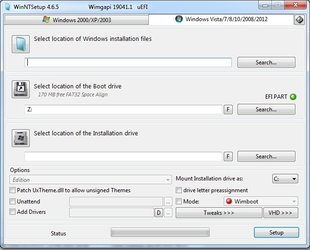
You can borrow my boot media and use winntsetup to apply the win11 image .

No need to use windows setup.exe

1904v3.iso
extract 1904v3.iso to bootable usb stick
Then copy the win11 install.wim/install.esd onto the usb stick so you can browse to it easily with winntsetup

winntsetup.jpg
 

My Computers My Computers

  • At a glance

    Win7,Win11i7-97002x16gb 3600mhz
    OS
    Win7,Win11
    Computer type
    PC/Desktop
    CPU
    i7-9700
    Motherboard
    gigabyte b365m ds3h
    Memory
    2x16gb 3600mhz
    Monitor(s) Displays
    benq gw2480
    PSU
    bequiet pure power 11 400CM
    Cooling
    cryorig m9i
  • At a glance

    win7,win11i5-84002x8gb 3200
    Operating System
    win7,win11
    Computer type
    PC/Desktop
    CPU
    i5-8400
    Motherboard
    gigabyte b365m ds3h
    Memory
    2x8gb 3200
    PSU
    xfx pro 450
You can also use Rufus to create a bootable UEFI or Legacy USB flash drive from Windows 10 ISO.
 

My Computers My Computers

  • At a glance

    Windows 11 Pro 23H2 (5699), 25H2 (8655)Mobile DualCore Intel Core 2 Duo T7250, 2000 MHz4GBMobile Intel(R) GMA 4500M (Mobile 4 series)
    OS
    Windows 11 Pro 23H2 (5699), 25H2 (8655)
    Computer type
    Laptop
    Manufacturer/Model
    Acer Extensa 5630EZ
    CPU
    Mobile DualCore Intel Core 2 Duo T7250, 2000 MHz
    Motherboard
    Acer Extensa 5630
    Memory
    4GB
    Graphics Card(s)
    Mobile Intel(R) GMA 4500M (Mobile 4 series)
    Sound Card
    Realtek ALC268 @ Intel 82801IB ICH9 - High Definition Audio Controller
    Monitor(s) Displays
    1
    Screen Resolution
    1280x800
    Hard Drives
    Samsung SSD 850 EVO 250GB SATA Device (250 GB, SATA-III)
    Internet Speed
    VDSL 50 Mbps
    Browser
    MICROSOFT EDGE
    Antivirus
    WINDOWS DEFENDER
    Other Info
    Legacy MBR installation, no TPM, no Secure Boot, no WDDM 2.0 graphics drivers, no SSE4.2, cannot get more unsupported ;) This is only my test laptop. I had installed Windows 11 here before upgrading my main PC. For my main PC I use everyday see my 2nd system specs.
  • At a glance

    Windows 11 Pro v25H2 (build 26200.8655)Intel Core-i7 3770 3.40GHz s1155 (3rd generat...2x Kingston Hyper-X Blu 8GB DDR3-1600GIGABYTE GeForce RTX 3050 WINDFORCE OC V2 6GB...
    Operating System
    Windows 11 Pro v25H2 (build 26200.8655)
    Computer type
    PC/Desktop
    Manufacturer/Model
    Custom-built PC
    CPU
    Intel Core-i7 3770 3.40GHz s1155 (3rd generation)
    Motherboard
    Asus P8H61 s1155 ATX
    Memory
    2x Kingston Hyper-X Blu 8GB DDR3-1600
    Graphics card(s)
    GIGABYTE GeForce RTX 3050 WINDFORCE OC V2 6GB (GV-N3050WF2OCV2-6GD)
    Sound Card
    Realtek HD audio (ALC887)
    Monitor(s) Displays
    Sony Bravia KDL-19L4000 19" LCD TV via VGA
    Screen Resolution
    1440x900 32-bit 60Hz
    Hard Drives
    WD Blue SA510 2.5 1000GB SSD as system disk, Western Digital Caviar Purple 4TB SATA III (WD40PURZ) as second
    PSU
    Thermaltake Litepower RGB 550W Full Wired
    Case
    SUPERCASE MIDI-TOWER
    Cooling
    Deepcool Gamma Archer CPU cooler, 1x 8cm fan at the back
    Keyboard
    Mitsumi 101-key PS/2
    Mouse
    Sunnyline OptiEye PS/2
    Internet Speed
    100Mbps
    Browser
    Microsoft Edge, Mozilla Firefox
    Antivirus
    Microsoft Windows Defender
    Other Info
    Legacy BIOS (MBR) installation, no TPM, no Secure Boot, WDDM 3.0 graphics drivers, WEI score 7.4
yes i see this script is ok just need wait if it will be works also with final iso on 05/09. maybe they add also option for download final iso then
 

My Computer My Computer

At a glance

windows 10 pro / windows 11 pro testingi5 7400 3.3 GHZ turbo 3.516 GB DDR4 2400Nvidia GTX 1050 TI 4GB DX12
OS
windows 10 pro / windows 11 pro testing
Computer type
PC/Desktop
CPU
i5 7400 3.3 GHZ turbo 3.5
Motherboard
ASUS H110 m-r
Memory
16 GB DDR4 2400
Graphics Card(s)
Nvidia GTX 1050 TI 4GB DX12
Monitor(s) Displays
HP 22
Screen Resolution
1920x1080
Hard Drives
1TB WD GReen 500GB HDD
Internet Speed
300 mb/s
Browser
Chrome
Antivirus
Eset
3 days before Windows 11 releases!
What will happen?
 

My Computers My Computers

  • At a glance

    Windows 11 HomeCore i5-12450HX20GB DDR5-4800iGPU + RTX 3050 Mobile (6GB)
    OS
    Windows 11 Home
    Computer type
    Laptop
    Manufacturer/Model
    Lenovo
    CPU
    Core i5-12450HX
    Memory
    20GB DDR5-4800
    Graphics Card(s)
    iGPU + RTX 3050 Mobile (6GB)
    Sound Card
    Realtek
    Monitor(s) Displays
    the built-in laptop screen, and a generic monitor
    Screen Resolution
    1080p * 2
    Hard Drives
    GIGABYTE NVMe SSD 256GB (GP-GSM2NE3256GNTD)
    Micron NVMe SSD 512GB (MTFDKCD512QFM-1BDIAABLA)
    Browser
    Firefox
    Antivirus
    WD
  • At a glance

    Windows 10 ProCore i3-21004GB DDR3-2133iGPU
    Operating System
    Windows 10 Pro
    Computer type
    PC/Desktop
    Manufacturer/Model
    Dell
    CPU
    Core i3-2100
    Memory
    4GB DDR3-2133
    Graphics card(s)
    iGPU
    Screen Resolution
    1080p
    Antivirus
    WD
In just a few more days end users can test drive Windows 11 on incompatible hardware:


a) Make free backup images and save the images to another disk drive or the cloud


b) Backup drivers in case you want to clean install Windows 10 and shorten the time period to reinstall working drivers:


c) Clean install Windows 11


d) Test drive Windows 11


e) Restore the image as needed
 

My Computer My Computer

At a glance

Windows 10Intel(R) Core(TM) i7-4800MQ CPU @ 2.70GHz16 GB Total: Manufacturer : Samsung MemoryTyp...NVIDIA Quadro K3100M; Intel(R) HD Graphics 4600
OS
Windows 10
Computer type
Laptop
Manufacturer/Model
HP
CPU
Intel(R) Core(TM) i7-4800MQ CPU @ 2.70GHz
Motherboard
Product : 190A Version : KBC Version 94.56
Memory
16 GB Total: Manufacturer : Samsung MemoryType : DDR3 FormFactor : SODIMM Capacity : 8GB Speed : 1600
Graphics Card(s)
NVIDIA Quadro K3100M; Intel(R) HD Graphics 4600
Sound Card
IDT High Definition Audio CODEC; PNP Device ID HDAUDIO\FUNC_01&VEN_111D&DEV_76E0
Hard Drives
Model Hitachi HTS727575A9E364
Antivirus
Microsoft Defender
Other Info
Mobile Workstation

My Computers My Computers

  • At a glance

    Windows 11 ProIntel Core i9-10900XCorsair 64 GB (4 x 16 GB) CMW64GX4M4C3000C15 ...GIGABYTE GeForce GTX 1660 Super Mini ITX 6 GB OC
    OS
    Windows 11 Pro
    Computer type
    PC/Desktop
    Manufacturer/Model
    Stigg's Build
    CPU
    Intel Core i9-10900X
    Motherboard
    GIGABYTE X299X DESIGNARE 10G
    Memory
    Corsair 64 GB (4 x 16 GB) CMW64GX4M4C3000C15 Vengeance RGB Pro 3000Mhz DDR4
    Graphics Card(s)
    GIGABYTE GeForce GTX 1660 Super Mini ITX 6 GB OC
    Sound Card
    Realtek ALC1220
    Monitor(s) Displays
    Samsung 27" FHD LED FreeSync Gaming Monitor (LS27F350FHEXXY)
    Screen Resolution
    1920 x 1080
    Hard Drives
    Samsung 970 Pro Series 1TB M.2 2280 NVMe SSD
    Western Digital Red Pro WD8003FFBX-68B9AN0 8 TB, 7200 RPM, SATA-III
    Western Digital Red Pro WD8003FFBX-68B9AN0 8 TB, 7200 RPM, SATA-III
    PSU
    Corsair HX1200 1200W 80 Plus Platinum
    Case
    Fractal Design Define 7 Black Solid Case
    Cooling
    Noctua NH-D15 Chromax Black
    Keyboard
    Razer Ornata V2
    Mouse
    Razer DeathAdder Essential
    Internet Speed
    FTTN 100Mbps / 40Mbps
    Browser
    Mozilla Firefox
    Antivirus
    N/A
    Other Info
    Logitech BRIO 4k Ultra HD USB-C Webcam
  • At a glance

    Windows 10 ProCore i7-8750HSK Hynix 32 GB (2 x 16 GB) HMA82GS6CJR8N-VK 1...NVIDIA GeForce GTX 1070
    Operating System
    Windows 10 Pro
    Computer type
    Laptop
    Manufacturer/Model
    ASUS ROG Zephyrus M GM501GS
    CPU
    Core i7-8750H
    Motherboard
    Zephyrus M GM501GS
    Memory
    SK Hynix 32 GB (2 x 16 GB) HMA82GS6CJR8N-VK 16 GB DDR4-2666 DDR4 SDRAM
    Graphics card(s)
    NVIDIA GeForce GTX 1070
    Sound Card
    Realtek ALC294
    Monitor(s) Displays
    AU Optronics B156HAN07.1 [15.6" LCD]
    Screen Resolution
    1920 x 1080
    Hard Drives
    Samsung MZVKW512HMJP-00000 512 GB, PCI-E 3.0 x4
    Samsung SSD 860 QVO 4TB 4 TB, SATA-III
    PSU
    N/A
    Case
    N/A
    Cooling
    N/A
    Keyboard
    PC/AT Enhanced PS2 Keyboard (101/102-Key)
    Mouse
    Razer DeathAdder Essential
    Internet Speed
    FTTN 100Mbps / 40Mbps
    Browser
    Mozilla Firefox
    Antivirus
    N/A
    Other Info
    USB2.0 HD UVC Webcam
Hello Everyone : Not sure if I should upgrade my pro 5 i5-7300 4gbram to Windows 11?
 
Hello Everyone : Not sure if I should upgrade my pro 5 i5-7300 4gbram to Windows 11?
There are ways to bypass the requirements but I wouldn't suggest doing it.
 

My Computer My Computer

At a glance

Windows 11 Home(RP) - 25H2 -26200.8737AMD Ryzen 5 5600GG.SKILL Ripjaws V Series 64GB 4x16Nvidia geforce gtx titan x
OS
Windows 11 Home(RP) - 25H2 -26200.8737
Computer type
PC/Desktop
Manufacturer/Model
Banana Junior 5600-G Series
CPU
AMD Ryzen 5 5600G
Motherboard
Asus ROG Strix B550-F
Memory
G.SKILL Ripjaws V Series 64GB 4x16
Graphics Card(s)
Nvidia geforce gtx titan x
Monitor(s) Displays
28" ASUS VP28U 4k
Screen Resolution
4K
Hard Drives
Primary SAMSUNG 970 EVO Plus
PSU
EVGA BQ 700w 80+ Bronze
Case
Zalman i3 NEO
Cooling
ARCTIC Freezer 7 X
Keyboard
Corsair
Mouse
Amazon Generic with Cord
Internet Speed
Download: 295.11 mbps Upload: 65.35 mbps T-Mobile Internet
Browser
Firefox and Edge
Antivirus
MS - Defender
Other Info
Speakers: Klipsch ProMedia 2.1
There are ways to bypass the requirements but I wouldn't suggest doing it.
I honestly do not understand why anyone would want to dive straight into the first public release of Windows 11 when Windows 10 has years of MS supported life still to come. I have it on a VM as an Insider but my real machine is staying on W10 until I see a reason to upgrade.
 

My Computers My Computers

  • At a glance

    Windows 10Intel i840016GBNVIDIA GeForce GT710
    OS
    Windows 10
    Computer type
    PC/Desktop
    Manufacturer/Model
    Self built
    CPU
    Intel i8400
    Motherboard
    ASUS PRIME Z370-P
    Memory
    16GB
    Graphics Card(s)
    NVIDIA GeForce GT710
    Sound Card
    ASUS Xonar D2X
    Monitor(s) Displays
    Dell SE2417HGXF Full HD Gaming Monitor, 24"
    Screen Resolution
    1920 x 1080
    Hard Drives
    Samsung V-NAND SSD 860EVO
    Other spinning HDDs
    PSU
    Xilence XP420
    Cooling
    PSU fan and stock CPU fan
    Mouse
    Microsoft
    Browser
    Firefox
    Antivirus
    Avira free
  • At a glance

    Windows 11 on VMware (Release, Beta and Dev)
    Operating System
    Windows 11 on VMware (Release, Beta and Dev)
    Computer type
    PC/Desktop
I honestly do not understand why anyone would want to dive straight into the first public release of Windows 11 when Windows 10 has years of MS supported life still to come. I have it on a VM as an Insider but my real machine is staying on W10 until I see a reason to upgrade.
The reason why I chose to use 11 is I like it and it works perfectly on my rig, which is compliant. As for running non compliant gear on 11.,. that's up to each individual to make that choice and they must know there may be risks involved with doing that.

It all comes down to choice.. you have the right to stay with 10 and I have the right to move onto 11.
 

My Computer My Computer

At a glance

Windows 11 Home(RP) - 25H2 -26200.8737AMD Ryzen 5 5600GG.SKILL Ripjaws V Series 64GB 4x16Nvidia geforce gtx titan x
OS
Windows 11 Home(RP) - 25H2 -26200.8737
Computer type
PC/Desktop
Manufacturer/Model
Banana Junior 5600-G Series
CPU
AMD Ryzen 5 5600G
Motherboard
Asus ROG Strix B550-F
Memory
G.SKILL Ripjaws V Series 64GB 4x16
Graphics Card(s)
Nvidia geforce gtx titan x
Monitor(s) Displays
28" ASUS VP28U 4k
Screen Resolution
4K
Hard Drives
Primary SAMSUNG 970 EVO Plus
PSU
EVGA BQ 700w 80+ Bronze
Case
Zalman i3 NEO
Cooling
ARCTIC Freezer 7 X
Keyboard
Corsair
Mouse
Amazon Generic with Cord
Internet Speed
Download: 295.11 mbps Upload: 65.35 mbps T-Mobile Internet
Browser
Firefox and Edge
Antivirus
MS - Defender
Other Info
Speakers: Klipsch ProMedia 2.1
The reason why I chose to use 11 is I like it and it works perfectly on my rig, which is compliant. As for running non compliant gear on 11.,. that's up to each individual to make that choice and they must know there may be risks involved with doing that.

It all comes down to choice.. you have the right to stay with 10 and I have the right to move onto 11.
I agree
 

My Computers My Computers

  • At a glance

    Windows 10Intel i840016GBNVIDIA GeForce GT710
    OS
    Windows 10
    Computer type
    PC/Desktop
    Manufacturer/Model
    Self built
    CPU
    Intel i8400
    Motherboard
    ASUS PRIME Z370-P
    Memory
    16GB
    Graphics Card(s)
    NVIDIA GeForce GT710
    Sound Card
    ASUS Xonar D2X
    Monitor(s) Displays
    Dell SE2417HGXF Full HD Gaming Monitor, 24"
    Screen Resolution
    1920 x 1080
    Hard Drives
    Samsung V-NAND SSD 860EVO
    Other spinning HDDs
    PSU
    Xilence XP420
    Cooling
    PSU fan and stock CPU fan
    Mouse
    Microsoft
    Browser
    Firefox
    Antivirus
    Avira free
  • At a glance

    Windows 11 on VMware (Release, Beta and Dev)
    Operating System
    Windows 11 on VMware (Release, Beta and Dev)
    Computer type
    PC/Desktop
Back
Top Bottom