Micro 11 Barebones Powershell Script


mackyreddy

Member
Member
Local time
10:01 AM
Posts
5
OS
Micro 11 Barebones
This Powershell Script creates a heavily stripped down Version of Windows 11, Adds portable Classic Calculator, Notepad, Paint & StartAllBack and also creates a TakeOwnership.cmd file in System32, Apart from these files everything else is stock Windows 11.

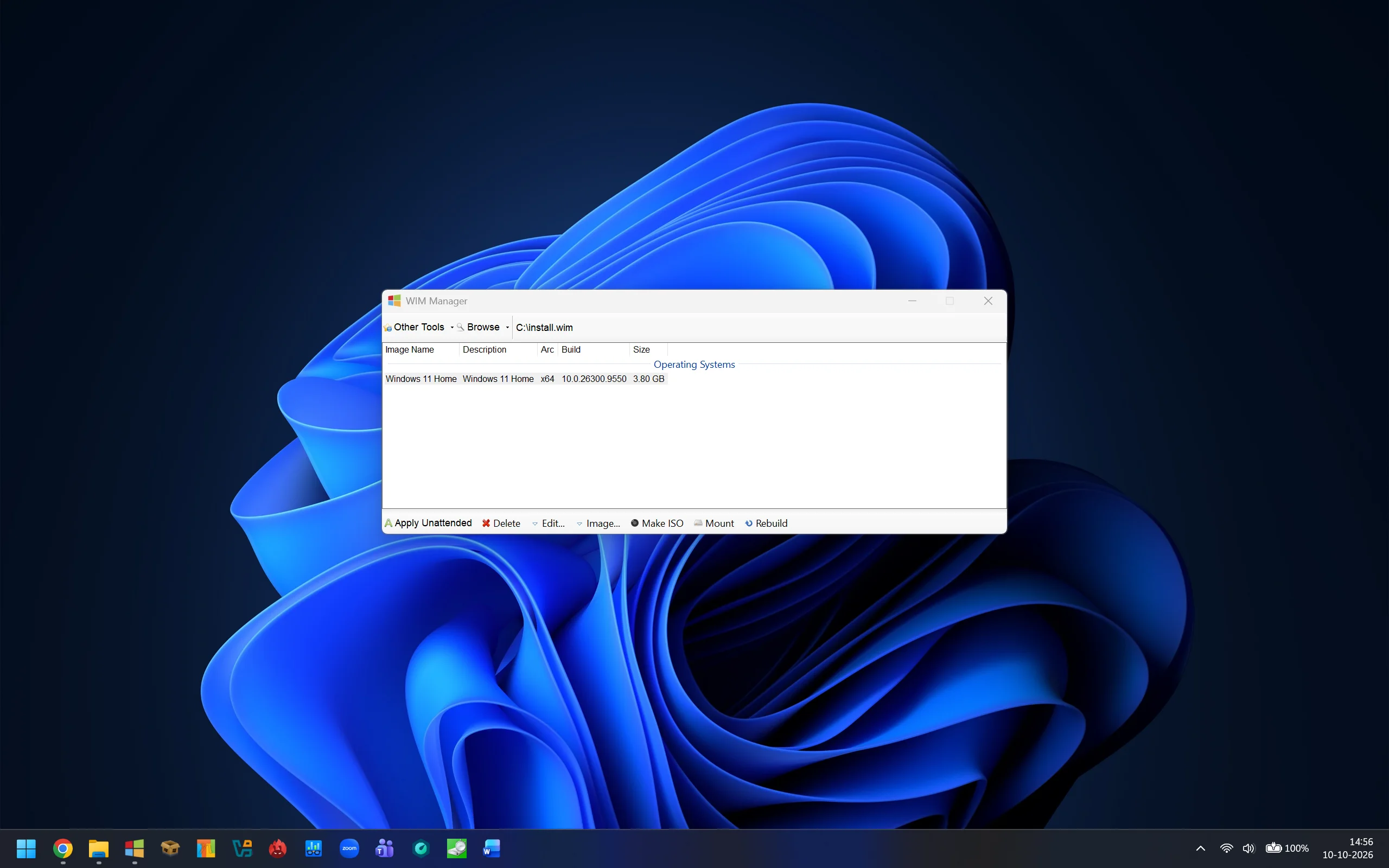
Latest 26H2 build 26300.9550 installation consumes around 3.80 GB and iso file size is around 1.07 GB.

1.Mount Windows 11 iso using Windows Explorer

2.Extract the downloaded archive into C:\Micro 11 Barebones Powershell Script or C:\Micro 11 Barebones StartAllBack Powershell Script

3.Open PowerShell as Administrator

4.Open & Copy PowerShell Script Instructions

5.Paste them in PowerShell and press enter

6.Now enter the mounted drive letter for the Windows 11 image (example F or G)

7.If you have multiple Windows editions like Home, Pro, Enterprise etc in the iso, Powershell Script will ask for edition you want to strip. So enter the index number and press enter.

8.Thats it all done, after few minutes Micro 11 Barebones.iso or Micro 11 Barebones StartAllBack.iso will be generated in the folder Micro 11 Barebones Powershell Script or Micro 11 Barebones StartAllBack Powershell Script

Hope you enjoy this release and feel free to improve the PowerShell Script

Let me know any issues encountered, I will try to resolve them.

cheers

Micro 11 Barebones Powershell Script

12.24 MB folder on MEGA

Micro 11 Barebones StartAllBack Powershell Script

15.82 MB folder on MEGA

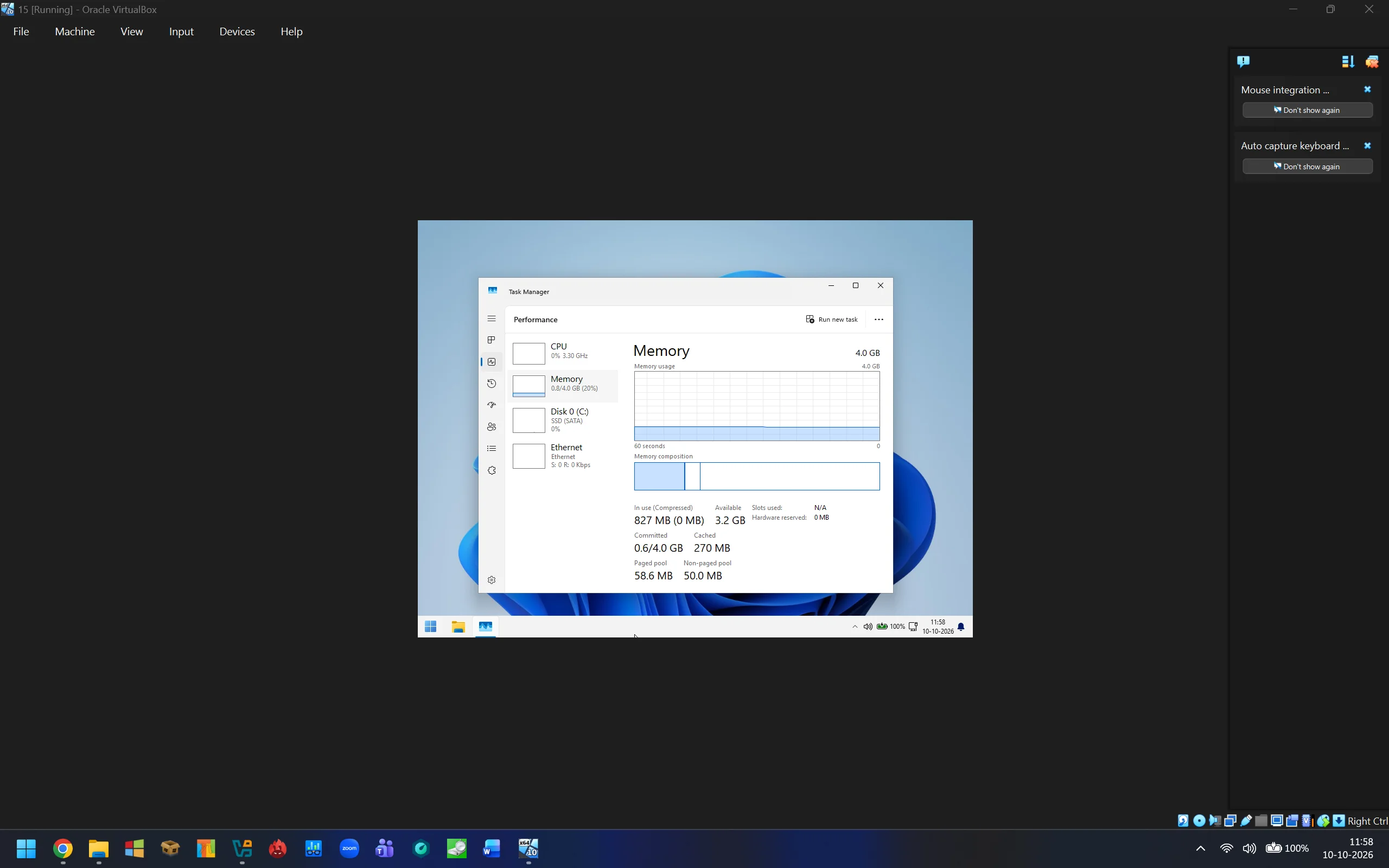
Micro 11 Barebones Memory Usage.webp


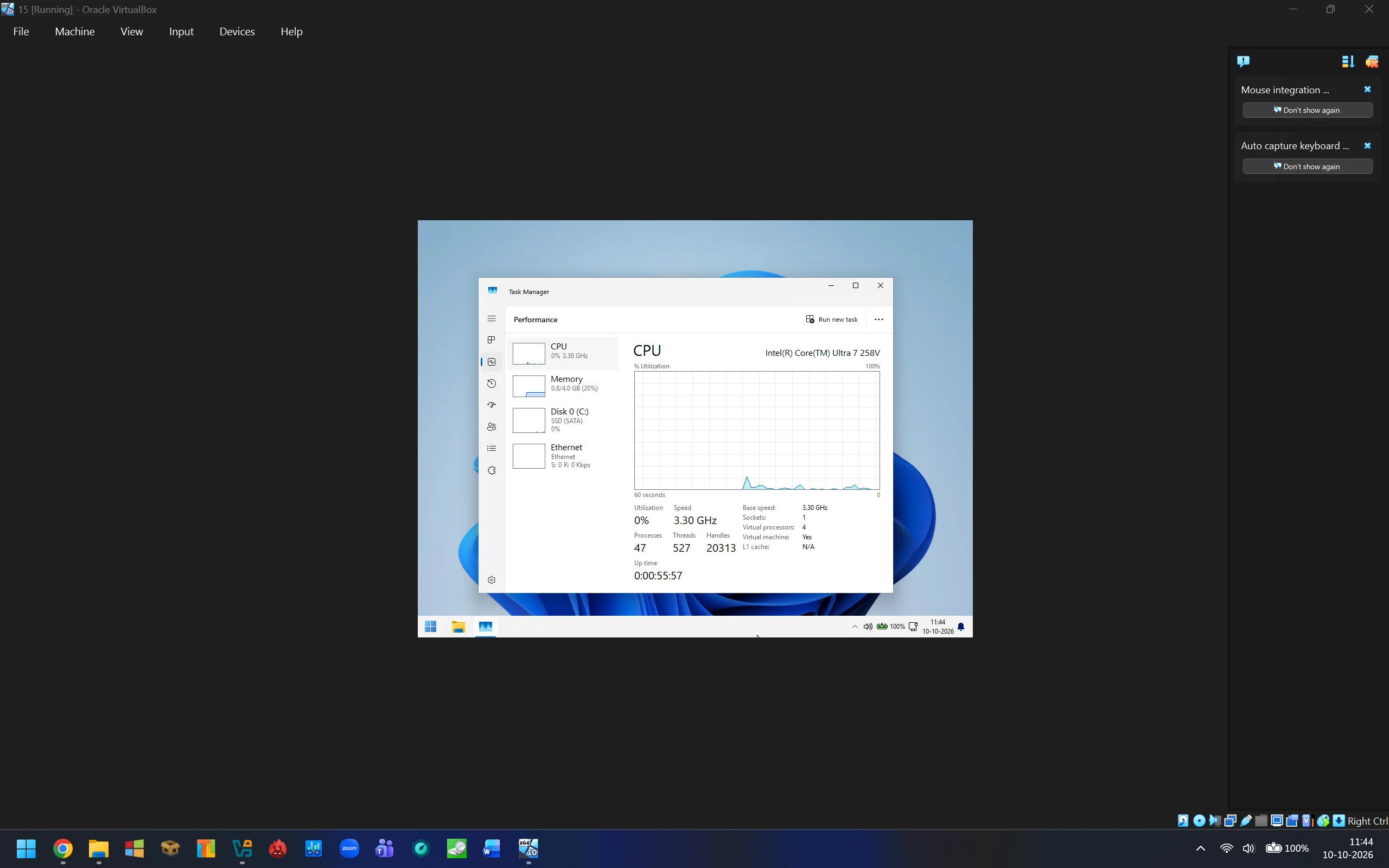
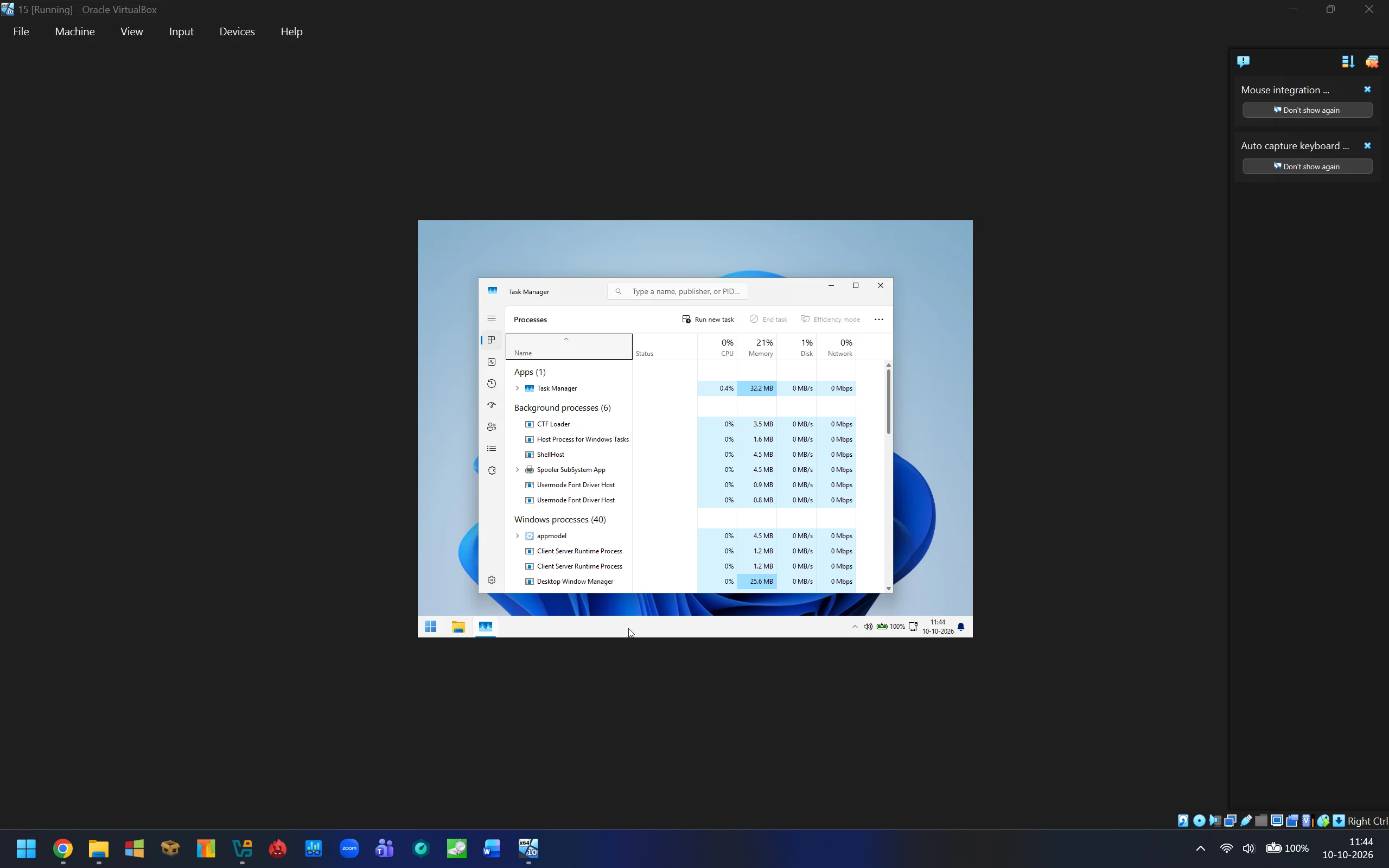
Micro 11 Barebones Processes.webp


Micro 11 Barebones Processes Detailed View.webp


Micro 11 Home 26H2 26300.9550 Installation Size.webp
 

My Computer My Computer

At a glance

Micro 11 BarebonesIntel Core Ultra 7 258V32GBIntel ARC 140V
OS
Micro 11 Barebones
Computer type
Laptop
Manufacturer/Model
Intel Core Ultra 7 258V
CPU
Intel Core Ultra 7 258V
Motherboard
Intel Core Ultra 7 258V
Memory
32GB
Graphics Card(s)
Intel ARC 140V
I wouldn't recommend using any Windows debloating script that doesn't openly state what features are removed (or allow users to customize their removals).

This script removes key features which might be important to some users:
Code:
"Microsoft-Windows-PowerShell-ISE-FOD-Package~",
"Microsoft-Windows-WMIC-FoD-Package~",
"Microsoft-Windows-MediaPlayer-Package~",
"Microsoft-Windows-LanguageFeatures-TextToSpeech-en-us-Package~",
"Microsoft-Windows-Hello-Face-Package~",
"Microsoft-Windows-MediaPlayer-Package-wow64.cab",
"Microsoft-Windows-LanguageFeatures-Speech-en-us-Package~",
"Microsoft-Windows-MSPaint-FoD-Package~",
"Microsoft-Windows-SnippingTool-FoD-Package~",
"Microsoft-Windows-Hello-BioEnrollment-Package~",  <-- required for Windows Hello
"Microsoft-Windows-BitLocker-DriveEncryption-FVE-Package~",  <-- required for BitLocker
"Microsoft-Windows-TPM-WMI-Provider-Package~",   <-- required for Secure Boot

Not to mention you're removing Defender. Some users may agree with your removal list, but it should be listed up front.
 

My Computer My Computer

At a glance

Windows 7
OS
Windows 7
Apparently, the "bare bones" Windows 11 market is open for business.

Two threads on the same topic today...


My Computer My Computer

At a glance

Windows 11 Pro 26H2
OS
Windows 11 Pro 26H2
Computer type
Laptop
Manufacturer/Model
Toshiba
Antivirus
Defender
I wouldn't recommend using any Windows debloating script that doesn't openly state what features are removed (or allow users to customize their removals).

This script removes key features which might be important to some users:
Code:
"Microsoft-Windows-PowerShell-ISE-FOD-Package~",
"Microsoft-Windows-WMIC-FoD-Package~",
"Microsoft-Windows-MediaPlayer-Package~",
"Microsoft-Windows-LanguageFeatures-TextToSpeech-en-us-Package~",
"Microsoft-Windows-Hello-Face-Package~",
"Microsoft-Windows-MediaPlayer-Package-wow64.cab",
"Microsoft-Windows-LanguageFeatures-Speech-en-us-Package~",
"Microsoft-Windows-MSPaint-FoD-Package~",
"Microsoft-Windows-SnippingTool-FoD-Package~",
"Microsoft-Windows-Hello-BioEnrollment-Package~",  <-- required for Windows Hello
"Microsoft-Windows-BitLocker-DriveEncryption-FVE-Package~",  <-- required for BitLocker
"Microsoft-Windows-TPM-WMI-Provider-Package~",   <-- required for Secure Boot

Not to mention you're removing Defender. Some users may agree with your removal list, but it should be listed up front.

Everything is removed, its a core os with basic app support ( Some apps might not work, as .Net Framework is also stripped down ) with no preloaded apps apart from some system tools like Powershell, Command Prompt, Disk Management, Device Manager, Classic Calculator, Classic Notepad, Classic Paint etc are present.

As requested what is removed, it can be huge list:

As garlin listed, System packages has been removed.

1. System Packages

"Microsoft-Windows-PowerShell-ISE-FOD-Package~",
"Microsoft-Windows-Telnet-Client-FOD-Package~",
"Microsoft-Windows-TerminalServices-AppServer-Client-FOD-Package~",
"Microsoft-Windows-Wifi-Client-Qualcomm-Athw8x-FOD-Package~",
"Microsoft-Windows-Wifi-Client-Realtek-Rtwlane-FOD-Package~",
"Microsoft-Windows-WMIC-FoD-Package~",
"Microsoft-Windows-Wifi-Client-Intel-Netwns64-FOD-Package~",
"Microsoft-Windows-Wifi-Client-Intel-Netwtw02-FOD-Package~",
"Microsoft-Windows-Wifi-Client-Intel-Netwtw08-FOD-Package~",
"Microsoft-Windows-Wifi-Client-Intel-Netwtw10-FOD-Package~",
"Microsoft-Windows-EnterpriseClientSync-Host-FOD-Package-wow64.cab",
"Microsoft-Windows-Notepad-System-FoD-Package~",
"Microsoft-Windows-StepsRecorder-Package-wow64.cab",
"Microsoft-Windows-Wifi-Client-Broadcom-Bcmwl63al-FOD-Package~",
"Microsoft-Windows-Wifi-Client-Qualcomm-Athwnx-FOD-Package~",
"Microsoft-Windows-Wifi-Client-Qualcomm-Qcamain10x64-FOD-Package~",
"Microsoft-Windows-MediaPlayer-Package~",
"Microsoft-Windows-TFTP-Client-FOD-Package~",
"Microsoft-Windows-Wifi-Client-Broadcom-Bcmwl63a-FOD-Package~",
"Microsoft-Windows-Wifi-Client-Intel-Netwew01-FOD-Package~",
"Microsoft-Windows-Wifi-Client-Marvel-Mrvlpcie8897-FOD-Package~",
"Microsoft-Windows-InternetExplorer-Optional-Package~",
"Microsoft-Windows-Kernel-LA57-FoD-Package~",
"Microsoft-Windows-PowerShell-ISE-FOD-Package-wow64.cab",
"Microsoft-Windows-Wifi-Client-Intel-Netwtw04-FOD-Package~",
"Microsoft-Windows-Wifi-Client-Realtek-Rtwlane13-FOD-Package~",
"Microsoft-Windows-Ethernet-Client-Intel-E2f68-FOD-Package~",
"Microsoft-Windows-LanguageFeatures-TextToSpeech-en-us-Package~",
"Microsoft-Windows-SmbDirect-FOD-Package~",
"Microsoft-Windows-TabletPCMath-Package~",
"Microsoft-Windows-Wifi-Client-Intel-Netwlv64-FOD-Package~",
"Microsoft-Windows-Wifi-Client-Realtek-Rtl8192se-FOD-Package~",
"Microsoft-Windows-Wifi-Client-Realtek-Rtwlane01-FOD-Package~",
"Microsoft-Windows-DirectoryServices-ADAM-Client-FOD-Package~",
"Microsoft-Windows-EnterpriseClientSync-Host-FOD-Package~",
"Microsoft-Windows-Hello-Face-Package~",
"Microsoft-Windows-MediaPlayer-Package-wow64.cab",
"Microsoft-Windows-SimpleTCP-FOD-Package~",
"Microsoft-Windows-Wifi-Client-Intel-Netwtw06-FOD-Package~",
"OpenSSH-Client-Package~",
"Microsoft-Edge-WebView-FOD-Package~",
"Microsoft-Windows-Ethernet-Client-Realtek-Rtcx21x64-FOD-Package~",
"Microsoft-Windows-ProjFS-OptionalFeature-FOD-Package~",
"Microsoft-Windows-StepsRecorder-Package~",
"Microsoft-Windows-TerminalServices-AppServer-Client-FOD-Package-wow64.cab",
"Microsoft-Windows-Wifi-Client-Intel-Netwbw02-FOD-Package~",
"Microsoft-Windows-Wifi-Client-Intel-Netwsw00-FOD-Package~",
"Microsoft-Windows-Wifi-Client-Ralink-Netr28x-FOD-Package~",
"Microsoft-Windows-WMIC-FoD-Package-wow64.cab",
"Microsoft-Windows-Ethernet-Client-Intel-E1i68x64-FOD-Package~",
"Microsoft-Windows-LanguageFeatures-Handwriting-en-us-Package~",
"Microsoft-Windows-LanguageFeatures-Speech-en-us-Package~",
"Microsoft-Windows-InternetExplorer-Optional-Package~31bf3856ad364e35",
"Microsoft-Windows-Kernel-LA57-FoD-Package~31bf3856ad364e35~amd64",
"Microsoft-Windows-LanguageFeatures-Handwriting-$languageCode-Package~31bf3856ad364e35",
"Microsoft-Windows-LanguageFeatures-Speech-$languageCode-Package~31bf3856ad364e35",
"Microsoft-Windows-LanguageFeatures-TextToSpeech-$languageCode-Package~31bf3856ad364e35",
"Microsoft-Windows-MediaPlayer-Package~31bf3856ad364e35",
"Windows-Defender-Client-Package~31bf3856ad364e35~",
"Microsoft-Windows-WordPad-FoD-Package~",
"Microsoft-Windows-MSPaint-FoD-Package~",
"Microsoft-Windows-SnippingTool-FoD-Package~",
"Microsoft-Windows-Xps-Xps-Viewer-Opt-Package~",
"*IME-ja-jp*",
"*IME-ko-kr*",
"*IME-zh-cn*",
"*IME-zh-tw*",
"Microsoft-Windows-Hello-BioEnrollment-Package~",
"Microsoft-Windows-BitLocker-DriveEncryption-FVE-Package~",
"Microsoft-Windows-TPM-WMI-Provider-Package~",
"Microsoft-Windows-Narrator-App-Package~",
"Microsoft-Windows-Magnifier-App-Package~"

2. Aggressive manual file deletions ( My hand picked features, folders, files and also dll's based on requirement , needs and experience on what to delete, I have been doing this since 2011 )

How its done, I cant explain each and every folder, its files and Dll's but in short I start finding features by going folder by folder its all starts with basic idea for whom this version is and its features.

For example i used to release multiple versions of Windows 7 , 8, 8.1, 10 & 11 in these variants

Slim: This version is for Folks who are interested in Complete Windows Desktop Environment Features where windows can not be updated as winsxs is removed, no Windows Store & no Windows 10 Universal Apps, everything else is intact.

Extreme: This version is for Folks who are interested in Stable yet heavily stripped down Windows Desktop Environment, has Stock Dot Net Framework.

Barebones: This version is for Folks who are enthusiasts & interested in Experimental Windows Desktop Environment, has Stripped down Dot Net Framework.

Barebones Dot Net Framework 4.0 Only: This version is for folks who doesn't use Software based on Dot Net Framework 2.0, 3.0 & 3.5.

New Laptops: I have kept the hardware features intact such as Windows Hello Bio-metric reader & IR webcam features, Touch & Pen support.

Old Laptops: the above mentioned new laptop features has been removed.

Core OS: Just a Core OS with Portable Classic Notepad, Paint & Calculator everything else is removed including a lot of system Dll's.

So this current Micro 11 Barebones Powershell Script is an amalgamation of these versions with Barebones Dot Net Framework 4.0 Only, This version is for Folks who are enthusiasts & interested in Experimental Windows Desktop Environment with no Universal Windows Platform (UWP) support and
has Stripped down Dot Net Framework ( Some software might not work ) and at the same time who doesn't use Software based on Dot Net Framework 2.0, 3.0 & 3.5. Along with Core OS features like Portable Classic Notepad, Paint & Calculator everything else is removed including a lot of system Dll's. One more thing to note down is 99% Winsxs is removed, so dont expect windows update to work. Search works in file explorer but not in Start menu, as this feature search in start menu is linked with or in technical language has a dependency with get started app and backup app, which makes start menu ugly, but its upto you can customize it in your own way. All New laptop features has been removed such as Windows Hello Bio-metric reader & IR webcam features, Touch & Pen support. One more important thing to notify, I have made the installation unattended at start it justs asks for Disk and partition for installation and then later in oobe its ask for Naming the Computer. So for people who want to select region time zone currency format and also keyboard language doesnt work during installation, you have to change it once you are on the desktop.

I am hopeful that i have explained what to expect from this script. If you want technical information like what has been removed just go through the script by opening it in a notepad.

To simplify what has been removed First step in the script is to Taking Ownership of the folders Program Files, Program Files (x86), ProgramData, Users & Windows ⟶ Removal of System packages ( check Script for what has been removed, also listed above) ⟶ Agressive Manual File Deletions ( Logic Explained above) ⟶ WinSxS Reduction ⟶ Registry Tweaks Applied ( AutoUnattended.xml is embedded in C# code here, TakeOwnership.cmd file is craeted here and sits in System32, its important to take ownership of the folders without any errors ) ⟶ Windows Services Tweaked ⟶ Custom File or Applications Injection like Classic Calculator, Notepad & Paint ⟶ Extensive Registry Cleanup for Install wim ( there is a lot to clean ) ⟶ Boot Wim Agressive Manual File Deletions ⟶ Boot Wim Extensive Registry Cleanup ⟶ Wim to ESD conversion ⟶ ISO Manual File Cleanup ⟶ ISO creation ⟶ Temporary File Cleanup ⟶ End

Screenshot (49).webp


Screenshot (50).webp


Screenshot (51).webp


Screenshot (52).webp


Screenshot (54).webp


Screenshot (47).webp


Screenshot (48).webp


Screenshot (46).webp
 
Last edited:

My Computer My Computer

At a glance

Micro 11 BarebonesIntel Core Ultra 7 258V32GBIntel ARC 140V
OS
Micro 11 Barebones
Computer type
Laptop
Manufacturer/Model
Intel Core Ultra 7 258V
CPU
Intel Core Ultra 7 258V
Motherboard
Intel Core Ultra 7 258V
Memory
32GB
Graphics Card(s)
Intel ARC 140V
Since 2011 i was releasing customized version of Windows in different forums & communities, but as i am getting older, i just thought to share my knowledge with everyone by means of this Powershell Script. I recently purchased a Snapdragon X2 Elite Laptop, none of the famous softwares like NTlite, Winreducer EX Series were compatible with arm64, So i decided to create my own customized stripped down Windows version again but was lazy to hand pick and delete the files, So decided to create bat files for automatic deletion but it doesnt work with future builds of Windows.

So decided to write the Powershell Script from scratch with what ever knowledge i remember from my good old Uni days of 2011 where i did my research and submitted my thesis on customized stripped down Windows versions.

This is how it started my interest towards stripping down versions of windows and here it is almost after a month and a half of designing, building and testing, hope everyone like it and customize the script accordingly based on your requirements, by the way its compatible with arm64 as well.

You can share your thoughts on improving, feel free to improve the powershell script. If you have any questions on the script, I am here to help.

cheers
 

My Computer My Computer

At a glance

Micro 11 BarebonesIntel Core Ultra 7 258V32GBIntel ARC 140V
OS
Micro 11 Barebones
Computer type
Laptop
Manufacturer/Model
Intel Core Ultra 7 258V
CPU
Intel Core Ultra 7 258V
Motherboard
Intel Core Ultra 7 258V
Memory
32GB
Graphics Card(s)
Intel ARC 140V
Looks like the files got corrupted while uploading, here is a fresh set of links to the files archive

Micro 11 Barebones Powershell Script:


Micro 11 Barebones StartAllBack Powershell Script:


My Computer My Computer

At a glance

Micro 11 BarebonesIntel Core Ultra 7 258V32GBIntel ARC 140V
OS
Micro 11 Barebones
Computer type
Laptop
Manufacturer/Model
Intel Core Ultra 7 258V
CPU
Intel Core Ultra 7 258V
Motherboard
Intel Core Ultra 7 258V
Memory
32GB
Graphics Card(s)
Intel ARC 140V
Looks like the files got corrupted while uploading, here is an another fresh set of links to the files archive

Micro 11 Barebones Powershell Script:


Micro 11 Barebones StartAllBack Powershell Script:


My Computer My Computer

At a glance

Micro 11 BarebonesIntel Core Ultra 7 258V32GBIntel ARC 140V
OS
Micro 11 Barebones
Computer type
Laptop
Manufacturer/Model
Intel Core Ultra 7 258V
CPU
Intel Core Ultra 7 258V
Motherboard
Intel Core Ultra 7 258V
Memory
32GB
Graphics Card(s)
Intel ARC 140V
This is amazing thank you so much.
 

My Computer My Computer

At a glance

Windows 11
OS
Windows 11
@mackyreddy
Although many people "debloat" Windows, most of them eventually go back to using the official version. That is what I have observed over time.
But, nice share 🙏
 

My Computer My Computer

At a glance

Windows 11 HomeIntel® Core™ i5-12450HXRamaxel 24GB DDR5Intel® UHD Graphics Family | Nvidia GeForce R...
OS
Windows 11 Home
Computer type
Laptop
Manufacturer/Model
Lenovo LOQ
CPU
Intel® Core™ i5-12450HX
Memory
Ramaxel 24GB DDR5
Graphics Card(s)
Intel® UHD Graphics Family | Nvidia GeForce RTX 3050 6GB
Sound Card
Realtek | Nvidia | Nahimic
Monitor(s) Displays
Lenovo Legion R34w-30
Screen Resolution
FHD 1920x1080 144hz | UWQHD 3440x1440 180hz
Hard Drives
M.2 2242 Micron 512GB | M.2 2280 WD Blue SN5000 2TB
Cooling
an area with pure mountain air
Keyboard
Logitech MK240
Mouse
Logitech M330
Browser
Microsoft Edge
Antivirus
Windows Security
Here some suggestions. If I'm wrong, please go easy on me :)
  • Bundle latest DISM. Running this script on a stripped Windows will throw errors since DISM won't function properly. Including DISM eliminates this issue.
  • Why disable services when you can remove them? You are removing actual component but the service name stays in the services.msc with a disabled state. If you also remove it from the services list, services.msc will look much cleaner.
  • Why not run "dism /cleanup-image /startcomponentcleanup /resetbase" just before WinSxS reduction?
  • You also run "dism /cleanup-image /startcomponentcleanup /resetbase" after several operations.
  • Performing component removals after a ResetBase or deep clean can corrupt it and throw dependency errors.
  • Shouldn't the order of operations be like this? 1. Remove all components 2. Run the DISM command 3. Aggresive cleaning of WinSxS. 4. No further component removal after this. 5. Start boot.wim editing.
  • Poor documentation not sure what's exactly left.
  • Wish you provide options to retain: printing, VPN, MS Office, .NET Framework 3.5+, Android MTP/Phone Connection support. I could swear that, for many people, these have now become fundamental in 2026.

You should definitely make GitHub repo and reach more people.
 

My Computer My Computer

At a glance

Windows 11
OS
Windows 11
@mackyreddy
Although many people "debloat" Windows, most of them eventually go back to using the official version. That is what I have observed over time.
But, nice share 🙏
I’ll personally never willingly ever reinstall Edge. Now that is 3.5gb of bloatware (in my opinion!) that is of absolutely no use to me whatsoever. Thankyou EU and the DMA 👍
 

My Computers My Computers

  • At a glance

    W11 Pro 26H2 26300.9550 W.F.E 1000.26100.372.0Intel i5 10400x2 8gb Corsair Vengeance LPX 3600Intel(R) UHD Graphics 630
    OS
    W11 Pro 26H2 26300.9550 W.F.E 1000.26100.372.0
    Computer type
    PC/Desktop
    Manufacturer/Model
    MSI
    CPU
    Intel i5 10400
    Motherboard
    B560M PRO-VDH WiFi BIOS 1.A1
    Memory
    x2 8gb Corsair Vengeance LPX 3600
    Graphics Card(s)
    Intel(R) UHD Graphics 630
    Sound Card
    Realtek onboard AL897
    Monitor(s) Displays
    MSI MAG Artymis 242C
    Screen Resolution
    1920 x 1080
    Hard Drives
    Samsung 970 Evo Plus 500gb
    PSU
    EVGA SuperNova 650w G3
    Case
    Gaming case
    Keyboard
    MSI GK20
    Mouse
    MSI Versa 300
    Internet Speed
    500mbps
    Browser
    Brave
    Antivirus
    Bitdefender
    Other Info
    MSI Herald BE9400 WiFi PCIe
    Printer - Brother MFC-L2750DW
  • At a glance

    Windows 11 Home 25H2 26300.955012th Gen Intel(R) Core(TM) i3-1215U8GBIntel(R) UHD Graphics (128 MB)
    Operating System
    Windows 11 Home 25H2 26300.9550
    Computer type
    Laptop
    Manufacturer/Model
    MSI Modern 14 C12M 637UK
    CPU
    12th Gen Intel(R) Core(TM) i3-1215U
    Motherboard
    Micro-Star International Co., Ltd. MS-14J1 (U3E1)
    Memory
    8GB
    Graphics card(s)
    Intel(R) UHD Graphics (128 MB)
    Sound Card
    Intel Smart Sound Technology for Bluetooth Audio
    Internet Speed
    500mbps
    Browser
    Brave
    Antivirus
    BitDefender
I’ll personally never willingly ever reinstall Edge. Now that is 3.5gb of bloatware (in my opinion!) that is of absolutely no use to me whatsoever. Thankyou EU and the DMA 👍
I know that the main issue with Windows 11 actually stems from Edge and WebView; both have a wide scope of use and consume significant resources for users with limited memory.
 

My Computer My Computer

At a glance

Windows 11 HomeIntel® Core™ i5-12450HXRamaxel 24GB DDR5Intel® UHD Graphics Family | Nvidia GeForce R...
OS
Windows 11 Home
Computer type
Laptop
Manufacturer/Model
Lenovo LOQ
CPU
Intel® Core™ i5-12450HX
Memory
Ramaxel 24GB DDR5
Graphics Card(s)
Intel® UHD Graphics Family | Nvidia GeForce RTX 3050 6GB
Sound Card
Realtek | Nvidia | Nahimic
Monitor(s) Displays
Lenovo Legion R34w-30
Screen Resolution
FHD 1920x1080 144hz | UWQHD 3440x1440 180hz
Hard Drives
M.2 2242 Micron 512GB | M.2 2280 WD Blue SN5000 2TB
Cooling
an area with pure mountain air
Keyboard
Logitech MK240
Mouse
Logitech M330
Browser
Microsoft Edge
Antivirus
Windows Security
I know that the main issue with Windows 11 actually stems from Edge and WebView; both have a wide scope of use and consume significant resources for users with limited memory.
To be fair, I just don’t like Edge full stop. There is no other reason, I just can’t stand it 🤷‍♂️
 

My Computers My Computers

  • At a glance

    W11 Pro 26H2 26300.9550 W.F.E 1000.26100.372.0Intel i5 10400x2 8gb Corsair Vengeance LPX 3600Intel(R) UHD Graphics 630
    OS
    W11 Pro 26H2 26300.9550 W.F.E 1000.26100.372.0
    Computer type
    PC/Desktop
    Manufacturer/Model
    MSI
    CPU
    Intel i5 10400
    Motherboard
    B560M PRO-VDH WiFi BIOS 1.A1
    Memory
    x2 8gb Corsair Vengeance LPX 3600
    Graphics Card(s)
    Intel(R) UHD Graphics 630
    Sound Card
    Realtek onboard AL897
    Monitor(s) Displays
    MSI MAG Artymis 242C
    Screen Resolution
    1920 x 1080
    Hard Drives
    Samsung 970 Evo Plus 500gb
    PSU
    EVGA SuperNova 650w G3
    Case
    Gaming case
    Keyboard
    MSI GK20
    Mouse
    MSI Versa 300
    Internet Speed
    500mbps
    Browser
    Brave
    Antivirus
    Bitdefender
    Other Info
    MSI Herald BE9400 WiFi PCIe
    Printer - Brother MFC-L2750DW
  • At a glance

    Windows 11 Home 25H2 26300.955012th Gen Intel(R) Core(TM) i3-1215U8GBIntel(R) UHD Graphics (128 MB)
    Operating System
    Windows 11 Home 25H2 26300.9550
    Computer type
    Laptop
    Manufacturer/Model
    MSI Modern 14 C12M 637UK
    CPU
    12th Gen Intel(R) Core(TM) i3-1215U
    Motherboard
    Micro-Star International Co., Ltd. MS-14J1 (U3E1)
    Memory
    8GB
    Graphics card(s)
    Intel(R) UHD Graphics (128 MB)
    Sound Card
    Intel Smart Sound Technology for Bluetooth Audio
    Internet Speed
    500mbps
    Browser
    Brave
    Antivirus
    BitDefender
Why disable services when you can remove them? You are removing actual component but the service name stays in the services.msc with a disabled state. If you also remove it from the services list, services.msc will look much cleaner

See you in a few weeks when you have some obscure error you can’t figure out.
 

My Computer My Computer

At a glance

Win11 Ent. 25H2
OS
Win11 Ent. 25H2
See you in a few weeks when you have some obscure error you can’t figure out.
I've been using NTLite and scripts like Tiny11 for years. Never encountered a obscure or absurd error if you know what you are doing.
 

My Computer My Computer

At a glance

Windows 11
OS
Windows 11
I've been using NTLite and scripts like Tiny11 for years. Never encountered a obscure or absurd error if you know what you are doing.

If we’re getting into a measuring contest, I’ve been administering Windows devices since NT 4, thousands at a time.
 

My Computer My Computer

At a glance

Win11 Ent. 25H2
OS
Win11 Ent. 25H2
@mackyreddy
Although many people "debloat" Windows, most of them eventually go back to using the official version. That is what I have observed over time.
But, nice share 🙏
yeah, as every windows H version update/upgrade bring back a lot.. so people give up as they have to do it over and over and over again after every big uproll. :-)
 

My Computers My Computers

  • At a glance

    Linux: Debian, Kali-linux, Alma, Win:7,10IoT,...i3, i5 and i7 From 2gen to 9th gen... Server ...
    OS
    Linux: Debian, Kali-linux, Alma, Win:7,10IoT,2012R
    Manufacturer/Model
    HP Elitebook 840, AsusX53, Aspire E1-572. AsusUX32A, HP Pro3130mt+3010mt, HP Proliant ML150, 3xCustom-PC, i3, i5, i7
    CPU
    i3, i5 and i7 From 2gen to 9th gen... Server dual Xenon
    Hard Drives
    Sata, M.2, SAS
  • At a glance

    Retro: 2003server.XPpro, Win2000, Win98SE, Wi...Oldest intel 8088 up to P4 dual core
    Operating System
    Retro: 2003server.XPpro, Win2000, Win98SE, Win95, Win3.11, MS-DOS, IBM-DOS
    Manufacturer/Model
    Commodore, AST, Fujitsu, Compaq, etc etc. etc Around 15 desktops and 20 laptops in the collection
    CPU
    Oldest intel 8088 up to P4 dual core
    Hard Drives
    MFM, IDE, SCSI
If we’re getting into a measuring contest, I’ve been administering Windows devices since NT 4, thousands at a time.
You quoted my post dude I was talking to OP. Not sure what you are up to. Don't act like 4 years old.
 

My Computer My Computer

At a glance

Windows 11
OS
Windows 11
yeah, as every windows H version update/upgrade bring back a lot.. so people give up as they have to do it over and over and over again after every big uproll. :-)
Ok, so 25H2 to 26H2 was only an enablement package, but Windows hasn’t reinstalled Edge back onto either my PC or laptop.

Just for kicks the previous day to this post, I reinstalled 26H2 On my laptop using the 26H2 repair version just to see if anything drastic would happen. It essentially downloaded a fresh OS but kept all my Apps and settings. Obviously I lost any registry tweaks I’d done and I had to run O&O ShutUp! again, but otherwise it was a complete success, no attempt to reinstall Edge or Copilot, a piece of cake. But that is the beauty of EU regulations, MS aren’t allowed to break your OS.
 

My Computers My Computers

  • At a glance

    W11 Pro 26H2 26300.9550 W.F.E 1000.26100.372.0Intel i5 10400x2 8gb Corsair Vengeance LPX 3600Intel(R) UHD Graphics 630
    OS
    W11 Pro 26H2 26300.9550 W.F.E 1000.26100.372.0
    Computer type
    PC/Desktop
    Manufacturer/Model
    MSI
    CPU
    Intel i5 10400
    Motherboard
    B560M PRO-VDH WiFi BIOS 1.A1
    Memory
    x2 8gb Corsair Vengeance LPX 3600
    Graphics Card(s)
    Intel(R) UHD Graphics 630
    Sound Card
    Realtek onboard AL897
    Monitor(s) Displays
    MSI MAG Artymis 242C
    Screen Resolution
    1920 x 1080
    Hard Drives
    Samsung 970 Evo Plus 500gb
    PSU
    EVGA SuperNova 650w G3
    Case
    Gaming case
    Keyboard
    MSI GK20
    Mouse
    MSI Versa 300
    Internet Speed
    500mbps
    Browser
    Brave
    Antivirus
    Bitdefender
    Other Info
    MSI Herald BE9400 WiFi PCIe
    Printer - Brother MFC-L2750DW
  • At a glance

    Windows 11 Home 25H2 26300.955012th Gen Intel(R) Core(TM) i3-1215U8GBIntel(R) UHD Graphics (128 MB)
    Operating System
    Windows 11 Home 25H2 26300.9550
    Computer type
    Laptop
    Manufacturer/Model
    MSI Modern 14 C12M 637UK
    CPU
    12th Gen Intel(R) Core(TM) i3-1215U
    Motherboard
    Micro-Star International Co., Ltd. MS-14J1 (U3E1)
    Memory
    8GB
    Graphics card(s)
    Intel(R) UHD Graphics (128 MB)
    Sound Card
    Intel Smart Sound Technology for Bluetooth Audio
    Internet Speed
    500mbps
    Browser
    Brave
    Antivirus
    BitDefender
Ok, so 25H2 to 26H2 was only an enablement package, but Windows hasn’t reinstalled Edge back onto either my PC or laptop.

Just for kicks the previous day to this post, I reinstalled 26H2 On my laptop using the 26H2 repair version just to see if anything drastic would happen. It essentially downloaded a fresh OS but kept all my Apps and settings. Obviously I lost any registry tweaks I’d done and I had to run O&O ShutUp! again, but otherwise it was a complete success, no attempt to reinstall Edge or Copilot, a piece of cake. But that is the beauty of EU regulations, MS aren’t allowed to break your OS.
I thought a repair install would keep the registry since it is basically a bunch of settings.
 

My Computers My Computers

  • At a glance

    win 11 pro, 25H2i5-240032 GB DDR-3Intel HD Graphics 2000 (on-board)
    OS
    win 11 pro, 25H2
    Computer type
    PC/Desktop
    Manufacturer/Model
    Dell 790 (Mt)
    CPU
    i5-2400
    Motherboard
    Dell
    Memory
    32 GB DDR-3
    Graphics Card(s)
    Intel HD Graphics 2000 (on-board)
    Sound Card
    Intel Cougar Point PCH [B2] (On-Board)
    Monitor(s) Displays
    LG 27MN60T
  • At a glance

    Windows 11 home, 25H2Intel I7-3630QM16GB DDR3
    Operating System
    Windows 11 home, 25H2
    Computer type
    Laptop
    Manufacturer/Model
    Dell Inspiron 17R SE 7720
    CPU
    Intel I7-3630QM
    Memory
    16GB DDR3
    Hard Drives
    Samsung 500GB SSD

Latest Support Threads

Back
Top Bottom