Random Application Freezes/Hangs - Win11


Regarding this issue, would it be safe to remove the attached entries in regedit?

edit: There's also a single entry for Zone Labs.
Don't go around messing with the reg unless you know what you are doing.
What is the full path of the reg entry please, keys do not mean anything.

Check this, it saves a backup just in case:
I am usually not a big fan of any kinds of cleaners but if I must recommend one:
 

My Computers My Computers

  • At a glance

    All Branches but StableAMD Ryzen 7 7735HS 3200-4500 Mhz 8 cores x 232 GB DDR5Radeon Graphic / NVIDIA GeForce RTX 4060 8 GB...
    OS
    All Branches but Stable
    Computer type
    Laptop
    Manufacturer/Model
    Acer Nitro ANV15-51
    CPU
    AMD Ryzen 7 7735HS 3200-4500 Mhz 8 cores x 2
    Motherboard
    Sportage_RBH
    Memory
    32 GB DDR5
    Graphics Card(s)
    Radeon Graphic / NVIDIA GeForce RTX 4060 8 GB GDDR6
    Sound Card
    AMD/Realtek(R) Audio
    Monitor(s) Displays
    Integrated Monitor (15.3"vis)
    Screen Resolution
    FHD 1920X1080 16:9 144Hz
    Hard Drives
    KINGSTON OM8SEP4512Q-AA 1TB
    Western Digital 256GB
    PSU
    19V DC 6.32 A 120 W
    Cooling
    Dual Fans
    Mouse
    MS Bluetooth
    Internet Speed
    Fiber 1GB Cox -us & 1GB Orange-fr
    Browser
    Edge Canary- Firefox Nightly-Chrome Dev-Chrome Dev
    Antivirus
    Windows Defender
  • At a glance

    Windows 11 BetaAMD A9-94208 GB of DDR4AMD Radeon R5
    Operating System
    Windows 11 Beta
    Computer type
    Laptop
    Manufacturer/Model
    Asus X751BP
    CPU
    AMD A9-9420
    Memory
    8 GB of DDR4
    Graphics card(s)
    AMD Radeon R5
    Screen Resolution
    1600x900
    Hard Drives
    Seagate 1 TB
Don't go around messing with the reg unless you know what you are doing.
What is the full path of the reg entry please, keys do not mean anything.

Check this, it saves a backup just in case:
I am usually not a big fan of any kinds of cleaners but if I must recommend one:

Thank you for the recommendation.

These are the full paths, if I did it correctly,

HKEY_LOCAL_MACHINE\SOFTWARE\WOW6432Node\CheckPoint
HKEY_LOCAL_MACHINE\SOFTWARE\WOW6432Node\Zone Labs
 

My Computer My Computer

At a glance

Windows 11AMD Ryzen 7 9700X Processor (8 Cores/16 Threads)CORSAIR VENGEANCE RGB DDR5 32GB (2x16GB) DDR5...Sapphire technology Nitro+ AMD Radeon RX 9060...
OS
Windows 11
Computer type
PC/Desktop
CPU
AMD Ryzen 7 9700X Processor (8 Cores/16 Threads)
Motherboard
Gigabyte B850 AORUS ELITE WIFI7 Motherboard
Memory
CORSAIR VENGEANCE RGB DDR5 32GB (2x16GB) DDR5 6000MHz CL30
Graphics Card(s)
Sapphire technology Nitro+ AMD Radeon RX 9060 XT Gaming OC, 16GB
Thank you for the recommendation.

These are the full paths, if I did it correctly,

HKEY_LOCAL_MACHINE\SOFTWARE\WOW6432Node\CheckPoint
HKEY_LOCAL_MACHINE\SOFTWARE\WOW6432Node\Zone Labs
Yes, those are under the Software hive and should be OK to clear.
I do recommend using the software I posted above as it gives you the chance to rollback.
The error(s) in the log from previous dates will remain though.
To clean, the logs, a command can be issued, but it clears everything from the beginning of time. :confused:
 

My Computers My Computers

  • At a glance

    All Branches but StableAMD Ryzen 7 7735HS 3200-4500 Mhz 8 cores x 232 GB DDR5Radeon Graphic / NVIDIA GeForce RTX 4060 8 GB...
    OS
    All Branches but Stable
    Computer type
    Laptop
    Manufacturer/Model
    Acer Nitro ANV15-51
    CPU
    AMD Ryzen 7 7735HS 3200-4500 Mhz 8 cores x 2
    Motherboard
    Sportage_RBH
    Memory
    32 GB DDR5
    Graphics Card(s)
    Radeon Graphic / NVIDIA GeForce RTX 4060 8 GB GDDR6
    Sound Card
    AMD/Realtek(R) Audio
    Monitor(s) Displays
    Integrated Monitor (15.3"vis)
    Screen Resolution
    FHD 1920X1080 16:9 144Hz
    Hard Drives
    KINGSTON OM8SEP4512Q-AA 1TB
    Western Digital 256GB
    PSU
    19V DC 6.32 A 120 W
    Cooling
    Dual Fans
    Mouse
    MS Bluetooth
    Internet Speed
    Fiber 1GB Cox -us & 1GB Orange-fr
    Browser
    Edge Canary- Firefox Nightly-Chrome Dev-Chrome Dev
    Antivirus
    Windows Defender
  • At a glance

    Windows 11 BetaAMD A9-94208 GB of DDR4AMD Radeon R5
    Operating System
    Windows 11 Beta
    Computer type
    Laptop
    Manufacturer/Model
    Asus X751BP
    CPU
    AMD A9-9420
    Memory
    8 GB of DDR4
    Graphics card(s)
    AMD Radeon R5
    Screen Resolution
    1600x900
    Hard Drives
    Seagate 1 TB
Yes, those are under the Software hive and should be OK to clear.
I do recommend using the software I posted above as it gives you the chance to rollback.

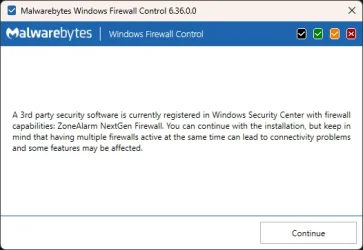
Thank you for letting me know, I've honestly never touched anything related to the registry before for reasons as you stated. The only reason I even want to remove the ZA/Checkpoint entries were because of the two services listed under services.msc as previously started but I could ignore those since are easy to disable but as said trying to add a new GUI for Windows Firewall Defender gave me the following (see attached image)

Would even removing those reg entries actually remove them from been registered with Windows Security Center? It's somewhat irritating knowing ZoneAlarm/Checkpoint are fully uninstalled and not even listed in Windows Security Center yet still are connected to it in someway.

The error(s) in the log from previous dates will remain though.
To clean, the logs, a command can be issued, but it clears everything from the beginning of time. :confused:

LOL, yikes. Reminds me oddly, I need to clear everything in AppData\Local\Temp. Must run Bleachbit more I suppose.
 

Attachments

  • wfc6setup_vCVACG9kvc.webp
    wfc6setup_vCVACG9kvc.webp
    18.5 KB · Views: 1

My Computer My Computer

At a glance

Windows 11AMD Ryzen 7 9700X Processor (8 Cores/16 Threads)CORSAIR VENGEANCE RGB DDR5 32GB (2x16GB) DDR5...Sapphire technology Nitro+ AMD Radeon RX 9060...
OS
Windows 11
Computer type
PC/Desktop
CPU
AMD Ryzen 7 9700X Processor (8 Cores/16 Threads)
Motherboard
Gigabyte B850 AORUS ELITE WIFI7 Motherboard
Memory
CORSAIR VENGEANCE RGB DDR5 32GB (2x16GB) DDR5 6000MHz CL30
Graphics Card(s)
Sapphire technology Nitro+ AMD Radeon RX 9060 XT Gaming OC, 16GB
Thank you for letting me know, I've honestly never touched anything related to the registry before for reasons as you stated. The only reason I even want to remove the ZA/Checkpoint entries were because of the two services listed under services.msc as previously started but I could ignore those since are easy to disable but as said trying to add a new GUI for Windows Firewall Defender gave me the following (see attached image)
I cannot advise you there as I have never used any additional security software other than what windows comes with.
I am a bit perplexed though, sorry if I missed your previous posts, but was an attempt made to add MalwareBytes Firewall on top of Zone Alarm?
 

My Computers My Computers

  • At a glance

    All Branches but StableAMD Ryzen 7 7735HS 3200-4500 Mhz 8 cores x 232 GB DDR5Radeon Graphic / NVIDIA GeForce RTX 4060 8 GB...
    OS
    All Branches but Stable
    Computer type
    Laptop
    Manufacturer/Model
    Acer Nitro ANV15-51
    CPU
    AMD Ryzen 7 7735HS 3200-4500 Mhz 8 cores x 2
    Motherboard
    Sportage_RBH
    Memory
    32 GB DDR5
    Graphics Card(s)
    Radeon Graphic / NVIDIA GeForce RTX 4060 8 GB GDDR6
    Sound Card
    AMD/Realtek(R) Audio
    Monitor(s) Displays
    Integrated Monitor (15.3"vis)
    Screen Resolution
    FHD 1920X1080 16:9 144Hz
    Hard Drives
    KINGSTON OM8SEP4512Q-AA 1TB
    Western Digital 256GB
    PSU
    19V DC 6.32 A 120 W
    Cooling
    Dual Fans
    Mouse
    MS Bluetooth
    Internet Speed
    Fiber 1GB Cox -us & 1GB Orange-fr
    Browser
    Edge Canary- Firefox Nightly-Chrome Dev-Chrome Dev
    Antivirus
    Windows Defender
  • At a glance

    Windows 11 BetaAMD A9-94208 GB of DDR4AMD Radeon R5
    Operating System
    Windows 11 Beta
    Computer type
    Laptop
    Manufacturer/Model
    Asus X751BP
    CPU
    AMD A9-9420
    Memory
    8 GB of DDR4
    Graphics card(s)
    AMD Radeon R5
    Screen Resolution
    1600x900
    Hard Drives
    Seagate 1 TB
I am a bit perplexed though, sorry if I missed your previous posts, but was an attempt made to add MalwareBytes Firewall on top of defender?

Yeah but it's not a firewall, just a GUI for Defender. It just makes Defender more "easier" to use and get around. It can be used in conjunction with Defender and doesn't cause any issues thankfully. I never even knew of the program up until a few months back as most only know MalwareBytes for their antivirus software.

Appreciate your help btw, I'll have to decide on those reg entries but at least I have options now, and given your recommendation of the reg software.
 

My Computer My Computer

At a glance

Windows 11AMD Ryzen 7 9700X Processor (8 Cores/16 Threads)CORSAIR VENGEANCE RGB DDR5 32GB (2x16GB) DDR5...Sapphire technology Nitro+ AMD Radeon RX 9060...
OS
Windows 11
Computer type
PC/Desktop
CPU
AMD Ryzen 7 9700X Processor (8 Cores/16 Threads)
Motherboard
Gigabyte B850 AORUS ELITE WIFI7 Motherboard
Memory
CORSAIR VENGEANCE RGB DDR5 32GB (2x16GB) DDR5 6000MHz CL30
Graphics Card(s)
Sapphire technology Nitro+ AMD Radeon RX 9060 XT Gaming OC, 16GB
The V2 logs collected 5 BSOD dump files.

There were other dumps reported.

Is the computer stable or do you still need help?
 

My Computer My Computer

At a glance

Windows 10Intel(R) Core(TM) i7-4800MQ CPU @ 2.70GHz16 GB Total: Manufacturer : Samsung MemoryTyp...NVIDIA Quadro K3100M; Intel(R) HD Graphics 4600
OS
Windows 10
Computer type
Laptop
Manufacturer/Model
HP
CPU
Intel(R) Core(TM) i7-4800MQ CPU @ 2.70GHz
Motherboard
Product : 190A Version : KBC Version 94.56
Memory
16 GB Total: Manufacturer : Samsung MemoryType : DDR3 FormFactor : SODIMM Capacity : 8GB Speed : 1600
Graphics Card(s)
NVIDIA Quadro K3100M; Intel(R) HD Graphics 4600
Sound Card
IDT High Definition Audio CODEC; PNP Device ID HDAUDIO\FUNC_01&VEN_111D&DEV_76E0
Hard Drives
Model Hitachi HTS727575A9E364
Antivirus
Microsoft Defender
Other Info
Mobile Workstation
The V2 logs collected 5 BSOD dump files.

There were other dumps reported.

Is the computer stable or do you still need help?

Happy to report the PC is stable. I believe those 5 BSOD errors may have been caused by the ram running at 6000MHz on my previous bios version, as at those times I believe I was running very intense memory related tasks. Since I've followed all instructions in this thread and updated my bios now running at 6000MHz I've had zero issues.

So yeah to answer your question it's stable, unless you believe there's anything to "fix" in relation to those dump files? If not please feel free to close the thread, and if this is the end of the line then a huge thank you to all those who landed a hand in correcting my issues..
 

My Computer My Computer

At a glance

Windows 11AMD Ryzen 7 9700X Processor (8 Cores/16 Threads)CORSAIR VENGEANCE RGB DDR5 32GB (2x16GB) DDR5...Sapphire technology Nitro+ AMD Radeon RX 9060...
OS
Windows 11
Computer type
PC/Desktop
CPU
AMD Ryzen 7 9700X Processor (8 Cores/16 Threads)
Motherboard
Gigabyte B850 AORUS ELITE WIFI7 Motherboard
Memory
CORSAIR VENGEANCE RGB DDR5 32GB (2x16GB) DDR5 6000MHz CL30
Graphics Card(s)
Sapphire technology Nitro+ AMD Radeon RX 9060 XT Gaming OC, 16GB
Don't go around messing with the reg unless you know what you are doing.
What is the full path of the reg entry please, keys do not mean anything.

Check this, it saves a backup just in case:
I am usually not a big fan of any kinds of cleaners but if I must recommend one:

Quick update, turns out I won't have to involve myself with the registry cleaner, there's a way to check if a firewall that's been uninstalled is still registered to Windows Security Center

1. Open a Windows Powershell window as an administrator
2. Run the command: Get-WmiObject -Namespace "root\SecurityCenter2" -Class FireWallProduct
3. If you see something Zonealarm related, run the command: wbemtest
4. Click Connect button
5. Then enter: root/securitycenter2
6. Click the "Connect" button
7. Click the "Query..." button
8. Enter: SELECT * from FireWallProduct
9.Select the Firewall product to delete
9. Click the "Delete" button
10. Reboot

After double checking ZA is still registered to it, I shall be following this method and "un-registering" it. It's a shame ZoneAlarm leaves over such a mess, again thank you all, I'll close the thread as resolved later on just incase anyone has anymore input.
 

My Computer My Computer

At a glance

Windows 11AMD Ryzen 7 9700X Processor (8 Cores/16 Threads)CORSAIR VENGEANCE RGB DDR5 32GB (2x16GB) DDR5...Sapphire technology Nitro+ AMD Radeon RX 9060...
OS
Windows 11
Computer type
PC/Desktop
CPU
AMD Ryzen 7 9700X Processor (8 Cores/16 Threads)
Motherboard
Gigabyte B850 AORUS ELITE WIFI7 Motherboard
Memory
CORSAIR VENGEANCE RGB DDR5 32GB (2x16GB) DDR5 6000MHz CL30
Graphics Card(s)
Sapphire technology Nitro+ AMD Radeon RX 9060 XT Gaming OC, 16GB
  • Like
Reactions: OAT
If there are no instability problems (BSOD or freezes) then you're set.


Running these will modify default settings and decrease the likelihood of missing BSODs:


Code:
Get-CimInstance -ClassName Win32_OSRecoveryConfiguration | Select-Object AutoReboot
Get-CimInstance -ClassName Win32_OSRecoveryConfiguration | Set-CimInstance -Property @{AutoReboot=$false}
Get-CimInstance -ClassName Win32_OSRecoveryConfiguration | Select-Object AutoReboot

Get-CimInstance -ClassName Win32_OSRecoveryConfiguration | Select-Object DebugInfoType
Get-CimInstance -ClassName Win32_OSRecoveryConfiguration | Set-CimInstance -Property @{DebugInfoType=7}
Get-CimInstance -ClassName Win32_OSRecoveryConfiguration | Select-Object DebugInfoType

Get-CimInstance -ClassName Win32_PageFileUsage | Format-List *

Get-CimInstance -ClassName Win32_ComputerSystem | Select-Object AutomaticManagedPagefile
Get-CimInstance -ClassName Win32_ComputerSystem | Set-CimInstance -Property @{AutomaticManagedPagefile=$true}
Get-CimInstance -ClassName Win32_ComputerSystem | Select-Object AutomaticManagedPagefile

bcdedit /enum '{badmemory}'


These were two of the the three misbehaving drivers:

Code:
cpdevmon_134351101207229826    cpdevmon_134351101207229826    \??\c:\windows\system32\drivers\cpdevmon.sys

Code:
cposfw    cposfw    c:\windows\system32\drivers\cposfw.sys
 

My Computer My Computer

At a glance

Windows 10Intel(R) Core(TM) i7-4800MQ CPU @ 2.70GHz16 GB Total: Manufacturer : Samsung MemoryTyp...NVIDIA Quadro K3100M; Intel(R) HD Graphics 4600
OS
Windows 10
Computer type
Laptop
Manufacturer/Model
HP
CPU
Intel(R) Core(TM) i7-4800MQ CPU @ 2.70GHz
Motherboard
Product : 190A Version : KBC Version 94.56
Memory
16 GB Total: Manufacturer : Samsung MemoryType : DDR3 FormFactor : SODIMM Capacity : 8GB Speed : 1600
Graphics Card(s)
NVIDIA Quadro K3100M; Intel(R) HD Graphics 4600
Sound Card
IDT High Definition Audio CODEC; PNP Device ID HDAUDIO\FUNC_01&VEN_111D&DEV_76E0
Hard Drives
Model Hitachi HTS727575A9E364
Antivirus
Microsoft Defender
Other Info
Mobile Workstation
If there are no instability problems (BSOD or freezes) then you're set.


Running these will modify default settings and decrease the likelihood of missing BSODs:


Code:
Get-CimInstance -ClassName Win32_OSRecoveryConfiguration | Select-Object AutoReboot
Get-CimInstance -ClassName Win32_OSRecoveryConfiguration | Set-CimInstance -Property @{AutoReboot=$false}
Get-CimInstance -ClassName Win32_OSRecoveryConfiguration | Select-Object AutoReboot

Get-CimInstance -ClassName Win32_OSRecoveryConfiguration | Select-Object DebugInfoType
Get-CimInstance -ClassName Win32_OSRecoveryConfiguration | Set-CimInstance -Property @{DebugInfoType=7}
Get-CimInstance -ClassName Win32_OSRecoveryConfiguration | Select-Object DebugInfoType

Get-CimInstance -ClassName Win32_PageFileUsage | Format-List *

Get-CimInstance -ClassName Win32_ComputerSystem | Select-Object AutomaticManagedPagefile
Get-CimInstance -ClassName Win32_ComputerSystem | Set-CimInstance -Property @{AutomaticManagedPagefile=$true}
Get-CimInstance -ClassName Win32_ComputerSystem | Select-Object AutomaticManagedPagefile

bcdedit /enum '{badmemory}'

Would those be entered individually or in bulk via Powershell? Just wanting to confirm.

These were two of the the three misbehaving drivers:

Code:
cpdevmon_134351101207229826    cpdevmon_134351101207229826    \??\c:\windows\system32\drivers\cpdevmon.sys

Code:
cposfw    cposfw    c:\windows\system32\drivers\cposfw.sys

I'll try and find more information on those for future reference, but luckily I am indeed all set.
 

My Computer My Computer

At a glance

Windows 11AMD Ryzen 7 9700X Processor (8 Cores/16 Threads)CORSAIR VENGEANCE RGB DDR5 32GB (2x16GB) DDR5...Sapphire technology Nitro+ AMD Radeon RX 9060...
OS
Windows 11
Computer type
PC/Desktop
CPU
AMD Ryzen 7 9700X Processor (8 Cores/16 Threads)
Motherboard
Gigabyte B850 AORUS ELITE WIFI7 Motherboard
Memory
CORSAIR VENGEANCE RGB DDR5 32GB (2x16GB) DDR5 6000MHz CL30
Graphics Card(s)
Sapphire technology Nitro+ AMD Radeon RX 9060 XT Gaming OC, 16GB
Please run each.

There were prior WMIC commands that were part of a script that was written for Windows 10.

Windows 11 no longer runs WMIC so these commands may be added to a new one click script.
 

My Computer My Computer

At a glance

Windows 10Intel(R) Core(TM) i7-4800MQ CPU @ 2.70GHz16 GB Total: Manufacturer : Samsung MemoryTyp...NVIDIA Quadro K3100M; Intel(R) HD Graphics 4600
OS
Windows 10
Computer type
Laptop
Manufacturer/Model
HP
CPU
Intel(R) Core(TM) i7-4800MQ CPU @ 2.70GHz
Motherboard
Product : 190A Version : KBC Version 94.56
Memory
16 GB Total: Manufacturer : Samsung MemoryType : DDR3 FormFactor : SODIMM Capacity : 8GB Speed : 1600
Graphics Card(s)
NVIDIA Quadro K3100M; Intel(R) HD Graphics 4600
Sound Card
IDT High Definition Audio CODEC; PNP Device ID HDAUDIO\FUNC_01&VEN_111D&DEV_76E0
Hard Drives
Model Hitachi HTS727575A9E364
Antivirus
Microsoft Defender
Other Info
Mobile Workstation

Latest Tutorials

Back
Top Bottom