Solved Secure boot update HowTo


I just got KB5077181 yesterday and it included this comment

[Secure Boot] With this update, Windows quality updates include a broad set of targeting data that identifies devices and their ability to receive new Secure Boot certificates. Devices will receive the new certificates only after they show sufficient successful update signals, which helps ensures a safe and phased rollout.
 

My Computers

System One System Two

  • OS
    Windows 11 (up to date)
    Computer type
    PC/Desktop
    Manufacturer/Model
    Custom
    CPU
    Intel i5 12400
    Motherboard
    Gigabyte Z690 UA
    Memory
    Corsair Vengeance LPX 16GB
    Graphics Card(s)
    On Board the Z690
    Sound Card
    On Board
    Monitor(s) Displays
    43" Samsung tu7000
    Screen Resolution
    2560 x 1440
    Hard Drives
    SAMSUNG SSD 1TB NVMe M.2
    PSU
    Thermaltake smart 500w 80+
    Case
    LIAN LANCOOL_205M
    Cooling
    Bunch of fans . . . :o) (lights dont work)
    Keyboard
    Unicomp: Ultra Classic White Buckling Spring USB
    Mouse
    M510
    Internet Speed
    50mbps on Ethernet
    Browser
    Fire Fox
    Antivirus
    Windows
    Other Info
    Love this computer but I still prefer Win-7 like I love my old Lazy Boy Recliner . . . it just feels better.
  • Operating System
    WIN-7-64BIT and Win-11 pro for testing on unsupported hardware
    Computer type
    PC/Desktop
    Manufacturer/Model
    Home built
    CPU
    i5-3570K CPU @ 3.40GHz, 3801 Mhz, 4 Core(s), 4 Logical Processor(s)
    Motherboard
    GA-Z77-HD3
    Memory
    16 GB - Crucial Ballistick 4GB PC3-14900 DDR3-1333 MHz
    Graphics card(s)
    NVIDIA GeForce GTX 1050
    Sound Card
    On Board
    Monitor(s) Displays
    ASUS VP278
    Screen Resolution
    1920 x 1080
    Hard Drives
    4 - internal Samsung 2.5" SSD, 1 WD HDD 7200 and some external drives
    PSU
    EVGA 550w
    Case
    Old Gygabyte Tower
    Cooling
    Yes
    Keyboard
    Unicomp - UNIOP4A USB (like the old IBM Model H that I started with)
    Mouse
    M510
    Internet Speed
    50mbps
    Browser
    Firefox
    Antivirus
    Windows
    Other Info
    The only thing it lack is USB-3.2 on the front face but it has 3.0 on the back
Most should eventually get it automatically via Windows Update. Old systems may not.
OK. I see in the link you provided that MS says "In the coming months, messages about the certificate update status will be available in the Windows Security App to help consumers track the certificate updates more closely." I hope they let us know ASAP where this can be found. It also mentions that in some cases a "firmware update" may be required ahead of time. That could be the kicker especially for older computers.

JohnD
 

My Computer

System One

  • OS
    Windows 10
In regedit,status says "in progress". Confidence level at REG SZ says "under observation-more data needed". Will the update complete? Just leave my computer on? Visit Windows Update? I apologize; I am not tech savvy even at a beginner level.
 

My Computer

System One

  • OS
    windows 11
    Computer type
    PC/Desktop
    Manufacturer/Model
    HP
The current update process can be deliberately slow. Technically it could finish in a few seconds, but it's not in a rush. Check back in 12 hours.
 

My Computer

System One

  • OS
    Windows 7
My registry has some strange items that make me think I need to wait on Windows 11 to decide when OR else I need to do a Bios update. Anyone got some input on the below?

HKEY_LOCAL_MACHINE\SYSTEM\CurrentControlSet\Control\SecureBoot\Servicing

(Default) REG_SZ (Value not set)

BucketHash REG_SZ 8b2aa1b8355ba442156f75edbf7362202d55f37b48f8982fe5e59b0c2fe9b8b7

ConfidenceLevel REG_SZ Under Observation - More Data Needed

ConfidenceUpdateType REG_DWORD 0x00000000 (0)

LastParsedBucketDataVersion REG_DWORD 0x00000006 (6)

UEFICA2023Status REG_SZ NotStarted

WindowsUEFICA2023Capable REG_DWORD 0x00000000 (0)
 

My Computer

System One

  • OS
    Windows 11
    Computer type
    Laptop
    Manufacturer/Model
    HP 17" Laptop, Acer Aspire 5
My registry has some strange items that make me think I need to wait on Windows 11 to decide when OR else I need to do a Bios update. Anyone got some input on the below?

HKEY_LOCAL_MACHINE\SYSTEM\CurrentControlSet\Control\SecureBoot\Servicing

(Default) REG_SZ (Value not set)
BucketHash REG_SZ 8b2aa1b8355ba442156f75edbf7362202d55f37b48f8982fe5e59b0c2fe9b8b7
ConfidenceLevel REG_SZ Under Observation - More Data Needed
ConfidenceUpdateType REG_DWORD 0x00000000 (0)
LastParsedBucketDataVersion REG_DWORD 0x00000006 (6)
UEFICA2023Status REG_SZ NotStarted
WindowsUEFICA2023Capable REG_DWORD 0x00000000 (0)
The Secure Boot update task is rolling out Confidence Buckets, which uses telemetry data to group your PC into a "bucket" of similar PC's which all share the same motherboard model and BIOS version. Based on the success/failure rates of early adopters, it tries to guess whether someone else with an identical PC will meet the same fate as those who have already tried updating their certs.

"More Data Needed" implies they haven't found enough PC's that match your motherboard and specific BIOS version, to make a decision. The update process might go smoothly, or it might fail from a lack of vendor support. Since they don't have enough results, everyone in your shared bucket will be held back until more data is available.

Rather than trying to decipher the reg keys, you should run a dedicated script to get a better idea if your PC can be updated.

garlin's PowerShell scripts for updating Secure Boot CA 2023

Code:
Check_UEFI-CA2023.ps1 -Verbose
 

My Computer

System One

  • OS
    Windows 7
My registry has some strange items that make me think I need to wait on Windows 11 to decide when OR else I need to do a Bios update. Anyone got some input on the below?

HKEY_LOCAL_MACHINE\SYSTEM\CurrentControlSet\Control\SecureBoot\Servicing

(Default) REG_SZ (Value not set)

BucketHash REG_SZ 8b2aa1b8355ba442156f75edbf7362202d55f37b48f8982fe5e59b0c2fe9b8b7

ConfidenceLevel REG_SZ Under Observation - More Data Needed

ConfidenceUpdateType REG_DWORD 0x00000000 (0)

LastParsedBucketDataVersion REG_DWORD 0x00000006 (6)

UEFICA2023Status REG_SZ NotStarted

WindowsUEFICA2023Capable REG_DWORD 0x00000000 (0)

please try Part One of the HowTo, page 1 post #1.
but give it about 10/15 minute between the TWO restarts

then check the registry to see if there is any change
before moving on to Part Two of the HowTo.

best of luck Steve ..
 

My Computers

System One System Two

  • OS
    Windows 11 Home
    Computer type
    PC/Desktop
    Manufacturer/Model
    HP 24" AiO
    CPU
    Ryzen 7 5825u
    Motherboard
    HP
    Memory
    64GB DDR4 3200
    Graphics Card(s)
    Ryzen 7 5825u
    Sound Card
    RealTek
    Monitor(s) Displays
    24" HP AiO
    Screen Resolution
    1920 x 1080 @60 Hz
    Hard Drives
    1TB WD Blue SN580 M2 SSD Partitioned.
    2x 1TB USB HDD External Backup/Storage.
    PSU
    90W external power brick
    Case
    24" All in One
    Cooling
    Default Air Cooling
    Keyboard
    HP WiFi UK extended
    Mouse
    HP WiFi 3 Button
    Internet Speed
    1GB full fibre
    Browser
    Edge & Firefox
    Antivirus
    AVG Internet Security/Windows Defender
    Other Info
    Mainly Open Source Software
  • Operating System
    Ubuntu 22.04.5 LTS
    Computer type
    Laptop
    Manufacturer/Model
    Dell 13" Latitude 2017
    CPU
    i5 7200u
    Motherboard
    Dell
    Memory
    16GB DDR4
    Graphics card(s)
    Intel
    Sound Card
    Intel
    Monitor(s) Displays
    13" Dell Laptop
    Hard Drives
    250GB Crucial 2.5" SSD
    Mouse
    Generic WiFi 3 button
    Internet Speed
    WiFi only
    Browser
    Firefox
    Antivirus
    ClamAV TK
    Other Info
    Mainly Open Source Software
Thank you for your support - it is highly appreciated.

A few days ago, I successfully changed my boot from unsecured to secure and imported certificates from 2023 and 2025, reaching the “in progress” status.

Yesterday, I somehow messed everything up and decided to reset and delete all certificates from the UEFI BIOS to try again.
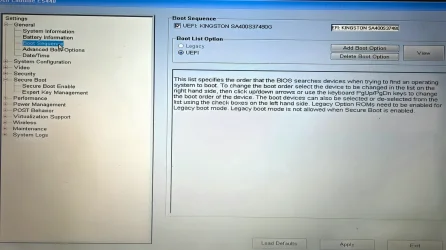
Now, my Dell Latitude E5440 (Windows 10 Pro) won’t boot in secure mode, though I can boot in unsecured mode. I have tried everything to boot in secure mode, including loading defaults and resetting the BIOS.

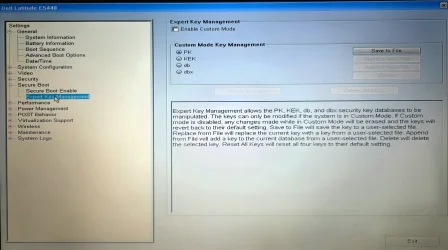
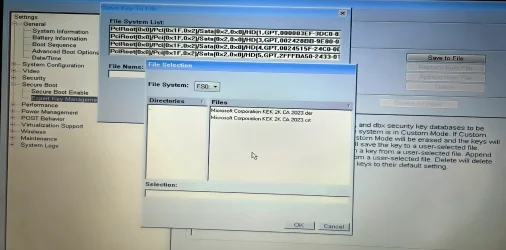
This is my BIOS menu and the current EFI and Microsoft certificates that are available there. What should I do now?

*I can boot in unsecured mode only.
*Dell Latitude E5440
*Bios ver: Dell Inc. A24, 13/06/2019
*Window 10 PRO: ver 10.0.19045 Build 19045. (UEFI installation)

Thank you!
 

Attachments

  • 20260316_185502.webp
    20260316_185502.webp
    266.7 KB · Views: 7
  • 20260316_184826.webp
    20260316_184826.webp
    297.6 KB · Views: 9
  • 20260316_184932.webp
    20260316_184932.webp
    336 KB · Views: 8
  • 20260316_185428.webp
    20260316_185428.webp
    781.5 KB · Views: 8
Last edited:

My Computer

System One

  • OS
    W10 PRO
    Computer type
    PC/Desktop
I presume since you've reset UEFI to factory defaults, the UEFI CA 2023 cert isn't present in the DB.

1. Copy the old boot file back:
Code:
mountvol S: /s
copy C:\Windows\Boot\EFI\bootmgfw.efi S:\EFI\Microsoft\Boot\bootmgfw.efi

2. Shutdown Windows. Enable Secure Boot.

3. Restart Windows.

This Dell's last BIOS update was Dec. 2019, which is too old to support the CA 2023 certs. It may be possible to replace the certs in Setup Mode (when no certs are installed), with a new set of MS certs.
 

My Computer

System One

  • OS
    Windows 7
I presume since you've reset UEFI to factory defaults, the UEFI CA 2023 cert isn't present in the DB.

1. Copy the old boot file back:
Code:
mountvol S: /s
copy C:\Windows\Boot\EFI\bootmgfw.efi S:\EFI\Microsoft\Boot\bootmgfw.efi

2. Shutdown Windows. Enable Secure Boot.

3. Restart Windows.

This Dell's last BIOS update was Dec. 2019, which is too old to support the CA 2023 certs. It may be possible to replace the certs in Setup Mode (when no certs are installed), with a new set of MS certs.
Sir, you are a gentleman and a scholar, thank you!

Per your instructions, I managed to boot into secure mode again immediately.

Status after PART A two restarts: "True"
Registry UEFICA2023Status: "InProgress".

I am now trying to reach the registry UEFICA2023Status to "Updated" by repeating PART B only, via elevated CMD and PowerShell. (So far I never managed to get this to "updated".)

I don’t know if this is related, but in the last few months there have been huge numbers of totally random crashes in older Dell laptop series. Internet is flooded with this problem and mine (2015 Dell e5440 latitude) laptop is one of them.

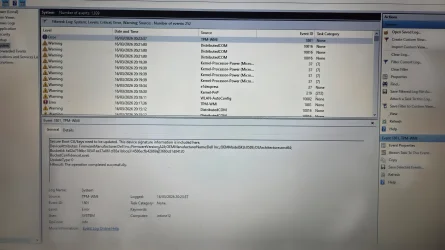
Every time it randomly crashes, Event Viewer reports the following error.
Error: TPM-WMI (Event ID) 1801
Secure Boot CA/keys need to be updated. This device signature information is included here:
DeviceAttributes: FirmwareManufacturerDell Inc.; FirmwareVersion:A24; OEMManufacturerNameDell Inc.; OEMModelSKU:05DE; OSArchitecture:amd64
BucketId: fa02a7166bc10541ee37a861cf83a1bbce314586ecfb42869a/3660c81d84120
BucketConfidenceLevel:
UpdateType:

HResult: The operation completed successfully. (?!!)

I am 90% sure that none of the drivers or any hardware issue is crashing the OS.
I am hoping to fix this error event "TPM-WMI (Event ID) 1801", with this update.
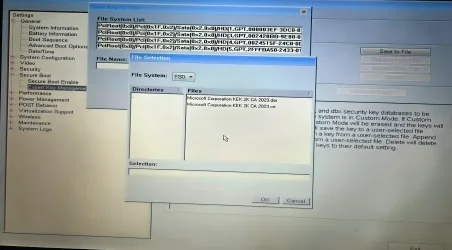
I don’t know if this is important, but KEK 2K CA 2023 (.der & .crt) can be found in my BIOS → EFI → Key Management → Certificates folders.

This is what I am trying to fix, am I wrong?

Thank you again!
 

Attachments

  • 20260316_184932.webp
    20260316_184932.webp
    341.7 KB · Views: 4
  • 20260316_202929.webp
    20260316_202929.webp
    416.5 KB · Views: 5
Last edited:

My Computer

System One

  • OS
    W10 PRO
    Computer type
    PC/Desktop
Please run the check script from this thread. Thanks.
garlin's PowerShell scripts for updating Secure Boot CA 2023

Code:
Check_UEFI-CA2023.ps1 -Verbose
Windows PowerShell
Copyright (C) Microsoft Corporation. All rights reserved.
Try the new cross-platform PowerShell Into the Pandaverse
PS C:\Windows\system32> cd C:\SB
PS C:\SB> .\Check_UEFI-CA2023.ps1 -Verbose
Windows 10 22H2 (19045.6466)

Secure Boot: ON
Virtualization Based Security: OFF
BitLocker on (C:) OFF

BIOS Firmware
-------------
Dell Inc. Latitude E5440
Version: A24
Date: 2019-06-13

Factory Default UEFI PK Cert
----------------------------
(NONE)

UEFI PK Cert
------------
Dell Inc. UEFI Platform Key
Manual update of [KEK CA 2023] is REQUIRED.

Factory Default UEFI KEK Certs
------------------------------
(NONE)

UEFI KEK Certs
--------------
Microsoft Corporation KEK CA 2011

Factory Default UEFI DB Certs
-----------------------------
(NONE)

UEFI DB Certs
-------------
Microsoft Corporation UEFI CA 2011
Microsoft Windows Production PCA 2011
Microsoft Option ROM UEFI CA 2023
Microsoft UEFI CA 2023
Windows UEFI CA 2023

Factory Default UEFI DBX Certs
------------------------------
(NONE)
Get-SecureBootUEFI : Variable is currently undefined: 0xC0000100
At C:\SB\Check_UEFI-CA2023.ps1:1115 char:62
+ ... gnatures: {1}' -f $Tab4, (Get-SecureBootUEFI -Name dbxDefault | Get-U ...
+ ~~~~~~~~~~~~~~~~~~~~~~~~~~~~~~~~~~~
+ CategoryInfo : ResourceUnavailable: (Microsoft.Secur...BootUefiCommand:GetSecureBootUefiCommand) [Get-S
ecureBootUEFI], StatusException
+ FullyQualifiedErrorId : GetFWVarFailed,Microsoft.SecureBoot.Commands.GetSecureBootUefiCommand


UEFI DBX Certs
--------------
Microsoft Windows PCA 2010
Windows BootMgr SVN is MISSING.
EFI_CERT_SHA256_GUID Signatures: 13

EFI Files
---------
Disk 0: Windows Boot Manager [Production PCA 2011] is ALLOWED.
bootmgfw.efi File version: 26100.1004

Registry: WindowsUEFICA2023Capable = 1
[Windows UEFI CA 2023] in UEFI DB.


REQUIRED ACTION
===============

Run the command:
Update_UEFI-CA2023.ps1 -Revoke

Finish the UEFI steps to manually add the [KEK CA 2023] cert, if the script provided instructions.

PS C:\SB>
 

Attachments

Last edited:

My Computer

System One

  • OS
    W10 PRO
    Computer type
    PC/Desktop
This is what I suspected, you're missing the critical KEK CA 2023.

1. Make sure your UEFI is in Custom Mode.

2. From that same UEFI menu, you see "Append from file" (grayed out). Use this sub-menu to add one of the two "KEK CA 2023" cert files. Both files are identical, but some BIOS'es are picky about the filename's extension.
 

My Computer

System One

  • OS
    Windows 7
Your help is so appreciated. I cannot thank you enough.

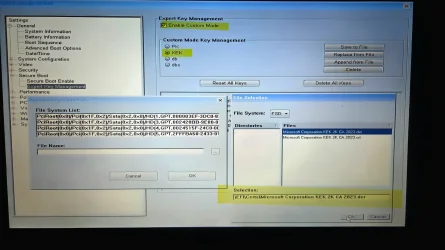
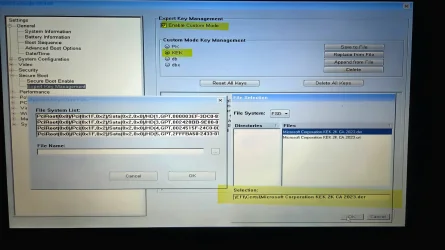
In BIOS mode: Secure Boot → Expert Key Management Enabled → Custom Mode

Selection: KEK -> Append from File
DIR: EFI/CERTS/
a) File name: Microsoft Corporation KEK 2K CA 2003.der
b) File name: Microsoft Corporation KEK 2K CA 2003.cer

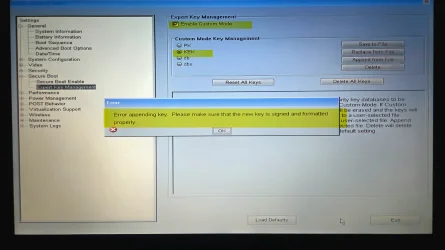
I tried both of them and received the following error: “Error appending key. Please make sure that the new key is signed and formatted properly.”
 

Attachments

  • 20260317_002503.webp
    20260317_002503.webp
    416.1 KB · Views: 5
  • 20260317_002545(1).webp
    20260317_002545(1).webp
    323 KB · Views: 7

My Computer

System One

  • OS
    W10 PRO
    Computer type
    PC/Desktop
That's what I was afraid of.
Some Dell BIOS'es have this funky signing requirement, and they don't accept .DER or .CRT formatted files.

You can try Reset All Keys, this wipes all the keys out and leaves UEFI in Setup Mode. The update script might be able to write the Windows OEM Devices certs into place. Windows OEM Devices is a drop-in replacement designed for this situation.
Code:
powershell -ep bypass -f Update_UEFI-CA2023.ps1
 

My Computer

System One

  • OS
    Windows 7
Just to clarify that these are the correct steps:
1. In BIOS mode: Secure Boot → Expert Key Management Enabled → Custom Mode
A. Delete all keys.
B. Then reset all keys.
2. Reboot into BIOS and disable Secure Boot.
3. Boot into Windows 10 and copy the old boot file back (as you instructed me previously).
4. Reboot into BIOS and re-enable Secure Boot.
5A. Apply or Skip (?) PART 1 and PART 2
5B. Run PowerShell as Administrator and execute this command for the Update_UEFI-CA2023.ps1 script:
"powershell -ep bypass -f Update_UEFI-CA2023.ps1"

Is this OK?
 
Last edited:

My Computer

System One

  • OS
    W10 PRO
    Computer type
    PC/Desktop
Don't run the Option 1 or 2 steps. That assumes you have a supported BIOS. If you run the check script when UEFI is in Setup Mode, it will instruct you to use the upgrade script.
 

My Computer

System One

  • OS
    Windows 7
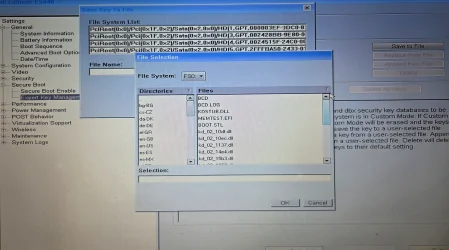
1. In BIOS, I deleted all keys, both "one-by- one" and also using the Delete All Keys" option. – Restart.
2. In BIOS, I reset all keys, using the "Reset All Keys" option. – Restart.
3. In BIOS, I loaded all defaults. – Restart.
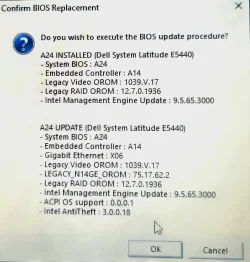
4. I even re-flashed the BIOS. – Restart.
5. I disabled Secure Boot, booted into W10PRO, copied the old boot file back (as you previously instructed), restart - then re-enabled Secure Boot. – Restart.

*******
**At this point, I checked in BIOS whether
EFI/CERTS/"Microsoft Corporation KEK 2K CA 2003.der" and "Microsoft Corporation KEK 2K CA 2003.cer" were still listed as options under “Append from File.
**Yes, they were still there. Did nothing - just restart.
*********

What do I do next?

A. Run "powershell -ep bypass -f Update_UEFI-CA2023.ps1" or
B. Run "Check_UEFI-CA2023.ps1 -Verbose" or
C. Both in what order?

Thanks!
 

Attachments

  • 20260317_030928.webp
    20260317_030928.webp
    500.5 KB · Views: 5
  • 20260317_002503.webp
    20260317_002503.webp
    416.1 KB · Views: 7
Last edited:

My Computer

System One

  • OS
    W10 PRO
    Computer type
    PC/Desktop
Back
Top Bottom