settingspagevisibility how to hide lighting for for developers

  • Thread starter Thread starter Deleted member 11899
  • Start date Start date

D

Deleted member 11899

Guest
hi,

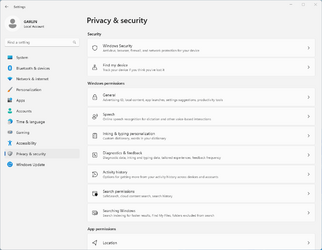
how do i hide the "dynamic lighting" and "for developers" settings pages using the settingspagevisibility registry key? The URI "developers" does not hide it.
 
Last edited by a moderator:
My Computer

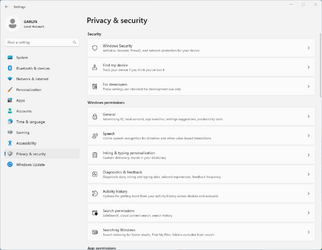
I don't believe Dynamic Lighting has its own ms-settings: URI, but you can hide "For Developers".
Code:
[HKEY_LOCAL_MACHINE\SOFTWARE\Microsoft\Windows\CurrentVersion\Policies\Explorer]
"SettingsPageVisibility"="hide:developers"
 

Attachments

  • Screenshot 2023-10-04 223302.png
    Screenshot 2023-10-04 223302.png
    31.4 KB · Views: 4
  • Screenshot 2023-10-04 223837.png
    Screenshot 2023-10-04 223837.png
    30.6 KB · Views: 5

My Computer

System One

  • OS
    Windows 7
TIL there is a Dynamic lighting URI: ms-settings:personalization-lighting
 

My Computer

System One

  • OS
    Windows 11
    Computer type
    Laptop
    Manufacturer/Model
    Asus G14 GA403UV
Hey Deleted member 11899,

Showing gratitude is important in online communities. Use the "like" button to appreciate helpful content. This motivates people to keep sharing knowledge. A "like" gives 1 point, "Helpful" gives 5 points, and "Great support" gives 10 points for exceptional help.

Latest Support Threads

Back
Top Bottom