
Navigation
Install the app
How to install the app on iOS
Follow along with the video below to see how to install our site as a web app on your home screen.
Note: This feature may not be available in some browsers.
More options
Style variation
System
Light
Dark
You are using an out of date browser. It may not display this or other websites correctly.
You should upgrade or use an alternative browser.
You should upgrade or use an alternative browser.
Solved Why is a clean install so hard?
- Thread starter PhilB
- Start date

I just setup my new Beelink Mini PC and I was given the option to continue without the internet. I was going to try hitting Shift + F10 but was pleased to find that I didn't have too. I can also happily say that all of my user folders are on the C: drive and OneDrive didn't take over. The PC came with Windows 11 Pro version 21H2 build 22000.318. I don't know if newer builds have removed this option or not. The one thing I did have trouble with was trying to use a Macrium repair USB drive to image the drisk before I made any changes. Some of the fonts were cut off and on certain areas the mouse cursor acted like I was using the eraser in Paint. I did finally manage to make the image.
My Computers
-
At a glance
Windows 11 Pro 25H2Intel Core i7-10700K16GB (8GB PC4-19200 DDR4 SDRAM x2)NVIDIA GeForce GTX 1050 TI- OS
- Windows 11 Pro 25H2
- Computer type
- PC/Desktop
- Manufacturer/Model
- PowerSpec B746
- CPU
- Intel Core i7-10700K
- Motherboard
- ASRock Z490 Phantom Gaming 4/ax
- Memory
- 16GB (8GB PC4-19200 DDR4 SDRAM x2)
- Graphics Card(s)
- NVIDIA GeForce GTX 1050 TI
- Sound Card
- Realtek Audio
- Monitor(s) Displays
- #1. LG ULTRAWIDE 34" #2. AOC Q32G2WG3 32"
- Screen Resolution
- #1. 3440 X 1440 #2. 1920 x 1080
- Hard Drives
- NVMe WDC WDS100T2B0C-00PXH0 1TB
Samsung SSD 860 EVO 1TB
- PSU
- 750 Watts (62.5A)
- Case
- PowerSpec/Lian Li ATX 205
- Keyboard
- Logitech K270
- Mouse
- Logitech M185
- Browser
- Microsoft Edge and Firefox
- Antivirus
- Webroot SecureAnywhere CE 26.1
-
At a glance
Windows 11 Canary ChannelIntel Core i5-8400 CPU @ 2.80GHz16 MB DDR 4-2666- Operating System
- Windows 11 Canary Channel
- Computer type
- PC/Desktop
- Manufacturer/Model
- PowerSpec G156
- CPU
- Intel Core i5-8400 CPU @ 2.80GHz
- Motherboard
- AsusTeK Prime B360M-A
- Memory
- 16 MB DDR 4-2666
- Monitor(s) Displays
- 23" Speptre HDMI 75Hz
- Screen Resolution
- 1920x1080
- Hard Drives
- Samsung 970 EVO 500GB NVMe
- Keyboard
- Logitek K270
- Mouse
- Logitek M185
- Browser
- Firefox, Edge and Edge Canary
- Antivirus
- Windows Defender

- Local time
- 9:21 PM
- Posts
- 4,746
- Location
- CurrentCounty
- OS
- Windows 11 Home x64 Version 25H2 Build 26200.9168
You're not the first to report this recently.I just setup my new Beelink Mini PC and I was given the option to continue without the internet. I was going to try hitting Shift + F10 but was pleased to find that I didn't have too.
I've done three OOBE procedures within the last week or so and I was not presented with the continue without the internet option until after I'd used Shift-F10 then the bypassnro thing.
The ISO from which my install USB was created was downloaded on the 28th of January 2023 [22H2]. Was yours a more recent one?
All the best,
Denis
My Computer
At a glance
Windows 11 Home x64 Version 25H2 Build 26200....
- OS
- Windows 11 Home x64 Version 25H2 Build 26200.9168
I've not had any problems with the install. I either use an MS account, or I provide a fake username/password combo and then it lets me continue with a local account. Rest of install has been really straight forward.
My Computers
-
At a glance
Windows 11 ProIntel Core i5-8279u32GB DDR4 2666MhzIntel Iris Plus 655- OS
- Windows 11 Pro
- Computer type
- PC/Desktop
- Manufacturer/Model
- Beelink SEI8
- CPU
- Intel Core i5-8279u
- Motherboard
- AZW SEI
- Memory
- 32GB DDR4 2666Mhz
- Graphics Card(s)
- Intel Iris Plus 655
- Sound Card
- Intel SST
- Monitor(s) Displays
- Asus ProArt PA278QV
- Screen Resolution
- 2560x1440
- Hard Drives
- 512GB NVMe
- PSU
- NA
- Case
- NA
- Cooling
- NA
- Keyboard
- NA
- Mouse
- NA
- Internet Speed
- 500/50
- Browser
- Edge
- Antivirus
- Defender
- Other Info
- Mini PC used for testing Windows 11.
-
At a glance
Windows 10 ProRyzen 9 5900x64GB DDR4-3600EVGA GeForce 3080 FT3 Ultra- Operating System
- Windows 10 Pro
- Computer type
- PC/Desktop
- Manufacturer/Model
- Custom
- CPU
- Ryzen 9 5900x
- Motherboard
- Asus Rog Strix X570-E Gaming
- Memory
- 64GB DDR4-3600
- Graphics card(s)
- EVGA GeForce 3080 FT3 Ultra
- Sound Card
- Onboard
- Monitor(s) Displays
- ASUS TUF Gaming VG27AQ. ASUS ProArt Display PA278QV 27” WQHD
- Screen Resolution
- 2560x1440
- Hard Drives
- 2TB WD SN850 PCI-E Gen 4 NVMe
2TB Sandisk Ultra 2.5" SATA SSD
- PSU
- Seasonic Focus 850
- Case
- Fractal Meshify S2 in White
- Cooling
- Dark Rock Pro CPU cooler, 3 x 140mm case fans
- Keyboard
- Corsiar K65 RGB Lux
- Mouse
- Logitech G9 Laser Mouse
- Internet Speed
- 500/50
- Browser
- Chrome
- Antivirus
- Defender.
It was version 21H2. I just made a second image using the free version of Macrium within Windows. Now I'm going to do all the updates.You're not the first to report this recently.
I've done three OOBE procedures within the last week or so and I was not presented with the continue without the internet option until after I'd used Shift-F10 then the bypassnro thing.
The ISO from which my install USB was created was downloaded on the 28th of January 2023 [22H2]. Was yours a more recent one?
All the best,
Denis
My Computers
-
At a glance
Windows 11 Pro 25H2Intel Core i7-10700K16GB (8GB PC4-19200 DDR4 SDRAM x2)NVIDIA GeForce GTX 1050 TI- OS
- Windows 11 Pro 25H2
- Computer type
- PC/Desktop
- Manufacturer/Model
- PowerSpec B746
- CPU
- Intel Core i7-10700K
- Motherboard
- ASRock Z490 Phantom Gaming 4/ax
- Memory
- 16GB (8GB PC4-19200 DDR4 SDRAM x2)
- Graphics Card(s)
- NVIDIA GeForce GTX 1050 TI
- Sound Card
- Realtek Audio
- Monitor(s) Displays
- #1. LG ULTRAWIDE 34" #2. AOC Q32G2WG3 32"
- Screen Resolution
- #1. 3440 X 1440 #2. 1920 x 1080
- Hard Drives
- NVMe WDC WDS100T2B0C-00PXH0 1TB
Samsung SSD 860 EVO 1TB
- PSU
- 750 Watts (62.5A)
- Case
- PowerSpec/Lian Li ATX 205
- Keyboard
- Logitech K270
- Mouse
- Logitech M185
- Browser
- Microsoft Edge and Firefox
- Antivirus
- Webroot SecureAnywhere CE 26.1
-
At a glance
Windows 11 Canary ChannelIntel Core i5-8400 CPU @ 2.80GHz16 MB DDR 4-2666- Operating System
- Windows 11 Canary Channel
- Computer type
- PC/Desktop
- Manufacturer/Model
- PowerSpec G156
- CPU
- Intel Core i5-8400 CPU @ 2.80GHz
- Motherboard
- AsusTeK Prime B360M-A
- Memory
- 16 MB DDR 4-2666
- Monitor(s) Displays
- 23" Speptre HDMI 75Hz
- Screen Resolution
- 1920x1080
- Hard Drives
- Samsung 970 EVO 500GB NVMe
- Keyboard
- Logitek K270
- Mouse
- Logitek M185
- Browser
- Firefox, Edge and Edge Canary
- Antivirus
- Windows Defender
I was hoping to be able to have to use one of the tricks to bypass needing the internet and a account just for testing.I've not had any problems with the install. I either use an MS account, or I provide a fake username/password combo and then it lets me continue with a local account. Rest of install has been really straight forward.
My Computers
-
At a glance
Windows 11 Pro 25H2Intel Core i7-10700K16GB (8GB PC4-19200 DDR4 SDRAM x2)NVIDIA GeForce GTX 1050 TI- OS
- Windows 11 Pro 25H2
- Computer type
- PC/Desktop
- Manufacturer/Model
- PowerSpec B746
- CPU
- Intel Core i7-10700K
- Motherboard
- ASRock Z490 Phantom Gaming 4/ax
- Memory
- 16GB (8GB PC4-19200 DDR4 SDRAM x2)
- Graphics Card(s)
- NVIDIA GeForce GTX 1050 TI
- Sound Card
- Realtek Audio
- Monitor(s) Displays
- #1. LG ULTRAWIDE 34" #2. AOC Q32G2WG3 32"
- Screen Resolution
- #1. 3440 X 1440 #2. 1920 x 1080
- Hard Drives
- NVMe WDC WDS100T2B0C-00PXH0 1TB
Samsung SSD 860 EVO 1TB
- PSU
- 750 Watts (62.5A)
- Case
- PowerSpec/Lian Li ATX 205
- Keyboard
- Logitech K270
- Mouse
- Logitech M185
- Browser
- Microsoft Edge and Firefox
- Antivirus
- Webroot SecureAnywhere CE 26.1
-
At a glance
Windows 11 Canary ChannelIntel Core i5-8400 CPU @ 2.80GHz16 MB DDR 4-2666- Operating System
- Windows 11 Canary Channel
- Computer type
- PC/Desktop
- Manufacturer/Model
- PowerSpec G156
- CPU
- Intel Core i5-8400 CPU @ 2.80GHz
- Motherboard
- AsusTeK Prime B360M-A
- Memory
- 16 MB DDR 4-2666
- Monitor(s) Displays
- 23" Speptre HDMI 75Hz
- Screen Resolution
- 1920x1080
- Hard Drives
- Samsung 970 EVO 500GB NVMe
- Keyboard
- Logitek K270
- Mouse
- Logitek M185
- Browser
- Firefox, Edge and Edge Canary
- Antivirus
- Windows Defender

Note my comments below are based upon my preference on using simple easy to use methods rather than more complicated ones to install Windows 11.
I noticed in a couple recent review of mini PCs that they came with Windows 11 21H2 instead of 22H2. I wonder if that was because with 22H2 you didn't have an option to install Windows 11 without an Internet connection.
Does anyone know why a lot of people want to install Windows 11 without an Internet connection? Like I said that 21H2 allowed you to use a local account instead of a Microsoft one if you didn't have an Internet connection. Since 22H2 doesn't allow that is there any other reason why some people still want to install Windows 11 without an Internet connection?
I also use the fake Microsoft account method to allow me to start with a local account. Through experimentation I found that not all fake accounts will work. I decided that it best to use a fake Microsoft account name that was easy to remember. I use the following fake Microsoft account.
Username: username
Password: password
I noticed in a couple recent review of mini PCs that they came with Windows 11 21H2 instead of 22H2. I wonder if that was because with 22H2 you didn't have an option to install Windows 11 without an Internet connection.
Does anyone know why a lot of people want to install Windows 11 without an Internet connection? Like I said that 21H2 allowed you to use a local account instead of a Microsoft one if you didn't have an Internet connection. Since 22H2 doesn't allow that is there any other reason why some people still want to install Windows 11 without an Internet connection?
I also use the fake Microsoft account method to allow me to start with a local account. Through experimentation I found that not all fake accounts will work. I decided that it best to use a fake Microsoft account name that was easy to remember. I use the following fake Microsoft account.
Username: username
Password: password
My Computers
-
At a glance
Windows 11 Pro 25H2 (26200.6901)AMD Ryzen 7 6800H with Radeon 680M GPU (486MB...Crucial DDR5-4800 (2400MHz) 32GB (2 x 16GB)NVIDIA RTX 3060 Laptop (6GB RAM)- OS
- Windows 11 Pro 25H2 (26200.6901)
- Computer type
- Laptop
- Manufacturer/Model
- ASUS TUF Gaming A15 (2022)
- CPU
- AMD Ryzen 7 6800H with Radeon 680M GPU (486MB RAM)
- Memory
- Crucial DDR5-4800 (2400MHz) 32GB (2 x 16GB)
- Graphics Card(s)
- NVIDIA RTX 3060 Laptop (6GB RAM)
- Sound Card
- n/a
- Monitor(s) Displays
- 15.6-inch
- Screen Resolution
- 1920x1080 300Hz
- Hard Drives
- 2 x Samsung 990 Evo Plus (2TB M.2 NVME SSD)
- PSU
- n/a
- Mouse
- Wireless Mouse M510
- Internet Speed
- 2100Mbps/300Mbps
- Browser
- Firefox
- Antivirus
- Malwarebytes
-
At a glance
Windows 11 Pro 25H2 (26200.8246)AMD Ryzen 7 5700X3DG.SKILL Flare X 32GB (2x16GB) DDR4ASUS ROG-STRIX-RTX3060TI-08G-V2-GAMING (RTX 3...- Operating System
- Windows 11 Pro 25H2 (26200.8246)
- Computer type
- PC/Desktop
- Manufacturer/Model
- Custom build
- CPU
- AMD Ryzen 7 5700X3D
- Motherboard
- ASUS ROG Strix B550-F Gaming WiFi II
- Memory
- G.SKILL Flare X 32GB (2x16GB) DDR4
- Graphics card(s)
- ASUS ROG-STRIX-RTX3060TI-08G-V2-GAMING (RTX 3060-Ti, 8GB RAM)
- Monitor(s) Displays
- Samsung G50D IPS 27"
- Screen Resolution
- 1440p/180Hz
- Hard Drives
- SAMSUNG 990 EVO Plus (2TB] M.2 NVME SSD
SAMSUNG 990 EVO Plus (4TB) M.2 NVME SSD
- PSU
- Corsair RM750x (750 watts)
- Case
- Cooler Master MasterCase 5
- Cooling
- Scythe Mugen 6
- Keyboard
- Logitech K520 (MK540 keyboard/mouse combo)
- Mouse
- Logitech M310 (MK540 keyboard/mouse combo)
- Internet Speed
- 2100 Mbps down / 300 Mbps up
- Browser
- Firefox, Edge, Chrome
- Antivirus
- Malwarebytes (Premium)
- Other Info
- ASUS Blu-ray Burner BW-16D1HT (SATA) || Western Digital Easystore 20TB USB 3.0 external hard drive used with Acronis True Image 2025 backup software || HP OfficeJet Pro 6975 Printer/Scanner
I know why I do it. MS doesn't want to add the option to choose your user name and the fact that OneDrive now wants to put all Users folders in the cloud instead of being local.Does anyone know why a lot of people want to install Windows 11 without an Internet connection?
My Computers
-
At a glance
Windows 11 Pro 25H2Intel Core i7-10700K16GB (8GB PC4-19200 DDR4 SDRAM x2)NVIDIA GeForce GTX 1050 TI- OS
- Windows 11 Pro 25H2
- Computer type
- PC/Desktop
- Manufacturer/Model
- PowerSpec B746
- CPU
- Intel Core i7-10700K
- Motherboard
- ASRock Z490 Phantom Gaming 4/ax
- Memory
- 16GB (8GB PC4-19200 DDR4 SDRAM x2)
- Graphics Card(s)
- NVIDIA GeForce GTX 1050 TI
- Sound Card
- Realtek Audio
- Monitor(s) Displays
- #1. LG ULTRAWIDE 34" #2. AOC Q32G2WG3 32"
- Screen Resolution
- #1. 3440 X 1440 #2. 1920 x 1080
- Hard Drives
- NVMe WDC WDS100T2B0C-00PXH0 1TB
Samsung SSD 860 EVO 1TB
- PSU
- 750 Watts (62.5A)
- Case
- PowerSpec/Lian Li ATX 205
- Keyboard
- Logitech K270
- Mouse
- Logitech M185
- Browser
- Microsoft Edge and Firefox
- Antivirus
- Webroot SecureAnywhere CE 26.1
-
At a glance
Windows 11 Canary ChannelIntel Core i5-8400 CPU @ 2.80GHz16 MB DDR 4-2666- Operating System
- Windows 11 Canary Channel
- Computer type
- PC/Desktop
- Manufacturer/Model
- PowerSpec G156
- CPU
- Intel Core i5-8400 CPU @ 2.80GHz
- Motherboard
- AsusTeK Prime B360M-A
- Memory
- 16 MB DDR 4-2666
- Monitor(s) Displays
- 23" Speptre HDMI 75Hz
- Screen Resolution
- 1920x1080
- Hard Drives
- Samsung 970 EVO 500GB NVMe
- Keyboard
- Logitek K270
- Mouse
- Logitek M185
- Browser
- Firefox, Edge and Edge Canary
- Antivirus
- Windows Defender

- Local time
- 9:21 PM
- Posts
- 8,820
- OS
- Windows 11 Pro + Win11 Canary VM.
Not everything on the web is true LOL!I read Windows 12 beta will be out shortly with an expected target launch date in 2024.
If it was me I'd say forget Windows 11 (if you have the option). If in the future you need to reinstall Windows then stay with Windows 10. That's what I'm going to do.
My Computer
At a glance
Windows 11 Pro + Win11 Canary VM.I9 13th gen i9-13900H 2.60 GHZ16 GB solderedIntegrated Intel Iris XE
- OS
- Windows 11 Pro + Win11 Canary VM.
- Computer type
- Laptop
- Manufacturer/Model
- ASUS Zenbook 14
- CPU
- I9 13th gen i9-13900H 2.60 GHZ
- Motherboard
- Yep, Laptop has one.
- Memory
- 16 GB soldered
- Graphics Card(s)
- Integrated Intel Iris XE
- Sound Card
- Realtek built in
- Monitor(s) Displays
- laptop OLED screen
- Screen Resolution
- 2880x1800 touchscreen
- Hard Drives
- 1 TB NVME SSD (only weakness is only one slot)
- PSU
- Internal + 65W thunderbolt USB4 charger
- Case
- Yep, got one
- Cooling
- Stella Artois (UK pint cans - 568 ml) - extra cost.
- Keyboard
- Built in UK keybd
- Mouse
- Bluetooth , wireless dongled, wired
- Internet Speed
- 900 mbs (ethernet), wifi 6 typical 350-450 mb/s both up and down
- Browser
- Edge
- Antivirus
- Defender
- Other Info
- TPM 2.0, 2xUSB4 thunderbolt, 1xUsb3 (usb a), 1xUsb-c, hdmi out, 3.5 mm audio out/in combo, ASUS backlit trackpad (inc. switchable number pad)
Macrium Reflect Home V8
Office 365 Family (6 users each 1TB onedrive space)
Hyper-V (a vm runs almost as fast as my older laptop)
Resistance is futile!I read Windows 12 beta will be out shortly with an expected target launch date in 2024.
If it was me I'd say forget Windows 11 (if you have the option). If in the future you need to reinstall Windows then stay with Windows 10. That's what I'm going to do.
My Computers
-
At a glance
Windows 11 Pro 25H2 (26200.6901)AMD Ryzen 7 6800H with Radeon 680M GPU (486MB...Crucial DDR5-4800 (2400MHz) 32GB (2 x 16GB)NVIDIA RTX 3060 Laptop (6GB RAM)- OS
- Windows 11 Pro 25H2 (26200.6901)
- Computer type
- Laptop
- Manufacturer/Model
- ASUS TUF Gaming A15 (2022)
- CPU
- AMD Ryzen 7 6800H with Radeon 680M GPU (486MB RAM)
- Memory
- Crucial DDR5-4800 (2400MHz) 32GB (2 x 16GB)
- Graphics Card(s)
- NVIDIA RTX 3060 Laptop (6GB RAM)
- Sound Card
- n/a
- Monitor(s) Displays
- 15.6-inch
- Screen Resolution
- 1920x1080 300Hz
- Hard Drives
- 2 x Samsung 990 Evo Plus (2TB M.2 NVME SSD)
- PSU
- n/a
- Mouse
- Wireless Mouse M510
- Internet Speed
- 2100Mbps/300Mbps
- Browser
- Firefox
- Antivirus
- Malwarebytes
-
At a glance
Windows 11 Pro 25H2 (26200.8246)AMD Ryzen 7 5700X3DG.SKILL Flare X 32GB (2x16GB) DDR4ASUS ROG-STRIX-RTX3060TI-08G-V2-GAMING (RTX 3...- Operating System
- Windows 11 Pro 25H2 (26200.8246)
- Computer type
- PC/Desktop
- Manufacturer/Model
- Custom build
- CPU
- AMD Ryzen 7 5700X3D
- Motherboard
- ASUS ROG Strix B550-F Gaming WiFi II
- Memory
- G.SKILL Flare X 32GB (2x16GB) DDR4
- Graphics card(s)
- ASUS ROG-STRIX-RTX3060TI-08G-V2-GAMING (RTX 3060-Ti, 8GB RAM)
- Monitor(s) Displays
- Samsung G50D IPS 27"
- Screen Resolution
- 1440p/180Hz
- Hard Drives
- SAMSUNG 990 EVO Plus (2TB] M.2 NVME SSD
SAMSUNG 990 EVO Plus (4TB) M.2 NVME SSD
- PSU
- Corsair RM750x (750 watts)
- Case
- Cooler Master MasterCase 5
- Cooling
- Scythe Mugen 6
- Keyboard
- Logitech K520 (MK540 keyboard/mouse combo)
- Mouse
- Logitech M310 (MK540 keyboard/mouse combo)
- Internet Speed
- 2100 Mbps down / 300 Mbps up
- Browser
- Firefox, Edge, Chrome
- Antivirus
- Malwarebytes (Premium)
- Other Info
- ASUS Blu-ray Burner BW-16D1HT (SATA) || Western Digital Easystore 20TB USB 3.0 external hard drive used with Acronis True Image 2025 backup software || HP OfficeJet Pro 6975 Printer/Scanner
- Local time
- 9:21 PM
- Posts
- 4,746
- Location
- CurrentCounty
- OS
- Windows 11 Home x64 Version 25H2 Build 26200.9168
Avoiding an internet connection in 22H2 OOBE does allow you to create a local account still & I expect that the same applies to a 22H2 clean installDoes anyone know why a lot of people want to install Windows 11 without an Internet connection? Like I said that 21H2 allowed you to use a local account instead of a Microsoft one if you didn't have an Internet connection. Since 22H2 doesn't allow that is there any other reason why some people still want to install Windows 11 without an Internet connection?
All the best,
Denis
My Computer
At a glance
Windows 11 Home x64 Version 25H2 Build 26200....
- OS
- Windows 11 Home x64 Version 25H2 Build 26200.9168
The annoying part is you have to use the OOBE or any other workaround at all. Microsoft should have allowed people to install Windows 11 without an Internet connection and create a local account from the start. With 21H2 at least they allowed people to do that with Windows 11 Pro. That option was removed in 22H2.Avoiding an internet connection in 22H2 OOBE does allow you to create a local account still & I expect that the same applies to a 22H2 clean install
All the best,
Denis
With Windows 11 21H2 Home you are stopped during setup if you don't have an Internet connection. You can't go further until you do. A workaround is required to bypass this and create a local account.
Windows 21H2 Home

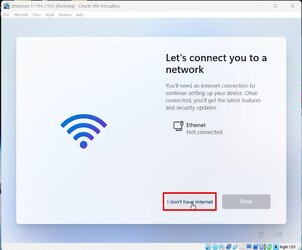
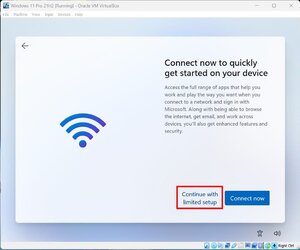
With Windows 11 21H2 Pro you have an option to bypass not having an Internet connection. When you select this you are allowed to create a local account.
Windows 21H2 Pro #1
Windows 21H2 Pro #2
Windows 21H2 Pro #3

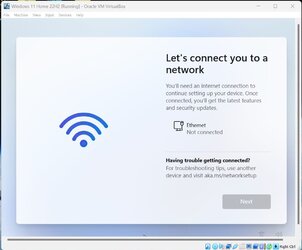
With Windows 11 22H2 neither Home or Pro allows you to bypass having an Internet connection without a workaround. You never even get to create an account.
Windows 11 22H2 Home
Windows 11 22H2 Pro

Attachments

My Computers
-
At a glance
Windows 11 Pro 25H2 (26200.6901)AMD Ryzen 7 6800H with Radeon 680M GPU (486MB...Crucial DDR5-4800 (2400MHz) 32GB (2 x 16GB)NVIDIA RTX 3060 Laptop (6GB RAM)- OS
- Windows 11 Pro 25H2 (26200.6901)
- Computer type
- Laptop
- Manufacturer/Model
- ASUS TUF Gaming A15 (2022)
- CPU
- AMD Ryzen 7 6800H with Radeon 680M GPU (486MB RAM)
- Memory
- Crucial DDR5-4800 (2400MHz) 32GB (2 x 16GB)
- Graphics Card(s)
- NVIDIA RTX 3060 Laptop (6GB RAM)
- Sound Card
- n/a
- Monitor(s) Displays
- 15.6-inch
- Screen Resolution
- 1920x1080 300Hz
- Hard Drives
- 2 x Samsung 990 Evo Plus (2TB M.2 NVME SSD)
- PSU
- n/a
- Mouse
- Wireless Mouse M510
- Internet Speed
- 2100Mbps/300Mbps
- Browser
- Firefox
- Antivirus
- Malwarebytes
-
At a glance
Windows 11 Pro 25H2 (26200.8246)AMD Ryzen 7 5700X3DG.SKILL Flare X 32GB (2x16GB) DDR4ASUS ROG-STRIX-RTX3060TI-08G-V2-GAMING (RTX 3...- Operating System
- Windows 11 Pro 25H2 (26200.8246)
- Computer type
- PC/Desktop
- Manufacturer/Model
- Custom build
- CPU
- AMD Ryzen 7 5700X3D
- Motherboard
- ASUS ROG Strix B550-F Gaming WiFi II
- Memory
- G.SKILL Flare X 32GB (2x16GB) DDR4
- Graphics card(s)
- ASUS ROG-STRIX-RTX3060TI-08G-V2-GAMING (RTX 3060-Ti, 8GB RAM)
- Monitor(s) Displays
- Samsung G50D IPS 27"
- Screen Resolution
- 1440p/180Hz
- Hard Drives
- SAMSUNG 990 EVO Plus (2TB] M.2 NVME SSD
SAMSUNG 990 EVO Plus (4TB) M.2 NVME SSD
- PSU
- Corsair RM750x (750 watts)
- Case
- Cooler Master MasterCase 5
- Cooling
- Scythe Mugen 6
- Keyboard
- Logitech K520 (MK540 keyboard/mouse combo)
- Mouse
- Logitech M310 (MK540 keyboard/mouse combo)
- Internet Speed
- 2100 Mbps down / 300 Mbps up
- Browser
- Firefox, Edge, Chrome
- Antivirus
- Malwarebytes (Premium)
- Other Info
- ASUS Blu-ray Burner BW-16D1HT (SATA) || Western Digital Easystore 20TB USB 3.0 external hard drive used with Acronis True Image 2025 backup software || HP OfficeJet Pro 6975 Printer/Scanner

- Local time
- 9:21 PM
- Posts
- 4,018
- OS
- Windows 11 Home 25H2
It's not hard. But installing Windows 10 was easier. First thing I do is uninstall one drive.
My Computers
-
At a glance
Windows 11 Home 25H2Core i5-1035G132gb- OS
- Windows 11 Home 25H2
- Computer type
- Laptop
- Manufacturer/Model
- HP Pavilion 14-ce3606sa
- CPU
- Core i5-1035G1
- Memory
- 32gb
- Hard Drives
- Samsung 870 evo sata ssd
- Cooling
- Could be better
- Internet Speed
- 50 mbps Starlink
- Browser
- Firefox
- Other Info
- Originally came installed with a 500gb H10 Optane ssd
-
At a glance
Windows 11 HomeIntel Core i5-1035G116gb- Operating System
- Windows 11 Home
- Computer type
- Laptop
- Manufacturer/Model
- HP Pavilion ce3606sa
- CPU
- Intel Core i5-1035G1
- Memory
- 16gb
- Hard Drives
- Hynix Gold P31 2TB
- Internet Speed
- 200mbps Starlink
- Browser
- Firefox
- Antivirus
- Defender
I can sum it up with just one word. OneDrive.The annoying part is you have to use the OOBE or any other workaround at all. Microsoft should have allowed people to install Windows 11 without an Internet connection and create a local account from the start. With 21H2 at least they allowed people to do that with Windows 11 Pro. That option was removed in 22H2.
My Computers
-
At a glance
Windows 11 Pro 25H2Intel Core i7-10700K16GB (8GB PC4-19200 DDR4 SDRAM x2)NVIDIA GeForce GTX 1050 TI- OS
- Windows 11 Pro 25H2
- Computer type
- PC/Desktop
- Manufacturer/Model
- PowerSpec B746
- CPU
- Intel Core i7-10700K
- Motherboard
- ASRock Z490 Phantom Gaming 4/ax
- Memory
- 16GB (8GB PC4-19200 DDR4 SDRAM x2)
- Graphics Card(s)
- NVIDIA GeForce GTX 1050 TI
- Sound Card
- Realtek Audio
- Monitor(s) Displays
- #1. LG ULTRAWIDE 34" #2. AOC Q32G2WG3 32"
- Screen Resolution
- #1. 3440 X 1440 #2. 1920 x 1080
- Hard Drives
- NVMe WDC WDS100T2B0C-00PXH0 1TB
Samsung SSD 860 EVO 1TB
- PSU
- 750 Watts (62.5A)
- Case
- PowerSpec/Lian Li ATX 205
- Keyboard
- Logitech K270
- Mouse
- Logitech M185
- Browser
- Microsoft Edge and Firefox
- Antivirus
- Webroot SecureAnywhere CE 26.1
-
At a glance
Windows 11 Canary ChannelIntel Core i5-8400 CPU @ 2.80GHz16 MB DDR 4-2666- Operating System
- Windows 11 Canary Channel
- Computer type
- PC/Desktop
- Manufacturer/Model
- PowerSpec G156
- CPU
- Intel Core i5-8400 CPU @ 2.80GHz
- Motherboard
- AsusTeK Prime B360M-A
- Memory
- 16 MB DDR 4-2666
- Monitor(s) Displays
- 23" Speptre HDMI 75Hz
- Screen Resolution
- 1920x1080
- Hard Drives
- Samsung 970 EVO 500GB NVMe
- Keyboard
- Logitek K270
- Mouse
- Logitek M185
- Browser
- Firefox, Edge and Edge Canary
- Antivirus
- Windows Defender
Many are reverting back to W10 despite it's getting nearer to it's EOL.It's not hard. But installing Windows 10 was easier. First thing I do is uninstall one drive.
My Computer
At a glance
Windows 11NVIDA 1650 Ti
- OS
- Windows 11
- Computer type
- Laptop
- Manufacturer/Model
- Lenovo
- Graphics Card(s)
- NVIDA 1650 Ti
- Monitor(s) Displays
- Lenovo C32q-20
OneDrive installation=evilI can sum it up with just one word. OneDrive.
My Computer
At a glance
Windows 11NVIDA 1650 Ti
- OS
- Windows 11
- Computer type
- Laptop
- Manufacturer/Model
- Lenovo
- Graphics Card(s)
- NVIDA 1650 Ti
- Monitor(s) Displays
- Lenovo C32q-20
- Local time
- 9:21 PM
- Posts
- 8,820
- OS
- Windows 11 Pro + Win11 Canary VM.
What a load of garbage.OneDrive installation=evil
The only people who whinge about it are tight fisted pillocks.
My Computer
At a glance
Windows 11 Pro + Win11 Canary VM.I9 13th gen i9-13900H 2.60 GHZ16 GB solderedIntegrated Intel Iris XE
- OS
- Windows 11 Pro + Win11 Canary VM.
- Computer type
- Laptop
- Manufacturer/Model
- ASUS Zenbook 14
- CPU
- I9 13th gen i9-13900H 2.60 GHZ
- Motherboard
- Yep, Laptop has one.
- Memory
- 16 GB soldered
- Graphics Card(s)
- Integrated Intel Iris XE
- Sound Card
- Realtek built in
- Monitor(s) Displays
- laptop OLED screen
- Screen Resolution
- 2880x1800 touchscreen
- Hard Drives
- 1 TB NVME SSD (only weakness is only one slot)
- PSU
- Internal + 65W thunderbolt USB4 charger
- Case
- Yep, got one
- Cooling
- Stella Artois (UK pint cans - 568 ml) - extra cost.
- Keyboard
- Built in UK keybd
- Mouse
- Bluetooth , wireless dongled, wired
- Internet Speed
- 900 mbs (ethernet), wifi 6 typical 350-450 mb/s both up and down
- Browser
- Edge
- Antivirus
- Defender
- Other Info
- TPM 2.0, 2xUSB4 thunderbolt, 1xUsb3 (usb a), 1xUsb-c, hdmi out, 3.5 mm audio out/in combo, ASUS backlit trackpad (inc. switchable number pad)
Macrium Reflect Home V8
Office 365 Family (6 users each 1TB onedrive space)
Hyper-V (a vm runs almost as fast as my older laptop)
I can truthfully say that I find OneDrive very useful. My reply in post #54 was about MS making OneDrive the default location for the Users' folders. IMHO, OneDrive should be an opt in choice and not an opt out choice. I can just imagine how many average users will buy the extra storage space because they don't know that the folders can be moved locally.What a load of garbage.
The only people who whinge about it are tight fisted pillocks.
My Computers
-
At a glance
Windows 11 Pro 25H2Intel Core i7-10700K16GB (8GB PC4-19200 DDR4 SDRAM x2)NVIDIA GeForce GTX 1050 TI- OS
- Windows 11 Pro 25H2
- Computer type
- PC/Desktop
- Manufacturer/Model
- PowerSpec B746
- CPU
- Intel Core i7-10700K
- Motherboard
- ASRock Z490 Phantom Gaming 4/ax
- Memory
- 16GB (8GB PC4-19200 DDR4 SDRAM x2)
- Graphics Card(s)
- NVIDIA GeForce GTX 1050 TI
- Sound Card
- Realtek Audio
- Monitor(s) Displays
- #1. LG ULTRAWIDE 34" #2. AOC Q32G2WG3 32"
- Screen Resolution
- #1. 3440 X 1440 #2. 1920 x 1080
- Hard Drives
- NVMe WDC WDS100T2B0C-00PXH0 1TB
Samsung SSD 860 EVO 1TB
- PSU
- 750 Watts (62.5A)
- Case
- PowerSpec/Lian Li ATX 205
- Keyboard
- Logitech K270
- Mouse
- Logitech M185
- Browser
- Microsoft Edge and Firefox
- Antivirus
- Webroot SecureAnywhere CE 26.1
-
At a glance
Windows 11 Canary ChannelIntel Core i5-8400 CPU @ 2.80GHz16 MB DDR 4-2666- Operating System
- Windows 11 Canary Channel
- Computer type
- PC/Desktop
- Manufacturer/Model
- PowerSpec G156
- CPU
- Intel Core i5-8400 CPU @ 2.80GHz
- Motherboard
- AsusTeK Prime B360M-A
- Memory
- 16 MB DDR 4-2666
- Monitor(s) Displays
- 23" Speptre HDMI 75Hz
- Screen Resolution
- 1920x1080
- Hard Drives
- Samsung 970 EVO 500GB NVMe
- Keyboard
- Logitek K270
- Mouse
- Logitek M185
- Browser
- Firefox, Edge and Edge Canary
- Antivirus
- Windows Defender

Ell201275
New member
- Local time
- 9:21 PM
- Posts
- 1
- OS
- Windows 10 Pro
So to clarify, there is NO WAY to automatically include the OOBE Bypass thing as part of the install media?
Is there not something I can add to the Windows 11 22H2 .iso to achieve this?
Is there not something I can add to the Windows 11 22H2 .iso to achieve this?
My Computer
At a glance
Windows 10 Pro
- OS
- Windows 10 Pro
- Local time
- 9:21 PM
- Posts
- 4,746
- Location
- CurrentCounty
- OS
- Windows 11 Home x64 Version 25H2 Build 26200.9168
No method that anybody has yet discovered & posted, at any rate.So to clarify, there is NO WAY to automatically include the OOBE Bypass thing as part of the install media?
Is there not something I can add to the Windows 11 22H2 .iso to achieve this?
Denis
My Computer
At a glance
Windows 11 Home x64 Version 25H2 Build 26200....
- OS
- Windows 11 Home x64 Version 25H2 Build 26200.9168
Similar threads

- Replies
- 6
- Views
- 589


- Replies
- 108
- Views
- 14K

- Replies
- 8
- Views
- 5K


Latest Support Threads
-
 Thunderbird 155.0.1: Play Sound in message filters disabled?
- Started by Krakenshark
- Replies: 0
-
 [delete double post] - Phone Link needs to be reset after every reboot
- Started by Skull_Candy
- Replies: 0
-
SmartApp is my new mommy, won't let anything dirty get through - even if I want it to
- Started by JaQuille
- Replies: 0
-
Include Drivers with Windows Update? Should I or not?
- Started by win11freak
- Replies: 0
-
 How to use Microsoft Defender when another Security provider is installed
- Started by Transcendence72
- Replies: 3
Latest Tutorials
-
 Accessibility Change Lock View Shortcut for Magnifier Zoom on Multiple Displays in Windows 11
- Started by Brink
- Replies: 0
-
 Personalization Enable or Disable "Customize menu" Tip in Windows 11
- Started by Brink
- Replies: 0
-
 Personalization Add or Remove "Customize menu" on Context Menu in Windows 11
- Started by Brink
- Replies: 0
-
 Accessibility Enable or Disable Magnifier Zoom per Display in Windows 11
- Started by Brink
- Replies: 0
-
