windows 11 startup messed up by latest cumulative update


I used that command to delete the ngc file, but always get the message saying that can't be found...and of course, upon reboot still stuck.
still get the msg" your device is offline. please sign in with last password used on this device" - hence the problem. The system does not bring up the option for pin and that's how I signed in last time prior to this issue
I just did the change password, got a code send to my phone, got it changed and received confirmation. Upon trying to log in now says" your device is offline. Please sign in with the last password used on this device" so it looks again and takes me nowhere
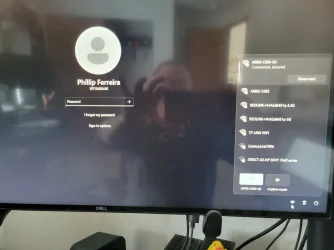
1) can you get a pic uploaded of the sign in screen
2) is your desktop only connected via Ethernet or does it have wifi too?
 

My Computer My Computer

At a glance

Windows 11 Pro
OS
Windows 11 Pro
17397338813945036970215772567093.webp


This is odd > Microsoft not found under appdata directory
 

My Computer My Computer

At a glance

windows 11 proIntel(R) Core(TM) i7-9700K CPU @ 3.60GHz64GBNVIDIA GeForce RTX 2060
OS
windows 11 pro
Computer type
PC/Desktop
Manufacturer/Model
Dell XPS 8930
CPU
Intel(R) Core(TM) i7-9700K CPU @ 3.60GHz
Memory
64GB
Graphics Card(s)
NVIDIA GeForce RTX 2060
Monitor(s) Displays
2
Hard Drives
2TB HDD / 512GB SSD
Internet Speed
TDS 1GB

Attachments

  • 20250212_103838.webp
    20250212_103838.webp
    811.1 KB · Views: 1

My Computer My Computer

At a glance

windows 11 proIntel(R) Core(TM) i7-9700K CPU @ 3.60GHz64GBNVIDIA GeForce RTX 2060
OS
windows 11 pro
Computer type
PC/Desktop
Manufacturer/Model
Dell XPS 8930
CPU
Intel(R) Core(TM) i7-9700K CPU @ 3.60GHz
Memory
64GB
Graphics Card(s)
NVIDIA GeForce RTX 2060
Monitor(s) Displays
2
Hard Drives
2TB HDD / 512GB SSD
Internet Speed
TDS 1GB
1) can you get a pic uploaded of the sign in screen
2) is your desktop only connected via Ethernet or does it have wifi too?
I tried with wifi 2.4 and 5ghz, hotspot from my phone and Ethernet cable - same result. funy thing is, it does see the wifi, I was able to reset the password, and then still says that cannot connect to network - offline
 

My Computer My Computer

At a glance

windows 11 proIntel(R) Core(TM) i7-9700K CPU @ 3.60GHz64GBNVIDIA GeForce RTX 2060
OS
windows 11 pro
Computer type
PC/Desktop
Manufacturer/Model
Dell XPS 8930
CPU
Intel(R) Core(TM) i7-9700K CPU @ 3.60GHz
Memory
64GB
Graphics Card(s)
NVIDIA GeForce RTX 2060
Monitor(s) Displays
2
Hard Drives
2TB HDD / 512GB SSD
Internet Speed
TDS 1GB
I ask you to execute dir command you are doing something i have not suggested also why are you still using X: drive as my command use C: drive letter i can see you have not watched my video if you did you would have solved the problem by now.
 

My Computer My Computer

At a glance

Windows 11AMD Ryzen 7 5700GMicron Technology DDR4-3200 16GBNVIDIA GeForce RTX 3060
OS
Windows 11
Computer type
PC/Desktop
Manufacturer/Model
HP Pavilion
CPU
AMD Ryzen 7 5700G
Motherboard
Erica6
Memory
Micron Technology DDR4-3200 16GB
Graphics Card(s)
NVIDIA GeForce RTX 3060
Sound Card
Realtek ALC671
Monitor(s) Displays
Samsung SyncMaster U28E590
Screen Resolution
3840 x 2160
Hard Drives
SAMSUNG MZVLQ1T0HALB-000H1
The icons in the bottom right never show, correct (power, network, ease of access)?

And is it Ethernet only or wifi?
they do - I can see nearby networks and change mine
 

My Computer My Computer

At a glance

windows 11 proIntel(R) Core(TM) i7-9700K CPU @ 3.60GHz64GBNVIDIA GeForce RTX 2060
OS
windows 11 pro
Computer type
PC/Desktop
Manufacturer/Model
Dell XPS 8930
CPU
Intel(R) Core(TM) i7-9700K CPU @ 3.60GHz
Memory
64GB
Graphics Card(s)
NVIDIA GeForce RTX 2060
Monitor(s) Displays
2
Hard Drives
2TB HDD / 512GB SSD
Internet Speed
TDS 1GB
What happens when you boot into safe mode? Same error?
 

My Computer My Computer

At a glance

Windows 11 Pro
OS
Windows 11 Pro
17397344760484848069992046526112.webp
 

My Computer My Computer

At a glance

windows 11 proIntel(R) Core(TM) i7-9700K CPU @ 3.60GHz64GBNVIDIA GeForce RTX 2060
OS
windows 11 pro
Computer type
PC/Desktop
Manufacturer/Model
Dell XPS 8930
CPU
Intel(R) Core(TM) i7-9700K CPU @ 3.60GHz
Memory
64GB
Graphics Card(s)
NVIDIA GeForce RTX 2060
Monitor(s) Displays
2
Hard Drives
2TB HDD / 512GB SSD
Internet Speed
TDS 1GB

My Computer My Computer

At a glance

windows 11 proIntel(R) Core(TM) i7-9700K CPU @ 3.60GHz64GBNVIDIA GeForce RTX 2060
OS
windows 11 pro
Computer type
PC/Desktop
Manufacturer/Model
Dell XPS 8930
CPU
Intel(R) Core(TM) i7-9700K CPU @ 3.60GHz
Memory
64GB
Graphics Card(s)
NVIDIA GeForce RTX 2060
Monitor(s) Displays
2
Hard Drives
2TB HDD / 512GB SSD
Internet Speed
TDS 1GB
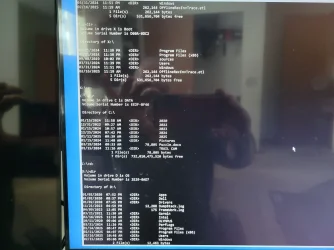
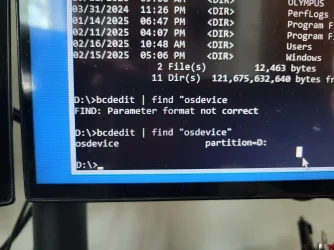
The photo you post is half i cannot see the full command and are you sure C: is the Windows 11 installed partition?


Please replace partition letter C: with Windows installed partition letter. When the computer boots into Windows Recovery Environment (WinRE) environment, the drive letter assign to Windows partition may not be C: drive letter because Windows 7, 8 , 8.1 and 10 creates a separate system partition when it's installed from scratch. The system partition contains boot files WinRE assigns the system partition the C: drive letter and the Windows installed partition will be assigned any other drive letter, usually D: drive letter is assign to Windows installed partition. The Bcdedit | find "osdevice" command can be used to find out the drive letter of the Windows installed partition, the output of the Bcdedit command is similar to this osdevice partition=D:. The drive letter after partition= is the drive letter of the Windows partition.
 

My Computer My Computer

At a glance

Windows 11AMD Ryzen 7 5700GMicron Technology DDR4-3200 16GBNVIDIA GeForce RTX 3060
OS
Windows 11
Computer type
PC/Desktop
Manufacturer/Model
HP Pavilion
CPU
AMD Ryzen 7 5700G
Motherboard
Erica6
Memory
Micron Technology DDR4-3200 16GB
Graphics Card(s)
NVIDIA GeForce RTX 3060
Sound Card
Realtek ALC671
Monitor(s) Displays
Samsung SyncMaster U28E590
Screen Resolution
3840 x 2160
Hard Drives
SAMSUNG MZVLQ1T0HALB-000H1
Sorry here is a better picture
 

Attachments

  • 17397350416516381632806051309903.webp
    17397350416516381632806051309903.webp
    1.1 MB · Views: 1

My Computer My Computer

At a glance

windows 11 proIntel(R) Core(TM) i7-9700K CPU @ 3.60GHz64GBNVIDIA GeForce RTX 2060
OS
windows 11 pro
Computer type
PC/Desktop
Manufacturer/Model
Dell XPS 8930
CPU
Intel(R) Core(TM) i7-9700K CPU @ 3.60GHz
Memory
64GB
Graphics Card(s)
NVIDIA GeForce RTX 2060
Monitor(s) Displays
2
Hard Drives
2TB HDD / 512GB SSD
Internet Speed
TDS 1GB

Attachments

  • 1739735215877162051872542830841.webp
    1739735215877162051872542830841.webp
    1.1 MB · Views: 1

My Computer My Computer

At a glance

windows 11 proIntel(R) Core(TM) i7-9700K CPU @ 3.60GHz64GBNVIDIA GeForce RTX 2060
OS
windows 11 pro
Computer type
PC/Desktop
Manufacturer/Model
Dell XPS 8930
CPU
Intel(R) Core(TM) i7-9700K CPU @ 3.60GHz
Memory
64GB
Graphics Card(s)
NVIDIA GeForce RTX 2060
Monitor(s) Displays
2
Hard Drives
2TB HDD / 512GB SSD
Internet Speed
TDS 1GB
The photo you post is half i cannot see the full command and are you sure C: is the Windows 11 installed partition?


Please replace partition letter C: with Windows installed partition letter. When the computer boots into Windows Recovery Environment (WinRE) environment, the drive letter assign to Windows partition may not be C: drive letter because Windows 7, 8 , 8.1 and 10 creates a separate system partition when it's installed from scratch. The system partition contains boot files WinRE assigns the system partition the C: drive letter and the Windows installed partition will be assigned any other drive letter, usually D: drive letter is assign to Windows installed partition. The Bcdedit | find "osdevice" command can be used to find out the drive letter of the Windows installed partition, the output of the Bcdedit command is similar to this osdevice partition=D:. The drive letter after partition= is the drive letter of the Windows partition.
another oddity - D drive was my secondary drive for Photos and other stuff, and C the main one - X is a new thing too: is being labeled as boot, D as OS and C as Data...and I have too letter E as winretools
 

My Computer My Computer

At a glance

windows 11 proIntel(R) Core(TM) i7-9700K CPU @ 3.60GHz64GBNVIDIA GeForce RTX 2060
OS
windows 11 pro
Computer type
PC/Desktop
Manufacturer/Model
Dell XPS 8930
CPU
Intel(R) Core(TM) i7-9700K CPU @ 3.60GHz
Memory
64GB
Graphics Card(s)
NVIDIA GeForce RTX 2060
Monitor(s) Displays
2
Hard Drives
2TB HDD / 512GB SSD
Internet Speed
TDS 1GB
Still searching for a solution to decrease the start-up time , after upgrade from 23H2 to 24H2 , using local administrator account ; with the pincode takes 20 seconds , when login without pincode/password , bootime takes 70 seconds !
HOW ( ??) to get my bootime ( 20 seconds ) back , without pin/password..............??

btw ; in 23H2 without pin/pass , about 20 seconds .......!
 

My Computers My Computers

  • At a glance

    Windows11 Pro 25H2i732GBnVidia
    OS
    Windows11 Pro 25H2
    Computer type
    PC/Desktop
    Manufacturer/Model
    Asus
    CPU
    i7
    Motherboard
    z97k
    Memory
    32GB
    Graphics Card(s)
    nVidia
    Sound Card
    Realtek
    Hard Drives
    3
    Cooling
    air
    Browser
    Edge
    Antivirus
    ESET
  • At a glance

    Windows11 ProIntel i516GBIntel
    Operating System
    Windows11 Pro
    Computer type
    PC/Desktop
    Manufacturer/Model
    ASUS
    CPU
    Intel i5
    Motherboard
    ASUS Basic
    Memory
    16GB
    Graphics card(s)
    Intel
    Sound Card
    Realtek
    Monitor(s) Displays
    Samsung
    Hard Drives
    one intern , 0ne extern, OS on SSD
    Cooling
    air
    Keyboard
    wireless Logitech
    Mouse
    wireless Logitech
    Internet Speed
    1GB
    Browser
    Edge
    Antivirus
    ESET
The photo you post is half i cannot see the full command and are you sure C: is the Windows 11 installed partition?


Please replace partition letter C: with Windows installed partition letter. When the computer boots into Windows Recovery Environment (WinRE) environment, the drive letter assign to Windows partition may not be C: drive letter because Windows 7, 8 , 8.1 and 10 creates a separate system partition when it's installed from scratch. The system partition contains boot files WinRE assigns the system partition the C: drive letter and the Windows installed partition will be assigned any other drive letter, usually D: drive letter is assign to Windows installed partition. The Bcdedit | find "osdevice" command can be used to find out the drive letter of the Windows installed partition, the output of the Bcdedit command is similar to this osdevice partition=D:. The drive letter after partition= is the drive letter of the Windows partition.
ok,switching to D erased the NGC - repeated the command and cannot be found now....getting somewhere it seems

gponto get our oc CMP and reboot - but will wait to see if you have anything else to add up as to do
 

My Computer My Computer

At a glance

windows 11 proIntel(R) Core(TM) i7-9700K CPU @ 3.60GHz64GBNVIDIA GeForce RTX 2060
OS
windows 11 pro
Computer type
PC/Desktop
Manufacturer/Model
Dell XPS 8930
CPU
Intel(R) Core(TM) i7-9700K CPU @ 3.60GHz
Memory
64GB
Graphics Card(s)
NVIDIA GeForce RTX 2060
Monitor(s) Displays
2
Hard Drives
2TB HDD / 512GB SSD
Internet Speed
TDS 1GB
Reboot your system to Windows 11.
 

My Computer My Computer

At a glance

Windows 11AMD Ryzen 7 5700GMicron Technology DDR4-3200 16GBNVIDIA GeForce RTX 3060
OS
Windows 11
Computer type
PC/Desktop
Manufacturer/Model
HP Pavilion
CPU
AMD Ryzen 7 5700G
Motherboard
Erica6
Memory
Micron Technology DDR4-3200 16GB
Graphics Card(s)
NVIDIA GeForce RTX 3060
Sound Card
Realtek ALC671
Monitor(s) Displays
Samsung SyncMaster U28E590
Screen Resolution
3840 x 2160
Hard Drives
SAMSUNG MZVLQ1T0HALB-000H1

Attachments

  • 17397360054302466738088550645450.webp
    17397360054302466738088550645450.webp
    557.5 KB · Views: 1

My Computer My Computer

At a glance

windows 11 proIntel(R) Core(TM) i7-9700K CPU @ 3.60GHz64GBNVIDIA GeForce RTX 2060
OS
windows 11 pro
Computer type
PC/Desktop
Manufacturer/Model
Dell XPS 8930
CPU
Intel(R) Core(TM) i7-9700K CPU @ 3.60GHz
Memory
64GB
Graphics Card(s)
NVIDIA GeForce RTX 2060
Monitor(s) Displays
2
Hard Drives
2TB HDD / 512GB SSD
Internet Speed
TDS 1GB
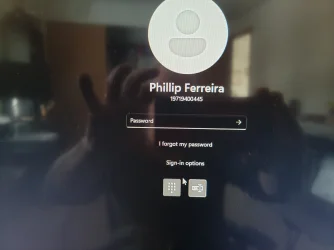
What happens when you click "Sign-in Options" as i can see its not PIN that is being asked, its your password.
 

My Computer My Computer

At a glance

Windows 11AMD Ryzen 7 5700GMicron Technology DDR4-3200 16GBNVIDIA GeForce RTX 3060
OS
Windows 11
Computer type
PC/Desktop
Manufacturer/Model
HP Pavilion
CPU
AMD Ryzen 7 5700G
Motherboard
Erica6
Memory
Micron Technology DDR4-3200 16GB
Graphics Card(s)
NVIDIA GeForce RTX 3060
Sound Card
Realtek ALC671
Monitor(s) Displays
Samsung SyncMaster U28E590
Screen Resolution
3840 x 2160
Hard Drives
SAMSUNG MZVLQ1T0HALB-000H1
What happens when you click "Sign-in Options" as i can see its not PIN that is being asked, its your password.
indeed - no pin is being asked - is either regular or sign in for windows hello
 

Attachments

  • 17397362167418856604709500496672.webp
    17397362167418856604709500496672.webp
    874.2 KB · Views: 1
  • 17397362366816036632478423876444.webp
    17397362366816036632478423876444.webp
    1 MB · Views: 1

My Computer My Computer

At a glance

windows 11 proIntel(R) Core(TM) i7-9700K CPU @ 3.60GHz64GBNVIDIA GeForce RTX 2060
OS
windows 11 pro
Computer type
PC/Desktop
Manufacturer/Model
Dell XPS 8930
CPU
Intel(R) Core(TM) i7-9700K CPU @ 3.60GHz
Memory
64GB
Graphics Card(s)
NVIDIA GeForce RTX 2060
Monitor(s) Displays
2
Hard Drives
2TB HDD / 512GB SSD
Internet Speed
TDS 1GB
Back
Top Bottom