windows 11 startup messed up by latest cumulative update


You need to enter your password to setup PIN.
 

My Computer My Computer

At a glance

Windows 11AMD Ryzen 7 5700GMicron Technology DDR4-3200 16GBNVIDIA GeForce RTX 3060
OS
Windows 11
Computer type
PC/Desktop
Manufacturer/Model
HP Pavilion
CPU
AMD Ryzen 7 5700G
Motherboard
Erica6
Memory
Micron Technology DDR4-3200 16GB
Graphics Card(s)
NVIDIA GeForce RTX 3060
Sound Card
Realtek ALC671
Monitor(s) Displays
Samsung SyncMaster U28E590
Screen Resolution
3840 x 2160
Hard Drives
SAMSUNG MZVLQ1T0HALB-000H1

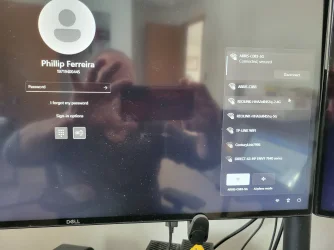
You need to enter your password to setup PIN.
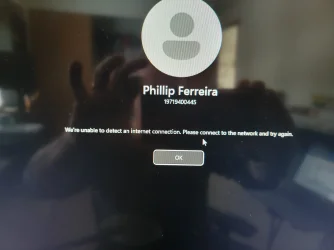
..and I get this msg saying that is unable to find an internet connection - I can't really understand what is going on with network connecting.....is being acknowledge but not to sign in?
 

Attachments

  • 17397368003956724551399280944791.webp
    17397368003956724551399280944791.webp
    716.4 KB · Views: 1
  • 17397368954371324628058732435365.webp
    17397368954371324628058732435365.webp
    818.3 KB · Views: 1

My Computer My Computer

At a glance

windows 11 proIntel(R) Core(TM) i7-9700K CPU @ 3.60GHz64GBNVIDIA GeForce RTX 2060
OS
windows 11 pro
Computer type
PC/Desktop
Manufacturer/Model
Dell XPS 8930
CPU
Intel(R) Core(TM) i7-9700K CPU @ 3.60GHz
Memory
64GB
Graphics Card(s)
NVIDIA GeForce RTX 2060
Monitor(s) Displays
2
Hard Drives
2TB HDD / 512GB SSD
Internet Speed
TDS 1GB
Are you using your local user account password to login to Windows 11?

Do you know your local user account password?

Do you know Microsoft login password?
 

My Computer My Computer

At a glance

Windows 11AMD Ryzen 7 5700GMicron Technology DDR4-3200 16GBNVIDIA GeForce RTX 3060
OS
Windows 11
Computer type
PC/Desktop
Manufacturer/Model
HP Pavilion
CPU
AMD Ryzen 7 5700G
Motherboard
Erica6
Memory
Micron Technology DDR4-3200 16GB
Graphics Card(s)
NVIDIA GeForce RTX 3060
Sound Card
Realtek ALC671
Monitor(s) Displays
Samsung SyncMaster U28E590
Screen Resolution
3840 x 2160
Hard Drives
SAMSUNG MZVLQ1T0HALB-000H1
Are you using your local user account password to login to Windows 11?

Do you know your local user account password?

Do you know Microsoft login password?
my log in to windows 11 used to be a pin number....and yes I do know the MS password. Seems that the pin number option is gone and only option left is the MS pswrd

I can use the forgot my pswrd option, and gets validated, but still takes me nowhere

should I consider making a password reset disk? I have another computer(laptop) but being from work does not let me install the application that would allow me to create it using another windows 11 pc. I could try on another computer that was upgraded from windows 10
 

My Computer My Computer

At a glance

windows 11 proIntel(R) Core(TM) i7-9700K CPU @ 3.60GHz64GBNVIDIA GeForce RTX 2060
OS
windows 11 pro
Computer type
PC/Desktop
Manufacturer/Model
Dell XPS 8930
CPU
Intel(R) Core(TM) i7-9700K CPU @ 3.60GHz
Memory
64GB
Graphics Card(s)
NVIDIA GeForce RTX 2060
Monitor(s) Displays
2
Hard Drives
2TB HDD / 512GB SSD
Internet Speed
TDS 1GB
my log in to windows 11 used to be a pin number....and yes I do know the MS password. Seems that the pin number option is gone and only option left is the MS pswrd
That login screen is for local user account password, not Microsoft password.

In this guide, i present a straightforward method for resetting Windows local user accounts password using Hiren's BootCD PE (Preinstallation Environment).


My Computer My Computer

At a glance

Windows 11AMD Ryzen 7 5700GMicron Technology DDR4-3200 16GBNVIDIA GeForce RTX 3060
OS
Windows 11
Computer type
PC/Desktop
Manufacturer/Model
HP Pavilion
CPU
AMD Ryzen 7 5700G
Motherboard
Erica6
Memory
Micron Technology DDR4-3200 16GB
Graphics Card(s)
NVIDIA GeForce RTX 3060
Sound Card
Realtek ALC671
Monitor(s) Displays
Samsung SyncMaster U28E590
Screen Resolution
3840 x 2160
Hard Drives
SAMSUNG MZVLQ1T0HALB-000H1
That login screen is for local user account password, not Microsoft password.

In this guide, i present a straightforward method for resetting Windows local user accounts password using Hiren's BootCD PE (Preinstallation Environment).

ok, let me watch and try that. Thanks

ok, I have to bug my wife to let use her pc ( I am on a Chromebook now) and download those apps
 

My Computer My Computer

At a glance

windows 11 proIntel(R) Core(TM) i7-9700K CPU @ 3.60GHz64GBNVIDIA GeForce RTX 2060
OS
windows 11 pro
Computer type
PC/Desktop
Manufacturer/Model
Dell XPS 8930
CPU
Intel(R) Core(TM) i7-9700K CPU @ 3.60GHz
Memory
64GB
Graphics Card(s)
NVIDIA GeForce RTX 2060
Monitor(s) Displays
2
Hard Drives
2TB HDD / 512GB SSD
Internet Speed
TDS 1GB
turns out my old windows 10 laptop still handles the work - just some stuck keys to deal wiyh
processing the usb drive
next - figure out to have my PC boot dfrom usb...which I don't recall to see that option
 

My Computer My Computer

At a glance

windows 11 proIntel(R) Core(TM) i7-9700K CPU @ 3.60GHz64GBNVIDIA GeForce RTX 2060
OS
windows 11 pro
Computer type
PC/Desktop
Manufacturer/Model
Dell XPS 8930
CPU
Intel(R) Core(TM) i7-9700K CPU @ 3.60GHz
Memory
64GB
Graphics Card(s)
NVIDIA GeForce RTX 2060
Monitor(s) Displays
2
Hard Drives
2TB HDD / 512GB SSD
Internet Speed
TDS 1GB
That login screen is for local user account password, not Microsoft password.

In this guide, i present a straightforward method for resetting Windows local user accounts password using Hiren's BootCD PE (Preinstallation Environment).

I see this on windows interface - will it work once I boot since I don't have access to windows itself?
 

My Computer My Computer

At a glance

windows 11 proIntel(R) Core(TM) i7-9700K CPU @ 3.60GHz64GBNVIDIA GeForce RTX 2060
OS
windows 11 pro
Computer type
PC/Desktop
Manufacturer/Model
Dell XPS 8930
CPU
Intel(R) Core(TM) i7-9700K CPU @ 3.60GHz
Memory
64GB
Graphics Card(s)
NVIDIA GeForce RTX 2060
Monitor(s) Displays
2
Hard Drives
2TB HDD / 512GB SSD
Internet Speed
TDS 1GB
You will boot your computer with Hiren's BootCD PE bootable USB.
 

My Computer My Computer

At a glance

Windows 11AMD Ryzen 7 5700GMicron Technology DDR4-3200 16GBNVIDIA GeForce RTX 3060
OS
Windows 11
Computer type
PC/Desktop
Manufacturer/Model
HP Pavilion
CPU
AMD Ryzen 7 5700G
Motherboard
Erica6
Memory
Micron Technology DDR4-3200 16GB
Graphics Card(s)
NVIDIA GeForce RTX 3060
Sound Card
Realtek ALC671
Monitor(s) Displays
Samsung SyncMaster U28E590
Screen Resolution
3840 x 2160
Hard Drives
SAMSUNG MZVLQ1T0HALB-000H1

You will boot your computer with Hiren's BootCD PE bootable USB.
Got it done but breaking for lunch. I think I found my w11 boot disk drive, but it was done in 2019/20 and not labeled....not taking chances
 

My Computer My Computer

At a glance

windows 11 proIntel(R) Core(TM) i7-9700K CPU @ 3.60GHz64GBNVIDIA GeForce RTX 2060
OS
windows 11 pro
Computer type
PC/Desktop
Manufacturer/Model
Dell XPS 8930
CPU
Intel(R) Core(TM) i7-9700K CPU @ 3.60GHz
Memory
64GB
Graphics Card(s)
NVIDIA GeForce RTX 2060
Monitor(s) Displays
2
Hard Drives
2TB HDD / 512GB SSD
Internet Speed
TDS 1GB
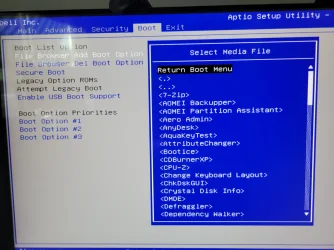
Was not expecting this > basically isn't giving me a simple bot from usb.
I can see a lot of options on programs
 

Attachments

  • 17397525025226342240262262659540.webp
    17397525025226342240262262659540.webp
    671.5 KB · Views: 2

My Computer My Computer

At a glance

windows 11 proIntel(R) Core(TM) i7-9700K CPU @ 3.60GHz64GBNVIDIA GeForce RTX 2060
OS
windows 11 pro
Computer type
PC/Desktop
Manufacturer/Model
Dell XPS 8930
CPU
Intel(R) Core(TM) i7-9700K CPU @ 3.60GHz
Memory
64GB
Graphics Card(s)
NVIDIA GeForce RTX 2060
Monitor(s) Displays
2
Hard Drives
2TB HDD / 512GB SSD
Internet Speed
TDS 1GB
Or should I pick something in theboot directory?,
 

Attachments

  • 17397526274686126021948621230699.webp
    17397526274686126021948621230699.webp
    570.6 KB · Views: 1
  • 17397526527067233680138928741976.webp
    17397526527067233680138928741976.webp
    834.3 KB · Views: 1

My Computer My Computer

At a glance

windows 11 proIntel(R) Core(TM) i7-9700K CPU @ 3.60GHz64GBNVIDIA GeForce RTX 2060
OS
windows 11 pro
Computer type
PC/Desktop
Manufacturer/Model
Dell XPS 8930
CPU
Intel(R) Core(TM) i7-9700K CPU @ 3.60GHz
Memory
64GB
Graphics Card(s)
NVIDIA GeForce RTX 2060
Monitor(s) Displays
2
Hard Drives
2TB HDD / 512GB SSD
Internet Speed
TDS 1GB
turn off secure boot and enable legacy roms. then keep pressing F8 or F12 or whatever your trigger key is at boot to generate a one time boot menu
 

My Computer My Computer

At a glance

Windows 11 Pro
OS
Windows 11 Pro
turn off secure boot and enable legacy roms. then keep pressing F8 or F12 or whatever your trigger key is at boot to generate a one time boot menu
UEFI can now be switched to Legacy, but gives a warning saying that might prevent system from booting or require a reinstall. .Yay or nay?
 

Attachments

  • 17397545039162072835870999677510.webp
    17397545039162072835870999677510.webp
    901.4 KB · Views: 1

My Computer My Computer

At a glance

windows 11 proIntel(R) Core(TM) i7-9700K CPU @ 3.60GHz64GBNVIDIA GeForce RTX 2060
OS
windows 11 pro
Computer type
PC/Desktop
Manufacturer/Model
Dell XPS 8930
CPU
Intel(R) Core(TM) i7-9700K CPU @ 3.60GHz
Memory
64GB
Graphics Card(s)
NVIDIA GeForce RTX 2060
Monitor(s) Displays
2
Hard Drives
2TB HDD / 512GB SSD
Internet Speed
TDS 1GB
yeah. once you boot from your usb and do what you need to, you can just turn secure boot back on and legacy roms back off. does no harm
 

My Computer My Computer

At a glance

Windows 11 Pro
OS
Windows 11 Pro
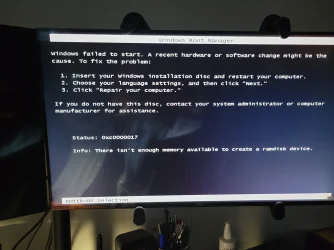
Was not taking f2 or f12, but f8 open the menu. Chose usb, and got this message
wtf???
if I continues then can see the hiren's boo cd as a system, but fails too
" there isn't enough memory avaialble to create a ramdisk device"
 

Attachments

  • 17397551651693138145549243557719.webp
    17397551651693138145549243557719.webp
    415.7 KB · Views: 1

My Computer My Computer

At a glance

windows 11 proIntel(R) Core(TM) i7-9700K CPU @ 3.60GHz64GBNVIDIA GeForce RTX 2060
OS
windows 11 pro
Computer type
PC/Desktop
Manufacturer/Model
Dell XPS 8930
CPU
Intel(R) Core(TM) i7-9700K CPU @ 3.60GHz
Memory
64GB
Graphics Card(s)
NVIDIA GeForce RTX 2060
Monitor(s) Displays
2
Hard Drives
2TB HDD / 512GB SSD
Internet Speed
TDS 1GB
Was not taking f2 or f12, but f8 open the menu. Chose usb, and got this message
wtf???
if I continues then can see the hiren's boo cd as a system, but fails too
" there isn't enough memory avaialble to create a ramdisk device"
 

Attachments

  • 17397556556324428635689553643912.webp
    17397556556324428635689553643912.webp
    727.2 KB · Views: 1

My Computer My Computer

At a glance

windows 11 proIntel(R) Core(TM) i7-9700K CPU @ 3.60GHz64GBNVIDIA GeForce RTX 2060
OS
windows 11 pro
Computer type
PC/Desktop
Manufacturer/Model
Dell XPS 8930
CPU
Intel(R) Core(TM) i7-9700K CPU @ 3.60GHz
Memory
64GB
Graphics Card(s)
NVIDIA GeForce RTX 2060
Monitor(s) Displays
2
Hard Drives
2TB HDD / 512GB SSD
Internet Speed
TDS 1GB
that im not sure. how did you burn the hirens onto usb?
 

My Computer My Computer

At a glance

Windows 11 Pro
OS
Windows 11 Pro
that im not sure. how did you burn the hirens onto usb?
Followed the instructions from a link in the first video > hirensbootcd.org/usb- booting/#google_vignette
 

My Computer My Computer

At a glance

windows 11 proIntel(R) Core(TM) i7-9700K CPU @ 3.60GHz64GBNVIDIA GeForce RTX 2060
OS
windows 11 pro
Computer type
PC/Desktop
Manufacturer/Model
Dell XPS 8930
CPU
Intel(R) Core(TM) i7-9700K CPU @ 3.60GHz
Memory
64GB
Graphics Card(s)
NVIDIA GeForce RTX 2060
Monitor(s) Displays
2
Hard Drives
2TB HDD / 512GB SSD
Internet Speed
TDS 1GB
use rufus (portable) and burn the iso to usb. then allow legacy roms and boot from it
 

My Computer My Computer

At a glance

Windows 11 Pro
OS
Windows 11 Pro
Back
Top Bottom