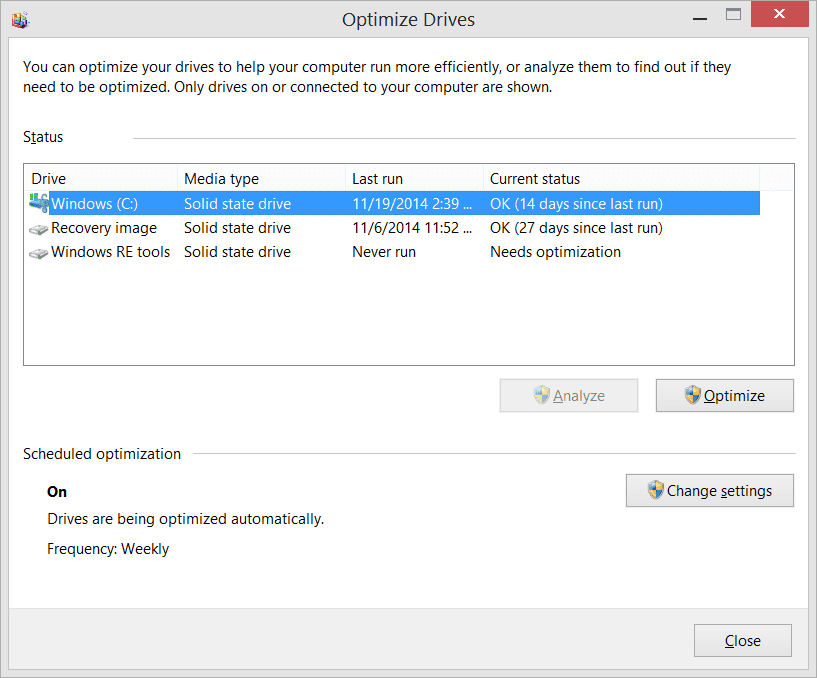
Defrag/Trim


you're all ignoring that fact that Windows is also defragmenting my SSD
I have not ignored that.
It has been the topic of every one of my posts in this thread.
It is the point of this thread. It is why KevTech started this thread.

Denis
 

My Computer My Computer

At a glance

Windows 11 Home x64 Version 25H2 Build 26200....
OS
Windows 11 Home x64 Version 25H2 Build 26200.8037
OK so why when I mentioned it in Kev's post is everyone telling me that 'Trimming' is normal behaviour? I'm not asking about that. My concerns relate to Windows performing a defrag as well on my SSD. That's what I'm not understanding.
 

My Computer My Computer

At a glance

Windows 11AMD Ryzen 5 1600 AM4 Hex Core Processor 3200GHzCorsair Vengeance LPX 16 GB (2x8 GB) DDR4 266...NVidia Geforce GTX 1050 Ti
OS
Windows 11
Computer type
PC/Desktop
Manufacturer/Model
ASUS Prime B350 Plus
CPU
AMD Ryzen 5 1600 AM4 Hex Core Processor 3200GHz
Motherboard
ASUS Prime B350 Plus
Memory
Corsair Vengeance LPX 16 GB (2x8 GB) DDR4 2666 MHz C16 XMP 2.0 High Performance Desktop Memory Kit - Red
Graphics Card(s)
NVidia Geforce GTX 1050 Ti
Sound Card
Onboard
Monitor(s) Displays
DELL U2412M
Screen Resolution
1920 x 1200
Hard Drives
Samsung 850 EVO SSD 120Gb
Seagate 2 TB
PSU
EVGA SuperNOVA 750 G2, 80+ GOLD 750W, Fully Modular
Case
Chieftec Scorpio TX 10BWD Mid Tower
Cooling
Arctic F8 PWM Rev.2
Keyboard
Logitech K520
Mouse
Logitech MX Master 3
Internet Speed
72.35 Mbps Down - 18.53 Mbps Up
Browser
Microsoft Edge
Antivirus
Windows Defender
Can somebody just please give me an answer to this question:

Am I supposed to be seeing an entry in the Windows Event Viewer stating that my SSD has been defragmented? Yes or No?

I know I also have another entry stating that a trim command has taken place but that's not my issue, I already know trimming is normal.
 

My Computer My Computer

At a glance

Windows 11AMD Ryzen 5 1600 AM4 Hex Core Processor 3200GHzCorsair Vengeance LPX 16 GB (2x8 GB) DDR4 266...NVidia Geforce GTX 1050 Ti
OS
Windows 11
Computer type
PC/Desktop
Manufacturer/Model
ASUS Prime B350 Plus
CPU
AMD Ryzen 5 1600 AM4 Hex Core Processor 3200GHz
Motherboard
ASUS Prime B350 Plus
Memory
Corsair Vengeance LPX 16 GB (2x8 GB) DDR4 2666 MHz C16 XMP 2.0 High Performance Desktop Memory Kit - Red
Graphics Card(s)
NVidia Geforce GTX 1050 Ti
Sound Card
Onboard
Monitor(s) Displays
DELL U2412M
Screen Resolution
1920 x 1200
Hard Drives
Samsung 850 EVO SSD 120Gb
Seagate 2 TB
PSU
EVGA SuperNOVA 750 G2, 80+ GOLD 750W, Fully Modular
Case
Chieftec Scorpio TX 10BWD Mid Tower
Cooling
Arctic F8 PWM Rev.2
Keyboard
Logitech K520
Mouse
Logitech MX Master 3
Internet Speed
72.35 Mbps Down - 18.53 Mbps Up
Browser
Microsoft Edge
Antivirus
Windows Defender
why when I mentioned it in Kev's post is everyone telling me that 'Trimming' is normal behaviour? I'm not asking about that
As I've just posted in your Conversation in response to your similar question there, the issue reported by KevTech and by you has been swamped by off-topic posts that fail to address the issue. My first post [post #28] was an attempt to bring the thread back on topic but I failed.

Denis
 

My Computer My Computer

At a glance

Windows 11 Home x64 Version 25H2 Build 26200....
OS
Windows 11 Home x64 Version 25H2 Build 26200.8037
Am I supposed to be seeing an entry in the Windows Event Viewer stating that my SSD has been defragmented? Yes or No?
No. According to MS, you should only be seeing that entry monthly [assuming your have set up the defrag-optimize UI to defrag weekly].

You & KevTech are experiencing behaviour that should not be taking place.

But, as we discussed, perhaps the Event viewer event descriptions are misleading. Perhaps "completed" just means "stopped because the system is no longer idle" so the repeated entries you have seen are merely resumptions of an interrupted, incomplete process.

Denis
 

My Computer My Computer

At a glance

Windows 11 Home x64 Version 25H2 Build 26200....
OS
Windows 11 Home x64 Version 25H2 Build 26200.8037
My previous post was specifically addressing the issue of TRIM, not defrag.

However, I have a question: Do you have System Restore enabled on your system? If so, then yes, Windows will defrag the SSD by design. This is necessary if System Restore is enabled. Note that Windows performs defrags on an SSD intelligently so that it won't dramatically impact SSD lifespan. By default, this used to be a once a month operation but all the Windows 11 systems I have checked appear to do it approximately once a week with some occasional defrags after less than a week (I've seen one or two a day after it was last run).

We could get into the technical reasons for this being necessary, but I'll spare you all of that unless you are really interested.

You could disable System Restore if this bothers you that much, but I would advise against that.

BTW, just a suggestion: Download a util that displays percentage of SSD life remaining (you can find several with a google / bing search). Keep an eye on it over a period of say 6 months. It's very likely that you will be surprised at how slowly that ticks down.

 

My Computers My Computers

  • At a glance

    Win11 Pro 25H2 (RTM+)Intel i7-14650HX32 GBNo GPU - Built-in Intel Graphics
    OS
    Win11 Pro 25H2 (RTM+)
    Computer type
    PC/Desktop
    Manufacturer/Model
    Acemagic
    CPU
    Intel i7-14650HX
    Memory
    32 GB
    Graphics Card(s)
    No GPU - Built-in Intel Graphics
    Sound Card
    Integrated
    Monitor(s) Displays
    Varies as machine will often be moved to locations with different monitors
    Screen Resolution
    Varies
    Hard Drives
    1 x 1TB Gen 4 NVMe SSD
    PSU
    120W Power Brick
    Keyboard
    Corsair K70 Max RGB Magnetic Keyboard
    Mouse
    Logitech MX Master 3
    Internet Speed
    1Gb Up / 1 Gb Down
    Browser
    Edge
    Antivirus
    Windows Defender
  • At a glance

    Win11 Pro 25H2 (RTM+)Intel i7-1255U16 GBIntel Iris Xe Graphics
    Operating System
    Win11 Pro 25H2 (RTM+)
    Computer type
    Laptop
    Manufacturer/Model
    Lenovo ThinkBook 13x Gen 2
    CPU
    Intel i7-1255U
    Memory
    16 GB
    Graphics card(s)
    Intel Iris Xe Graphics
    Sound Card
    Realtek® ALC3306-CG codec
    Monitor(s) Displays
    13.3-inch IPS Display
    Screen Resolution
    WQXGA (2560 x 1600)
    Hard Drives
    2 TB 4 x 4 NVMe SSD
    PSU
    USB-C / Thunderbolt 4 Power / Charging
    Keyboard
    Backlit, spill resistant keyboard
    Mouse
    Buttonless Glass Precision Touchpad
    Internet Speed
    1Gb Up / 1Gb Down
    Browser
    Edge
    Antivirus
    Windows Defender
    Other Info
    WiFi 6e / Bluetooth 5.1 / Facial Recognition / Fingerprint Sensor / ToF (Time of Flight) Human Presence Sensor

My Computer My Computer

At a glance

Windows 11 Home x64 Version 25H2 Build 26200....
OS
Windows 11 Home x64 Version 25H2 Build 26200.8037
Okay, bear with me a few minutes. I'm going to see if I can find something that explains this better than I can. My knowledge on the topic is not as detailed as I would like but I can tell you that it deals with volume snapshots specifically which are used by System Restore.

Standby...
 

My Computers My Computers

  • At a glance

    Win11 Pro 25H2 (RTM+)Intel i7-14650HX32 GBNo GPU - Built-in Intel Graphics
    OS
    Win11 Pro 25H2 (RTM+)
    Computer type
    PC/Desktop
    Manufacturer/Model
    Acemagic
    CPU
    Intel i7-14650HX
    Memory
    32 GB
    Graphics Card(s)
    No GPU - Built-in Intel Graphics
    Sound Card
    Integrated
    Monitor(s) Displays
    Varies as machine will often be moved to locations with different monitors
    Screen Resolution
    Varies
    Hard Drives
    1 x 1TB Gen 4 NVMe SSD
    PSU
    120W Power Brick
    Keyboard
    Corsair K70 Max RGB Magnetic Keyboard
    Mouse
    Logitech MX Master 3
    Internet Speed
    1Gb Up / 1 Gb Down
    Browser
    Edge
    Antivirus
    Windows Defender
  • At a glance

    Win11 Pro 25H2 (RTM+)Intel i7-1255U16 GBIntel Iris Xe Graphics
    Operating System
    Win11 Pro 25H2 (RTM+)
    Computer type
    Laptop
    Manufacturer/Model
    Lenovo ThinkBook 13x Gen 2
    CPU
    Intel i7-1255U
    Memory
    16 GB
    Graphics card(s)
    Intel Iris Xe Graphics
    Sound Card
    Realtek® ALC3306-CG codec
    Monitor(s) Displays
    13.3-inch IPS Display
    Screen Resolution
    WQXGA (2560 x 1600)
    Hard Drives
    2 TB 4 x 4 NVMe SSD
    PSU
    USB-C / Thunderbolt 4 Power / Charging
    Keyboard
    Backlit, spill resistant keyboard
    Mouse
    Buttonless Glass Precision Touchpad
    Internet Speed
    1Gb Up / 1Gb Down
    Browser
    Edge
    Antivirus
    Windows Defender
    Other Info
    WiFi 6e / Bluetooth 5.1 / Facial Recognition / Fingerprint Sensor / ToF (Time of Flight) Human Presence Sensor
@Try3 THANKYOU.., I was beginning to think I was going mad for a moment! I apologise, I did go off topic myself a few times but some of the comments left here didn't even seem interested in mine or @KevTech questions or they ignored them completely. Your mention of misleading event descriptions is what I was trying to say in one of my earlier post although probably not very well.

@hsehestedt
In response to your question about 'System Restore' no.., I don't have that turned on. I disabled that feature on all drives as I perform manual backups on a regular basis. HOWEVER.., Windows is still defragmenting my SSD regularly. NOT to be confused with Trim as per the majority of this thread. As I said before we all know Trimming is normal behaviour.

Re: downloading a utility to monitor life span of my SSD, thanks but it's not needed, I have Samsung Magician installed as mentioned in one of my off topic posts above.
 

My Computer My Computer

At a glance

Windows 11AMD Ryzen 5 1600 AM4 Hex Core Processor 3200GHzCorsair Vengeance LPX 16 GB (2x8 GB) DDR4 266...NVidia Geforce GTX 1050 Ti
OS
Windows 11
Computer type
PC/Desktop
Manufacturer/Model
ASUS Prime B350 Plus
CPU
AMD Ryzen 5 1600 AM4 Hex Core Processor 3200GHz
Motherboard
ASUS Prime B350 Plus
Memory
Corsair Vengeance LPX 16 GB (2x8 GB) DDR4 2666 MHz C16 XMP 2.0 High Performance Desktop Memory Kit - Red
Graphics Card(s)
NVidia Geforce GTX 1050 Ti
Sound Card
Onboard
Monitor(s) Displays
DELL U2412M
Screen Resolution
1920 x 1200
Hard Drives
Samsung 850 EVO SSD 120Gb
Seagate 2 TB
PSU
EVGA SuperNOVA 750 G2, 80+ GOLD 750W, Fully Modular
Case
Chieftec Scorpio TX 10BWD Mid Tower
Cooling
Arctic F8 PWM Rev.2
Keyboard
Logitech K520
Mouse
Logitech MX Master 3
Internet Speed
72.35 Mbps Down - 18.53 Mbps Up
Browser
Microsoft Edge
Antivirus
Windows Defender
Wow, finding documentation on this is not easy. I knew about this only because of my working for a major storage company for 12+ years, but now that I look for docs on this, it's not easy to come by.

However, below is a link to a blog from a Microsoft employee explaining this. It's an old blog from 2014, but the information presented still holds true. The one detail that appears to have changed is the frequency of the defrag. Whether that change in frequency is accidental or on purpose, I could not tell you.


I hope that this helps!
 

My Computers My Computers

  • At a glance

    Win11 Pro 25H2 (RTM+)Intel i7-14650HX32 GBNo GPU - Built-in Intel Graphics
    OS
    Win11 Pro 25H2 (RTM+)
    Computer type
    PC/Desktop
    Manufacturer/Model
    Acemagic
    CPU
    Intel i7-14650HX
    Memory
    32 GB
    Graphics Card(s)
    No GPU - Built-in Intel Graphics
    Sound Card
    Integrated
    Monitor(s) Displays
    Varies as machine will often be moved to locations with different monitors
    Screen Resolution
    Varies
    Hard Drives
    1 x 1TB Gen 4 NVMe SSD
    PSU
    120W Power Brick
    Keyboard
    Corsair K70 Max RGB Magnetic Keyboard
    Mouse
    Logitech MX Master 3
    Internet Speed
    1Gb Up / 1 Gb Down
    Browser
    Edge
    Antivirus
    Windows Defender
  • At a glance

    Win11 Pro 25H2 (RTM+)Intel i7-1255U16 GBIntel Iris Xe Graphics
    Operating System
    Win11 Pro 25H2 (RTM+)
    Computer type
    Laptop
    Manufacturer/Model
    Lenovo ThinkBook 13x Gen 2
    CPU
    Intel i7-1255U
    Memory
    16 GB
    Graphics card(s)
    Intel Iris Xe Graphics
    Sound Card
    Realtek® ALC3306-CG codec
    Monitor(s) Displays
    13.3-inch IPS Display
    Screen Resolution
    WQXGA (2560 x 1600)
    Hard Drives
    2 TB 4 x 4 NVMe SSD
    PSU
    USB-C / Thunderbolt 4 Power / Charging
    Keyboard
    Backlit, spill resistant keyboard
    Mouse
    Buttonless Glass Precision Touchpad
    Internet Speed
    1Gb Up / 1Gb Down
    Browser
    Edge
    Antivirus
    Windows Defender
    Other Info
    WiFi 6e / Bluetooth 5.1 / Facial Recognition / Fingerprint Sensor / ToF (Time of Flight) Human Presence Sensor
Doh! Just saw the last response after I posted. So, maybe in your case it is not system restore, but maybe something else (backup program?) that is working with volume snapshots aka Volume Shadow Copy.
 

My Computers My Computers

  • At a glance

    Win11 Pro 25H2 (RTM+)Intel i7-14650HX32 GBNo GPU - Built-in Intel Graphics
    OS
    Win11 Pro 25H2 (RTM+)
    Computer type
    PC/Desktop
    Manufacturer/Model
    Acemagic
    CPU
    Intel i7-14650HX
    Memory
    32 GB
    Graphics Card(s)
    No GPU - Built-in Intel Graphics
    Sound Card
    Integrated
    Monitor(s) Displays
    Varies as machine will often be moved to locations with different monitors
    Screen Resolution
    Varies
    Hard Drives
    1 x 1TB Gen 4 NVMe SSD
    PSU
    120W Power Brick
    Keyboard
    Corsair K70 Max RGB Magnetic Keyboard
    Mouse
    Logitech MX Master 3
    Internet Speed
    1Gb Up / 1 Gb Down
    Browser
    Edge
    Antivirus
    Windows Defender
  • At a glance

    Win11 Pro 25H2 (RTM+)Intel i7-1255U16 GBIntel Iris Xe Graphics
    Operating System
    Win11 Pro 25H2 (RTM+)
    Computer type
    Laptop
    Manufacturer/Model
    Lenovo ThinkBook 13x Gen 2
    CPU
    Intel i7-1255U
    Memory
    16 GB
    Graphics card(s)
    Intel Iris Xe Graphics
    Sound Card
    Realtek® ALC3306-CG codec
    Monitor(s) Displays
    13.3-inch IPS Display
    Screen Resolution
    WQXGA (2560 x 1600)
    Hard Drives
    2 TB 4 x 4 NVMe SSD
    PSU
    USB-C / Thunderbolt 4 Power / Charging
    Keyboard
    Backlit, spill resistant keyboard
    Mouse
    Buttonless Glass Precision Touchpad
    Internet Speed
    1Gb Up / 1Gb Down
    Browser
    Edge
    Antivirus
    Windows Defender
    Other Info
    WiFi 6e / Bluetooth 5.1 / Facial Recognition / Fingerprint Sensor / ToF (Time of Flight) Human Presence Sensor
@hsehestedt

Isn't that the same Scott Hanselman blog which me and @Try3 mentioned earlier in this thread? It looks very familiar.

I do believe the Volume Shadow Copy Service does come into play when I run a backup, I do seem to recall having seen reference to that in the backup window but if it helps further, I only do manual backups, not on a schedule. All references to Defragmenting my SSD in the Windows Event Log happened when no backups were running.
 

My Computer My Computer

At a glance

Windows 11AMD Ryzen 5 1600 AM4 Hex Core Processor 3200GHzCorsair Vengeance LPX 16 GB (2x8 GB) DDR4 266...NVidia Geforce GTX 1050 Ti
OS
Windows 11
Computer type
PC/Desktop
Manufacturer/Model
ASUS Prime B350 Plus
CPU
AMD Ryzen 5 1600 AM4 Hex Core Processor 3200GHz
Motherboard
ASUS Prime B350 Plus
Memory
Corsair Vengeance LPX 16 GB (2x8 GB) DDR4 2666 MHz C16 XMP 2.0 High Performance Desktop Memory Kit - Red
Graphics Card(s)
NVidia Geforce GTX 1050 Ti
Sound Card
Onboard
Monitor(s) Displays
DELL U2412M
Screen Resolution
1920 x 1200
Hard Drives
Samsung 850 EVO SSD 120Gb
Seagate 2 TB
PSU
EVGA SuperNOVA 750 G2, 80+ GOLD 750W, Fully Modular
Case
Chieftec Scorpio TX 10BWD Mid Tower
Cooling
Arctic F8 PWM Rev.2
Keyboard
Logitech K520
Mouse
Logitech MX Master 3
Internet Speed
72.35 Mbps Down - 18.53 Mbps Up
Browser
Microsoft Edge
Antivirus
Windows Defender
However, below is a link to a blog from a Microsoft employee explaining this.
Thanks. That was referenced in post #28.

The volsnap-defrag dependency might not be correct.
- Scott included it as a comment that had been made but MS did not regard it as robust enough to include in their article on the subject [also linked to through post #28].
- I have watched an SSD defrag take place and volsnap [VSS] was not running during it.
- But I forced the SSD defrag using defrag.exe and the relationships between the defrag-optimize UI & volsnap [& defragsvc] could only be discovered if somebody caught that UI initiating the defrag and then monitored Services while it was running. I don't think that will happen.

I don't expect the situation to be explained unless MS publish another article but that might never happen.

Happy New Year,
Denis
 

My Computer My Computer

At a glance

Windows 11 Home x64 Version 25H2 Build 26200....
OS
Windows 11 Home x64 Version 25H2 Build 26200.8037
Isn't that the same Scott Hanselman blog which me and @Try3 mentioned earlier in this thread?
Yes


It is not impossible that the comment made to Scott was a mistake, as we discussed earlier. There is a close {undocumented} relationship between the defrag-optimize UI, defrag.exe & defragsvc. Perhaps Scott's conversation included a slip of the tongue.

All the best,
Denis
 

My Computer My Computer

At a glance

Windows 11 Home x64 Version 25H2 Build 26200....
OS
Windows 11 Home x64 Version 25H2 Build 26200.8037
I think it's certainly possible! I know one thing.., it's a bit frustrating not knowing who's right. Your own experiments certainly sow doubt on his comments.
 

My Computer My Computer

At a glance

Windows 11AMD Ryzen 5 1600 AM4 Hex Core Processor 3200GHzCorsair Vengeance LPX 16 GB (2x8 GB) DDR4 266...NVidia Geforce GTX 1050 Ti
OS
Windows 11
Computer type
PC/Desktop
Manufacturer/Model
ASUS Prime B350 Plus
CPU
AMD Ryzen 5 1600 AM4 Hex Core Processor 3200GHz
Motherboard
ASUS Prime B350 Plus
Memory
Corsair Vengeance LPX 16 GB (2x8 GB) DDR4 2666 MHz C16 XMP 2.0 High Performance Desktop Memory Kit - Red
Graphics Card(s)
NVidia Geforce GTX 1050 Ti
Sound Card
Onboard
Monitor(s) Displays
DELL U2412M
Screen Resolution
1920 x 1200
Hard Drives
Samsung 850 EVO SSD 120Gb
Seagate 2 TB
PSU
EVGA SuperNOVA 750 G2, 80+ GOLD 750W, Fully Modular
Case
Chieftec Scorpio TX 10BWD Mid Tower
Cooling
Arctic F8 PWM Rev.2
Keyboard
Logitech K520
Mouse
Logitech MX Master 3
Internet Speed
72.35 Mbps Down - 18.53 Mbps Up
Browser
Microsoft Edge
Antivirus
Windows Defender
I do believe the Volume Shadow Copy Service does come into play when I run a backup

Yes, absolutely. That's why VSS exists.

Denis
 

My Computer My Computer

At a glance

Windows 11 Home x64 Version 25H2 Build 26200....
OS
Windows 11 Home x64 Version 25H2 Build 26200.8037
It may be the same blog , apologies if I missed it. As for the timing of the defrags, these have nothing to do with when the backup is running. The defrag happens on its own schedule, it's not triggered at the time of a backup or any other event on the system. Basically, when optimization is set to run, it looks to see if volume snapshots exist. If they do, then a defrag is included as part of the optimization.

It's important to note that a defrag on an SSD is not the same as a defrag on a HDD. The blog alludes to this with this statement:

"It's also worth pointing out that what we (old-timers) think about as "defrag.exe" as a UI is really "optimize your storage" now. It was defrag in the past and now it's a larger disk health automated system."
 

My Computers My Computers

  • At a glance

    Win11 Pro 25H2 (RTM+)Intel i7-14650HX32 GBNo GPU - Built-in Intel Graphics
    OS
    Win11 Pro 25H2 (RTM+)
    Computer type
    PC/Desktop
    Manufacturer/Model
    Acemagic
    CPU
    Intel i7-14650HX
    Memory
    32 GB
    Graphics Card(s)
    No GPU - Built-in Intel Graphics
    Sound Card
    Integrated
    Monitor(s) Displays
    Varies as machine will often be moved to locations with different monitors
    Screen Resolution
    Varies
    Hard Drives
    1 x 1TB Gen 4 NVMe SSD
    PSU
    120W Power Brick
    Keyboard
    Corsair K70 Max RGB Magnetic Keyboard
    Mouse
    Logitech MX Master 3
    Internet Speed
    1Gb Up / 1 Gb Down
    Browser
    Edge
    Antivirus
    Windows Defender
  • At a glance

    Win11 Pro 25H2 (RTM+)Intel i7-1255U16 GBIntel Iris Xe Graphics
    Operating System
    Win11 Pro 25H2 (RTM+)
    Computer type
    Laptop
    Manufacturer/Model
    Lenovo ThinkBook 13x Gen 2
    CPU
    Intel i7-1255U
    Memory
    16 GB
    Graphics card(s)
    Intel Iris Xe Graphics
    Sound Card
    Realtek® ALC3306-CG codec
    Monitor(s) Displays
    13.3-inch IPS Display
    Screen Resolution
    WQXGA (2560 x 1600)
    Hard Drives
    2 TB 4 x 4 NVMe SSD
    PSU
    USB-C / Thunderbolt 4 Power / Charging
    Keyboard
    Backlit, spill resistant keyboard
    Mouse
    Buttonless Glass Precision Touchpad
    Internet Speed
    1Gb Up / 1Gb Down
    Browser
    Edge
    Antivirus
    Windows Defender
    Other Info
    WiFi 6e / Bluetooth 5.1 / Facial Recognition / Fingerprint Sensor / ToF (Time of Flight) Human Presence Sensor
But surely that would only run during my manual backup?
 

My Computer My Computer

At a glance

Windows 11AMD Ryzen 5 1600 AM4 Hex Core Processor 3200GHzCorsair Vengeance LPX 16 GB (2x8 GB) DDR4 266...NVidia Geforce GTX 1050 Ti
OS
Windows 11
Computer type
PC/Desktop
Manufacturer/Model
ASUS Prime B350 Plus
CPU
AMD Ryzen 5 1600 AM4 Hex Core Processor 3200GHz
Motherboard
ASUS Prime B350 Plus
Memory
Corsair Vengeance LPX 16 GB (2x8 GB) DDR4 2666 MHz C16 XMP 2.0 High Performance Desktop Memory Kit - Red
Graphics Card(s)
NVidia Geforce GTX 1050 Ti
Sound Card
Onboard
Monitor(s) Displays
DELL U2412M
Screen Resolution
1920 x 1200
Hard Drives
Samsung 850 EVO SSD 120Gb
Seagate 2 TB
PSU
EVGA SuperNOVA 750 G2, 80+ GOLD 750W, Fully Modular
Case
Chieftec Scorpio TX 10BWD Mid Tower
Cooling
Arctic F8 PWM Rev.2
Keyboard
Logitech K520
Mouse
Logitech MX Master 3
Internet Speed
72.35 Mbps Down - 18.53 Mbps Up
Browser
Microsoft Edge
Antivirus
Windows Defender
One more point to add: In the past, the way the defrag worked on an SSD was that when optimization ran, it would check to see if a defrag was appropriate for the SSD. If a defrag was already run within the last 28 days, it would skip the defrag. At the next scheduled optimization, this check will be performed again. If it was 28 days or longer since a defrag was performed and a defrag is appropriate for the SSD, then the defrag would be run.

What seems to have changed now is that 28-day, aka once a month, figure.
 

My Computers My Computers

  • At a glance

    Win11 Pro 25H2 (RTM+)Intel i7-14650HX32 GBNo GPU - Built-in Intel Graphics
    OS
    Win11 Pro 25H2 (RTM+)
    Computer type
    PC/Desktop
    Manufacturer/Model
    Acemagic
    CPU
    Intel i7-14650HX
    Memory
    32 GB
    Graphics Card(s)
    No GPU - Built-in Intel Graphics
    Sound Card
    Integrated
    Monitor(s) Displays
    Varies as machine will often be moved to locations with different monitors
    Screen Resolution
    Varies
    Hard Drives
    1 x 1TB Gen 4 NVMe SSD
    PSU
    120W Power Brick
    Keyboard
    Corsair K70 Max RGB Magnetic Keyboard
    Mouse
    Logitech MX Master 3
    Internet Speed
    1Gb Up / 1 Gb Down
    Browser
    Edge
    Antivirus
    Windows Defender
  • At a glance

    Win11 Pro 25H2 (RTM+)Intel i7-1255U16 GBIntel Iris Xe Graphics
    Operating System
    Win11 Pro 25H2 (RTM+)
    Computer type
    Laptop
    Manufacturer/Model
    Lenovo ThinkBook 13x Gen 2
    CPU
    Intel i7-1255U
    Memory
    16 GB
    Graphics card(s)
    Intel Iris Xe Graphics
    Sound Card
    Realtek® ALC3306-CG codec
    Monitor(s) Displays
    13.3-inch IPS Display
    Screen Resolution
    WQXGA (2560 x 1600)
    Hard Drives
    2 TB 4 x 4 NVMe SSD
    PSU
    USB-C / Thunderbolt 4 Power / Charging
    Keyboard
    Backlit, spill resistant keyboard
    Mouse
    Buttonless Glass Precision Touchpad
    Internet Speed
    1Gb Up / 1Gb Down
    Browser
    Edge
    Antivirus
    Windows Defender
    Other Info
    WiFi 6e / Bluetooth 5.1 / Facial Recognition / Fingerprint Sensor / ToF (Time of Flight) Human Presence Sensor
But surely that would only run during my manual backup?
Not sure I understand the question. What is "that"? If you are referring to the shadow copies, those get created at the time of the backup (technically, just before the backup begins).
 

My Computers My Computers

  • At a glance

    Win11 Pro 25H2 (RTM+)Intel i7-14650HX32 GBNo GPU - Built-in Intel Graphics
    OS
    Win11 Pro 25H2 (RTM+)
    Computer type
    PC/Desktop
    Manufacturer/Model
    Acemagic
    CPU
    Intel i7-14650HX
    Memory
    32 GB
    Graphics Card(s)
    No GPU - Built-in Intel Graphics
    Sound Card
    Integrated
    Monitor(s) Displays
    Varies as machine will often be moved to locations with different monitors
    Screen Resolution
    Varies
    Hard Drives
    1 x 1TB Gen 4 NVMe SSD
    PSU
    120W Power Brick
    Keyboard
    Corsair K70 Max RGB Magnetic Keyboard
    Mouse
    Logitech MX Master 3
    Internet Speed
    1Gb Up / 1 Gb Down
    Browser
    Edge
    Antivirus
    Windows Defender
  • At a glance

    Win11 Pro 25H2 (RTM+)Intel i7-1255U16 GBIntel Iris Xe Graphics
    Operating System
    Win11 Pro 25H2 (RTM+)
    Computer type
    Laptop
    Manufacturer/Model
    Lenovo ThinkBook 13x Gen 2
    CPU
    Intel i7-1255U
    Memory
    16 GB
    Graphics card(s)
    Intel Iris Xe Graphics
    Sound Card
    Realtek® ALC3306-CG codec
    Monitor(s) Displays
    13.3-inch IPS Display
    Screen Resolution
    WQXGA (2560 x 1600)
    Hard Drives
    2 TB 4 x 4 NVMe SSD
    PSU
    USB-C / Thunderbolt 4 Power / Charging
    Keyboard
    Backlit, spill resistant keyboard
    Mouse
    Buttonless Glass Precision Touchpad
    Internet Speed
    1Gb Up / 1Gb Down
    Browser
    Edge
    Antivirus
    Windows Defender
    Other Info
    WiFi 6e / Bluetooth 5.1 / Facial Recognition / Fingerprint Sensor / ToF (Time of Flight) Human Presence Sensor

Latest Support Threads

Back
Top Bottom