Random Freezes several time a day (HYPERVISOR 20001 Error at restart)


My Computer

System One

  • OS
    Windows 10
    Computer type
    Laptop
    Manufacturer/Model
    HP
    CPU
    Intel(R) Core(TM) i7-4800MQ CPU @ 2.70GHz
    Motherboard
    Product : 190A Version : KBC Version 94.56
    Memory
    16 GB Total: Manufacturer : Samsung MemoryType : DDR3 FormFactor : SODIMM Capacity : 8GB Speed : 1600
    Graphics Card(s)
    NVIDIA Quadro K3100M; Intel(R) HD Graphics 4600
    Sound Card
    IDT High Definition Audio CODEC; PNP Device ID HDAUDIO\FUNC_01&VEN_111D&DEV_76E0
    Hard Drives
    Model Hitachi HTS727575A9E364
    Antivirus
    Microsoft Defender
    Other Info
    Mobile Workstation

My Computer

System One

  • OS
    Windows 11
    Computer type
    Laptop
    Manufacturer/Model
    ASUS TUF Gaming A17 FA707RW_TUF707RW
    CPU
    AMD Ryzen 76800H
    Motherboard
    FA707RW
    Memory
    16Gb
    Graphics Card(s)
    NVIDIA GeForce RTX 3070Ti, AMD Radeon(TM),
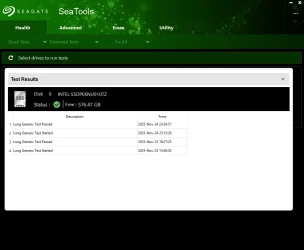
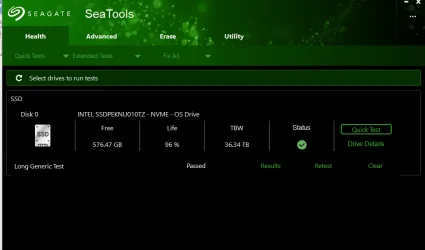
Where should I click to get a "share link" for seatools ? I don't understand
 

Attachments

  • 1764023775220.webp
    1764023775220.webp
    31.2 KB · Views: 1
  • 1764023827351.webp
    1764023827351.webp
    27.3 KB · Views: 1

My Computer

System One

  • OS
    Windows 11
    Computer type
    Laptop
    Manufacturer/Model
    ASUS TUF Gaming A17 FA707RW_TUF707RW
    CPU
    AMD Ryzen 76800H
    Motherboard
    FA707RW
    Memory
    16Gb
    Graphics Card(s)
    NVIDIA GeForce RTX 3070Ti, AMD Radeon(TM),
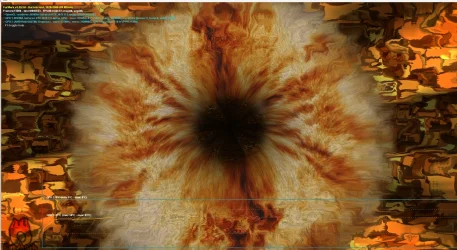
Furmark captures
Video available here: Gofile - Cloud Storage Made Simple

last test was one hour long and looked the same to me, didn't notice anything different or weird after an hour
 

Attachments

  • 1764024792831.webp
    1764024792831.webp
    273.8 KB · Views: 1

My Computer

System One

  • OS
    Windows 11
    Computer type
    Laptop
    Manufacturer/Model
    ASUS TUF Gaming A17 FA707RW_TUF707RW
    CPU
    AMD Ryzen 76800H
    Motherboard
    FA707RW
    Memory
    16Gb
    Graphics Card(s)
    NVIDIA GeForce RTX 3070Ti, AMD Radeon(TM),
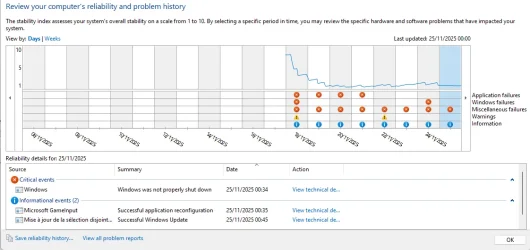
Please monitor the computer using reliability history:


Were either of the commands working to find and compress the memory dump file or do the commands need rewriting?


For any new BSOD please post a new V2 share link into the newest post.
 

My Computer

System One

  • OS
    Windows 10
    Computer type
    Laptop
    Manufacturer/Model
    HP
    CPU
    Intel(R) Core(TM) i7-4800MQ CPU @ 2.70GHz
    Motherboard
    Product : 190A Version : KBC Version 94.56
    Memory
    16 GB Total: Manufacturer : Samsung MemoryType : DDR3 FormFactor : SODIMM Capacity : 8GB Speed : 1600
    Graphics Card(s)
    NVIDIA Quadro K3100M; Intel(R) HD Graphics 4600
    Sound Card
    IDT High Definition Audio CODEC; PNP Device ID HDAUDIO\FUNC_01&VEN_111D&DEV_76E0
    Hard Drives
    Model Hitachi HTS727575A9E364
    Antivirus
    Microsoft Defender
    Other Info
    Mobile Workstation
Command 5) on command prompt worked (the zip generated is in the link i gave earlier). I think the powershell line works as well, but as the file was already generated, it displayed an error. Or at least that's how i understand it. I was confused because i thought you asked to do both ! :)

Here are the reliability history infos

I had my computer spontaneously restart today, unsure if i should count this as Bsod ?
 

Attachments

My Computer

System One

  • OS
    Windows 11
    Computer type
    Laptop
    Manufacturer/Model
    ASUS TUF Gaming A17 FA707RW_TUF707RW
    CPU
    AMD Ryzen 76800H
    Motherboard
    FA707RW
    Memory
    16Gb
    Graphics Card(s)
    NVIDIA GeForce RTX 3070Ti, AMD Radeon(TM),
Please test these commands using each:


a) Command prompt at boot: > post share links

wevtutil epl Application %userprofile%\Desktop\application.evtx

wevtutil epl System %userprofile%\Desktop\system.evtx


b) Administrative command prompt: > post share links

wevtutil epl Application %userprofile%\Desktop\application.evtx

wevtutil epl System %userprofile%\Desktop\system.evtx


If these methods don't work another link will be posted
 

My Computer

System One

  • OS
    Windows 10
    Computer type
    Laptop
    Manufacturer/Model
    HP
    CPU
    Intel(R) Core(TM) i7-4800MQ CPU @ 2.70GHz
    Motherboard
    Product : 190A Version : KBC Version 94.56
    Memory
    16 GB Total: Manufacturer : Samsung MemoryType : DDR3 FormFactor : SODIMM Capacity : 8GB Speed : 1600
    Graphics Card(s)
    NVIDIA Quadro K3100M; Intel(R) HD Graphics 4600
    Sound Card
    IDT High Definition Audio CODEC; PNP Device ID HDAUDIO\FUNC_01&VEN_111D&DEV_76E0
    Hard Drives
    Model Hitachi HTS727575A9E364
    Antivirus
    Microsoft Defender
    Other Info
    Mobile Workstation
This is using administrative PS:

wevtutil epl System "$env:USERPROFILE\Desktop\application.evtx" /ow:true

wevtutil epl System "$env:USERPROFILE\Desktop\system.evtx" /ow:true
 

My Computer

System One

  • OS
    Windows 10
    Computer type
    Laptop
    Manufacturer/Model
    HP
    CPU
    Intel(R) Core(TM) i7-4800MQ CPU @ 2.70GHz
    Motherboard
    Product : 190A Version : KBC Version 94.56
    Memory
    16 GB Total: Manufacturer : Samsung MemoryType : DDR3 FormFactor : SODIMM Capacity : 8GB Speed : 1600
    Graphics Card(s)
    NVIDIA Quadro K3100M; Intel(R) HD Graphics 4600
    Sound Card
    IDT High Definition Audio CODEC; PNP Device ID HDAUDIO\FUNC_01&VEN_111D&DEV_76E0
    Hard Drives
    Model Hitachi HTS727575A9E364
    Antivirus
    Microsoft Defender
    Other Info
    Mobile Workstation

Got an error of invalid argument on prompt at boot (but maybe i copied it wrong)

tried your administrative PS command: result uploaded here as "application&system": Gofile - Cloud Storage Made Simple
 

My Computer

System One

  • OS
    Windows 11
    Computer type
    Laptop
    Manufacturer/Model
    ASUS TUF Gaming A17 FA707RW_TUF707RW
    CPU
    AMD Ryzen 76800H
    Motherboard
    FA707RW
    Memory
    16Gb
    Graphics Card(s)
    NVIDIA GeForce RTX 3070Ti, AMD Radeon(TM),
Please confirm: only the PS commands worked.


See if the drive(s) can be recognized by GSmartControl:


GSmart Control (all drives)


Click Self-Tests tab > Test type > Extended Self-test > Execute (run overnight)

Copy and paste the results > post a share link


Click Attributes tab > for any entries that are red or pink post share links of the full results window


Something had happened to the drive on 11/18 (thousands of errors)

However this appeared with a brief log scan to be a one day problem.

The driver detected a controller error on \Device\Harddisk1\DR2.
The IO operation at logical block address 0x25f64988 for Disk 1 (PDO name: \Device\0000008f) failed due to a hardware error.
The IO operation at logical block address 0x2646e800 for Disk 1 (PDO name: \Device\0000008f) failed due to a hardware error.
The IO operation at logical block address 0xafd5010 for Disk 1 (PDO name: \Device\0000008f) failed due to a hardware error.
The IO operation at logical block address 0xaebd810 for Disk 1 (PDO name: \Device\0000008f) failed due to a hardware error.
The IO operation at logical block address 0x44cd41a0 for Disk 1 (PDO name: \Device\0000008f) failed due to a hardware error.
The IO operation at logical block address 0xaebd808 for Disk 1 (PDO name: \Device\0000008f) failed due to a hardware error.
The IO operation at logical block address 0xaebd838 for Disk 1 (PDO name: \Device\0000008f) failed due to a hardware error.
The IO operation at logical block address 0x44cd41e0 for Disk 1 (PDO name: \Device\0000008f) failed due to a hardware error.
The IO operation at logical block address 0x44cd41c8 for Disk 1 (PDO name: \Device\0000008f) failed due to a hardware error.
 
Last edited:

My Computer

System One

  • OS
    Windows 10
    Computer type
    Laptop
    Manufacturer/Model
    HP
    CPU
    Intel(R) Core(TM) i7-4800MQ CPU @ 2.70GHz
    Motherboard
    Product : 190A Version : KBC Version 94.56
    Memory
    16 GB Total: Manufacturer : Samsung MemoryType : DDR3 FormFactor : SODIMM Capacity : 8GB Speed : 1600
    Graphics Card(s)
    NVIDIA Quadro K3100M; Intel(R) HD Graphics 4600
    Sound Card
    IDT High Definition Audio CODEC; PNP Device ID HDAUDIO\FUNC_01&VEN_111D&DEV_76E0
    Hard Drives
    Model Hitachi HTS727575A9E364
    Antivirus
    Microsoft Defender
    Other Info
    Mobile Workstation
Both the PS commands and administrative command prompt worked. Both files can be viewed here: Gofile - Cloud Storage Made Simple


[update]
This morning i had a diagnostic error at startup (hypervisor x 20001) then after a few minutes, a propper freeze.

Both V2 collector are available on this link:
 

My Computer

System One

  • OS
    Windows 11
    Computer type
    Laptop
    Manufacturer/Model
    ASUS TUF Gaming A17 FA707RW_TUF707RW
    CPU
    AMD Ryzen 76800H
    Motherboard
    FA707RW
    Memory
    16Gb
    Graphics Card(s)
    NVIDIA GeForce RTX 3070Ti, AMD Radeon(TM),
Please run the McAfee uninstall tool:


Indicate whether there are or not important files since the new installation.


The event viewer reported a large number of unexpected shutdowns and restarts without BSODs.

Were these manual power offs after hangs and freezes or were they spontaneous?

Was something done to the drive on the 18th?
 

My Computer

System One

  • OS
    Windows 10
    Computer type
    Laptop
    Manufacturer/Model
    HP
    CPU
    Intel(R) Core(TM) i7-4800MQ CPU @ 2.70GHz
    Motherboard
    Product : 190A Version : KBC Version 94.56
    Memory
    16 GB Total: Manufacturer : Samsung MemoryType : DDR3 FormFactor : SODIMM Capacity : 8GB Speed : 1600
    Graphics Card(s)
    NVIDIA Quadro K3100M; Intel(R) HD Graphics 4600
    Sound Card
    IDT High Definition Audio CODEC; PNP Device ID HDAUDIO\FUNC_01&VEN_111D&DEV_76E0
    Hard Drives
    Model Hitachi HTS727575A9E364
    Antivirus
    Microsoft Defender
    Other Info
    Mobile Workstation

My Computer

System One

  • OS
    Windows 11
    Computer type
    Laptop
    Manufacturer/Model
    ASUS TUF Gaming A17 FA707RW_TUF707RW
    CPU
    AMD Ryzen 76800H
    Motherboard
    FA707RW
    Memory
    16Gb
    Graphics Card(s)
    NVIDIA GeForce RTX 3070Ti, AMD Radeon(TM),
Please post new event viewer files.


Please run the McAfee uninstall tool:

https://www.mcafee.com/support/s/article/000001616?language=en_US


Indicate whether there are or not important files since the new installation.


The event viewer reported a large number of unexpected shutdowns and restarts without BSODs.

Were these manual power offs after hangs and freezes or were they spontaneous?

Was something done to the drive on the 18th?


Code:
Event[33157]
  Log Name: System
  Source: Service Control Manager
  Date: 2025-11-25T10:43:12.5450000Z
  Event ID: 7045
  Task: N/A
  Level: Information
  Opcode: N/A
  Keyword: Classic,
  User: S-1-5-18
  User Name: AUTORITE NT\SystÞme
  Computer: Malo
  Description:
A service was installed in the system.

Service Name:  McAfee Scheduled Task - (McAfee-Dynamicappdownloader)
Service File Name:  "C:\Program Files\McAfee\wps\1.35.148.1\dad\mc-dad.exe"
Service Type:  service en mode utilisateur
Service Start Type:  DÚmarrage Ó la demande
Service Account:  LocalSystem

Event[33158]
  Log Name: System
  Source: Service Control Manager
  Date: 2025-11-25T10:43:16.1420000Z
  Event ID: 7040
  Task: N/A
  Level: Information
  Opcode: N/A
  Keyword: Classic,
  User: S-1-5-18
  User Name: AUTORITE NT\SystÞme
  Computer: Malo
  Description:
The start type of the McAfee Scheduled Task - (McAfee-Dynamicappdownloader) service was changed from DÚmarrage Ó la demande to dÚsactivÚ.

Event[33159]
  Log Name: System
  Source: Service Control Manager
  Date: 2025-11-25T10:43:17.7000000Z
  Event ID: 7045
  Task: N/A
  Level: Information
  Opcode: N/A
  Keyword: Classic,
  User: S-1-5-18
  User Name: AUTORITE NT\SystÞme
  Computer: Malo
  Description:
A service was installed in the system.

Service Name:  McAfee Scheduled Task - (McAfee-Dynamicappdownloader)
Service File Name:  "C:\Program Files\McAfee\wps\1.35.148.1\dad\mc-dad.exe"
Service Type:  service en mode utilisateur
Service Start Type:  DÚmarrage Ó la demande
Service Account:  LocalSystem

Event[33160]
  Log Name: System
  Source: Service Control Manager
  Date: 2025-11-25T10:43:20.8670000Z
  Event ID: 7040
  Task: N/A
  Level: Information
  Opcode: N/A
  Keyword: Classic,
  User: S-1-5-18
  User Name: AUTORITE NT\SystÞme
  Computer: Malo
  Description:
The start type of the McAfee Scheduled Task - (McAfee-Dynamicappdownloader) service was changed from DÚmarrage Ó la demande to dÚsactivÚ.
 

My Computer

System One

  • OS
    Windows 10
    Computer type
    Laptop
    Manufacturer/Model
    HP
    CPU
    Intel(R) Core(TM) i7-4800MQ CPU @ 2.70GHz
    Motherboard
    Product : 190A Version : KBC Version 94.56
    Memory
    16 GB Total: Manufacturer : Samsung MemoryType : DDR3 FormFactor : SODIMM Capacity : 8GB Speed : 1600
    Graphics Card(s)
    NVIDIA Quadro K3100M; Intel(R) HD Graphics 4600
    Sound Card
    IDT High Definition Audio CODEC; PNP Device ID HDAUDIO\FUNC_01&VEN_111D&DEV_76E0
    Hard Drives
    Model Hitachi HTS727575A9E364
    Antivirus
    Microsoft Defender
    Other Info
    Mobile Workstation
There are no important files on this computer
 

My Computer

System One

  • OS
    Windows 11
    Computer type
    Laptop
    Manufacturer/Model
    ASUS TUF Gaming A17 FA707RW_TUF707RW
    CPU
    AMD Ryzen 76800H
    Motherboard
    FA707RW
    Memory
    16Gb
    Graphics Card(s)
    NVIDIA GeForce RTX 3070Ti, AMD Radeon(TM),
What do you mean by " new event viewer files" ? reliability history ?
 

Attachments

My Computer

System One

  • OS
    Windows 11
    Computer type
    Laptop
    Manufacturer/Model
    ASUS TUF Gaming A17 FA707RW_TUF707RW
    CPU
    AMD Ryzen 76800H
    Motherboard
    FA707RW
    Memory
    16Gb
    Graphics Card(s)
    NVIDIA GeForce RTX 3070Ti, AMD Radeon(TM),
The CP and PS commands that you had tested.


Please answer:

The event viewer reported a large number of unexpected shutdowns and restarts without BSODs.

Were these manual power offs after hangs and freezes or were they spontaneous?

Was something done to the drive on the 18th?
 

My Computer

System One

  • OS
    Windows 10
    Computer type
    Laptop
    Manufacturer/Model
    HP
    CPU
    Intel(R) Core(TM) i7-4800MQ CPU @ 2.70GHz
    Motherboard
    Product : 190A Version : KBC Version 94.56
    Memory
    16 GB Total: Manufacturer : Samsung MemoryType : DDR3 FormFactor : SODIMM Capacity : 8GB Speed : 1600
    Graphics Card(s)
    NVIDIA Quadro K3100M; Intel(R) HD Graphics 4600
    Sound Card
    IDT High Definition Audio CODEC; PNP Device ID HDAUDIO\FUNC_01&VEN_111D&DEV_76E0
    Hard Drives
    Model Hitachi HTS727575A9E364
    Antivirus
    Microsoft Defender
    Other Info
    Mobile Workstation
It's 4:04 AM > going to bed
 

My Computer

System One

  • OS
    Windows 10
    Computer type
    Laptop
    Manufacturer/Model
    HP
    CPU
    Intel(R) Core(TM) i7-4800MQ CPU @ 2.70GHz
    Motherboard
    Product : 190A Version : KBC Version 94.56
    Memory
    16 GB Total: Manufacturer : Samsung MemoryType : DDR3 FormFactor : SODIMM Capacity : 8GB Speed : 1600
    Graphics Card(s)
    NVIDIA Quadro K3100M; Intel(R) HD Graphics 4600
    Sound Card
    IDT High Definition Audio CODEC; PNP Device ID HDAUDIO\FUNC_01&VEN_111D&DEV_76E0
    Hard Drives
    Model Hitachi HTS727575A9E364
    Antivirus
    Microsoft Defender
    Other Info
    Mobile Workstation
Were these manual power offs after hangs and freezes or were they spontaneous?
-After a freeze I have to hard-power-off the PC (not responding, so not "spontaneous" per say. I also had a spontaneous restart this morning, without action from me

Was something done to the drive on the 18th?
-I believe this should be the day i formatted my computer (as mentionned before), ASUS services asked me to do that to solve the problem. Didn't solve the problem
 

My Computer

System One

  • OS
    Windows 11
    Computer type
    Laptop
    Manufacturer/Model
    ASUS TUF Gaming A17 FA707RW_TUF707RW
    CPU
    AMD Ryzen 76800H
    Motherboard
    FA707RW
    Memory
    16Gb
    Graphics Card(s)
    NVIDIA GeForce RTX 3070Ti, AMD Radeon(TM),
What is the computer's warranty status?

We're looking to rule in / rule out malfunctioning hardware.


Do you have another computer to use so this computer can undergo more testing with continuous downtime?
 

My Computer

System One

  • OS
    Windows 10
    Computer type
    Laptop
    Manufacturer/Model
    HP
    CPU
    Intel(R) Core(TM) i7-4800MQ CPU @ 2.70GHz
    Motherboard
    Product : 190A Version : KBC Version 94.56
    Memory
    16 GB Total: Manufacturer : Samsung MemoryType : DDR3 FormFactor : SODIMM Capacity : 8GB Speed : 1600
    Graphics Card(s)
    NVIDIA Quadro K3100M; Intel(R) HD Graphics 4600
    Sound Card
    IDT High Definition Audio CODEC; PNP Device ID HDAUDIO\FUNC_01&VEN_111D&DEV_76E0
    Hard Drives
    Model Hitachi HTS727575A9E364
    Antivirus
    Microsoft Defender
    Other Info
    Mobile Workstation
Back
Top Bottom