Windows 11 installation royally messed up 😔


I'm kinda curious if there is actually some hardware issue going on. Since you have reloaded from scratch fairly recently something caused the system to become borked very bad. This is much deeper than a video driver installation issue. Some RAM incompatibility issue? How about a failing OS drive? Some interoperability on the motherboard itself? CPU, memory controller, drive interface, etc?

Again... I already tried installing a fresh Windows 11 and everything worked perfectly then: I could install the Nvidia drivers and many others, SFC and DISM worked ok, etc.

It's not a hardware problem.
 

My Computer My Computer

At a glance

Win 11 Pro 24H2 26100.1882Ryzen 9 5950X32GBRTX 4080
OS
Win 11 Pro 24H2 26100.1882
Computer type
PC/Desktop
CPU
Ryzen 9 5950X
Motherboard
Gigabyte X570 Aorus Ultra
Memory
32GB
Graphics Card(s)
RTX 4080
Monitor(s) Displays
Aorus 2160p 144Hz + NexiGo Aurora Pro UHD HDMI 2.1 projector
Screen Resolution
2160p
Keyboard
Logitech 915
Mouse
Logitech MX Master 3
Internet Speed
100MB
Browser
Chrome
Antivirus
MalwareHunter + MalwareBytes
I am not very well versed with drives. I do understand though from reading, that bad sectors can also happen on SSD/NVMe drives. I would assume, a reinstall would of moved files around as it is a fresh install. Wondering if there are specific sections of the NVMe that files that are needed to operate properly, may be compromised.

again, you have tried pretty much everything so far so just being random here.

It's not a hardware problem.

1715480032725.png
 

My Computer My Computer

At a glance

Win 11 Pro 24H2 26100.1882Ryzen 9 5950X32GBRTX 4080
OS
Win 11 Pro 24H2 26100.1882
Computer type
PC/Desktop
CPU
Ryzen 9 5950X
Motherboard
Gigabyte X570 Aorus Ultra
Memory
32GB
Graphics Card(s)
RTX 4080
Monitor(s) Displays
Aorus 2160p 144Hz + NexiGo Aurora Pro UHD HDMI 2.1 projector
Screen Resolution
2160p
Keyboard
Logitech 915
Mouse
Logitech MX Master 3
Internet Speed
100MB
Browser
Chrome
Antivirus
MalwareHunter + MalwareBytes

My Computers My Computers

  • At a glance

    Windows 11 Pro 25H2 Build 26200.8655Intel(R) Core(TM) i7-4770K CPU @ 3.50GHz32.0 GB of I forget and the box is in storage.Gigabyte nVidia GeForce GTX 1660 Super OC 6GB
    OS
    Windows 11 Pro 25H2 Build 26200.8655
    Computer type
    PC/Desktop
    Manufacturer/Model
    Sin-built 2013
    CPU
    Intel(R) Core(TM) i7-4770K CPU @ 3.50GHz
    Motherboard
    ASUS ROG Maximus VI Formula
    Memory
    32.0 GB of I forget and the box is in storage.
    Graphics Card(s)
    Gigabyte nVidia GeForce GTX 1660 Super OC 6GB
    Sound Card
    ROG SupremeFX Formula 8-Channel High Definition Audio
    Monitor(s) Displays
    5 x LG 25MS500-B - 1 x 24MK430H-B - 1 x Wacom Pro 22" Touch Screen Tablet
    Screen Resolution
    All over the place
    Hard Drives
    Too many to list. OS on Samsung 1TB 870 QVO SATA
    PSU
    Silverstone 1500
    Case
    NZXT Phantom 820 Full-Tower Case
    Cooling
    Noctua NH-D15 Elite Class Dual Tower CPU Cooler / 6 x EziDIY 120mm / 2 x Corsair 140mm somethings / 1 x 140mm Thermaltake something / 2 x 200mm Corsair.
    Keyboard
    Corsair K95 / Logitech diNovo Edge Wireless
    Mouse
    Logitech: G402 / G502 / Mx Masters / Mx Air Cordless
    Internet Speed
    2000/500Mbps
    Browser
    All sorts
    Antivirus
    Kaspersky Premium
    Other Info
    ㅤㅤㅤㅤㅤㅤㅤㅤㅤㅤㅤㅤㅤㅤㅤㅤㅤㅤㅤㅤㅤㅤㅤㅤㅤㅤㅤㅤㅤㅤㅤㅤㅤㅤㅤㅤㅤㅤㅤㅤ⠀⠀⠀⠀⠀⠀⠀⠀⠀⠀
    TP-Link BE9300 WiFi 7 Bluetooth 5.4 (Archer TBE550E)
    TP-Link TX201 V1 2.5GB Lan

    Grandstream HT812 - VoIP
    ASUS DSL-AX82U - Mesh
    ASUS RT-AC68U - Mesh
    ASUS RT-BE88U Router

    Brother MFC-L2880DW Printer

    I’m on a horse.
  • At a glance

    Windows 11 Pro 25H2 Build 26200.8655 (Wifes)13th Generation Intel® Core™ i5-1340P Process...16GB LPDDR5-52001x Intel® Iris® Xe Graphics
    Operating System
    Windows 11 Pro 25H2 Build 26200.8655 (Wifes)
    Computer type
    Laptop
    Manufacturer/Model
    LENOVO Yoga 7 14IRL8 - Type 82YL
    CPU
    13th Generation Intel® Core™ i5-1340P Processor(Core™ i5-1340P)
    Memory
    16GB LPDDR5-5200
    Graphics card(s)
    1x Intel® Iris® Xe Graphics
    Sound Card
    Optimized with Dolby Atmos®
    Screen Resolution
    QHD 2880 x 1800 OLED
    Hard Drives
    M.2 512 GB SSD PCIe
    Mouse
    Logiteck MX Master 3S
    Internet Speed
    2000/500
    Antivirus
    Defender / Malwarebytes
    Other Info
    …still on a horse.


    Wireless Network: Wi-Fi 6E 2x2 AX; Bluetooth® 5.1 or above
    Ports: 1x 1 Novo button; 2 in 1 Audio Combo jack; Micro SD Card Reader; HDMI 1.4b; 2 x USB Type-C (TBT4)
    USB 3.2 Gen 2 DP 1.4a
    PD 3.0); 1 x USB 3.2 Gen1 Type A
    Camera
    1x 1080P FHD IR/RGB Hybrid with Privacy Shutter and Dual Array Microphone
    Graphics
    1x Intel® Iris® Xe Graphics
    Monitor
    14" WUXGA
    Form Factor
    Convertible Notebook
  • Windows 11 Pro 25H2 Build 26200.8655 (Wifes)

    Yoga 7 2-in-1 14IML9 - Type 83DJ

    Processor: Intel® Core™ Ultra 7 155H Processor(Core™ Ultra 7 155H)

    Memory: 32GB LPD5X-7467

    Hard Drive: 1 TB SSD PCIe

    Wireless Network: 1x Wi-Fi 6E 2x2 AX; Bluetooth® 5.1 or above

    Ports: 1 x HDMI 2.1 TMDS; 1 x Novo Button; 1 x Combo Audio Jack
    2 x USB-C (USB 4.0)
    1 x USB-A 3.2 Gen 1

    Camera: 1080P FHD IR Hybrid with Dual Microphone

    Graphics: Intel® Arc™ Graphics

    Monitor: 14" 2.8K

    ...Where's my horse?
local Administrator results?
 

My Computer My Computer

At a glance

Windows 11 Pro
OS
Windows 11 Pro

My Computer My Computer

At a glance

Win 11 Pro 24H2 26100.1882Ryzen 9 5950X32GBRTX 4080
OS
Win 11 Pro 24H2 26100.1882
Computer type
PC/Desktop
CPU
Ryzen 9 5950X
Motherboard
Gigabyte X570 Aorus Ultra
Memory
32GB
Graphics Card(s)
RTX 4080
Monitor(s) Displays
Aorus 2160p 144Hz + NexiGo Aurora Pro UHD HDMI 2.1 projector
Screen Resolution
2160p
Keyboard
Logitech 915
Mouse
Logitech MX Master 3
Internet Speed
100MB
Browser
Chrome
Antivirus
MalwareHunter + MalwareBytes
does your mobo have a built in graphics (vga or anything)?

or do you have another gpu you can use for a test?
 
Last edited:

My Computer My Computer

At a glance

Windows 11 Pro
OS
Windows 11 Pro
does your mobo have a built in graphics (vga or anything)?

or do you have another gpu you can use for a test?
No, but again, the problem is not the GPU. When I install a fresh Windows 11 *everything* works fine.
 

My Computer My Computer

At a glance

Win 11 Pro 24H2 26100.1882Ryzen 9 5950X32GBRTX 4080
OS
Win 11 Pro 24H2 26100.1882
Computer type
PC/Desktop
CPU
Ryzen 9 5950X
Motherboard
Gigabyte X570 Aorus Ultra
Memory
32GB
Graphics Card(s)
RTX 4080
Monitor(s) Displays
Aorus 2160p 144Hz + NexiGo Aurora Pro UHD HDMI 2.1 projector
Screen Resolution
2160p
Keyboard
Logitech 915
Mouse
Logitech MX Master 3
Internet Speed
100MB
Browser
Chrome
Antivirus
MalwareHunter + MalwareBytes
that wasnt where i was going with this but ok.
we'll try safe mode instead of an alternate gpu. wouldve been easier if the hardware was not detected *at all*.
boot into safe mode (no networking) > run ddu again > verify all DLLs and Registry Entries are gone for nvidia > reboot (out of safemode) > go back to the driver that worked (552.22?) > extract the contents without installing > in extraction dump, find *.inf file > right click > install

see if that gives you the same permissions issues

we'll worry about other windows features after resolving the graphics
 

My Computer My Computer

At a glance

Windows 11 Pro
OS
Windows 11 Pro
that wasnt where i was going with this but ok.
we'll try safe mode instead of an alternate gpu. wouldve been easier if the hardware was not detected *at all*.
boot into safe mode (no networking) > run ddu again > verify all DLLs and Registry Entries are gone for nvidia > reboot (out of safemode) > go back to the driver that worked (552.22?) > extract the contents without installing > in extraction dump, find *.inf file > right click > install

see if that gives you the same permissions issues

we'll worry about other windows features after resolving the graphics

Did that. Not the "*.inf file > right click > install", but selecting the folder with the .inf files using the "Let me choose the driver" option. Same result. Always "Access denied"
 

My Computer My Computer

At a glance

Win 11 Pro 24H2 26100.1882Ryzen 9 5950X32GBRTX 4080
OS
Win 11 Pro 24H2 26100.1882
Computer type
PC/Desktop
CPU
Ryzen 9 5950X
Motherboard
Gigabyte X570 Aorus Ultra
Memory
32GB
Graphics Card(s)
RTX 4080
Monitor(s) Displays
Aorus 2160p 144Hz + NexiGo Aurora Pro UHD HDMI 2.1 projector
Screen Resolution
2160p
Keyboard
Logitech 915
Mouse
Logitech MX Master 3
Internet Speed
100MB
Browser
Chrome
Antivirus
MalwareHunter + MalwareBytes
thats why i said right click the inf and install. do not go through the device manager to do it....
 

My Computer My Computer

At a glance

Windows 11 Pro
OS
Windows 11 Pro
IMO your're spinning your wheels. I believe it will require a repair install (which does not work for you), a custom install like @zbook suggested in post #12 or a clean install, as distasteful as it may be. Backup your drivers so you can install them manually if necessary.

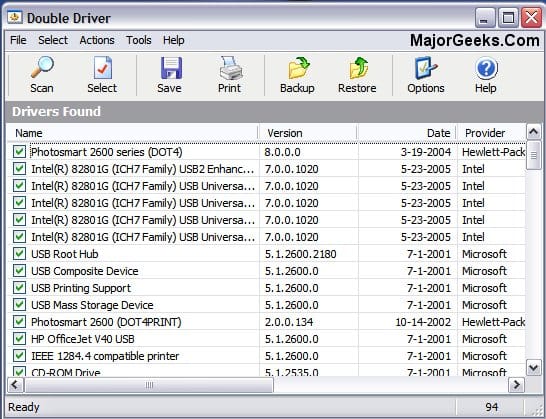
Personally, I prefer to use an old free standalone app named Double Driver. It's exe must be run as administrator. It's been around since Windows 7 days but works as well in 11 as it did back then. I've used it many times in 11 as I do not like MS generic drivers. I prefer to have a current copy of any drivers from my OEM, . What I like about it is, it's results are easy to read by device. You can see a screenshot of its results on the download page. You only need to backup 3rd party drivers, not the MS ones. You can either restore any/all the 3rd party drivers using the app or use the manual method in device manager for just the ones you want and point to DD output file.

I've used DD probably several hundred times over the years and it's never failed me. If you decide to use it, don't get impatient. Its processing will appear to have stalled but it's working sorting your drivers and takes some time. Just start your backup and walk away. A watched pot never seems to boil. Once it's sorted them out you will see each driver on the screen as it is being backed up.

 
Last edited:

My Computers My Computers

  • At a glance

    Windows 11 Pro 25H2 26200.8655i9-10900 10 core 20 threads32 gbnone-Intel UHD Graphics 630
    OS
    Windows 11 Pro 25H2 26200.8655
    Computer type
    PC/Desktop
    Manufacturer/Model
    Dell Optiplex 7080
    CPU
    i9-10900 10 core 20 threads
    Motherboard
    DELL 0J37VM
    Memory
    32 gb
    Graphics Card(s)
    none-Intel UHD Graphics 630
    Sound Card
    Integrated Realtek
    Monitor(s) Displays
    Benq 27
    Screen Resolution
    2560x1440
    Hard Drives
    2x1tb Solidigm m.2 nvme /External drives 512gb Samsung m.2 sata+2tb Kingston m2.nvme
    PSU
    500w
    Case
    MT
    Cooling
    Dell Premium
    Keyboard
    Logitech wired
    Mouse
    Logitech wireless
    Internet Speed
    so slow I'm too embarrassed to tell
    Browser
    #1 Edge #2 Firefox
    Antivirus
    Defender+MWB Premium
  • At a glance

    Windows 11 Pro 24H2 26200.8457AMD Ryzen 7 6800U32 gbintegrated
    Operating System
    Windows 11 Pro 24H2 26200.8457
    Computer type
    PC/Desktop
    Manufacturer/Model
    Beelink Mini PC SER5
    CPU
    AMD Ryzen 7 6800U
    Memory
    32 gb
    Graphics card(s)
    integrated
    Sound Card
    integrated
    Monitor(s) Displays
    Benq 27
    Screen Resolution
    2560x1440
    Hard Drives
    1TB Crucial nvme
    Keyboard
    Logitech wired
    Mouse
    Logitech wireless
    Internet Speed
    still too embarrassed to tell
    Browser
    Firefox
    Antivirus
    Defender
    Other Info
    System 3 is non compliant Dell 9020 i7-4770/24gb ram Win11 PRO 26200.8457
Or install a second drive

Install Windows WITHOUT connecting to the internet.

Run winaero tweaker in portable mode *still no internet *

Winaero > disable driver updates

Reboot

Connect to internet

Install updates

slave off your old (current) hdd

browse for drivers manually from device
Manager on your new install

If desired, once 100% configured, clone new install to original hdd and install in machine again.

You won’t have windows updates issues, incomparable driver issues AND have a current hdd Clone just in case
 

My Computer My Computer

At a glance

Windows 11 Pro
OS
Windows 11 Pro
Or install a second drive
True but then his bootloader could (and probably would) end up on the first drive. It's ALWAYS recommended when installing windows to physically disconnect or disable in UEFI bios all other drives except the one where you are installing windows to insure that the bootloader is installed on the same drive as windows..
 

My Computers My Computers

  • At a glance

    Windows 11 Pro 25H2 26200.8655i9-10900 10 core 20 threads32 gbnone-Intel UHD Graphics 630
    OS
    Windows 11 Pro 25H2 26200.8655
    Computer type
    PC/Desktop
    Manufacturer/Model
    Dell Optiplex 7080
    CPU
    i9-10900 10 core 20 threads
    Motherboard
    DELL 0J37VM
    Memory
    32 gb
    Graphics Card(s)
    none-Intel UHD Graphics 630
    Sound Card
    Integrated Realtek
    Monitor(s) Displays
    Benq 27
    Screen Resolution
    2560x1440
    Hard Drives
    2x1tb Solidigm m.2 nvme /External drives 512gb Samsung m.2 sata+2tb Kingston m2.nvme
    PSU
    500w
    Case
    MT
    Cooling
    Dell Premium
    Keyboard
    Logitech wired
    Mouse
    Logitech wireless
    Internet Speed
    so slow I'm too embarrassed to tell
    Browser
    #1 Edge #2 Firefox
    Antivirus
    Defender+MWB Premium
  • At a glance

    Windows 11 Pro 24H2 26200.8457AMD Ryzen 7 6800U32 gbintegrated
    Operating System
    Windows 11 Pro 24H2 26200.8457
    Computer type
    PC/Desktop
    Manufacturer/Model
    Beelink Mini PC SER5
    CPU
    AMD Ryzen 7 6800U
    Memory
    32 gb
    Graphics card(s)
    integrated
    Sound Card
    integrated
    Monitor(s) Displays
    Benq 27
    Screen Resolution
    2560x1440
    Hard Drives
    1TB Crucial nvme
    Keyboard
    Logitech wired
    Mouse
    Logitech wireless
    Internet Speed
    still too embarrassed to tell
    Browser
    Firefox
    Antivirus
    Defender
    Other Info
    System 3 is non compliant Dell 9020 i7-4770/24gb ram Win11 PRO 26200.8457
@Milincho

Please do not use scripts or other fixes that are not intended for your PC.

x BlueRobot has determined in the other thread where the error is located and has provided a fix for exactly this PC.

He also wrote specifically:
Warning: this fix is specific to the user in this thread. No one else should follow these instructions as it may cause more harm than good. If you are after assistance, please start a thread of your own.”

You should take this warning seriously.

Greetings
 

My Computer My Computer

At a glance

Win 11
OS
Win 11
It seems like the video card is the culprit.

You might as well replace it if you can't install the correct driver.
 

My Computers My Computers

  • At a glance

    Windows 11 Education For 25H2Intel® Core i7 5500u8 GBIntel HD Family Graphics 5500 AMD Firepro 4150M
    OS
    Windows 11 Education For 25H2
    Computer type
    Laptop
    Manufacturer/Model
    HP ZBook G2
    CPU
    Intel® Core i7 5500u
    Motherboard
    HP
    Memory
    8 GB
    Graphics Card(s)
    Intel HD Family Graphics 5500 AMD Firepro 4150M
    Sound Card
    Realtek High Audio
    Hard Drives
    1 TB SSD
    Mouse
    HP USB Mouse
    Antivirus
    Windows Defender
  • At a glance

    Windows 11 Pro For Workstations 25H2Xeon 1535m v632 GBAMD Quadro Pro 4100
    Operating System
    Windows 11 Pro For Workstations 25H2
    Computer type
    Laptop
    Manufacturer/Model
    HP Zbook G4
    CPU
    Xeon 1535m v6
    Motherboard
    HP
    Memory
    32 GB
    Graphics card(s)
    AMD Quadro Pro 4100
    Sound Card
    Bang and Olufson Audio
    Hard Drives
    1TB SSD
    Mouse
    HP USB Mouse
    Antivirus
    Windows Defender
It seems like the video card is the culprit.

You might as well replace it if you can't install the correct driver.
Not according to the thread if you read It.
 

My Computers My Computers

  • At a glance

    Windows 11 Pro 25H2 Build 26200.8655Intel(R) Core(TM) i7-4770K CPU @ 3.50GHz32.0 GB of I forget and the box is in storage.Gigabyte nVidia GeForce GTX 1660 Super OC 6GB
    OS
    Windows 11 Pro 25H2 Build 26200.8655
    Computer type
    PC/Desktop
    Manufacturer/Model
    Sin-built 2013
    CPU
    Intel(R) Core(TM) i7-4770K CPU @ 3.50GHz
    Motherboard
    ASUS ROG Maximus VI Formula
    Memory
    32.0 GB of I forget and the box is in storage.
    Graphics Card(s)
    Gigabyte nVidia GeForce GTX 1660 Super OC 6GB
    Sound Card
    ROG SupremeFX Formula 8-Channel High Definition Audio
    Monitor(s) Displays
    5 x LG 25MS500-B - 1 x 24MK430H-B - 1 x Wacom Pro 22" Touch Screen Tablet
    Screen Resolution
    All over the place
    Hard Drives
    Too many to list. OS on Samsung 1TB 870 QVO SATA
    PSU
    Silverstone 1500
    Case
    NZXT Phantom 820 Full-Tower Case
    Cooling
    Noctua NH-D15 Elite Class Dual Tower CPU Cooler / 6 x EziDIY 120mm / 2 x Corsair 140mm somethings / 1 x 140mm Thermaltake something / 2 x 200mm Corsair.
    Keyboard
    Corsair K95 / Logitech diNovo Edge Wireless
    Mouse
    Logitech: G402 / G502 / Mx Masters / Mx Air Cordless
    Internet Speed
    2000/500Mbps
    Browser
    All sorts
    Antivirus
    Kaspersky Premium
    Other Info
    ㅤㅤㅤㅤㅤㅤㅤㅤㅤㅤㅤㅤㅤㅤㅤㅤㅤㅤㅤㅤㅤㅤㅤㅤㅤㅤㅤㅤㅤㅤㅤㅤㅤㅤㅤㅤㅤㅤㅤㅤ⠀⠀⠀⠀⠀⠀⠀⠀⠀⠀
    TP-Link BE9300 WiFi 7 Bluetooth 5.4 (Archer TBE550E)
    TP-Link TX201 V1 2.5GB Lan

    Grandstream HT812 - VoIP
    ASUS DSL-AX82U - Mesh
    ASUS RT-AC68U - Mesh
    ASUS RT-BE88U Router

    Brother MFC-L2880DW Printer

    I’m on a horse.
  • At a glance

    Windows 11 Pro 25H2 Build 26200.8655 (Wifes)13th Generation Intel® Core™ i5-1340P Process...16GB LPDDR5-52001x Intel® Iris® Xe Graphics
    Operating System
    Windows 11 Pro 25H2 Build 26200.8655 (Wifes)
    Computer type
    Laptop
    Manufacturer/Model
    LENOVO Yoga 7 14IRL8 - Type 82YL
    CPU
    13th Generation Intel® Core™ i5-1340P Processor(Core™ i5-1340P)
    Memory
    16GB LPDDR5-5200
    Graphics card(s)
    1x Intel® Iris® Xe Graphics
    Sound Card
    Optimized with Dolby Atmos®
    Screen Resolution
    QHD 2880 x 1800 OLED
    Hard Drives
    M.2 512 GB SSD PCIe
    Mouse
    Logiteck MX Master 3S
    Internet Speed
    2000/500
    Antivirus
    Defender / Malwarebytes
    Other Info
    …still on a horse.


    Wireless Network: Wi-Fi 6E 2x2 AX; Bluetooth® 5.1 or above
    Ports: 1x 1 Novo button; 2 in 1 Audio Combo jack; Micro SD Card Reader; HDMI 1.4b; 2 x USB Type-C (TBT4)
    USB 3.2 Gen 2 DP 1.4a
    PD 3.0); 1 x USB 3.2 Gen1 Type A
    Camera
    1x 1080P FHD IR/RGB Hybrid with Privacy Shutter and Dual Array Microphone
    Graphics
    1x Intel® Iris® Xe Graphics
    Monitor
    14" WUXGA
    Form Factor
    Convertible Notebook
  • Windows 11 Pro 25H2 Build 26200.8655 (Wifes)

    Yoga 7 2-in-1 14IML9 - Type 83DJ

    Processor: Intel® Core™ Ultra 7 155H Processor(Core™ Ultra 7 155H)

    Memory: 32GB LPD5X-7467

    Hard Drive: 1 TB SSD PCIe

    Wireless Network: 1x Wi-Fi 6E 2x2 AX; Bluetooth® 5.1 or above

    Ports: 1 x HDMI 2.1 TMDS; 1 x Novo Button; 1 x Combo Audio Jack
    2 x USB-C (USB 4.0)
    1 x USB-A 3.2 Gen 1

    Camera: 1080P FHD IR Hybrid with Dual Microphone

    Graphics: Intel® Arc™ Graphics

    Monitor: 14" 2.8K

    ...Where's my horse?
Could have helped more with the diagnostics - if you made a report shortly after running into driver issues with latest Windows 11 Stable Build. Beta/Preview Builds can complicate things (running a standard diagnostic while trying the usual on this builds - can be a waste of time for various reasons). 😐
 

My Computer My Computer

At a glance

WinDOS 25H2Intel & AMDSO-DIMM SK Hynix 15.8 GB Dual-Channel DDR4-26...nVidia RTX 2060 6GB Mobile GPU (TU106M)
OS
WinDOS 25H2
Computer type
Laptop
CPU
Intel & AMD
Memory
SO-DIMM SK Hynix 15.8 GB Dual-Channel DDR4-2666 (2 x 8 GB) 1329MHz (19-19-19-43)
Graphics Card(s)
nVidia RTX 2060 6GB Mobile GPU (TU106M)
Sound Card
Onbord Realtek ALC1220
Screen Resolution
1920 x 1080
Hard Drives
1x Samsung PM981 NVMe PCIe M.2 512GB / 1x Seagate Expansion ST1000LM035 1TB
Not according to the thread if you read It.

More like borked driver dll registry pointers. The old hunting for a needle in the haystack.
 

My Computer My Computer

At a glance

11 Pro 25H2i7-10750H16GB Samsung DDR4 3200Intel + Nvidia RTX3060 Laptop
OS
11 Pro 25H2
Computer type
Laptop
Manufacturer/Model
MSI
CPU
i7-10750H
Motherboard
MSI MS-17F5
Memory
16GB Samsung DDR4 3200
Graphics Card(s)
Intel + Nvidia RTX3060 Laptop
Sound Card
Realtek
Monitor(s) Displays
Samsung 24" Curved (HDMI)
Screen Resolution
1920x1080
Hard Drives
Sabrent Rocket Gen3 1Tb Smasung EVO 870 1TB
Antivirus
Bitdefender
@Milincho The script posted in this post will fix your issue: "Class is not registered" , error 0x80040154

@Milincho

Please do not use scripts or other fixes that are not intended for your PC.

x BlueRobot has determined in the other thread where the error is located and has provided a fix for exactly this PC.

He also wrote specifically:
Warning: this fix is specific to the user in this thread. No one else should follow these instructions as it may cause more harm than good. If you are after assistance, please start a thread of your own.”

You should take this warning seriously.

Greetings

As I have Macrium backups I decided to risk it and try the SFCfix script. Result says ok:

SFCFix version 3.0.2.1 by niemiro.
Start time: 2024-05-12 14:24:05.456
Microsoft Windows 10 Build 22631 - amd64
Using .txt script file at C:\Users\Jesus\Desktop\SFCFixScript.txt [5]


RegistryScript::
Successfully took ownership and permissions for registry key HKEY_LOCAL_MACHINE\SOFTWARE\Classes\CLSID\{0823B6F8-F499-4d5e-B885-EA9CB4F43B24}\LocalServer32.
Successfully took ownership and permissions for registry key HKEY_CLASSES_ROOT\CLSID\{0823B6F8-F499-4d5e-B885-EA9CB4F43B24}\LocalServer32.
Successfully took ownership and permissions for registry key HKEY_LOCAL_MACHINE\SOFTWARE\Classes\WOW6432Node\CLSID\{0823B6F8-F499-4d5e-B885-EA9CB4F43B24}\LocalServer32.

Successfully imported registry key HKEY_LOCAL_MACHINE\SOFTWARE\Classes\CLSID\{0823B6F8-F499-4d5e-B885-EA9CB4F43B24}\LocalServer32.
Successfully imported registry key HKEY_CLASSES_ROOT\CLSID\{0823B6F8-F499-4d5e-B885-EA9CB4F43B24}\LocalServer32.
Successfully imported registry key HKEY_LOCAL_MACHINE\SOFTWARE\Classes\WOW6432Node\CLSID\{0823B6F8-F499-4d5e-B885-EA9CB4F43B24}\LocalServer32.

Successfully restored ownership and permissions for registry key HKEY_LOCAL_MACHINE\SOFTWARE\Classes\CLSID\{0823B6F8-F499-4d5e-B885-EA9CB4F43B24}\LocalServer32.
Successfully restored ownership and permissions for registry key HKEY_CLASSES_ROOT\CLSID\{0823B6F8-F499-4d5e-B885-EA9CB4F43B24}\LocalServer32.
Successfully restored ownership and permissions for registry key HKEY_LOCAL_MACHINE\SOFTWARE\Classes\WOW6432Node\CLSID\{0823B6F8-F499-4d5e-B885-EA9CB4F43B24}\LocalServer32.
RegistryScript:: directive completed successfully.


Successfully processed all directives.
SFCFix version 3.0.2.1 by niemiro has completed.
Currently storing 3 datablocks.
Finish time: 2024-05-12 14:24:05.544
Script hash: 6Y/I0XvZbie9UnZFIkH0voUaRAQe0OdX9DpERfIt14o=
----------------------EOF-----------------------

But everything is the same after: SFC and DISM do not work, Windows Update do not work, etc.

 

My Computer My Computer

At a glance

Win 11 Pro 24H2 26100.1882Ryzen 9 5950X32GBRTX 4080
OS
Win 11 Pro 24H2 26100.1882
Computer type
PC/Desktop
CPU
Ryzen 9 5950X
Motherboard
Gigabyte X570 Aorus Ultra
Memory
32GB
Graphics Card(s)
RTX 4080
Monitor(s) Displays
Aorus 2160p 144Hz + NexiGo Aurora Pro UHD HDMI 2.1 projector
Screen Resolution
2160p
Keyboard
Logitech 915
Mouse
Logitech MX Master 3
Internet Speed
100MB
Browser
Chrome
Antivirus
MalwareHunter + MalwareBytes

Latest Support Threads

Back
Top Bottom