RAM uncertainty


Have you tried reinstalling the operating system? It sounds like you are using an Ethernet cable. Is that correct?

If you simply want to set up a local account just disconnect the cable and try installing without it. You may have to click "I don't have internet" twice before it lets you proceed. You can fix the rest of it up later, after the OS is finished installing.
Yes, I was using an ethernet cable. I'll try without and post an update. If it doesn't work, I'm thinking maybe to reset the BIOS to factory default to see it it fixes the problem.
 

My Computer My Computer

At a glance

Windows 11Intel S1700 i5 12400Corsair LPX 32GBASUS NVIDIA Geforce RTX 3060
OS
Windows 11
Computer type
PC/Desktop
CPU
Intel S1700 i5 12400
Motherboard
ASUS PRIME Z790M PLUS D4
Memory
Corsair LPX 32GB
Graphics Card(s)
ASUS NVIDIA Geforce RTX 3060
Monitor(s) Displays
HP 24w
Hard Drives
Samsung 980 PRO M.2 NVMe
PSU
Corsair TX650M
Case
Matx
Cooling
ID-COOLING Dashflow 240
I don't recommend re-flashing the BIOS if that is what you're thinking, but resetting the system defaults is okay. I apologize if I misunderstood. I am not aware of what level of expertise you may or may not have. There are tutorials online for setting up a local account when Win 11 gets stubborn and demands an internet connection. I've heard they stopped doing that but it's a new OS in a state of flux and IMO it's still in Beta. A rose by any other name is still a flower.
 

My Computer My Computer

At a glance

WIN 11, WIN 10, WIN 8.1, WIN 7 U, WIN 7 PRO, ...Intel i7 6900K and i9-7960X / AMD 3800X (8 core)128 GB CORSAIR DOMINATOR PLATINUM (B DIE)NVIDIA 1070 and RTX 3070
OS
WIN 11, WIN 10, WIN 8.1, WIN 7 U, WIN 7 PRO, WIN 7 HOME (32 Bit), LINUX MINT
Computer type
PC/Desktop
Manufacturer/Model
DIY, ASUS, and DELL
CPU
Intel i7 6900K and i9-7960X / AMD 3800X (8 core)
Motherboard
ASUS X99E-WS USB 3.1 and ASUS X299 SAGE
Memory
128 GB CORSAIR DOMINATOR PLATINUM (B DIE)
Graphics Card(s)
NVIDIA 1070 and RTX 3070
Sound Card
Crystal Sound (onboard)
Monitor(s) Displays
single Samsung 30" 4K and 8" aux monitor
Screen Resolution
4K and something equally attrocious. I'll be working on this.
Hard Drives
A, B, C, D, E, F, G, H, I, J, K, L, M, N, O, P, Q, R, S, T, U, V, W

Ports X, Y, and Z are reserved for USB access and removable drives.

Drive types consist of the following: Various mechanical hard drives bearing the brand names, Seagate, Toshiba, and Western Digital. Various NVMe drives bearing the brand names Kingston, Intel, Silicon Power, Crucial, Western Digital, and Team Group. Various SATA SSDs bearing various different brand names.

RAID arrays included:

LSI RAID 10 (WD Velociraptors) 1115.72 GB
LSI RAID 10 (WD SSDS) 463.80 GB

INTEL RAID 0 (KINGSTON HYPER X) System 447.14 GB
INTEL RAID 1 TOSHIBA ENTERPRIZE class Data 2794.52 GB
INTEL RAID 1 SEAGATE HYBRID 931.51 GB
PSU
SEVERAL. I prefer my Corsair Platinum HX1000i but I also like EVGA power supplies
Case
ThermalTake Level 10 GT (among others)
Cooling
Noctua is my favorite and I use it in my main. I also own various other coolers.
Keyboard
all kinds.
Mouse
all kinds
Internet Speed
360 mbps - 1 gbps (depending)
Browser
FIREFOX
Antivirus
KASPERSKY (no apologies)
Other Info
Gave Dell touch screen with Windows 11 to daughter and got me an OTVOC. Being a PC builder I own many desktop PCs as well. I am a father of five providing PCs, laptops, and tablets for all my family, most of which I have modified, rebuilt, or simply built from scratch. I do not own a cell phone, never have, never will.
A rose by any other name is still a flower.
Hahaha.

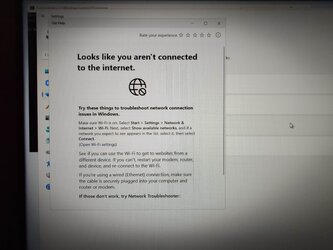
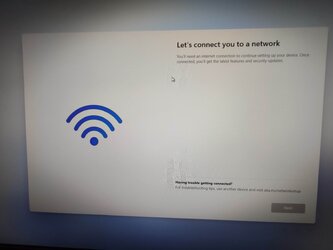
Anyway, yesterday, I tried the “I do not have a Windows key” option twice as advised, but no joy, still stuck on the “Let’s get you connected to the internet screen”, with the NEXT option still greyed out. I had tried the local account method earlier from YT but as you mention, it had been patched. I would describe my expertise as just below mid-level, and above newbie.

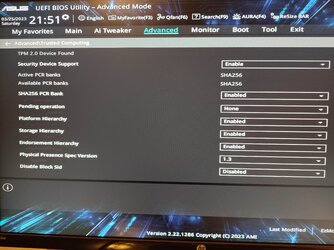
So I then checked the BIOS to make sure that TPM was enabled, and also changed the Secure Boot option to Windows UEFI Secure Boot (from Other OS), but still no joy, even though I’m clearly connected to Microsoft’s servers.

I decided to call Microsoft, but despite trying various phone numbers I kept on being deferred to online self-help.

I then saw a video about reformatting the SSD from MBR to GPT in order to connect to the internet, but don’t know how accurate this info is, and it’s obvious it has be to done from inside Windows. Plus, I’ve already wiped the SSD about ten times using ASUS Secure Erase to try to reinstall Windows.

Also, I just realized that before installing Windows, the option was presented to “REPAIR WINDOWS” which took me to Advanced Options, and I could then actually type in the Command Prompt box. But it cannot be a possible way forward as there's no OS installed, surely?

I think my remaining options are to phone ASUS (not a hardware problem, they might point out), or just to buy a Windows 10 aftermarket product key and take it from there.

P.S. I took some photos of the setup screen at various stages but the files were too large to upload.
 
Last edited:

My Computer My Computer

At a glance

Windows 11Intel S1700 i5 12400Corsair LPX 32GBASUS NVIDIA Geforce RTX 3060
OS
Windows 11
Computer type
PC/Desktop
CPU
Intel S1700 i5 12400
Motherboard
ASUS PRIME Z790M PLUS D4
Memory
Corsair LPX 32GB
Graphics Card(s)
ASUS NVIDIA Geforce RTX 3060
Monitor(s) Displays
HP 24w
Hard Drives
Samsung 980 PRO M.2 NVMe
PSU
Corsair TX650M
Case
Matx
Cooling
ID-COOLING Dashflow 240
Hahaha.

Anyway, yesterday, I tried the “I do not have a Windows key” option twice as advised, but no joy, still stuck on the “Let’s get you connected to the internet screen”, with the NEXT option still greyed out. I had tried the local account method earlier from YT but as you mention, it had been patched. I would describe my expertise as just below mid-level, and above newbie.

So I then checked the BIOS to make sure that TPM was enabled, and also changed the Secure Boot option to Windows UEFI Secure Boot (from Other OS), but still no joy, even though I’m clearly connected to Microsoft’s servers.

I decided to call Microsoft, but despite trying various phone numbers I kept on being deferred to online self-help.

I then saw a video about reformatting the SSD from MBR to GPT in order to connect to the internet, but don’t know how accurate this info is, and it’s obvious it has be to done from inside Windows. Plus, I’ve already wiped the SSD about ten times using ASUS Secure Erase to try to reinstall Windows.

Also, I just realized that before installing Windows, the option was presented to “REPAIR WINDOWS” which took me to Advanced Options, and I could then actually type in the Command Prompt box. But it cannot be a possible way forward as there's no OS installed, surely?

I think my remaining options are to phone ASUS (not a hardware problem, they might point out), or just to buy a Windows 10 aftermarket product key and take it from there.

P.S. I took some photos of the setup screen at various stages but the files were too large to upload.
In order for BIOS to work in UEFI mode I(legacy or CSM) in BIOS should be off and system disk in GPT. That should be set in BIOS prior to attempted W11 installation on a clean disk.
Getting new license key will not help but there are ways to bypass internet requirement.
After it's installed you can have fair chance to solve problem with internet.
 

My Computer My Computer

At a glance

W11 Pro and Insider DevAMD Ryzen 9 7900x2x16GB Kingston 6000MHz, Cl 32 @ 6200MHz Cl30Gigabyte Rx 6600XT Gaming OC 8G Pro
OS
W11 Pro and Insider Dev
Computer type
PC/Desktop
Manufacturer/Model
Home brewed
CPU
AMD Ryzen 9 7900x
Motherboard
ASROCK b650 PRO RS
Memory
2x16GB Kingston 6000MHz, Cl 32 @ 6200MHz Cl30
Graphics Card(s)
Gigabyte Rx 6600XT Gaming OC 8G Pro
Sound Card
MB, Realtek Ac1220p
Monitor(s) Displays
3 x 27"
Screen Resolution
1080p
Hard Drives
Kingston KC3000. 1TBSamsung 970 evo Plus 500GB, Crucial P1 NVMe 1TB, Lexar NVMe 2 TB, Silicon Power M.2 SATA 500GB
PSU
Seasonic 750W
Case
Custom Raidmax
Cooling
Arctic Liquid Freezer III 360mm
Internet Speed
20/19 mbps
In order for BIOS to work in UEFI mode I(legacy or CSM) in BIOS should be off and system disk in GPT. That should be set in BIOS prior to attempted W11 installation on a clean disk.
So in BIOS under BOOT section, I should change the OS type from Windows UEFI Mode, to Other OS, is that correct?

Also, I'm still confused about the GPT thing, where do I find it in the BIOS?
 

My Computer My Computer

At a glance

Windows 11Intel S1700 i5 12400Corsair LPX 32GBASUS NVIDIA Geforce RTX 3060
OS
Windows 11
Computer type
PC/Desktop
CPU
Intel S1700 i5 12400
Motherboard
ASUS PRIME Z790M PLUS D4
Memory
Corsair LPX 32GB
Graphics Card(s)
ASUS NVIDIA Geforce RTX 3060
Monitor(s) Displays
HP 24w
Hard Drives
Samsung 980 PRO M.2 NVMe
PSU
Corsair TX650M
Case
Matx
Cooling
ID-COOLING Dashflow 240
So in BIOS under BOOT section, I should change the OS type from Windows UEFI Mode, to Other OS, is that correct?

Also, I'm still confused about the GPT thing, where do I find it in the BIOS?
#1. Yes, options in BIOS should be: CSM (new name for Legacy), UEFI only or even maybe Auto mode. Disabling CSM takes you to UEFI mode only. "Other OS" means it will only allow Windows to install or modify BOOT.
MBR/GPT you'll not find in BIOS It's up to OS to format in either mode, W11 will automatically format in GPT if UEFI bios is enabled.
By "Clean disk" I mean no partitions defined and even unformatted so Windows can make required partitions in required mode.
Typically will look like this.
1679729938482.png
 

My Computer My Computer

At a glance

W11 Pro and Insider DevAMD Ryzen 9 7900x2x16GB Kingston 6000MHz, Cl 32 @ 6200MHz Cl30Gigabyte Rx 6600XT Gaming OC 8G Pro
OS
W11 Pro and Insider Dev
Computer type
PC/Desktop
Manufacturer/Model
Home brewed
CPU
AMD Ryzen 9 7900x
Motherboard
ASROCK b650 PRO RS
Memory
2x16GB Kingston 6000MHz, Cl 32 @ 6200MHz Cl30
Graphics Card(s)
Gigabyte Rx 6600XT Gaming OC 8G Pro
Sound Card
MB, Realtek Ac1220p
Monitor(s) Displays
3 x 27"
Screen Resolution
1080p
Hard Drives
Kingston KC3000. 1TBSamsung 970 evo Plus 500GB, Crucial P1 NVMe 1TB, Lexar NVMe 2 TB, Silicon Power M.2 SATA 500GB
PSU
Seasonic 750W
Case
Custom Raidmax
Cooling
Arctic Liquid Freezer III 360mm
Internet Speed
20/19 mbps
Sometimes on a Windows installation the "format" will not work because the drive you want to install to isn't GPT. You can correct this by putting it in another PC and converting it to GPT via Windows Manager, shutting down the PC, removing the drive and reconnecting it to the PC that you are trying to install Windows 11 on. You want to click "new" before installing and you want to format it with the Windows installation first. After this Windows will proceed to make its own partitions much like the ones you see in CountMike's illustration above.
 

My Computer My Computer

At a glance

WIN 11, WIN 10, WIN 8.1, WIN 7 U, WIN 7 PRO, ...Intel i7 6900K and i9-7960X / AMD 3800X (8 core)128 GB CORSAIR DOMINATOR PLATINUM (B DIE)NVIDIA 1070 and RTX 3070
OS
WIN 11, WIN 10, WIN 8.1, WIN 7 U, WIN 7 PRO, WIN 7 HOME (32 Bit), LINUX MINT
Computer type
PC/Desktop
Manufacturer/Model
DIY, ASUS, and DELL
CPU
Intel i7 6900K and i9-7960X / AMD 3800X (8 core)
Motherboard
ASUS X99E-WS USB 3.1 and ASUS X299 SAGE
Memory
128 GB CORSAIR DOMINATOR PLATINUM (B DIE)
Graphics Card(s)
NVIDIA 1070 and RTX 3070
Sound Card
Crystal Sound (onboard)
Monitor(s) Displays
single Samsung 30" 4K and 8" aux monitor
Screen Resolution
4K and something equally attrocious. I'll be working on this.
Hard Drives
A, B, C, D, E, F, G, H, I, J, K, L, M, N, O, P, Q, R, S, T, U, V, W

Ports X, Y, and Z are reserved for USB access and removable drives.

Drive types consist of the following: Various mechanical hard drives bearing the brand names, Seagate, Toshiba, and Western Digital. Various NVMe drives bearing the brand names Kingston, Intel, Silicon Power, Crucial, Western Digital, and Team Group. Various SATA SSDs bearing various different brand names.

RAID arrays included:

LSI RAID 10 (WD Velociraptors) 1115.72 GB
LSI RAID 10 (WD SSDS) 463.80 GB

INTEL RAID 0 (KINGSTON HYPER X) System 447.14 GB
INTEL RAID 1 TOSHIBA ENTERPRIZE class Data 2794.52 GB
INTEL RAID 1 SEAGATE HYBRID 931.51 GB
PSU
SEVERAL. I prefer my Corsair Platinum HX1000i but I also like EVGA power supplies
Case
ThermalTake Level 10 GT (among others)
Cooling
Noctua is my favorite and I use it in my main. I also own various other coolers.
Keyboard
all kinds.
Mouse
all kinds
Internet Speed
360 mbps - 1 gbps (depending)
Browser
FIREFOX
Antivirus
KASPERSKY (no apologies)
Other Info
Gave Dell touch screen with Windows 11 to daughter and got me an OTVOC. Being a PC builder I own many desktop PCs as well. I am a father of five providing PCs, laptops, and tablets for all my family, most of which I have modified, rebuilt, or simply built from scratch. I do not own a cell phone, never have, never will.
Disabling CSM takes you to UEFI mode only.
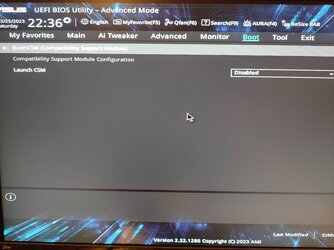
CSM is already disabled. I have taken low quality pics and hopefully I can upload them.
Sometimes on a Windows installation the "format" will not work because the drive you want to install to isn't GPT. You can correct this by putting it in another PC and converting it to GPT via Windows Manager

Okay, I will have to get an external M.2 bay from Amazon to connect to my ASUS B85M-G pc to do the format.
 

Attachments

  • 1679784790603.jpg
    1679784790603.jpg
    905.4 KB · Views: 4
  • 1679782281072.jpg
    1679782281072.jpg
    901.1 KB · Views: 4
  • 1679782247571.jpg
    1679782247571.jpg
    1.1 MB · Views: 4

My Computer My Computer

At a glance

Windows 11Intel S1700 i5 12400Corsair LPX 32GBASUS NVIDIA Geforce RTX 3060
OS
Windows 11
Computer type
PC/Desktop
CPU
Intel S1700 i5 12400
Motherboard
ASUS PRIME Z790M PLUS D4
Memory
Corsair LPX 32GB
Graphics Card(s)
ASUS NVIDIA Geforce RTX 3060
Monitor(s) Displays
HP 24w
Hard Drives
Samsung 980 PRO M.2 NVMe
PSU
Corsair TX650M
Case
Matx
Cooling
ID-COOLING Dashflow 240
Or just make a live Linux on a USB stick, boot from it and format in whatever format you want,
 

My Computer My Computer

At a glance

W11 Pro and Insider DevAMD Ryzen 9 7900x2x16GB Kingston 6000MHz, Cl 32 @ 6200MHz Cl30Gigabyte Rx 6600XT Gaming OC 8G Pro
OS
W11 Pro and Insider Dev
Computer type
PC/Desktop
Manufacturer/Model
Home brewed
CPU
AMD Ryzen 9 7900x
Motherboard
ASROCK b650 PRO RS
Memory
2x16GB Kingston 6000MHz, Cl 32 @ 6200MHz Cl30
Graphics Card(s)
Gigabyte Rx 6600XT Gaming OC 8G Pro
Sound Card
MB, Realtek Ac1220p
Monitor(s) Displays
3 x 27"
Screen Resolution
1080p
Hard Drives
Kingston KC3000. 1TBSamsung 970 evo Plus 500GB, Crucial P1 NVMe 1TB, Lexar NVMe 2 TB, Silicon Power M.2 SATA 500GB
PSU
Seasonic 750W
Case
Custom Raidmax
Cooling
Arctic Liquid Freezer III 360mm
Internet Speed
20/19 mbps
Or just make a live Linux on a USB stick, boot from it and format in whatever format you want,
OK, I'll try that.

I'll update soon.

Thanks guys.
 

My Computer My Computer

At a glance

Windows 11Intel S1700 i5 12400Corsair LPX 32GBASUS NVIDIA Geforce RTX 3060
OS
Windows 11
Computer type
PC/Desktop
CPU
Intel S1700 i5 12400
Motherboard
ASUS PRIME Z790M PLUS D4
Memory
Corsair LPX 32GB
Graphics Card(s)
ASUS NVIDIA Geforce RTX 3060
Monitor(s) Displays
HP 24w
Hard Drives
Samsung 980 PRO M.2 NVMe
PSU
Corsair TX650M
Case
Matx
Cooling
ID-COOLING Dashflow 240
I appreciate all the help, guys.

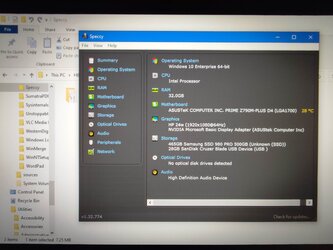
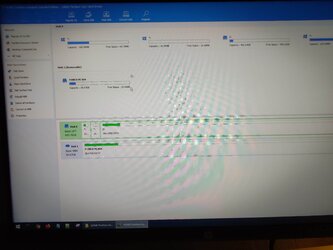
According to HirensBCD, my M.2 drive is already formatted as GPT (see photos). There are a few network troubleshooting tools on the HBCD USB, but because they are so outdated I’m not sure it’s safe to connect to the internet to try them. I also made an Ubuntu Live USB, but its not as intuitive to use.

Also, I came across the thread below -


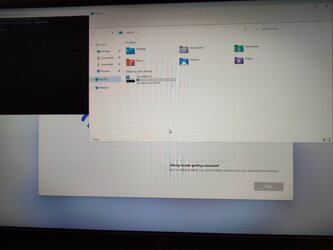
which suggested either a corrupt Windows Installation Media or the absence of a Network Driver. To rule out the Installation Media as a cause, I downloaded a fresh copy on another USB, but same result – still couldn’t connect W11 to the net. Then a few minutes ago I tried Shift + F10 and then WIN + E, and this opened up Explorer on a local account. As I have my mobo’s network drivers on a USB, is this something I can try, given that driver installation is supposed to follow a specific sequence i.e. chipset, gpu before LAN etc? Or should I just download a generic network driver from Intel and then install my mobo’s drivers afterwards?
 

Attachments

  • 1680401005216.jpg
    1680401005216.jpg
    582 KB · Views: 3
  • 1680400967714.jpg
    1680400967714.jpg
    380.2 KB · Views: 3
  • 1680400911653.jpg
    1680400911653.jpg
    212.3 KB · Views: 3
  • 1680400940057.jpg
    1680400940057.jpg
    251.8 KB · Views: 2
  • 1680400869413.jpg
    1680400869413.jpg
    521.5 KB · Views: 2
  • 1680400834372.jpg
    1680400834372.jpg
    306.3 KB · Views: 2

My Computer My Computer

At a glance

Windows 11Intel S1700 i5 12400Corsair LPX 32GBASUS NVIDIA Geforce RTX 3060
OS
Windows 11
Computer type
PC/Desktop
CPU
Intel S1700 i5 12400
Motherboard
ASUS PRIME Z790M PLUS D4
Memory
Corsair LPX 32GB
Graphics Card(s)
ASUS NVIDIA Geforce RTX 3060
Monitor(s) Displays
HP 24w
Hard Drives
Samsung 980 PRO M.2 NVMe
PSU
Corsair TX650M
Case
Matx
Cooling
ID-COOLING Dashflow 240
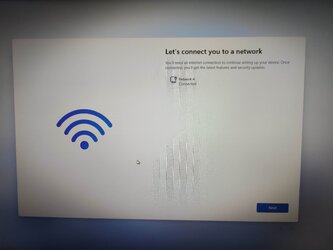
It looks as though you have the OS installed. What does it look like in Device Manager? Any nasty little yellow triangles to fix?

I've never broken my PC reinstalling drivers that came with the system board. I would try that at least. ASUS is pretty good that way. I've been noticing lately that Windows has been taking out my Ethernet drivers on an AMD build of mine and not really delivering a viable replacement. I have to keep on reinstalling and reactivating the old drivers. Not sure what's doing that.

*Another thought. If device manager says you're good to go you might want to try calling your ISP. You could be having an issue with your router. Maybe it doesn't like your PC. I've had this happen to me before too, where it gives all my other devices internet but won't work with a newer one.
 
Last edited:

My Computer My Computer

At a glance

WIN 11, WIN 10, WIN 8.1, WIN 7 U, WIN 7 PRO, ...Intel i7 6900K and i9-7960X / AMD 3800X (8 core)128 GB CORSAIR DOMINATOR PLATINUM (B DIE)NVIDIA 1070 and RTX 3070
OS
WIN 11, WIN 10, WIN 8.1, WIN 7 U, WIN 7 PRO, WIN 7 HOME (32 Bit), LINUX MINT
Computer type
PC/Desktop
Manufacturer/Model
DIY, ASUS, and DELL
CPU
Intel i7 6900K and i9-7960X / AMD 3800X (8 core)
Motherboard
ASUS X99E-WS USB 3.1 and ASUS X299 SAGE
Memory
128 GB CORSAIR DOMINATOR PLATINUM (B DIE)
Graphics Card(s)
NVIDIA 1070 and RTX 3070
Sound Card
Crystal Sound (onboard)
Monitor(s) Displays
single Samsung 30" 4K and 8" aux monitor
Screen Resolution
4K and something equally attrocious. I'll be working on this.
Hard Drives
A, B, C, D, E, F, G, H, I, J, K, L, M, N, O, P, Q, R, S, T, U, V, W

Ports X, Y, and Z are reserved for USB access and removable drives.

Drive types consist of the following: Various mechanical hard drives bearing the brand names, Seagate, Toshiba, and Western Digital. Various NVMe drives bearing the brand names Kingston, Intel, Silicon Power, Crucial, Western Digital, and Team Group. Various SATA SSDs bearing various different brand names.

RAID arrays included:

LSI RAID 10 (WD Velociraptors) 1115.72 GB
LSI RAID 10 (WD SSDS) 463.80 GB

INTEL RAID 0 (KINGSTON HYPER X) System 447.14 GB
INTEL RAID 1 TOSHIBA ENTERPRIZE class Data 2794.52 GB
INTEL RAID 1 SEAGATE HYBRID 931.51 GB
PSU
SEVERAL. I prefer my Corsair Platinum HX1000i but I also like EVGA power supplies
Case
ThermalTake Level 10 GT (among others)
Cooling
Noctua is my favorite and I use it in my main. I also own various other coolers.
Keyboard
all kinds.
Mouse
all kinds
Internet Speed
360 mbps - 1 gbps (depending)
Browser
FIREFOX
Antivirus
KASPERSKY (no apologies)
Other Info
Gave Dell touch screen with Windows 11 to daughter and got me an OTVOC. Being a PC builder I own many desktop PCs as well. I am a father of five providing PCs, laptops, and tablets for all my family, most of which I have modified, rebuilt, or simply built from scratch. I do not own a cell phone, never have, never will.
What does it look like in Device Manager? Any nasty little yellow triangles to fix?
Device Manager looking OK, but messy under the Other Devices category with 9 yellow triangles (photo attached).

I'll install the ASUS LAN driver and post an update.

Thanks, bro.
 

Attachments

  • 1680480684270.jpg
    1680480684270.jpg
    422.7 KB · Views: 3

My Computer My Computer

At a glance

Windows 11Intel S1700 i5 12400Corsair LPX 32GBASUS NVIDIA Geforce RTX 3060
OS
Windows 11
Computer type
PC/Desktop
CPU
Intel S1700 i5 12400
Motherboard
ASUS PRIME Z790M PLUS D4
Memory
Corsair LPX 32GB
Graphics Card(s)
ASUS NVIDIA Geforce RTX 3060
Monitor(s) Displays
HP 24w
Hard Drives
Samsung 980 PRO M.2 NVMe
PSU
Corsair TX650M
Case
Matx
Cooling
ID-COOLING Dashflow 240
May as well tend to the rest of those drivers while you're at it. You have the original driver software. I wouldn't worry that much about the order now that you have the OS installed. Let us know how it goes. Windows might even sort itself out with the updates once you have all the originals installed. :-)
 

My Computer My Computer

At a glance

WIN 11, WIN 10, WIN 8.1, WIN 7 U, WIN 7 PRO, ...Intel i7 6900K and i9-7960X / AMD 3800X (8 core)128 GB CORSAIR DOMINATOR PLATINUM (B DIE)NVIDIA 1070 and RTX 3070
OS
WIN 11, WIN 10, WIN 8.1, WIN 7 U, WIN 7 PRO, WIN 7 HOME (32 Bit), LINUX MINT
Computer type
PC/Desktop
Manufacturer/Model
DIY, ASUS, and DELL
CPU
Intel i7 6900K and i9-7960X / AMD 3800X (8 core)
Motherboard
ASUS X99E-WS USB 3.1 and ASUS X299 SAGE
Memory
128 GB CORSAIR DOMINATOR PLATINUM (B DIE)
Graphics Card(s)
NVIDIA 1070 and RTX 3070
Sound Card
Crystal Sound (onboard)
Monitor(s) Displays
single Samsung 30" 4K and 8" aux monitor
Screen Resolution
4K and something equally attrocious. I'll be working on this.
Hard Drives
A, B, C, D, E, F, G, H, I, J, K, L, M, N, O, P, Q, R, S, T, U, V, W

Ports X, Y, and Z are reserved for USB access and removable drives.

Drive types consist of the following: Various mechanical hard drives bearing the brand names, Seagate, Toshiba, and Western Digital. Various NVMe drives bearing the brand names Kingston, Intel, Silicon Power, Crucial, Western Digital, and Team Group. Various SATA SSDs bearing various different brand names.

RAID arrays included:

LSI RAID 10 (WD Velociraptors) 1115.72 GB
LSI RAID 10 (WD SSDS) 463.80 GB

INTEL RAID 0 (KINGSTON HYPER X) System 447.14 GB
INTEL RAID 1 TOSHIBA ENTERPRIZE class Data 2794.52 GB
INTEL RAID 1 SEAGATE HYBRID 931.51 GB
PSU
SEVERAL. I prefer my Corsair Platinum HX1000i but I also like EVGA power supplies
Case
ThermalTake Level 10 GT (among others)
Cooling
Noctua is my favorite and I use it in my main. I also own various other coolers.
Keyboard
all kinds.
Mouse
all kinds
Internet Speed
360 mbps - 1 gbps (depending)
Browser
FIREFOX
Antivirus
KASPERSKY (no apologies)
Other Info
Gave Dell touch screen with Windows 11 to daughter and got me an OTVOC. Being a PC builder I own many desktop PCs as well. I am a father of five providing PCs, laptops, and tablets for all my family, most of which I have modified, rebuilt, or simply built from scratch. I do not own a cell phone, never have, never will.
Try enable Network Stack in bios to fix no ethernet connection. Reboot bios then disable! enjoy... I hope ;-)
 

My Computer My Computer

At a glance

Windows 11 Pro 25H2Intel Alder lake i7 12700K32 Gb Corsair Vengeance LPX DDR4 3200 XMP2EVGA 3070ti FTW3 Ultra Gaming & Intel Arc
OS
Windows 11 Pro 25H2
Computer type
PC/Desktop
Manufacturer/Model
My Self
CPU
Intel Alder lake i7 12700K
Motherboard
Asus z690 Gaming WiFi D4, Bios Ver 4505
Memory
32 Gb Corsair Vengeance LPX DDR4 3200 XMP2
Graphics Card(s)
EVGA 3070ti FTW3 Ultra Gaming & Intel Arc
Sound Card
Via Display port
Monitor(s) Displays
Dell AW2723DF
Screen Resolution
2560 x 1440 @ 280Hz G-Sync mode
Hard Drives
WD Black SN850 1Tb NVME (Boot Drive)
WD BLACK SN850X + Heatsink 1Tb NVME
Samsung 870 Qvo 1Tb SSD,
Pioneer DVD-RW DVR-219L
WD Black SN850x NVME 2Tb x3
PSU
Corsair RM850
Case
Phanteks Enthoo Pro M Tempered Glass
Cooling
Be Quiet Shadow Rock 3
Keyboard
Logitech G Pro
Mouse
Logitech G903, Lightspeed + Powerplay Mat
Internet Speed
900Mb/900Mb Fritz!Box 7590ax v2
Browser
Firefox
Antivirus
MS Defender
Other Info
Logitech C930e webcam
Synology DS218 play 2 x 4Tb Synology HAT3300-4T
Try enable Network Stack in bios to fix no ethernet connection. Reboot bios then disable! enjoy... I hope ;-)
Good advice! I completely forgot about that trick! :D
 

My Computer My Computer

At a glance

WIN 11, WIN 10, WIN 8.1, WIN 7 U, WIN 7 PRO, ...Intel i7 6900K and i9-7960X / AMD 3800X (8 core)128 GB CORSAIR DOMINATOR PLATINUM (B DIE)NVIDIA 1070 and RTX 3070
OS
WIN 11, WIN 10, WIN 8.1, WIN 7 U, WIN 7 PRO, WIN 7 HOME (32 Bit), LINUX MINT
Computer type
PC/Desktop
Manufacturer/Model
DIY, ASUS, and DELL
CPU
Intel i7 6900K and i9-7960X / AMD 3800X (8 core)
Motherboard
ASUS X99E-WS USB 3.1 and ASUS X299 SAGE
Memory
128 GB CORSAIR DOMINATOR PLATINUM (B DIE)
Graphics Card(s)
NVIDIA 1070 and RTX 3070
Sound Card
Crystal Sound (onboard)
Monitor(s) Displays
single Samsung 30" 4K and 8" aux monitor
Screen Resolution
4K and something equally attrocious. I'll be working on this.
Hard Drives
A, B, C, D, E, F, G, H, I, J, K, L, M, N, O, P, Q, R, S, T, U, V, W

Ports X, Y, and Z are reserved for USB access and removable drives.

Drive types consist of the following: Various mechanical hard drives bearing the brand names, Seagate, Toshiba, and Western Digital. Various NVMe drives bearing the brand names Kingston, Intel, Silicon Power, Crucial, Western Digital, and Team Group. Various SATA SSDs bearing various different brand names.

RAID arrays included:

LSI RAID 10 (WD Velociraptors) 1115.72 GB
LSI RAID 10 (WD SSDS) 463.80 GB

INTEL RAID 0 (KINGSTON HYPER X) System 447.14 GB
INTEL RAID 1 TOSHIBA ENTERPRIZE class Data 2794.52 GB
INTEL RAID 1 SEAGATE HYBRID 931.51 GB
PSU
SEVERAL. I prefer my Corsair Platinum HX1000i but I also like EVGA power supplies
Case
ThermalTake Level 10 GT (among others)
Cooling
Noctua is my favorite and I use it in my main. I also own various other coolers.
Keyboard
all kinds.
Mouse
all kinds
Internet Speed
360 mbps - 1 gbps (depending)
Browser
FIREFOX
Antivirus
KASPERSKY (no apologies)
Other Info
Gave Dell touch screen with Windows 11 to daughter and got me an OTVOC. Being a PC builder I own many desktop PCs as well. I am a father of five providing PCs, laptops, and tablets for all my family, most of which I have modified, rebuilt, or simply built from scratch. I do not own a cell phone, never have, never will.
May as well tend to the rest of those drivers while you're at it.
Almost there….

@Scannerman, a million thanks to you for the advice and encouragement so far. Also, thanks to PenPusher for the tip.

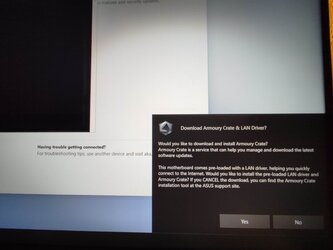
So, a few days ago as I switched on the pc to install the LAN driver, even before I inserted the USB drive containing the driver, ASUS splashed a message (photo) on the screen I had been stuck on. I almost fell off my chair! Anyway, I followed the prompts in within minutes I was on the official W11 desktop.

I then installed the other ASUS drivers which got rid of most of the exclamation marks in Device Manager, but two remain – PCI Device and SM Bus Controller, and I can’t tell which hardware devices they refer to.

I installed Intel Driver and Support Assistant which claims there are no missing drivers. Can I trust Windows to download the missing drivers from the internet?

P.S. For some reason Paint is not working properly, so I’m still using my phone on low quality pic settings.
 

Attachments

  • 1680928347648.jpg
    1680928347648.jpg
    340.8 KB · Views: 2
  • 1680928481021.jpg
    1680928481021.jpg
    343.3 KB · Views: 2
  • 1680928084080.jpg
    1680928084080.jpg
    543 KB · Views: 2
  • 1680928045789.jpg
    1680928045789.jpg
    578.9 KB · Views: 2

My Computer My Computer

At a glance

Windows 11Intel S1700 i5 12400Corsair LPX 32GBASUS NVIDIA Geforce RTX 3060
OS
Windows 11
Computer type
PC/Desktop
CPU
Intel S1700 i5 12400
Motherboard
ASUS PRIME Z790M PLUS D4
Memory
Corsair LPX 32GB
Graphics Card(s)
ASUS NVIDIA Geforce RTX 3060
Monitor(s) Displays
HP 24w
Hard Drives
Samsung 980 PRO M.2 NVMe
PSU
Corsair TX650M
Case
Matx
Cooling
ID-COOLING Dashflow 240
i wouldn't rely on Armory Crate too much, not very good application.
PCI Device and SM Bus Controller drivers should be with chipset drivers bundle as those are chipset functions. Chipset drivers should be first drivers installed or updated after clean windows installation
 

My Computer My Computer

At a glance

W11 Pro and Insider DevAMD Ryzen 9 7900x2x16GB Kingston 6000MHz, Cl 32 @ 6200MHz Cl30Gigabyte Rx 6600XT Gaming OC 8G Pro
OS
W11 Pro and Insider Dev
Computer type
PC/Desktop
Manufacturer/Model
Home brewed
CPU
AMD Ryzen 9 7900x
Motherboard
ASROCK b650 PRO RS
Memory
2x16GB Kingston 6000MHz, Cl 32 @ 6200MHz Cl30
Graphics Card(s)
Gigabyte Rx 6600XT Gaming OC 8G Pro
Sound Card
MB, Realtek Ac1220p
Monitor(s) Displays
3 x 27"
Screen Resolution
1080p
Hard Drives
Kingston KC3000. 1TBSamsung 970 evo Plus 500GB, Crucial P1 NVMe 1TB, Lexar NVMe 2 TB, Silicon Power M.2 SATA 500GB
PSU
Seasonic 750W
Case
Custom Raidmax
Cooling
Arctic Liquid Freezer III 360mm
Internet Speed
20/19 mbps
i wouldn't rely on Armory Crate too much, not very good application.
PCI Device and SM Bus Controller drivers should be with chipset drivers bundle as those are chipset functions. Chipset drivers should be first drivers installed or updated after clean windows installation

Yes, but for the time present we should eliminate all the "bangs" (I think that's what they're called?) Our friend can always tweak out the nonsense later. I had an issue with an X570 that wouldn't work right until I installed Armory Crate. Once I installed it the nasties went away but I never use it. I agree that the software sucks and presents all kinds of new complications. Definitely agree on the Bus controller drivers and the Chipset. In fact, I think we have identified the source of the problem if I am not mistaken. Those bangs should not be there and Chipset drivers are numero Uno. I have no idea what the mysterious PCI Device could be. Perhaps a card? Drivers can be so much fun! :)
 

My Computer My Computer

At a glance

WIN 11, WIN 10, WIN 8.1, WIN 7 U, WIN 7 PRO, ...Intel i7 6900K and i9-7960X / AMD 3800X (8 core)128 GB CORSAIR DOMINATOR PLATINUM (B DIE)NVIDIA 1070 and RTX 3070
OS
WIN 11, WIN 10, WIN 8.1, WIN 7 U, WIN 7 PRO, WIN 7 HOME (32 Bit), LINUX MINT
Computer type
PC/Desktop
Manufacturer/Model
DIY, ASUS, and DELL
CPU
Intel i7 6900K and i9-7960X / AMD 3800X (8 core)
Motherboard
ASUS X99E-WS USB 3.1 and ASUS X299 SAGE
Memory
128 GB CORSAIR DOMINATOR PLATINUM (B DIE)
Graphics Card(s)
NVIDIA 1070 and RTX 3070
Sound Card
Crystal Sound (onboard)
Monitor(s) Displays
single Samsung 30" 4K and 8" aux monitor
Screen Resolution
4K and something equally attrocious. I'll be working on this.
Hard Drives
A, B, C, D, E, F, G, H, I, J, K, L, M, N, O, P, Q, R, S, T, U, V, W

Ports X, Y, and Z are reserved for USB access and removable drives.

Drive types consist of the following: Various mechanical hard drives bearing the brand names, Seagate, Toshiba, and Western Digital. Various NVMe drives bearing the brand names Kingston, Intel, Silicon Power, Crucial, Western Digital, and Team Group. Various SATA SSDs bearing various different brand names.

RAID arrays included:

LSI RAID 10 (WD Velociraptors) 1115.72 GB
LSI RAID 10 (WD SSDS) 463.80 GB

INTEL RAID 0 (KINGSTON HYPER X) System 447.14 GB
INTEL RAID 1 TOSHIBA ENTERPRIZE class Data 2794.52 GB
INTEL RAID 1 SEAGATE HYBRID 931.51 GB
PSU
SEVERAL. I prefer my Corsair Platinum HX1000i but I also like EVGA power supplies
Case
ThermalTake Level 10 GT (among others)
Cooling
Noctua is my favorite and I use it in my main. I also own various other coolers.
Keyboard
all kinds.
Mouse
all kinds
Internet Speed
360 mbps - 1 gbps (depending)
Browser
FIREFOX
Antivirus
KASPERSKY (no apologies)
Other Info
Gave Dell touch screen with Windows 11 to daughter and got me an OTVOC. Being a PC builder I own many desktop PCs as well. I am a father of five providing PCs, laptops, and tablets for all my family, most of which I have modified, rebuilt, or simply built from scratch. I do not own a cell phone, never have, never will.
Yes, but for the time present we should eliminate all the "bangs" (I think that's what they're called?) Our friend can always tweak out the nonsense later. I had an issue with an X570 that wouldn't work right until I installed Armory Crate. Once I installed it the nasties went away but I never use it. I agree that the software sucks and presents all kinds of new complications. Definitely agree on the Bus controller drivers and the Chipset. In fact, I think we have identified the source of the problem if I am not mistaken. Those bangs should not be there and Chipset drivers are numero Uno. I have no idea what the mysterious PCI Device could be. Perhaps a card? Drivers can be so much fun! :)
According to chipset drivers PCIe device is just whole PCIe bus. All of it but that's for Ryzen system.
From whole Armory Crate i kept only Aura control, the rest was junk.
 

My Computer My Computer

At a glance

W11 Pro and Insider DevAMD Ryzen 9 7900x2x16GB Kingston 6000MHz, Cl 32 @ 6200MHz Cl30Gigabyte Rx 6600XT Gaming OC 8G Pro
OS
W11 Pro and Insider Dev
Computer type
PC/Desktop
Manufacturer/Model
Home brewed
CPU
AMD Ryzen 9 7900x
Motherboard
ASROCK b650 PRO RS
Memory
2x16GB Kingston 6000MHz, Cl 32 @ 6200MHz Cl30
Graphics Card(s)
Gigabyte Rx 6600XT Gaming OC 8G Pro
Sound Card
MB, Realtek Ac1220p
Monitor(s) Displays
3 x 27"
Screen Resolution
1080p
Hard Drives
Kingston KC3000. 1TBSamsung 970 evo Plus 500GB, Crucial P1 NVMe 1TB, Lexar NVMe 2 TB, Silicon Power M.2 SATA 500GB
PSU
Seasonic 750W
Case
Custom Raidmax
Cooling
Arctic Liquid Freezer III 360mm
Internet Speed
20/19 mbps

Latest Support Threads

Back
Top Bottom