
Windows keeps turning on Periodic Scanning.


HideoK

Well-known member
Local time
4:06 PM
Posts
19
OS
Windows 11
Hello, I'm on Windows 11 from less than 1 month. I freshly installed it on 27th November. It was all fine, but after a week/ten days it started to show me a notification message on Startup. Doesn't happen always on every startup, but let's say 8 times out of 10.
It's "Windows Security. Periodic Scanning of Microsoft Defender is Enabled" In the following message it also says that I'm using another Antivirus, and it's correct, because I use Bitdefender Total Security.
Considering this issue started after ten days, I suspect could be an update that screwed something. I'm on 22H2 (22621.963)
The most annoying part, is that this also slows the PC after the startup log screen. I have to wait 5-6 seconds even to launch the browser. Basically, I have to wait for the notification to shows up, then I can normally use my PC
I tried to disable Periodic Scanning, but it keeps turning on by itself. I also tried to completely disable Windows Defender in Group Policy, but same, it keeps turning on.

I'll attach the notification it to this message, but it's in italian.
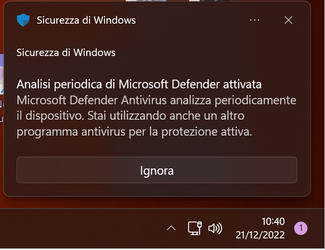
wdef.png
 
Windows Build/Version
22621.963

My Computer My Computer

At a glance

Windows 115800x3d32Gb DDR4 Corsair5070Ti
OS
Windows 11
Computer type
PC/Desktop
CPU
5800x3d
Motherboard
Gigabyte X570 Aorus Elite
Memory
32Gb DDR4 Corsair
Graphics Card(s)
5070Ti
Screen Resolution
3840x2160
Browser
Chrome
Antivirus
Windows Defender
And you pressed the ... next to X
and chose not to have the Notifications shown from Sicurezza di Windows?
 

My Computers My Computers

  • At a glance

    All Branches but StableAMD Ryzen 7 7735HS 3200-4500 Mhz 8 cores x 232 GB DDR5Radeon Graphic / NVIDIA GeForce RTX 4060 8 GB...
    OS
    All Branches but Stable
    Computer type
    Laptop
    Manufacturer/Model
    Acer Nitro ANV15-51
    CPU
    AMD Ryzen 7 7735HS 3200-4500 Mhz 8 cores x 2
    Motherboard
    Sportage_RBH
    Memory
    32 GB DDR5
    Graphics Card(s)
    Radeon Graphic / NVIDIA GeForce RTX 4060 8 GB GDDR6
    Sound Card
    AMD/Realtek(R) Audio
    Monitor(s) Displays
    Integrated Monitor (15.3"vis)
    Screen Resolution
    FHD 1920X1080 16:9 144Hz
    Hard Drives
    KINGSTON OM8SEP4512Q-AA 1TB
    Western Digital 256GB
    PSU
    19V DC 6.32 A 120 W
    Cooling
    Dual Fans
    Mouse
    MS Bluetooth
    Internet Speed
    Fiber 1GB Cox -us & 1GB Orange-fr
    Browser
    Edge Canary- Firefox Nightly-Chrome Dev-Chrome Dev
    Antivirus
    Windows Defender
  • At a glance

    Windows 11 BetaAMD A9-94208 GB of DDR4AMD Radeon R5
    Operating System
    Windows 11 Beta
    Computer type
    Laptop
    Manufacturer/Model
    Asus X751BP
    CPU
    AMD A9-9420
    Memory
    8 GB of DDR4
    Graphics card(s)
    AMD Radeon R5
    Screen Resolution
    1600x900
    Hard Drives
    Seagate 1 TB
And you pressed the ... next to X
and chose not to have the Notifications shown from Sicurezza di Windows?
I can't. It's greyed out. Anyway, even if I can turn off notifications, it doesn't change the fact that this scan keeps turning on, and slows down the PC on startup.
 

My Computer My Computer

At a glance

Windows 115800x3d32Gb DDR4 Corsair5070Ti
OS
Windows 11
Computer type
PC/Desktop
CPU
5800x3d
Motherboard
Gigabyte X570 Aorus Elite
Memory
32Gb DDR4 Corsair
Graphics Card(s)
5070Ti
Screen Resolution
3840x2160
Browser
Chrome
Antivirus
Windows Defender
OK what do you see when you run: (WinKey +R) ,

shell:startup (enter)

This very site has this
 

My Computers My Computers

  • At a glance

    All Branches but StableAMD Ryzen 7 7735HS 3200-4500 Mhz 8 cores x 232 GB DDR5Radeon Graphic / NVIDIA GeForce RTX 4060 8 GB...
    OS
    All Branches but Stable
    Computer type
    Laptop
    Manufacturer/Model
    Acer Nitro ANV15-51
    CPU
    AMD Ryzen 7 7735HS 3200-4500 Mhz 8 cores x 2
    Motherboard
    Sportage_RBH
    Memory
    32 GB DDR5
    Graphics Card(s)
    Radeon Graphic / NVIDIA GeForce RTX 4060 8 GB GDDR6
    Sound Card
    AMD/Realtek(R) Audio
    Monitor(s) Displays
    Integrated Monitor (15.3"vis)
    Screen Resolution
    FHD 1920X1080 16:9 144Hz
    Hard Drives
    KINGSTON OM8SEP4512Q-AA 1TB
    Western Digital 256GB
    PSU
    19V DC 6.32 A 120 W
    Cooling
    Dual Fans
    Mouse
    MS Bluetooth
    Internet Speed
    Fiber 1GB Cox -us & 1GB Orange-fr
    Browser
    Edge Canary- Firefox Nightly-Chrome Dev-Chrome Dev
    Antivirus
    Windows Defender
  • At a glance

    Windows 11 BetaAMD A9-94208 GB of DDR4AMD Radeon R5
    Operating System
    Windows 11 Beta
    Computer type
    Laptop
    Manufacturer/Model
    Asus X751BP
    CPU
    AMD A9-9420
    Memory
    8 GB of DDR4
    Graphics card(s)
    AMD Radeon R5
    Screen Resolution
    1600x900
    Hard Drives
    Seagate 1 TB
OK what do you see when you run: (WinKey +R) ,

shell:startup (enter)

This very site has this
Nothing, it's empty.

Thanks, I already tried that, but it keeps turning on by itself. That's why I think it's a bug introduced by some Windows Update.
 

My Computer My Computer

At a glance

Windows 115800x3d32Gb DDR4 Corsair5070Ti
OS
Windows 11
Computer type
PC/Desktop
CPU
5800x3d
Motherboard
Gigabyte X570 Aorus Elite
Memory
32Gb DDR4 Corsair
Graphics Card(s)
5070Ti
Screen Resolution
3840x2160
Browser
Chrome
Antivirus
Windows Defender
Well uninstall the update and see.
 

My Computers My Computers

  • At a glance

    All Branches but StableAMD Ryzen 7 7735HS 3200-4500 Mhz 8 cores x 232 GB DDR5Radeon Graphic / NVIDIA GeForce RTX 4060 8 GB...
    OS
    All Branches but Stable
    Computer type
    Laptop
    Manufacturer/Model
    Acer Nitro ANV15-51
    CPU
    AMD Ryzen 7 7735HS 3200-4500 Mhz 8 cores x 2
    Motherboard
    Sportage_RBH
    Memory
    32 GB DDR5
    Graphics Card(s)
    Radeon Graphic / NVIDIA GeForce RTX 4060 8 GB GDDR6
    Sound Card
    AMD/Realtek(R) Audio
    Monitor(s) Displays
    Integrated Monitor (15.3"vis)
    Screen Resolution
    FHD 1920X1080 16:9 144Hz
    Hard Drives
    KINGSTON OM8SEP4512Q-AA 1TB
    Western Digital 256GB
    PSU
    19V DC 6.32 A 120 W
    Cooling
    Dual Fans
    Mouse
    MS Bluetooth
    Internet Speed
    Fiber 1GB Cox -us & 1GB Orange-fr
    Browser
    Edge Canary- Firefox Nightly-Chrome Dev-Chrome Dev
    Antivirus
    Windows Defender
  • At a glance

    Windows 11 BetaAMD A9-94208 GB of DDR4AMD Radeon R5
    Operating System
    Windows 11 Beta
    Computer type
    Laptop
    Manufacturer/Model
    Asus X751BP
    CPU
    AMD A9-9420
    Memory
    8 GB of DDR4
    Graphics card(s)
    AMD Radeon R5
    Screen Resolution
    1600x900
    Hard Drives
    Seagate 1 TB
I uninstalled all updates, and the issue is still present. That's weird. Can it be and internal update of Defender?
 

My Computer My Computer

At a glance

Windows 115800x3d32Gb DDR4 Corsair5070Ti
OS
Windows 11
Computer type
PC/Desktop
CPU
5800x3d
Motherboard
Gigabyte X570 Aorus Elite
Memory
32Gb DDR4 Corsair
Graphics Card(s)
5070Ti
Screen Resolution
3840x2160
Browser
Chrome
Antivirus
Windows Defender
When was the last time BitDefender was updated? It could also be BitDefender causing issues.

Also - this is not an issue. Everything I've read and everything I've used alongside Windows Defedner, including BitDefender, recommends that you leave periodic scanning enabled in Defender, so it may be BitDefender itself that keeps re-enabling it. I had it on when I used Malwarebytes with Windows Defender, too, and it is on now.
 

My Computers My Computers

  • At a glance

    Windows 11 23H2 Current buildAMD Ryzen 9 3950X4 * 32 GB - Corsair Vengeance 3600 MHzEVGA GeForce RTX 3080 Ti XC3 ULTRA GAMING (12...
    OS
    Windows 11 23H2 Current build
    Computer type
    PC/Desktop
    Manufacturer/Model
    HomeBrew
    CPU
    AMD Ryzen 9 3950X
    Motherboard
    MSI MEG X570 GODLIKE
    Memory
    4 * 32 GB - Corsair Vengeance 3600 MHz
    Graphics Card(s)
    EVGA GeForce RTX 3080 Ti XC3 ULTRA GAMING (12G-P5-3955-KR)
    Sound Card
    Realtek® ALC1220 Codec
    Monitor(s) Displays
    2x Eve Spectrum ES07D03 4K Gaming Monitor (Matte) | Eve Spectrum ES07DC9 4K Gaming Monitor (Glossy)
    Screen Resolution
    3x 3840 x 2160
    Hard Drives
    3x Samsung 980 Pro NVMe PCIe 4 M.2 2 TB SSD (MZ-V8P2T0B/AM) } 3x Sabrent Rocket NVMe 4.0 1 TB SSD (USB)
    PSU
    PC Power & Cooling’s Silencer Series 1050 Watt, 80 Plus Platinum
    Case
    Fractal Design Define 7 XL Dark ATX Full Tower Case
    Cooling
    Arctic Liquid Freezer III 420 RGB + Air 3x 140mm case fans (pull front) + 1x 120 mm (push back) and 1 x 120 mm (pull bottom)
    Keyboard
    SteelSeries Apex Pro Wired Gaming Keyboard
    Mouse
    Logitech MX Master 3S | MX Master 3 for Business
    Internet Speed
    AT&T LightSpeed Gigabit Duplex Ftth
    Browser
    Nightly (default) + Firefox (stable), Chrome, Edge , Arc
    Antivirus
    Defender + MB 5 Beta
  • At a glance

    ChromeOS Flex Dev Channel (current)Intel(R) Core(TM) i5-6300U CPU @ 2.40GHz, 250...16 GBIntel(R) HD Graphics 520
    Operating System
    ChromeOS Flex Dev Channel (current)
    Computer type
    Laptop
    Manufacturer/Model
    Dell Latitude E5470
    CPU
    Intel(R) Core(TM) i5-6300U CPU @ 2.40GHz, 2501 Mhz, 2 Core(s), 4 Logical Processor(s)
    Motherboard
    Dell
    Memory
    16 GB
    Graphics card(s)
    Intel(R) HD Graphics 520
    Sound Card
    Intel(R) HD Graphics 520 + RealTek Audio
    Monitor(s) Displays
    Dell laptop display 15"
    Screen Resolution
    1920 * 1080
    Hard Drives
    Toshiba 128GB M.2 22300 drive
    INTEL Cherryville 520 Series SSDSC2CW180A 180 GB SATA III SSD
    PSU
    Dell
    Case
    Dell
    Cooling
    Dell
    Keyboard
    Dell
    Mouse
    Logitech MX Master 3S (shared w. Sys 1) | Dell TouchPad
    Internet Speed
    AT&T LightSpeed Gigabit Duplex Ftth
Hi,
Periodic scanning is off and I use mbam pro
Updates may activate if you don't go through additional measure to limit defenders existence

MBAM pro will hijack access to defenders tamper protection setting though, without using/ enabling mbam tamper protection setting.
Really annoying trait just have to uncheck register with windows security and then defenders tamper protect setting is available again.
 

My Computer My Computer

At a glance

Win-7-10-11Pro's10900k & 9940x & 5930kTrident-Z Royal 4000c16 2x16gb & Trident-Z 36...Titan Xp & 1080ti FTW3 & evga 980ti gaming
OS
Win-7-10-11Pro's
Computer type
PC/Desktop
Manufacturer/Model
Acer 17" Nitro 7840sn/ 2x16gb 5600c40/ 4060/ stock 1tb-os/ 4tb sn850x
CPU
10900k & 9940x & 5930k
Motherboard
z490-Apex & x299-Apex & x99-Sabertooth
Memory
Trident-Z Royal 4000c16 2x16gb & Trident-Z 3600c16 4x8gb & 3200c14 4x8gb
Graphics Card(s)
Titan Xp & 1080ti FTW3 & evga 980ti gaming
Sound Card
Onboard Realtek x3
Monitor(s) Displays
1-AOC G2460PG 24"G-Sync 144Hz/ 2nd 1-ASUS VG248QE 24"/ 3rd LG 43" series
Screen Resolution
1920-1080 not sure what the t.v is besides 43" class scales from 1920-1080 perfectly
Hard Drives
2-WD-sn850x 4tb/ 970evo+500gb/ 980 pro 2tb.
PSU
1000p2 & 1200p2 & 850p2
Case
D450 x2 & 1 Test bench in cherry Entertainment center
Cooling
Custom water loops x3 with 2x mora 360mm rads only 980ti gaming air cooled
Keyboard
G710+x3
Mouse
Redragon x3
Internet Speed
xfinity gigabyte
Browser
Firefox
Antivirus
mbam pro
When was the last time BitDefender was updated? It could also be BitDefender causing issues.

Also - this is not an issue. Everything I've read and everything I've used alongside Windows Defedner, including BitDefender, recommends that you leave periodic scanning enabled in Defender, so it may be BitDefender itself that keeps re-enabling it. I had it on when I used Malwarebytes with Windows Defender, too, and it is on now.
I got that, but it's like a hourly scan, more than a periodic scan.

Hi,
Periodic scanning is off and I use mbam pro
Updates may activate if you don't go through additional measure to limit defenders existence

MBAM pro will hijack access to defenders tamper protection setting though, without using/ enabling mbam tamper protection setting.
Really annoying trait just have to uncheck register with windows security and then defenders tamper protect setting is available again.
Sorry, what?
 

My Computer My Computer

At a glance

Windows 115800x3d32Gb DDR4 Corsair5070Ti
OS
Windows 11
Computer type
PC/Desktop
CPU
5800x3d
Motherboard
Gigabyte X570 Aorus Elite
Memory
32Gb DDR4 Corsair
Graphics Card(s)
5070Ti
Screen Resolution
3840x2160
Browser
Chrome
Antivirus
Windows Defender
Hi,
lol I'm saying it is possible for a third party security suite to hijack defender settings as I described mbam pro which is malwarebytes doing the same thing just a different defender setting.
 

My Computer My Computer

At a glance

Win-7-10-11Pro's10900k & 9940x & 5930kTrident-Z Royal 4000c16 2x16gb & Trident-Z 36...Titan Xp & 1080ti FTW3 & evga 980ti gaming
OS
Win-7-10-11Pro's
Computer type
PC/Desktop
Manufacturer/Model
Acer 17" Nitro 7840sn/ 2x16gb 5600c40/ 4060/ stock 1tb-os/ 4tb sn850x
CPU
10900k & 9940x & 5930k
Motherboard
z490-Apex & x299-Apex & x99-Sabertooth
Memory
Trident-Z Royal 4000c16 2x16gb & Trident-Z 3600c16 4x8gb & 3200c14 4x8gb
Graphics Card(s)
Titan Xp & 1080ti FTW3 & evga 980ti gaming
Sound Card
Onboard Realtek x3
Monitor(s) Displays
1-AOC G2460PG 24"G-Sync 144Hz/ 2nd 1-ASUS VG248QE 24"/ 3rd LG 43" series
Screen Resolution
1920-1080 not sure what the t.v is besides 43" class scales from 1920-1080 perfectly
Hard Drives
2-WD-sn850x 4tb/ 970evo+500gb/ 980 pro 2tb.
PSU
1000p2 & 1200p2 & 850p2
Case
D450 x2 & 1 Test bench in cherry Entertainment center
Cooling
Custom water loops x3 with 2x mora 360mm rads only 980ti gaming air cooled
Keyboard
G710+x3
Mouse
Redragon x3
Internet Speed
xfinity gigabyte
Browser
Firefox
Antivirus
mbam pro
Did you ever find a solution for this? Here it is more than a year later and I have the same problem on at least two systems, one Desktop and one Laptop. Haven't really paid attention to my other desktops, or my wife's laptop. I really don't want Defender doing periodic scans on its own. I use Acronis Cyber Protect Home Office, so I don't need Defender scanning and slowing down my already slow systems, as Acronis already does this.
 

My Computer My Computer

At a glance

Win 10
OS
Win 10
Computer type
PC/Desktop
Manufacturer/Model
Lets see, Asus, Antec, Intel, Sandisk...
Just a suggestion, have you tried disabling Windows Defender tasks in Task Scheduler?
 

My Computer My Computer

At a glance

Windows 10 Pro
OS
Windows 10 Pro
Back
Top Bottom




