RAM uncertainty


According to chipset drivers PCIe device is just whole PCIe bus. All of it but that's for Ryzen system.
Yep. I'm hoping that's the case. I've seen cards represented that way in device manager when they don't have drivers though. I don't have enough information to formulate a conclusion. Either way that bus needs attention.
 

My Computer My Computer

At a glance

WIN 11, WIN 10, WIN 8.1, WIN 7 U, WIN 7 PRO, ...Intel i7 6900K and i9-7960X / AMD 3800X (8 core)128 GB CORSAIR DOMINATOR PLATINUM (B DIE)NVIDIA 1070 and RTX 3070
OS
WIN 11, WIN 10, WIN 8.1, WIN 7 U, WIN 7 PRO, WIN 7 HOME (32 Bit), LINUX MINT
Computer type
PC/Desktop
Manufacturer/Model
DIY, ASUS, and DELL
CPU
Intel i7 6900K and i9-7960X / AMD 3800X (8 core)
Motherboard
ASUS X99E-WS USB 3.1 and ASUS X299 SAGE
Memory
128 GB CORSAIR DOMINATOR PLATINUM (B DIE)
Graphics Card(s)
NVIDIA 1070 and RTX 3070
Sound Card
Crystal Sound (onboard)
Monitor(s) Displays
single Samsung 30" 4K and 8" aux monitor
Screen Resolution
4K and something equally attrocious. I'll be working on this.
Hard Drives
A, B, C, D, E, F, G, H, I, J, K, L, M, N, O, P, Q, R, S, T, U, V, W

Ports X, Y, and Z are reserved for USB access and removable drives.

Drive types consist of the following: Various mechanical hard drives bearing the brand names, Seagate, Toshiba, and Western Digital. Various NVMe drives bearing the brand names Kingston, Intel, Silicon Power, Crucial, Western Digital, and Team Group. Various SATA SSDs bearing various different brand names.

RAID arrays included:

LSI RAID 10 (WD Velociraptors) 1115.72 GB
LSI RAID 10 (WD SSDS) 463.80 GB

INTEL RAID 0 (KINGSTON HYPER X) System 447.14 GB
INTEL RAID 1 TOSHIBA ENTERPRIZE class Data 2794.52 GB
INTEL RAID 1 SEAGATE HYBRID 931.51 GB
PSU
SEVERAL. I prefer my Corsair Platinum HX1000i but I also like EVGA power supplies
Case
ThermalTake Level 10 GT (among others)
Cooling
Noctua is my favorite and I use it in my main. I also own various other coolers.
Keyboard
all kinds.
Mouse
all kinds
Internet Speed
360 mbps - 1 gbps (depending)
Browser
FIREFOX
Antivirus
KASPERSKY (no apologies)
Other Info
Gave Dell touch screen with Windows 11 to daughter and got me an OTVOC. Being a PC builder I own many desktop PCs as well. I am a father of five providing PCs, laptops, and tablets for all my family, most of which I have modified, rebuilt, or simply built from scratch. I do not own a cell phone, never have, never will.
According to chipset drivers PCIe device is just whole PCIe bus.
I installed the chipset driver first, then the others, but I couldn’t install the Management Engine Driver update because when I pressed MEUpdater to install it nothing happened, I just got a warning message to check it was already on the PC, which it is (photos, under 4650). Then I googled it and they said something about it being BIOS related, so I decided to leave it alone until later, not realizing how important it was. (Google has led me on several wild goose chases…)

So today I decided to update the ME driver manually by right-clicking, and selecting the ASUS ME Updater folder, but Windows then said the best driver was already installed. So regarding the chipset...

ASUS_CHIPSET_INTEL_SERIAL_IO (Installed)

MEUpdateTool_16.1.25.2020v2_S_Z (NOT installed)
 

Attachments

  • 1681008373339.jpg
    1681008373339.jpg
    502.7 KB · Views: 2
  • 1681008428956.jpg
    1681008428956.jpg
    488.9 KB · Views: 3
  • 1681008464715.jpg
    1681008464715.jpg
    548.9 KB · Views: 3

My Computer My Computer

At a glance

Windows 11Intel S1700 i5 12400Corsair LPX 32GBASUS NVIDIA Geforce RTX 3060
OS
Windows 11
Computer type
PC/Desktop
CPU
Intel S1700 i5 12400
Motherboard
ASUS PRIME Z790M PLUS D4
Memory
Corsair LPX 32GB
Graphics Card(s)
ASUS NVIDIA Geforce RTX 3060
Monitor(s) Displays
HP 24w
Hard Drives
Samsung 980 PRO M.2 NVMe
PSU
Corsair TX650M
Case
Matx
Cooling
ID-COOLING Dashflow 240
i wouldn't rely on Armory Crate too much, not very good application.
Agreed, I use Asus boards and I don't like Armory Crate.....
 

My Computers My Computers

  • At a glance

    Windows 11 Pro 25H2Intel Core i9 13900KCorsair Dominator Platinum 64gb 5600MT/s DDR5...Sapphire NITRO+ AMD Radeon RX 7900 XTX Vapor-...
    OS
    Windows 11 Pro 25H2
    Computer type
    PC/Desktop
    Manufacturer/Model
    Homebuilt
    CPU
    Intel Core i9 13900K
    Motherboard
    Asus ProArt Z790 Creator WiFi - Bios 3107
    Memory
    Corsair Dominator Platinum 64gb 5600MT/s DDR5 Dual Channel
    Graphics Card(s)
    Sapphire NITRO+ AMD Radeon RX 7900 XTX Vapor-X 24GB
    Sound Card
    External DAC: Cambridge Audio DACMagic200M - Headphone Amp: Topping L50
    Monitor(s) Displays
    Panasonic MX950 Mini LED 55" TV 120hz
    Screen Resolution
    3840 x 2160 120hz
    Hard Drives
    Samsung 980 Pro 2TB (OS)
    Samsung 980 Pro 1TB (Files)
    Lexar NZ790 4TB
    LaCie d2 Professional 6TB external - USB 3.1
    Seagate Expansion 16TB external - USB 3.2
    Seagate One Touch 18TB external HD - USB 3.0
    PSU
    Corsair RM1200x Shift
    Case
    Corsair RGB Smart Case 5000x (white)
    Cooling
    Corsair iCue H150i Elite Capellix XT
    Keyboard
    Incase Ergonomic USB (Microsoft clone)
    Mouse
    Logitech MX Master 3S
    Internet Speed
    Fibre 900/500 Mbps
    Browser
    Microsoft Edge Chromium
    Antivirus
    Bitdefender Total Security
    Other Info
    AMD Radeon Software & Drivers 26.1.1
    Hasleo Backup Suite
    Dashlane password manager
    Kensington Verimark fingerprint reader
    Logitech Brio 4K webcam
    Orico 10-port powered USB 3.0 hub
  • At a glance

    Windows 11 Pro 25H2Intel® Core™ i9-13900H32GB DDR4-3200 Dual channel*Intel Iris Xᵉ Graphics G7
    Operating System
    Windows 11 Pro 25H2
    Computer type
    Laptop
    Manufacturer/Model
    Asus Vivobook X1605VA
    CPU
    Intel® Core™ i9-13900H
    Motherboard
    Asus X1605VA bios 309
    Memory
    32GB DDR4-3200 Dual channel
    Graphics card(s)
    *Intel Iris Xᵉ Graphics G7
    Sound Card
    Realtek | Intel SST Bluetooth & USB
    Monitor(s) Displays
    16.0-inch, WUXGA 16:10 aspect ratio, IPS-level Panel
    Screen Resolution
    1920 x 1200 60hz
    Hard Drives
    512GB M.2 NVMe™ PCIe® 3.0 SSD
    Mouse
    Logitech MX Ergo Trackball
    Antivirus
    Bitdefender Total Security
    Other Info
    720p Webcam
    WiFi & USB to ethernet
Agreed, I use Asus boards and I don't like Armory Crate.....

If you just want RGB control use Asus Aura Sync. It is no longer being updated since 2022, but it is better than the bloated, buggy, forever beta Armory Crate - as long as it supports your hardware.


For monitoring the hardware, use HWINFO64. It can give you much more information and is very reliable. You can customize it to show what you want, define custom values and warnings, and apply visual graphs ,and is lean with no bloat:

Screenshot 2023-04-09 003110.png
 
Last edited:

My Computers My Computers

  • At a glance

    Windows 11 Pro x64i9 14900K P/E 5.8/4.5 GHz, cache 5.0 GHz96GB (2x48) G.skill Ripjaws 6800 MT/sAsus ROG Strix 4070 Ti OC
    OS
    Windows 11 Pro x64
    Computer type
    PC/Desktop
    Manufacturer/Model
    📷🔈🎧 🪛 DIY Photoshop/Audio/Game/tinker
    CPU
    i9 14900K P/E 5.8/4.5 GHz, cache 5.0 GHz
    Motherboard
    Asus ROG Maximus Z790 Dark Hero
    Memory
    🐏 96GB (2x48) G.skill Ripjaws 6800 MT/s
    Graphics Card(s)
    Asus ROG Strix 4070 Ti OC
    Sound Card
    🔊Bowers & Wilkins 606 S3 speakers; Audiolabs 7000a integrated amp; RSL 10S Mk2 sub; Creative Pebble Pro Minimilist
    Monitor(s) Displays
    🖥️🖥️ Eizo CG2730 ColorEdge, ViewSonic VP2768
    Screen Resolution
    🖥️🖥️ 2560 x 1440p x 2
    Hard Drives
    💾 WDC SN850X 4TB nvme, SN850 1TB nvme, SK-Hynix 2 TB P41 nvme,. Sabrent USB-C DS-SC5B 5-bay docking station: 6TB WDC Black, 6TB Ironwolf Pro; 2x 2TB WDC Black HDD
    PSU
    ⚡️ 850W Seasonic Vertex PX-850 ATX 3.0/PCI-E 5.0
    Case
    Fractal Design North XL Mesh, Black Walnut
    Cooling
    ❄️ EK Nucleus black 360 AIO w/Phanteks T30-120 fans, 2 Noctua NF-A14 Chromax case fan, 1 T30-120 fan cooling memory
    Keyboard
    ⌨️ Keychron Q3 Max TKL with custom GMK Redsuns Red Samuri keycaps, TX Stabs
    Mouse
    🖱️ Logitech G305 wireless gaming
    Internet Speed
    ⬇️ 500 Mb/s ⬆️ 12 Mb/s
    Browser
    🔥🦊 Firefox
    Antivirus
    🦺 Defender, Macrium Reflect X 🏆
    Other Info
    Phangkey Amaterasu V2 Desk Mat
  • At a glance

    Apple M1
    Computer type
    Laptop
    Manufacturer/Model
    💻 Apple 13" Macbook Pro 2020 (m1)
    CPU
    Apple M1
    Screen Resolution
    2560x1600
    Browser
    Firefox
I use HWINFO64 also and find it very reliable. I haven't bothered to customize it but I've never had a problem with it. My top two PCs are both ASUS system boards, my work station is an Intel platform and my entertainment rig is AMD. Have not used Armory Crate for ages. I don't really need it now that I installed it.
 

My Computer My Computer

At a glance

WIN 11, WIN 10, WIN 8.1, WIN 7 U, WIN 7 PRO, ...Intel i7 6900K and i9-7960X / AMD 3800X (8 core)128 GB CORSAIR DOMINATOR PLATINUM (B DIE)NVIDIA 1070 and RTX 3070
OS
WIN 11, WIN 10, WIN 8.1, WIN 7 U, WIN 7 PRO, WIN 7 HOME (32 Bit), LINUX MINT
Computer type
PC/Desktop
Manufacturer/Model
DIY, ASUS, and DELL
CPU
Intel i7 6900K and i9-7960X / AMD 3800X (8 core)
Motherboard
ASUS X99E-WS USB 3.1 and ASUS X299 SAGE
Memory
128 GB CORSAIR DOMINATOR PLATINUM (B DIE)
Graphics Card(s)
NVIDIA 1070 and RTX 3070
Sound Card
Crystal Sound (onboard)
Monitor(s) Displays
single Samsung 30" 4K and 8" aux monitor
Screen Resolution
4K and something equally attrocious. I'll be working on this.
Hard Drives
A, B, C, D, E, F, G, H, I, J, K, L, M, N, O, P, Q, R, S, T, U, V, W

Ports X, Y, and Z are reserved for USB access and removable drives.

Drive types consist of the following: Various mechanical hard drives bearing the brand names, Seagate, Toshiba, and Western Digital. Various NVMe drives bearing the brand names Kingston, Intel, Silicon Power, Crucial, Western Digital, and Team Group. Various SATA SSDs bearing various different brand names.

RAID arrays included:

LSI RAID 10 (WD Velociraptors) 1115.72 GB
LSI RAID 10 (WD SSDS) 463.80 GB

INTEL RAID 0 (KINGSTON HYPER X) System 447.14 GB
INTEL RAID 1 TOSHIBA ENTERPRIZE class Data 2794.52 GB
INTEL RAID 1 SEAGATE HYBRID 931.51 GB
PSU
SEVERAL. I prefer my Corsair Platinum HX1000i but I also like EVGA power supplies
Case
ThermalTake Level 10 GT (among others)
Cooling
Noctua is my favorite and I use it in my main. I also own various other coolers.
Keyboard
all kinds.
Mouse
all kinds
Internet Speed
360 mbps - 1 gbps (depending)
Browser
FIREFOX
Antivirus
KASPERSKY (no apologies)
Other Info
Gave Dell touch screen with Windows 11 to daughter and got me an OTVOC. Being a PC builder I own many desktop PCs as well. I am a father of five providing PCs, laptops, and tablets for all my family, most of which I have modified, rebuilt, or simply built from scratch. I do not own a cell phone, never have, never will.
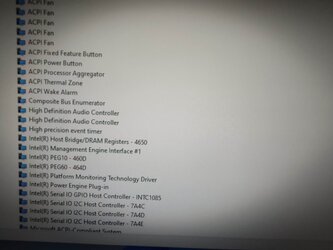
I installed the chipset driver first, then the others, but I couldn’t install the Management Engine Driver update because when I pressed MEUpdater to install it nothing happened, I just got a warning message to check it was already on the PC, which it is (photos, under 4650). Then I googled it and they said something about it being BIOS related, so I decided to leave it alone until later, not realizing how important it was. (Google has led me on several wild goose chases…)

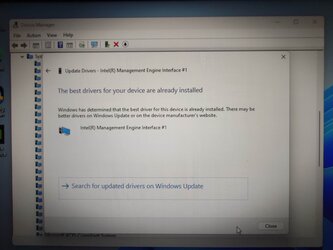
So today I decided to update the ME driver manually by right-clicking, and selecting the ASUS ME Updater folder, but Windows then said the best driver was already installed. So regarding the chipset...

ASUS_CHIPSET_INTEL_SERIAL_IO (Installed)

MEUpdateTool_16.1.25.2020v2_S_Z (NOT installed)

That's great news! I'm not sure if you really need that update tool anyway. Have you checked to see if you're using the latest BIOS version for your system board? It looks as though all those nasty yellow triangles have been eliminated and the other problems have been dealt with. Progress! :)

*Edit* - Perhaps this link might be helpful?
 
Last edited:

My Computer My Computer

At a glance

WIN 11, WIN 10, WIN 8.1, WIN 7 U, WIN 7 PRO, ...Intel i7 6900K and i9-7960X / AMD 3800X (8 core)128 GB CORSAIR DOMINATOR PLATINUM (B DIE)NVIDIA 1070 and RTX 3070
OS
WIN 11, WIN 10, WIN 8.1, WIN 7 U, WIN 7 PRO, WIN 7 HOME (32 Bit), LINUX MINT
Computer type
PC/Desktop
Manufacturer/Model
DIY, ASUS, and DELL
CPU
Intel i7 6900K and i9-7960X / AMD 3800X (8 core)
Motherboard
ASUS X99E-WS USB 3.1 and ASUS X299 SAGE
Memory
128 GB CORSAIR DOMINATOR PLATINUM (B DIE)
Graphics Card(s)
NVIDIA 1070 and RTX 3070
Sound Card
Crystal Sound (onboard)
Monitor(s) Displays
single Samsung 30" 4K and 8" aux monitor
Screen Resolution
4K and something equally attrocious. I'll be working on this.
Hard Drives
A, B, C, D, E, F, G, H, I, J, K, L, M, N, O, P, Q, R, S, T, U, V, W

Ports X, Y, and Z are reserved for USB access and removable drives.

Drive types consist of the following: Various mechanical hard drives bearing the brand names, Seagate, Toshiba, and Western Digital. Various NVMe drives bearing the brand names Kingston, Intel, Silicon Power, Crucial, Western Digital, and Team Group. Various SATA SSDs bearing various different brand names.

RAID arrays included:

LSI RAID 10 (WD Velociraptors) 1115.72 GB
LSI RAID 10 (WD SSDS) 463.80 GB

INTEL RAID 0 (KINGSTON HYPER X) System 447.14 GB
INTEL RAID 1 TOSHIBA ENTERPRIZE class Data 2794.52 GB
INTEL RAID 1 SEAGATE HYBRID 931.51 GB
PSU
SEVERAL. I prefer my Corsair Platinum HX1000i but I also like EVGA power supplies
Case
ThermalTake Level 10 GT (among others)
Cooling
Noctua is my favorite and I use it in my main. I also own various other coolers.
Keyboard
all kinds.
Mouse
all kinds
Internet Speed
360 mbps - 1 gbps (depending)
Browser
FIREFOX
Antivirus
KASPERSKY (no apologies)
Other Info
Gave Dell touch screen with Windows 11 to daughter and got me an OTVOC. Being a PC builder I own many desktop PCs as well. I am a father of five providing PCs, laptops, and tablets for all my family, most of which I have modified, rebuilt, or simply built from scratch. I do not own a cell phone, never have, never will.
If you just want RGB control use Asus Aura Sync. It is no longer being updated since 2022, but it is better than the bloated, buggy, forever beta Armory Crate - as long as it supports your hardware.
Although Armoury Crate is installed it is nowhere to be found on the pc. I’m actually using ASUS AI Suite 3 which provides temps and voltage info. The pc is RGB free at the moment.

That's great news! I'm not sure if you really need that update tool anyway. Have you checked to see if you're using the latest BIOS version for your system board?
I’m on the latest BIOS version for my board, 0810, and so as you rightly suggest, I don’t really need the MEUpdate tool, however I have made a note of the link you have provided. The pc is very stable otherwise.

It looks as though all those nasty yellow triangles have been eliminated and the other problems have been dealt with. Progress! :)
Not quite.

Two exclamation marks remain -

PCI Device
SM Bus Controller

I asked Windows to search for and install the missing drivers but it couldn’t find any online. At one point I did consider copying and pasting the Device ID details under the exclamation marks into the Edge browser to see if there would be any clues, but I’ve never done that before and don’t know if it’s safe to do so.

I also conducted a few basic system checks such as sfc/ scannow and DISM /Online /CheckHealth and although a few errors were found and repaired there was no change in what I really wanted to be repaired i.e. the two remaining exclamation marks. I also carried out full virus checks which came out clean.

Would I have to do a clean install?
 

My Computer My Computer

At a glance

Windows 11Intel S1700 i5 12400Corsair LPX 32GBASUS NVIDIA Geforce RTX 3060
OS
Windows 11
Computer type
PC/Desktop
CPU
Intel S1700 i5 12400
Motherboard
ASUS PRIME Z790M PLUS D4
Memory
Corsair LPX 32GB
Graphics Card(s)
ASUS NVIDIA Geforce RTX 3060
Monitor(s) Displays
HP 24w
Hard Drives
Samsung 980 PRO M.2 NVMe
PSU
Corsair TX650M
Case
Matx
Cooling
ID-COOLING Dashflow 240
Although Armoury Crate is installed it is nowhere to be found on the pc. I’m actually using ASUS AI Suite 3 which provides temps and voltage info. The pc is RGB free at the moment.


I’m on the latest BIOS version for my board, 0810, and so as you rightly suggest, I don’t really need the MEUpdate tool, however I have made a note of the link you have provided. The pc is very stable otherwise.


Not quite.

Two exclamation marks remain -

PCI Device
SM Bus Controller

I asked Windows to search for and install the missing drivers but it couldn’t find any online. At one point I did consider copying and pasting the Device ID details under the exclamation marks into the Edge browser to see if there would be any clues, but I’ve never done that before and don’t know if it’s safe to do so.

I also conducted a few basic system checks such as sfc/ scannow and DISM /Online /CheckHealth and although a few errors were found and repaired there was no change in what I really wanted to be repaired i.e. the two remaining exclamation marks. I also carried out full virus checks which came out clean.

Would I have to do a clean install?

OK. We are still making progress. To be honest, I'm not entirely familiar with newer system boards using DDR5. Most of the builds I do use DDR4 or even DDR3 memory and it has been my experience that once the memory platform changes everything (almost) changes. I will try to help where I can.

ASUS and Armoury Crate seem to have a weird thing going. I recall having to reinstall it once just to get other things to work right and I never use it because it is annoying and unreliable. So I'm glad you don't care about the RGB end of it.

Another plus: You have the latest BIOS version installed on your system board. I know the update tool was totally optional on older ASUS system boards so you might try running a clean uninstall of that. This could result in some annoying error messages popping up on your screen but I believe you can remove those from the library in Management although I've never done this with Win 11.

I don't know what your complete system specs are, if you're using any additional cards at all, or some device requiring an update. Perhaps you tried something at some point and later removed it? At any rate I would advise completely uninstalling and removing those two bangs and rebooting. See if they're still there. Before you do this make sure to unplug any peripherals other than your keyboard and mouse. Once you're rebooted check to ensure that all your USB connectivity is still working.

I don't recommend a clean install of Windows at this point. The PCI device could be simply a matter of a missing card or a card that needs a driver. Try this and get back to us :)

Oh. One more thing: Do you have XMP enabled in your BIOS?
 

My Computer My Computer

At a glance

WIN 11, WIN 10, WIN 8.1, WIN 7 U, WIN 7 PRO, ...Intel i7 6900K and i9-7960X / AMD 3800X (8 core)128 GB CORSAIR DOMINATOR PLATINUM (B DIE)NVIDIA 1070 and RTX 3070
OS
WIN 11, WIN 10, WIN 8.1, WIN 7 U, WIN 7 PRO, WIN 7 HOME (32 Bit), LINUX MINT
Computer type
PC/Desktop
Manufacturer/Model
DIY, ASUS, and DELL
CPU
Intel i7 6900K and i9-7960X / AMD 3800X (8 core)
Motherboard
ASUS X99E-WS USB 3.1 and ASUS X299 SAGE
Memory
128 GB CORSAIR DOMINATOR PLATINUM (B DIE)
Graphics Card(s)
NVIDIA 1070 and RTX 3070
Sound Card
Crystal Sound (onboard)
Monitor(s) Displays
single Samsung 30" 4K and 8" aux monitor
Screen Resolution
4K and something equally attrocious. I'll be working on this.
Hard Drives
A, B, C, D, E, F, G, H, I, J, K, L, M, N, O, P, Q, R, S, T, U, V, W

Ports X, Y, and Z are reserved for USB access and removable drives.

Drive types consist of the following: Various mechanical hard drives bearing the brand names, Seagate, Toshiba, and Western Digital. Various NVMe drives bearing the brand names Kingston, Intel, Silicon Power, Crucial, Western Digital, and Team Group. Various SATA SSDs bearing various different brand names.

RAID arrays included:

LSI RAID 10 (WD Velociraptors) 1115.72 GB
LSI RAID 10 (WD SSDS) 463.80 GB

INTEL RAID 0 (KINGSTON HYPER X) System 447.14 GB
INTEL RAID 1 TOSHIBA ENTERPRIZE class Data 2794.52 GB
INTEL RAID 1 SEAGATE HYBRID 931.51 GB
PSU
SEVERAL. I prefer my Corsair Platinum HX1000i but I also like EVGA power supplies
Case
ThermalTake Level 10 GT (among others)
Cooling
Noctua is my favorite and I use it in my main. I also own various other coolers.
Keyboard
all kinds.
Mouse
all kinds
Internet Speed
360 mbps - 1 gbps (depending)
Browser
FIREFOX
Antivirus
KASPERSKY (no apologies)
Other Info
Gave Dell touch screen with Windows 11 to daughter and got me an OTVOC. Being a PC builder I own many desktop PCs as well. I am a father of five providing PCs, laptops, and tablets for all my family, most of which I have modified, rebuilt, or simply built from scratch. I do not own a cell phone, never have, never will.
Memory works same way as it ever did. Main changes are in production process and largest jump was from EDO to DDR. Main advance was staking memory chips in several layers on single physical chip and that kept on increasing. With EDO it needed 8 chips for 1 MB + a control chip. Same for DDR1 but it was for 1GB, Number of layers increased with each DDR generation, with DDR5 you can have 16GB in 4 chips.
Another thing that changes with each generation is number of lines connecting it to CPU which increases number of operations in each power cycle which in turn boosts speed but also needs more pins.
Probably best part with DDR was moving memory controller from a chip on MB to IMC (Internal Memory Controller) in the processor eliminating a step and having CPU as only control.
DDR5 got another advantage and that's in IMC whih now can have 2 channels per IMC so DDR5 can have dual channel instead of one in every module which theoretically doubles memory throughput.
As it got more complicated and with fiber/smaller transistors variation of quality between identical chips grew and it was possible to overclock some RAM so with DDR3 Intel introduced XMP which is just firmware that suggests BIOS to make settings for best tested speed and other parameters for particular RAM stick instead of dong it manually.
 

My Computer My Computer

At a glance

W11 Pro and Insider DevAMD Ryzen 9 7900x2x16GB Kingston 6000MHz, Cl 32 @ 6200MHz Cl30Gigabyte Rx 6600XT Gaming OC 8G Pro
OS
W11 Pro and Insider Dev
Computer type
PC/Desktop
Manufacturer/Model
Home brewed
CPU
AMD Ryzen 9 7900x
Motherboard
ASROCK b650 PRO RS
Memory
2x16GB Kingston 6000MHz, Cl 32 @ 6200MHz Cl30
Graphics Card(s)
Gigabyte Rx 6600XT Gaming OC 8G Pro
Sound Card
MB, Realtek Ac1220p
Monitor(s) Displays
3 x 27"
Screen Resolution
1080p
Hard Drives
Kingston KC3000. 1TBSamsung 970 evo Plus 500GB, Crucial P1 NVMe 1TB, Lexar NVMe 2 TB, Silicon Power M.2 SATA 500GB
PSU
Seasonic 750W
Case
Custom Raidmax
Cooling
Arctic Liquid Freezer III 360mm
Internet Speed
20/19 mbps
Memory works same way as it ever did. Main changes are in production process and largest jump was from EDO to DDR. Main advance was staking memory chips in several layers on single physical chip and that kept on increasing. With EDO it needed 8 chips for 1 MB + a control chip. Same for DDR1 but it was for 1GB, Number of layers increased with each DDR generation, with DDR5 you can have 16GB in 4 chips.
Another thing that changes with each generation is number of lines connecting it to CPU which increases number of operations in each power cycle which in turn boosts speed but also needs more pins.
Probably best part with DDR was moving memory controller from a chip on MB to IMC (Internal Memory Controller) in the processor eliminating a step and having CPU as only control.
DDR5 got another advantage and that's in IMC whih now can have 2 channels per IMC so DDR5 can have dual channel instead of one in every module which theoretically doubles memory throughput.
As it got more complicated and with fiber/smaller transistors variation of quality between identical chips grew and it was possible to overclock some RAM so with DDR3 Intel introduced XMP which is just firmware that suggests BIOS to make settings for best tested speed and other parameters for particular RAM stick instead of dong it manually.
I've since learned that sjc312 is using a DDR4 system memory platform. I have noticed from the turn of the millennium that more significant changes in system boards are marked by generations of RAM. In fact, that is how I categorize them now in my mind because a change in DDR Memory always results in a new generation of CPUs, CPU sockets, and/or other features such as USB connectivity and ports — not excluding changes in PCI. It's good to see that USB4 is finally out on system boards. I've waited for that for a long time. Now I'm wondering when the new PCIe cards will be coming out for USB4 upgrades on older system boards such as my own. I like XMP for starting my OC on memory and then seeing how far I can go with it when I switch to manual. There was something about XMP in the link I sent sjc312 which might help to eliminate their issue. This could be the setting in the BIOS they were mentioning. Anyway, if they're not manually overclocking the memory it might be a good idea to at least set it on XMP. Can't hurt. :-)
 

My Computer My Computer

At a glance

WIN 11, WIN 10, WIN 8.1, WIN 7 U, WIN 7 PRO, ...Intel i7 6900K and i9-7960X / AMD 3800X (8 core)128 GB CORSAIR DOMINATOR PLATINUM (B DIE)NVIDIA 1070 and RTX 3070
OS
WIN 11, WIN 10, WIN 8.1, WIN 7 U, WIN 7 PRO, WIN 7 HOME (32 Bit), LINUX MINT
Computer type
PC/Desktop
Manufacturer/Model
DIY, ASUS, and DELL
CPU
Intel i7 6900K and i9-7960X / AMD 3800X (8 core)
Motherboard
ASUS X99E-WS USB 3.1 and ASUS X299 SAGE
Memory
128 GB CORSAIR DOMINATOR PLATINUM (B DIE)
Graphics Card(s)
NVIDIA 1070 and RTX 3070
Sound Card
Crystal Sound (onboard)
Monitor(s) Displays
single Samsung 30" 4K and 8" aux monitor
Screen Resolution
4K and something equally attrocious. I'll be working on this.
Hard Drives
A, B, C, D, E, F, G, H, I, J, K, L, M, N, O, P, Q, R, S, T, U, V, W

Ports X, Y, and Z are reserved for USB access and removable drives.

Drive types consist of the following: Various mechanical hard drives bearing the brand names, Seagate, Toshiba, and Western Digital. Various NVMe drives bearing the brand names Kingston, Intel, Silicon Power, Crucial, Western Digital, and Team Group. Various SATA SSDs bearing various different brand names.

RAID arrays included:

LSI RAID 10 (WD Velociraptors) 1115.72 GB
LSI RAID 10 (WD SSDS) 463.80 GB

INTEL RAID 0 (KINGSTON HYPER X) System 447.14 GB
INTEL RAID 1 TOSHIBA ENTERPRIZE class Data 2794.52 GB
INTEL RAID 1 SEAGATE HYBRID 931.51 GB
PSU
SEVERAL. I prefer my Corsair Platinum HX1000i but I also like EVGA power supplies
Case
ThermalTake Level 10 GT (among others)
Cooling
Noctua is my favorite and I use it in my main. I also own various other coolers.
Keyboard
all kinds.
Mouse
all kinds
Internet Speed
360 mbps - 1 gbps (depending)
Browser
FIREFOX
Antivirus
KASPERSKY (no apologies)
Other Info
Gave Dell touch screen with Windows 11 to daughter and got me an OTVOC. Being a PC builder I own many desktop PCs as well. I am a father of five providing PCs, laptops, and tablets for all my family, most of which I have modified, rebuilt, or simply built from scratch. I do not own a cell phone, never have, never will.
I know the update tool was totally optional on older ASUS system boards so you might try running a clean uninstall of that. This could result in some annoying error messages popping up on your screen but I believe you can remove those from the library in Management although I've never done this with Win 11.
As I mentioned earlier, I was unable to install the MEUpdate tool as the Intel Management Engine Interface driver was already installed on the pc by Windows without any interaction from myself. However, I will attempt a clean install of that driver as suggested tomorrow.

I don't know what your complete system specs are, if you're using any additional cards at all, or some device requiring an update. Perhaps you tried something at some point and later removed it?
I initially had a 128GB SSD containing stand-alone apps attached to the mobo as a D: drive, but removed it after about the third OS install, as someone on YT had mentioned that the MBR could be separated from the C: drive and deposited elsewhere if multiple drives are present. I then left the SATA cable attached to the mobo, to save me fiddling around when reinstalling the SSD. Since you raised the matter, I have now removed the cable.

At any rate I would advise completely uninstalling and removing those two bangs and rebooting. See if they're still there.
I carried out the remove instruction twice i.e. uninstalled the two exclamation marks and then rebooted, but they came right back. My processor has built-in graphics so if need be, I could remove the NVIDIA graphics card also and reboot, to see if that changes anything.

This evening, I went back to the ASUS website to check the driver download section and copied all the driver titles for my board and then noted which ones I installed. I had deduced each driver's importance based on how they had been presented on the download site before installation.

Intel LAN Driver V12.19.2.45 for Windows 10 64-bit & Win11 64-bit---(WHQL). (INSTALLED)

Intel SerialIO Software V30.100.2237.26 for Windows 10 64-bit & Win11 64-bit---(WHQL). (INSTALLED)

Intel SerialIO Software V30.100.2221.20 for Windows 10 64-bit & Win11 64-bit---(WHQL). (NOT INSTALLED)

Intel GNA Driver V3.0.0.1457 for Windows 10 64-bit & Win11 64-bit---(WHQL). (NOT INSTALLED)

Intel Management Engine Interface V2229.3.2.0 for Windows 10 64-bit & Win11 64-bit---(WHQL). (NOT INSTALLED)

Intel Chipset Driver V10.1.19199.8340 for Windows 10 64-bit & Win11 64-bit---(WHQL). (NOT INSTALLED)

Realtek Audio Driver V6.0.9381.1 for Windows 10 64-bit & Win11 64-bit---(WHQL). (INSTALLED)

Intel Graphics Accelerator Driver V31.0.101.3678 For Windows 10/11 64-bit. (INSTALLED)

Intel Graphics Accelerator Driver V31.0.101.3302 for Windows 10 64-bit & Win11 64-bit---(WHQL). (NOT INSTALLED)

ASUS AI Suite 3 V3.03.17 (INSTALLED)

WinRAR V6.10.0 for Windows 10 64-bit & Win11 64-bit. (NOT INSTALLED)

ASUS AI Suite 3 V3.03.11 for Windows 10 64-bit & Win11 64-bit. (NOT INSTALLED)

ASUS CPU-Z V2.01 for Windows 10 64-bit & Win11 64-bit. (NOT INSTALLED)

Intel Rapid Storage Technology Driver software V19.5.1.1040 For Windows 10/11 64-bit. (INSTALLED)

Intel Rapid Storage Technology Driver software V19.5.0.1037 for Windows 10 64-bit & Win11 64-bit---(WHQL). (NOT INSTALLED)

Armoury Crate & Aura Creator Installer (INSTALLED)

Armoury Crate Uninstall Tool (INSTALLED)

Oh. One more thing: Do you have XMP enabled in your BIOS?
XMP has been disabled in the BIOS since the installation of the OS. I had enabled it whilst conducting Memtest86 scans, then I turned it off.

There was something about XMP in the link I sent sjc312 which might help to eliminate their issue. This could be the setting in the BIOS they were mentioning. Anyway, if they're not manually overclocking the memory it might be a good idea to at least set it on XMP. Can't hurt.
OK...XMP2 will be turned on the BIOS :-)
 

My Computer My Computer

At a glance

Windows 11Intel S1700 i5 12400Corsair LPX 32GBASUS NVIDIA Geforce RTX 3060
OS
Windows 11
Computer type
PC/Desktop
CPU
Intel S1700 i5 12400
Motherboard
ASUS PRIME Z790M PLUS D4
Memory
Corsair LPX 32GB
Graphics Card(s)
ASUS NVIDIA Geforce RTX 3060
Monitor(s) Displays
HP 24w
Hard Drives
Samsung 980 PRO M.2 NVMe
PSU
Corsair TX650M
Case
Matx
Cooling
ID-COOLING Dashflow 240
Do you have GNA turned on in the Bios?
 

My Computer My Computer

At a glance

Windows 11 Pro 25H2Intel Alder lake i7 12700K32 Gb Corsair Vengeance LPX DDR4 3200 XMP2EVGA 3070ti FTW3 Ultra Gaming & Intel Arc
OS
Windows 11 Pro 25H2
Computer type
PC/Desktop
Manufacturer/Model
My Self
CPU
Intel Alder lake i7 12700K
Motherboard
Asus z690 Gaming WiFi D4, Bios Ver 4505
Memory
32 Gb Corsair Vengeance LPX DDR4 3200 XMP2
Graphics Card(s)
EVGA 3070ti FTW3 Ultra Gaming & Intel Arc
Sound Card
Via Display port
Monitor(s) Displays
Dell AW2723DF
Screen Resolution
2560 x 1440 @ 280Hz G-Sync mode
Hard Drives
WD Black SN850 1Tb NVME (Boot Drive)
WD BLACK SN850X + Heatsink 1Tb NVME
Samsung 870 Qvo 1Tb SSD,
Pioneer DVD-RW DVR-219L
WD Black SN850x NVME 2Tb x3
PSU
Corsair RM850
Case
Phanteks Enthoo Pro M Tempered Glass
Cooling
Be Quiet Shadow Rock 3
Keyboard
Logitech G Pro
Mouse
Logitech G903, Lightspeed + Powerplay Mat
Internet Speed
900Mb/900Mb Fritz!Box 7590ax v2
Browser
Firefox
Antivirus
MS Defender
Other Info
Logitech C930e webcam
Synology DS218 play 2 x 4Tb Synology HAT3300-4T
Hi all

Despite uncertainty due to conflicting online reviews, I installed two 1.35volt Corsair CL18 ram sticks into an Asus Z790M board as part of a new build in an m-atx case. Initially, the board won’t boot, beeping ram issues. I reset CMOS and used just 1 stick and was able to boot into the BIOS. I immediately enabled XMP2 which made the mobo accept the ram’s voltage and then carried out a successful memtest86 with zero errors.

Having seen the thread below I know this does not mean the new build is safe from crashes etc.

What are the best settings from my RAM? - Page 1- Windows 10 Forums (tenforums.com)

Asus Prime and MSI Gaming plus boards had been specifically cited as having issues with 3600 ram. Also, I read somewhere that it’s best to disable XMP until Windows and all its initial updates are installed in order to avoid update errors. Is this true?

I have a couple of weeks to return the ram if I run into problems, so any advice would be much appreciated.

Board : Asus Z790M plus D4 (BIOS 0411)
RAM : Corsair Vengeance LPX DDR4 3600 (2 x 16GB) CMK32GX4M2Z3600C18
Processor : Intel i5 12400
SSD : Samsung 980 Pro M.2 NVME 500GB
Graphics : Asus Dual NVIDIA GeForce RTX 3060 12GB (not yet installed)
Windows 11 Home (not yet installed)
Hi,
No corsair memory or other brands either are 100% safe from crashes

Lots of people have more issues with corsair memory than other brands because they change parts way to often on same frequencies cas latency as well
Personally I go with trident-z line and it's never failed but I always buy single kits and don't mix to add more.

3600c18 is mediocre at best cas latency and bets off on if it does well.
If you want a safer bet do 3600c16.
 

My Computer My Computer

At a glance

Win-7-10-11Pro's10900k & 9940x & 5930kTrident-Z Royal 4000c16 2x16gb & Trident-Z 36...Titan Xp & 1080ti FTW3 & evga 980ti gaming
OS
Win-7-10-11Pro's
Computer type
PC/Desktop
Manufacturer/Model
Acer 17" Nitro 7840sn/ 2x16gb 5600c40/ 4060/ stock 1tb-os/ 4tb sn850x
CPU
10900k & 9940x & 5930k
Motherboard
z490-Apex & x299-Apex & x99-Sabertooth
Memory
Trident-Z Royal 4000c16 2x16gb & Trident-Z 3600c16 4x8gb & 3200c14 4x8gb
Graphics Card(s)
Titan Xp & 1080ti FTW3 & evga 980ti gaming
Sound Card
Onboard Realtek x3
Monitor(s) Displays
1-AOC G2460PG 24"G-Sync 144Hz/ 2nd 1-ASUS VG248QE 24"/ 3rd LG 43" series
Screen Resolution
1920-1080 not sure what the t.v is besides 43" class scales from 1920-1080 perfectly
Hard Drives
2-WD-sn850x 4tb/ 970evo+500gb/ 980 pro 2tb.
PSU
1000p2 & 1200p2 & 850p2
Case
D450 x2 & 1 Test bench in cherry Entertainment center
Cooling
Custom water loops x3 with 2x mora 360mm rads only 980ti gaming air cooled
Keyboard
G710+x3
Mouse
Redragon x3
Internet Speed
xfinity gigabyte
Browser
Firefox
Antivirus
mbam pro
While DDR5 has two channels per DIMM, each channel is 32 bits wide, vs. the single 64 bit channel on older DDR.

There are supposed to be advantages to that, but nothing like a doubling of performance.

I'm not trying to talk anyone out of going with DDR5. I use it myself, and it meets my expectations.
 

My Computers My Computers

  • At a glance

    Windows 11 26200.8728Amd Threadripper 7970X128GB (4 X 32) G.Skill DDR5 6400 (RDIMM)Gigabyte RTX 4090 OC
    OS
    Windows 11 26200.8728
    Computer type
    PC/Desktop
    Manufacturer/Model
    homebuilt
    CPU
    Amd Threadripper 7970X
    Motherboard
    Gigabyte TRX50 Aero D Rev. 1.0
    Memory
    128GB (4 X 32) G.Skill DDR5 6400 (RDIMM)
    Graphics Card(s)
    Gigabyte RTX 4090 OC
    Sound Card
    none (USB to speakers), Realtek
    Monitor(s) Displays
    Innocn 32" OLED
    Screen Resolution
    3840 X 2160 @ 60Hz
    Hard Drives
    Crucial T700 2TB M.2 NVME SSD
    WD 4TB Blue SATA SSD
    Seagate 18TB IronWolf Pro
    PSU
    BeQuiet! Straight Power 12 1500W
    Case
    Lian Li 011 Dynamic Evo XL
    Cooling
    SilverStone Technology XE360-TR5, with 3 Phanteks T30 fans
    Keyboard
    Cherry KC 500 MX LP (mechanical)
    Mouse
    Logitech M500s (wired)
    Internet Speed
    2000/250 Mbps (down/up)
    Other Info
    xFinity gateway
  • At a glance

    windows 11 26200.8728Intel I9-13900K64GB G.Skill DDR5-6000Gigabyte RTX 3090 ti
    Operating System
    windows 11 26200.8728
    Computer type
    PC/Desktop
    Manufacturer/Model
    homebuilt
    CPU
    Intel I9-13900K
    Motherboard
    Asus RoG Strix Z690-E
    Memory
    64GB G.Skill DDR5-6000
    Graphics card(s)
    Gigabyte RTX 3090 ti
    Sound Card
    built in Realtek
    Monitor(s) Displays
    Philips 27E1N8900 27" OLED
    Screen Resolution
    3840 X 2160 @60Hz
    Hard Drives
    WDC SN850 1TB
    8TB Seagate Ironwolf
    4TB Seagate Ironwolf
    PSU
    eVGA SuperNOVA 1300 GT
    Case
    Lian Li 011 Dynamic Evo
    Cooling
    Corsair iCUE H150i ELITE CAPELLIX Liquid CPU Cooler
    Keyboard
    Cherry Streaming (wired)
    Mouse
    Logitech M500s (wired)
3600c18 is mediocre at best cas latency and bets off on if it does well.
If you want a safer bet do 3600c16
Noted.

Intel Chipset Driver V10.1.19199.8340 for Windows 10 64-bit & Win11 64-bit---(WHQL). (NOT INSTALLED)
Error on my part. This was installed.
 

My Computer My Computer

At a glance

Windows 11Intel S1700 i5 12400Corsair LPX 32GBASUS NVIDIA Geforce RTX 3060
OS
Windows 11
Computer type
PC/Desktop
CPU
Intel S1700 i5 12400
Motherboard
ASUS PRIME Z790M PLUS D4
Memory
Corsair LPX 32GB
Graphics Card(s)
ASUS NVIDIA Geforce RTX 3060
Monitor(s) Displays
HP 24w
Hard Drives
Samsung 980 PRO M.2 NVMe
PSU
Corsair TX650M
Case
Matx
Cooling
ID-COOLING Dashflow 240

My Computer My Computer

At a glance

W11 Pro and Insider DevAMD Ryzen 9 7900x2x16GB Kingston 6000MHz, Cl 32 @ 6200MHz Cl30Gigabyte Rx 6600XT Gaming OC 8G Pro
OS
W11 Pro and Insider Dev
Computer type
PC/Desktop
Manufacturer/Model
Home brewed
CPU
AMD Ryzen 9 7900x
Motherboard
ASROCK b650 PRO RS
Memory
2x16GB Kingston 6000MHz, Cl 32 @ 6200MHz Cl30
Graphics Card(s)
Gigabyte Rx 6600XT Gaming OC 8G Pro
Sound Card
MB, Realtek Ac1220p
Monitor(s) Displays
3 x 27"
Screen Resolution
1080p
Hard Drives
Kingston KC3000. 1TBSamsung 970 evo Plus 500GB, Crucial P1 NVMe 1TB, Lexar NVMe 2 TB, Silicon Power M.2 SATA 500GB
PSU
Seasonic 750W
Case
Custom Raidmax
Cooling
Arctic Liquid Freezer III 360mm
Internet Speed
20/19 mbps
@sjc312

I'm with ThrashZone on the Corsair stuff. (Partly why I keep on calling it "that RAM".) I don't know if Corsair's Dominator is the same stuff it used to be, but once upon a time it used Samsung B die silicon and it was pretty decent stuff. According to Buildzoid, Corsair doesn't even bin their chips and that LPX stuff was always a gamble. I won't buy it anymore. For stock RAM (if you don't plan on overclocking and you just want standard performance) I recommend Crucial. They bin their chips and they make their own silicon and their standard of manufacturing is second to none. For XMP/OC RAM I've found Team Group T-Force to be both reliable and economical. If money is no object Trident Z seems a good choice based on the hundreds of reviews I've read from users. It can get pretty pricey but at least they deliver on the latency and frequency.

I'm not too fussy. I'm happy with a CAS of 15-15-15 @ 3666 MHz. but as for newer systems and DDR5 memory I reserve any comment. lol ask me in 5 years. :cool:
 

My Computer My Computer

At a glance

WIN 11, WIN 10, WIN 8.1, WIN 7 U, WIN 7 PRO, ...Intel i7 6900K and i9-7960X / AMD 3800X (8 core)128 GB CORSAIR DOMINATOR PLATINUM (B DIE)NVIDIA 1070 and RTX 3070
OS
WIN 11, WIN 10, WIN 8.1, WIN 7 U, WIN 7 PRO, WIN 7 HOME (32 Bit), LINUX MINT
Computer type
PC/Desktop
Manufacturer/Model
DIY, ASUS, and DELL
CPU
Intel i7 6900K and i9-7960X / AMD 3800X (8 core)
Motherboard
ASUS X99E-WS USB 3.1 and ASUS X299 SAGE
Memory
128 GB CORSAIR DOMINATOR PLATINUM (B DIE)
Graphics Card(s)
NVIDIA 1070 and RTX 3070
Sound Card
Crystal Sound (onboard)
Monitor(s) Displays
single Samsung 30" 4K and 8" aux monitor
Screen Resolution
4K and something equally attrocious. I'll be working on this.
Hard Drives
A, B, C, D, E, F, G, H, I, J, K, L, M, N, O, P, Q, R, S, T, U, V, W

Ports X, Y, and Z are reserved for USB access and removable drives.

Drive types consist of the following: Various mechanical hard drives bearing the brand names, Seagate, Toshiba, and Western Digital. Various NVMe drives bearing the brand names Kingston, Intel, Silicon Power, Crucial, Western Digital, and Team Group. Various SATA SSDs bearing various different brand names.

RAID arrays included:

LSI RAID 10 (WD Velociraptors) 1115.72 GB
LSI RAID 10 (WD SSDS) 463.80 GB

INTEL RAID 0 (KINGSTON HYPER X) System 447.14 GB
INTEL RAID 1 TOSHIBA ENTERPRIZE class Data 2794.52 GB
INTEL RAID 1 SEAGATE HYBRID 931.51 GB
PSU
SEVERAL. I prefer my Corsair Platinum HX1000i but I also like EVGA power supplies
Case
ThermalTake Level 10 GT (among others)
Cooling
Noctua is my favorite and I use it in my main. I also own various other coolers.
Keyboard
all kinds.
Mouse
all kinds
Internet Speed
360 mbps - 1 gbps (depending)
Browser
FIREFOX
Antivirus
KASPERSKY (no apologies)
Other Info
Gave Dell touch screen with Windows 11 to daughter and got me an OTVOC. Being a PC builder I own many desktop PCs as well. I am a father of five providing PCs, laptops, and tablets for all my family, most of which I have modified, rebuilt, or simply built from scratch. I do not own a cell phone, never have, never will.
Noted.


Error on my part. This was installed.
Hi,
Looks like you're leaning to ddr5
A good thing to keep in mind is cas latency numbers or CL

Try to consider if you see CL 36 try to get that cl as close to 7200c36 or cl28 5600c28 and so on 6000c30 these are also considered mediocre

In a perfect world/ budget you'd want the CLx2= at least the same or lower than the first to numbers of the rated speed just like the ddr4 example 3600c16
c16x2=32 and first two numbers of speed is 36 which is 4 under and considered awesome :cool:
 

My Computer My Computer

At a glance

Win-7-10-11Pro's10900k & 9940x & 5930kTrident-Z Royal 4000c16 2x16gb & Trident-Z 36...Titan Xp & 1080ti FTW3 & evga 980ti gaming
OS
Win-7-10-11Pro's
Computer type
PC/Desktop
Manufacturer/Model
Acer 17" Nitro 7840sn/ 2x16gb 5600c40/ 4060/ stock 1tb-os/ 4tb sn850x
CPU
10900k & 9940x & 5930k
Motherboard
z490-Apex & x299-Apex & x99-Sabertooth
Memory
Trident-Z Royal 4000c16 2x16gb & Trident-Z 3600c16 4x8gb & 3200c14 4x8gb
Graphics Card(s)
Titan Xp & 1080ti FTW3 & evga 980ti gaming
Sound Card
Onboard Realtek x3
Monitor(s) Displays
1-AOC G2460PG 24"G-Sync 144Hz/ 2nd 1-ASUS VG248QE 24"/ 3rd LG 43" series
Screen Resolution
1920-1080 not sure what the t.v is besides 43" class scales from 1920-1080 perfectly
Hard Drives
2-WD-sn850x 4tb/ 970evo+500gb/ 980 pro 2tb.
PSU
1000p2 & 1200p2 & 850p2
Case
D450 x2 & 1 Test bench in cherry Entertainment center
Cooling
Custom water loops x3 with 2x mora 360mm rads only 980ti gaming air cooled
Keyboard
G710+x3
Mouse
Redragon x3
Internet Speed
xfinity gigabyte
Browser
Firefox
Antivirus
mbam pro
Hi,
Looks like you're leaning to ddr5
A good thing to keep in mind is cas latency numbers or CL

Try to consider if you see CL 36 try to get that cl as close to 7200c36 or cl28 5600c28 and so on 6000c30 these are also considered mediocre

In a perfect world/ budget you'd want the CLx2= at least the same or lower than the first to numbers of the rated speed just like the ddr4 example 3600c16
c16x2=32 and first two numbers of speed is 36 which is 4 under and considered awesome :cool:

I think they're considering it but using DDR4 atm. I would imagine some things about DDR4 and 5 are still the same. I'm guessing For best OC performance it's still two sticks in a single channel or just a single stick. Always a compromise when you're loading A+B and sometimes C + D. I did a little mild OC on my workstation. Not trying to break any records, just wanted a more responsive system. It could prob use some more tweaking but it does pretty good for what it is. Those numbers look pretty staggering to an old enthusiast like me.
 

My Computer My Computer

At a glance

WIN 11, WIN 10, WIN 8.1, WIN 7 U, WIN 7 PRO, ...Intel i7 6900K and i9-7960X / AMD 3800X (8 core)128 GB CORSAIR DOMINATOR PLATINUM (B DIE)NVIDIA 1070 and RTX 3070
OS
WIN 11, WIN 10, WIN 8.1, WIN 7 U, WIN 7 PRO, WIN 7 HOME (32 Bit), LINUX MINT
Computer type
PC/Desktop
Manufacturer/Model
DIY, ASUS, and DELL
CPU
Intel i7 6900K and i9-7960X / AMD 3800X (8 core)
Motherboard
ASUS X99E-WS USB 3.1 and ASUS X299 SAGE
Memory
128 GB CORSAIR DOMINATOR PLATINUM (B DIE)
Graphics Card(s)
NVIDIA 1070 and RTX 3070
Sound Card
Crystal Sound (onboard)
Monitor(s) Displays
single Samsung 30" 4K and 8" aux monitor
Screen Resolution
4K and something equally attrocious. I'll be working on this.
Hard Drives
A, B, C, D, E, F, G, H, I, J, K, L, M, N, O, P, Q, R, S, T, U, V, W

Ports X, Y, and Z are reserved for USB access and removable drives.

Drive types consist of the following: Various mechanical hard drives bearing the brand names, Seagate, Toshiba, and Western Digital. Various NVMe drives bearing the brand names Kingston, Intel, Silicon Power, Crucial, Western Digital, and Team Group. Various SATA SSDs bearing various different brand names.

RAID arrays included:

LSI RAID 10 (WD Velociraptors) 1115.72 GB
LSI RAID 10 (WD SSDS) 463.80 GB

INTEL RAID 0 (KINGSTON HYPER X) System 447.14 GB
INTEL RAID 1 TOSHIBA ENTERPRIZE class Data 2794.52 GB
INTEL RAID 1 SEAGATE HYBRID 931.51 GB
PSU
SEVERAL. I prefer my Corsair Platinum HX1000i but I also like EVGA power supplies
Case
ThermalTake Level 10 GT (among others)
Cooling
Noctua is my favorite and I use it in my main. I also own various other coolers.
Keyboard
all kinds.
Mouse
all kinds
Internet Speed
360 mbps - 1 gbps (depending)
Browser
FIREFOX
Antivirus
KASPERSKY (no apologies)
Other Info
Gave Dell touch screen with Windows 11 to daughter and got me an OTVOC. Being a PC builder I own many desktop PCs as well. I am a father of five providing PCs, laptops, and tablets for all my family, most of which I have modified, rebuilt, or simply built from scratch. I do not own a cell phone, never have, never will.

Do you have GNA turned on in the Bios?
I did look this up GNA thing (Gaussian and Neural Accelerator), and it seems in some cases it can interfere with driver installation. Exactly where is it in the BIOS, please? And should I turn it on or off? I have the driver downloaded already in case I have to install it.

Hi,
No corsair memory or other brands either are 100% safe from crashes

Lots of people have more issues with corsair memory than other brands because they change parts way to often on same frequencies cas latency as well
Personally I go with trident-z line and it's never failed but I always buy single kits and don't mix to add more.

3600c18 is mediocre at best cas latency and bets off on if it does well.
If you want a safer bet do 3600c16.
As a precaution, I checked the qvl list for my board, but was specifically looking for Corsair RAM as all my other builds have this brand. I had assumed that a CL18 stick with 3600hz timing would be just fractionally slower than a CL16.

It should be under Firmware
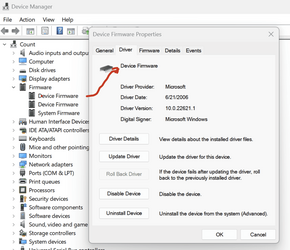
According to my Device Manager Firmware Tree
  1. Device Firmware – Driver provider and digital signer – Microsoft, driver version 10.0.22621.1​
  2. Device Firmware – Same as above​
  3. System Firmware – Same as above​
There is no indication of any ASUS file properties in the Firmware Tree whatsoever, even though as I mentioned, I did install the chipset driver. To add to my confusion, when extracted there are usually two .exe files in the ASUS driver folder, one of which is ASUS Setup, which I always select. It’s quite possible that I may have double-clicked the wrong .exe file whilst installing a driver, leading to chaos.

With Windows 7 and 10, I installed the OS offline, then the mobo drivers also offline, to stop Windows from automatically downloading and installing whatever it saw fit, and as a result, in my experience at least, my builds were very stable (ASUS P5G41M-LX dual core and ASUS B85M-G core i5).

Now it seems an internet connection is a prerequisite, with no way of getting onto the Windows desktop, and even if I could bypass this, the mobo driver files are now the very barebones, requiring an internet connection to fully download other relevant files particular to the driver before completing the installation.

Then we have the infamous Intel Driver and Support Assistant….

I'm with ThrashZone on the Corsair stuff. (Partly why I keep on calling it "that RAM".) I don't know if Corsair's Dominator is the same stuff it used to be, but once upon a time it used Samsung B die silicon and it was pretty decent stuff.
According to the BIOS, both my Corsair RAM sticks in this build were manufactured by Samsung, but that's as far as the information goes.

I think they're considering it but using DDR4 atm.
My motherboard supports DDR4 only.
 

My Computer My Computer

At a glance

Windows 11Intel S1700 i5 12400Corsair LPX 32GBASUS NVIDIA Geforce RTX 3060
OS
Windows 11
Computer type
PC/Desktop
CPU
Intel S1700 i5 12400
Motherboard
ASUS PRIME Z790M PLUS D4
Memory
Corsair LPX 32GB
Graphics Card(s)
ASUS NVIDIA Geforce RTX 3060
Monitor(s) Displays
HP 24w
Hard Drives
Samsung 980 PRO M.2 NVMe
PSU
Corsair TX650M
Case
Matx
Cooling
ID-COOLING Dashflow 240

Latest Support Threads

Back
Top Bottom