Solved Removing 'Bitmap image' from 'New' context menu...


Still why would you remove it. Do you uninstall notepad once you install word? You don't mess with system apps.

Think about the concept of "personal" computer. In essence the word implies "feel free to personalize" your computer. That's one major difference between Apple and Microsoft. Apple keeps their software proprietary whereas we get to pick and choose what programs work on Windows. On the other side of the coin, we can choose to remove apps and programs that are simply useless or annoying. Annoying is the major reason people come here to learn how to rid themselves of apps IMHO.

When we share our knowledge/experience here or in any other Windows forum we are giving suggestions to the public.

Sadly, some people are ready to fight whenever someone else has a different opinion. Just think about what you are going to say before you reply to another person's thoughts and suggestions. ;-)
 

My Computer My Computer

At a glance

W11 HomeIntel Core i9-13900KFDDR5 32GB (2x16GB) DDR5 4600RTX 4080 12GB
OS
W11 Home
Computer type
PC/Desktop
Manufacturer/Model
Build Date: March 2022
CPU
Intel Core i9-13900KF
Motherboard
ASUS Prime 690-P
Memory
DDR5 32GB (2x16GB) DDR5 4600
Graphics Card(s)
RTX 4080 12GB
Screen Resolution
1920 x 1080 (scaled 125%) (144Mhz Refresh Rate)
PSU
1000 Watt
Cooling
AIO
Internet Speed
1GB
Browser
Chrome and Edge
Antivirus
Malwarebytes Premium

Maybe this will help some of you...
The following worked for me to remove bitmap image:
1. Make IrfanView the default app for file type .bmp (Settings > Apps > …)
2. Uninstall Paint (Settings > Apps > …)
3. Restart File Explorer (possibly twice or even restart the computer)

I can only guess that any 3rd party program other than IrfanView should also work?
Not an ideal solution but will do until Brink comes up with the "official" solution.

You are correct my friend. When a person installs Irfanview as their image viewer and editor then remove Paint the Bitmap item in New Context Menu disappears. I have used Irfanview for 22 years. I have other image editors but 99% of the time for cropping and resizing I use Irfanview.
 

My Computer My Computer

At a glance

W11 HomeIntel Core i9-13900KFDDR5 32GB (2x16GB) DDR5 4600RTX 4080 12GB
OS
W11 Home
Computer type
PC/Desktop
Manufacturer/Model
Build Date: March 2022
CPU
Intel Core i9-13900KF
Motherboard
ASUS Prime 690-P
Memory
DDR5 32GB (2x16GB) DDR5 4600
Graphics Card(s)
RTX 4080 12GB
Screen Resolution
1920 x 1080 (scaled 125%) (144Mhz Refresh Rate)
PSU
1000 Watt
Cooling
AIO
Internet Speed
1GB
Browser
Chrome and Edge
Antivirus
Malwarebytes Premium
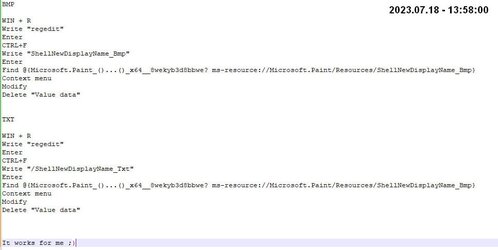
BMP

WIN + R
Write "regedit"
Enter
CTRL+F
Write "ShellNewDisplayName_Bmp"
Enter
Find @{Microsoft.Paint_()...()_x64__8wekyb3d8bbwe? ms-resource://Microsoft.Paint/Resources/ShellNewDisplayName_Bmp}
Context menu
Modify
Delete "Value data"


TXT

WIN + R
Write "regedit"
Enter
CTRL+F
Write "/ShellNewDisplayName_Txt"
Enter
Find @{Microsoft.Paint_()...()_x64__8wekyb3d8bbwe? ms-resource://Microsoft.Paint/Resources/ShellNewDisplayName_Bmp}
Context menu
Modify
Delete "Value data"


It works for me ;)


Regards.
 

Attachments

  • xxxx.jpg
    xxxx.jpg
    31.6 KB · Views: 7

My Computer My Computer

At a glance

Windows 11QuadCore Intel Core i5-7500, 3700 MHz (37Wilk Elektronik GY2400D464L15S/8GMSI GTX 1060 Gaming X 6G (MS-V328)
OS
Windows 11
Computer type
PC/Desktop
Manufacturer/Model
-
CPU
QuadCore Intel Core i5-7500, 3700 MHz (37
Motherboard
ASRock H110M-DVS R3.0
Memory
Wilk Elektronik GY2400D464L15S/8G
Graphics Card(s)
MSI GTX 1060 Gaming X 6G (MS-V328)
Sound Card
Realtek ALC887
Monitor(s) Displays
Acer V193W
Screen Resolution
1440 x 900
Hard Drives
Dysk nr 1 - ADATA SU800 (2H0820071617) [119 GB] C:
Dysk nr 2 - TOSHIBA HDWD120 (90IB78PAS) [1863 GB] D:
Dysk nr 3 - TOSHIBA HDWD110 (68KS3S2FS) [931 GB] E:
PSU
SilentiumPC Vero L2 500W 80 Plus Bronze
Case
-
Cooling
-
Keyboard
-
Mouse
-
Internet Speed
-
Browser
-
Antivirus
-
Other Info
-
@panaho

I don't understand why you've got Paint and Bmp in both sets of lines above. One should have Txt in it, shouldn't it?

Oh, yeah: Welcome to the forum!
 

My Computers My Computers

  • At a glance

    11 Pro 24H2 26100.2454i7-9700 @ 3.00GHz32GBDDR4 @ 2666MHzIntel HD 630 Graphics onboard
    OS
    11 Pro 24H2 26100.2454
    Computer type
    PC/Desktop
    Manufacturer/Model
    Lenovo ThinkCentre M920S SFF
    CPU
    i7-9700 @ 3.00GHz
    Motherboard
    Lenovo 3132
    Memory
    32GBDDR4 @ 2666MHz
    Graphics Card(s)
    Intel HD 630 Graphics onboard
    Sound Card
    Realtek HD Audio
    Monitor(s) Displays
    LG E2442
    Screen Resolution
    1920x1080
    Hard Drives
    1 x Samsung 970 EVO PLUS 500GB NVMe SSD, 1 x WD_BLACK SN770
    250GB NVMe SSD (OS and programs), 1 x WD_BLACK SN770
    500GB NVMe SSD (Data)
    Case
    Lenovo SFF
    Keyboard
    Cherry Stream TKL JK-8600US-2 Wired
    Mouse
    LogiTech M510 wireless
    Internet Speed
    Fast (for fixed wireless!)
    Browser
    Chrome, sometimes Firefox
    Antivirus
    Malwarebytes Premium & Defender (working together beautifully!)
  • At a glance

    11 Pro 24H2 26100.2454i5-8400 @ 2.80GHz32GB DDR4 @ 2600MHzIntel HD 630 Graphics onboard
    Operating System
    11 Pro 24H2 26100.2454
    Computer type
    PC/Desktop
    Manufacturer/Model
    Lenovo ThinkCentre M920S SFF
    CPU
    i5-8400 @ 2.80GHz
    Motherboard
    Lenovo 3132
    Memory
    32GB DDR4 @ 2600MHz
    Graphics card(s)
    Intel HD 630 Graphics onboard
    Sound Card
    Realtek High Definition Audio onboard
    Monitor(s) Displays
    LG FULL HD (1920x1080@59Hz)
    Screen Resolution
    1920 x 1080
    Hard Drives
    1 x Samsung 970 EVO PLUS NVMe; 1 x Samsung 980 NVMe SSD
    Case
    Lenovo Think Centre SFF
    Keyboard
    Cherry Stream TKL JK-8600US-2 Wired
    Mouse
    LogiTech M510 wireless
    Internet Speed
    Fast (for fixed wireless!)
    Browser
    Chrome
    Antivirus
    Malwarebytes Premium and MS Defender, beautiful together
  • Like
Reactions: OAT
One is for the menu entry New *.bmp and the other is New *.txt. What do you not understand?
 

My Computer My Computer

At a glance

Windows 11QuadCore Intel Core i5-7500, 3700 MHz (37Wilk Elektronik GY2400D464L15S/8GMSI GTX 1060 Gaming X 6G (MS-V328)
OS
Windows 11
Computer type
PC/Desktop
Manufacturer/Model
-
CPU
QuadCore Intel Core i5-7500, 3700 MHz (37
Motherboard
ASRock H110M-DVS R3.0
Memory
Wilk Elektronik GY2400D464L15S/8G
Graphics Card(s)
MSI GTX 1060 Gaming X 6G (MS-V328)
Sound Card
Realtek ALC887
Monitor(s) Displays
Acer V193W
Screen Resolution
1440 x 900
Hard Drives
Dysk nr 1 - ADATA SU800 (2H0820071617) [119 GB] C:
Dysk nr 2 - TOSHIBA HDWD120 (90IB78PAS) [1863 GB] D:
Dysk nr 3 - TOSHIBA HDWD110 (68KS3S2FS) [931 GB] E:
PSU
SilentiumPC Vero L2 500W 80 Plus Bronze
Case
-
Cooling
-
Keyboard
-
Mouse
-
Internet Speed
-
Browser
-
Antivirus
-
Other Info
-
One is for the menu entry New *.bmp and the other is New *.txt. What do you not understand?

You've got "ShellNewDisplayName_Bmp" under TXT in your post.
 

My Computers My Computers

  • At a glance

    11 Pro 24H2 26100.2454i7-9700 @ 3.00GHz32GBDDR4 @ 2666MHzIntel HD 630 Graphics onboard
    OS
    11 Pro 24H2 26100.2454
    Computer type
    PC/Desktop
    Manufacturer/Model
    Lenovo ThinkCentre M920S SFF
    CPU
    i7-9700 @ 3.00GHz
    Motherboard
    Lenovo 3132
    Memory
    32GBDDR4 @ 2666MHz
    Graphics Card(s)
    Intel HD 630 Graphics onboard
    Sound Card
    Realtek HD Audio
    Monitor(s) Displays
    LG E2442
    Screen Resolution
    1920x1080
    Hard Drives
    1 x Samsung 970 EVO PLUS 500GB NVMe SSD, 1 x WD_BLACK SN770
    250GB NVMe SSD (OS and programs), 1 x WD_BLACK SN770
    500GB NVMe SSD (Data)
    Case
    Lenovo SFF
    Keyboard
    Cherry Stream TKL JK-8600US-2 Wired
    Mouse
    LogiTech M510 wireless
    Internet Speed
    Fast (for fixed wireless!)
    Browser
    Chrome, sometimes Firefox
    Antivirus
    Malwarebytes Premium & Defender (working together beautifully!)
  • At a glance

    11 Pro 24H2 26100.2454i5-8400 @ 2.80GHz32GB DDR4 @ 2600MHzIntel HD 630 Graphics onboard
    Operating System
    11 Pro 24H2 26100.2454
    Computer type
    PC/Desktop
    Manufacturer/Model
    Lenovo ThinkCentre M920S SFF
    CPU
    i5-8400 @ 2.80GHz
    Motherboard
    Lenovo 3132
    Memory
    32GB DDR4 @ 2600MHz
    Graphics card(s)
    Intel HD 630 Graphics onboard
    Sound Card
    Realtek High Definition Audio onboard
    Monitor(s) Displays
    LG FULL HD (1920x1080@59Hz)
    Screen Resolution
    1920 x 1080
    Hard Drives
    1 x Samsung 970 EVO PLUS NVMe; 1 x Samsung 980 NVMe SSD
    Case
    Lenovo Think Centre SFF
    Keyboard
    Cherry Stream TKL JK-8600US-2 Wired
    Mouse
    LogiTech M510 wireless
    Internet Speed
    Fast (for fixed wireless!)
    Browser
    Chrome
    Antivirus
    Malwarebytes Premium and MS Defender, beautiful together
Someone asked
"Hi All,

did anyone figured out how to remove 'Bitmap image' from 'New' context menu?

Old Windows 10 registry tweak does not seem to work anymore...

Thanks."
I replied.

Of course, you need to make a backup before any modification !!!
In this case, there will be no great problems with restoring the previous state.
:wink:
I am impressed that the administration reacts so quickly.
Regards.

BMP and TXT are two items that are not easy to remove with external programs. That's why both items are in one post.
 

My Computer My Computer

At a glance

Windows 11QuadCore Intel Core i5-7500, 3700 MHz (37Wilk Elektronik GY2400D464L15S/8GMSI GTX 1060 Gaming X 6G (MS-V328)
OS
Windows 11
Computer type
PC/Desktop
Manufacturer/Model
-
CPU
QuadCore Intel Core i5-7500, 3700 MHz (37
Motherboard
ASRock H110M-DVS R3.0
Memory
Wilk Elektronik GY2400D464L15S/8G
Graphics Card(s)
MSI GTX 1060 Gaming X 6G (MS-V328)
Sound Card
Realtek ALC887
Monitor(s) Displays
Acer V193W
Screen Resolution
1440 x 900
Hard Drives
Dysk nr 1 - ADATA SU800 (2H0820071617) [119 GB] C:
Dysk nr 2 - TOSHIBA HDWD120 (90IB78PAS) [1863 GB] D:
Dysk nr 3 - TOSHIBA HDWD110 (68KS3S2FS) [931 GB] E:
PSU
SilentiumPC Vero L2 500W 80 Plus Bronze
Case
-
Cooling
-
Keyboard
-
Mouse
-
Internet Speed
-
Browser
-
Antivirus
-
Other Info
-
Sorry, we seem to be talking past each other:

Under your reg change to get rid of TXT, you used the entry for BMP again. The TXT part says Paint and Bmp, just as it did for BMP above. It should say Txt, shouldn't it?
 

My Computers My Computers

  • At a glance

    11 Pro 24H2 26100.2454i7-9700 @ 3.00GHz32GBDDR4 @ 2666MHzIntel HD 630 Graphics onboard
    OS
    11 Pro 24H2 26100.2454
    Computer type
    PC/Desktop
    Manufacturer/Model
    Lenovo ThinkCentre M920S SFF
    CPU
    i7-9700 @ 3.00GHz
    Motherboard
    Lenovo 3132
    Memory
    32GBDDR4 @ 2666MHz
    Graphics Card(s)
    Intel HD 630 Graphics onboard
    Sound Card
    Realtek HD Audio
    Monitor(s) Displays
    LG E2442
    Screen Resolution
    1920x1080
    Hard Drives
    1 x Samsung 970 EVO PLUS 500GB NVMe SSD, 1 x WD_BLACK SN770
    250GB NVMe SSD (OS and programs), 1 x WD_BLACK SN770
    500GB NVMe SSD (Data)
    Case
    Lenovo SFF
    Keyboard
    Cherry Stream TKL JK-8600US-2 Wired
    Mouse
    LogiTech M510 wireless
    Internet Speed
    Fast (for fixed wireless!)
    Browser
    Chrome, sometimes Firefox
    Antivirus
    Malwarebytes Premium & Defender (working together beautifully!)
  • At a glance

    11 Pro 24H2 26100.2454i5-8400 @ 2.80GHz32GB DDR4 @ 2600MHzIntel HD 630 Graphics onboard
    Operating System
    11 Pro 24H2 26100.2454
    Computer type
    PC/Desktop
    Manufacturer/Model
    Lenovo ThinkCentre M920S SFF
    CPU
    i5-8400 @ 2.80GHz
    Motherboard
    Lenovo 3132
    Memory
    32GB DDR4 @ 2600MHz
    Graphics card(s)
    Intel HD 630 Graphics onboard
    Sound Card
    Realtek High Definition Audio onboard
    Monitor(s) Displays
    LG FULL HD (1920x1080@59Hz)
    Screen Resolution
    1920 x 1080
    Hard Drives
    1 x Samsung 970 EVO PLUS NVMe; 1 x Samsung 980 NVMe SSD
    Case
    Lenovo Think Centre SFF
    Keyboard
    Cherry Stream TKL JK-8600US-2 Wired
    Mouse
    LogiTech M510 wireless
    Internet Speed
    Fast (for fixed wireless!)
    Browser
    Chrome
    Antivirus
    Malwarebytes Premium and MS Defender, beautiful together
BMP

WIN + R
Write "regedit"
Enter
CTRL+F
Write "ShellNewDisplayName_Bmp"
Enter
Find @{Microsoft.Paint_()...()_x64__8wekyb3d8bbwe? ms-resource://Microsoft.Paint/Resources/ShellNewDisplayName_Bmp}
Context menu
Modify
Delete "Value data"

I agree that this works. And it survives a reboot.
It is the Data that is removed not the entire Name entry line.
What the change actually does is remove the display name for that entry and Windows just skips over it without that being in place. I didn't know it would do that.

[.reg file removed. The search string ShellNewDisplayName_Bmp exists in different Keys in different computers and in multiple Keys in some.]

I agree with WiseWiz that you mistyped that txt section in your original post.


Well done,
All the best,
Denis
 
Last edited:

My Computer My Computer

At a glance

Windows 11 Home x64 Version 25H2 Build 26200....
OS
Windows 11 Home x64 Version 25H2 Build 26200.8037
Try: Microsoft.WindowsNotepad_11.2304.26.0_x64__8wekyb3d8bbwe%5Cmicrosoft.system.package.metadata%5 etc.

instead of the second use of the Paint line.
 

My Computers My Computers

  • At a glance

    11 Pro 24H2 26100.2454i7-9700 @ 3.00GHz32GBDDR4 @ 2666MHzIntel HD 630 Graphics onboard
    OS
    11 Pro 24H2 26100.2454
    Computer type
    PC/Desktop
    Manufacturer/Model
    Lenovo ThinkCentre M920S SFF
    CPU
    i7-9700 @ 3.00GHz
    Motherboard
    Lenovo 3132
    Memory
    32GBDDR4 @ 2666MHz
    Graphics Card(s)
    Intel HD 630 Graphics onboard
    Sound Card
    Realtek HD Audio
    Monitor(s) Displays
    LG E2442
    Screen Resolution
    1920x1080
    Hard Drives
    1 x Samsung 970 EVO PLUS 500GB NVMe SSD, 1 x WD_BLACK SN770
    250GB NVMe SSD (OS and programs), 1 x WD_BLACK SN770
    500GB NVMe SSD (Data)
    Case
    Lenovo SFF
    Keyboard
    Cherry Stream TKL JK-8600US-2 Wired
    Mouse
    LogiTech M510 wireless
    Internet Speed
    Fast (for fixed wireless!)
    Browser
    Chrome, sometimes Firefox
    Antivirus
    Malwarebytes Premium & Defender (working together beautifully!)
  • At a glance

    11 Pro 24H2 26100.2454i5-8400 @ 2.80GHz32GB DDR4 @ 2600MHzIntel HD 630 Graphics onboard
    Operating System
    11 Pro 24H2 26100.2454
    Computer type
    PC/Desktop
    Manufacturer/Model
    Lenovo ThinkCentre M920S SFF
    CPU
    i5-8400 @ 2.80GHz
    Motherboard
    Lenovo 3132
    Memory
    32GB DDR4 @ 2600MHz
    Graphics card(s)
    Intel HD 630 Graphics onboard
    Sound Card
    Realtek High Definition Audio onboard
    Monitor(s) Displays
    LG FULL HD (1920x1080@59Hz)
    Screen Resolution
    1920 x 1080
    Hard Drives
    1 x Samsung 970 EVO PLUS NVMe; 1 x Samsung 980 NVMe SSD
    Case
    Lenovo Think Centre SFF
    Keyboard
    Cherry Stream TKL JK-8600US-2 Wired
    Mouse
    LogiTech M510 wireless
    Internet Speed
    Fast (for fixed wireless!)
    Browser
    Chrome
    Antivirus
    Malwarebytes Premium and MS Defender, beautiful together
Yes!!! You're right!!!
I couldn't see my mistake!!!
I am sorry for my mistake!!!

BMP

WIN+R
Write "regedit"
enter
CTRL+F
Write "ShellNewDisplayName_Bmp"
enter
Find @{Microsoft.Paint_()...()_x64__8wekyb3d8bbwe? ms-resource://Microsoft.Paint/Resources/ShellNewDisplayName_Bmp}
context menu
Modify
Delete "Value data"


TXT

WIN+R
Write "regedit"
enter
CTRL+F
Write "/ShellNewDisplayName_Txt"
enter
@{Microsoft.WindowsNotepad_()...()__8wekyb3d8bbwe? ms-resource://Microsoft.WindowsNotepad/Resources/ShellNewDisplayName_Txt}
context menu
Modify
Delete "Value data"


It works for me ;)
 

My Computer My Computer

At a glance

Windows 11QuadCore Intel Core i5-7500, 3700 MHz (37Wilk Elektronik GY2400D464L15S/8GMSI GTX 1060 Gaming X 6G (MS-V328)
OS
Windows 11
Computer type
PC/Desktop
Manufacturer/Model
-
CPU
QuadCore Intel Core i5-7500, 3700 MHz (37
Motherboard
ASRock H110M-DVS R3.0
Memory
Wilk Elektronik GY2400D464L15S/8G
Graphics Card(s)
MSI GTX 1060 Gaming X 6G (MS-V328)
Sound Card
Realtek ALC887
Monitor(s) Displays
Acer V193W
Screen Resolution
1440 x 900
Hard Drives
Dysk nr 1 - ADATA SU800 (2H0820071617) [119 GB] C:
Dysk nr 2 - TOSHIBA HDWD120 (90IB78PAS) [1863 GB] D:
Dysk nr 3 - TOSHIBA HDWD110 (68KS3S2FS) [931 GB] E:
PSU
SilentiumPC Vero L2 500W 80 Plus Bronze
Case
-
Cooling
-
Keyboard
-
Mouse
-
Internet Speed
-
Browser
-
Antivirus
-
Other Info
-
(y) (y)
 

My Computers My Computers

  • At a glance

    11 Pro 24H2 26100.2454i7-9700 @ 3.00GHz32GBDDR4 @ 2666MHzIntel HD 630 Graphics onboard
    OS
    11 Pro 24H2 26100.2454
    Computer type
    PC/Desktop
    Manufacturer/Model
    Lenovo ThinkCentre M920S SFF
    CPU
    i7-9700 @ 3.00GHz
    Motherboard
    Lenovo 3132
    Memory
    32GBDDR4 @ 2666MHz
    Graphics Card(s)
    Intel HD 630 Graphics onboard
    Sound Card
    Realtek HD Audio
    Monitor(s) Displays
    LG E2442
    Screen Resolution
    1920x1080
    Hard Drives
    1 x Samsung 970 EVO PLUS 500GB NVMe SSD, 1 x WD_BLACK SN770
    250GB NVMe SSD (OS and programs), 1 x WD_BLACK SN770
    500GB NVMe SSD (Data)
    Case
    Lenovo SFF
    Keyboard
    Cherry Stream TKL JK-8600US-2 Wired
    Mouse
    LogiTech M510 wireless
    Internet Speed
    Fast (for fixed wireless!)
    Browser
    Chrome, sometimes Firefox
    Antivirus
    Malwarebytes Premium & Defender (working together beautifully!)
  • At a glance

    11 Pro 24H2 26100.2454i5-8400 @ 2.80GHz32GB DDR4 @ 2600MHzIntel HD 630 Graphics onboard
    Operating System
    11 Pro 24H2 26100.2454
    Computer type
    PC/Desktop
    Manufacturer/Model
    Lenovo ThinkCentre M920S SFF
    CPU
    i5-8400 @ 2.80GHz
    Motherboard
    Lenovo 3132
    Memory
    32GB DDR4 @ 2600MHz
    Graphics card(s)
    Intel HD 630 Graphics onboard
    Sound Card
    Realtek High Definition Audio onboard
    Monitor(s) Displays
    LG FULL HD (1920x1080@59Hz)
    Screen Resolution
    1920 x 1080
    Hard Drives
    1 x Samsung 970 EVO PLUS NVMe; 1 x Samsung 980 NVMe SSD
    Case
    Lenovo Think Centre SFF
    Keyboard
    Cherry Stream TKL JK-8600US-2 Wired
    Mouse
    LogiTech M510 wireless
    Internet Speed
    Fast (for fixed wireless!)
    Browser
    Chrome
    Antivirus
    Malwarebytes Premium and MS Defender, beautiful together
panaho,

Welcome to ElevenForum.

It's really worth making time to browse through the ElevenForums Tutorial index - there's a shortcut to it at the top of every ElevenForum page [within the Tutorials dropdown list].
- At the foot of the ElevenForum Tutorial index is a shortcut to download it as a spreadsheet.
- I download a new copy each month.
- By downloading it as a spreadsheet I can benefit from Excel's excellent filtering capabilities when I search for topics of interest.
- ElevenForum tutorials are also listed at Tutorials and there's a shortcut to that at the top of every page.

You can search ElevenForum using the search box in the top-right corner of all ElevenForum webpages or using Advanced Search - ElevenForum
- You can also search ElevenForum threads in many general search engines, such as Google, by adding site:elevenforum.com after your search term. For example,
Taskbar setup site:elevenforum.com
- [This is what the search box in the top-right corner of ElevenForum webpages does automatically]


All the best,
Denis
 

My Computer My Computer

At a glance

Windows 11 Home x64 Version 25H2 Build 26200....
OS
Windows 11 Home x64 Version 25H2 Build 26200.8037

panaho, Wisewiz,

Please would you find
ShellNewDisplayName_Bmp
in your Registry and tell me if it is in the same Key as it is in mine
HKEY_CLASSES_ROOT\Local Settings\MrtCache\C:%5CProgram Files%5CWindowsApps%5CMicrosoft.Paint_11.2201.22.0_x64__8wekyb3d8bbwe%5Cmicrosoft.system.package.metadata%5CS-1-5-21-1942356667-1740977122-1132271861-1001-MergedResources-0.pri\1d998aedb628014\1be3960b
as @Brink reports that it is not in his.

If it is not the same Key for everybody then some awkward reg command & Registry search utility manipulations would be needed to automate the change.


Denis
 

My Computer My Computer

At a glance

Windows 11 Home x64 Version 25H2 Build 26200....
OS
Windows 11 Home x64 Version 25H2 Build 26200.8037
panaho, Wisewiz,

Please would you find
ShellNewDisplayName_Bmp
in your Registry and tell me if it is in the same Key as it is in mine
HKEY_CLASSES_ROOT\Local Settings\MrtCache\C:%5CProgram Files%5CWindowsApps%5CMicrosoft.Paint_11.2201.22.0_x64__8wekyb3d8bbwe%5Cmicrosoft.system.package.metadata%5CS-1-5-21-1942356667-1740977122-1132271861-1001-MergedResources-0.pri\1d998aedb628014\1be3960b
as @Brink reports that it is not in his.

If it is not the same Key for everybody then some awkward reg command & Registry search utility manipulations would be needed to automate the change.


Denis
It is in mine but modifying the registry does not remove the bitmap image from the context menu.
Screenshot 2023-07-18 190121.jpg
 

My Computers My Computers

  • At a glance

    All Branches but ReleaseAMD Ryzen 7 7735HS 3200-4500 Mhz 8 cores x 232 GB DDR5Radeon Graphic / NVIDIA GeForce RTX 4060 8 GB...
    OS
    All Branches but Release
    Computer type
    Laptop
    Manufacturer/Model
    Acer Nitro ANV15-51
    CPU
    AMD Ryzen 7 7735HS 3200-4500 Mhz 8 cores x 2
    Motherboard
    Sportage_RBH
    Memory
    32 GB DDR5
    Graphics Card(s)
    Radeon Graphic / NVIDIA GeForce RTX 4060 8 GB GDDR6
    Sound Card
    AMD/Realtek(R) Audio
    Monitor(s) Displays
    Integrated Monitor (15.3"vis)
    Screen Resolution
    FHD 1920X1080 16:9 144Hz
    Hard Drives
    KINGSTON OM8SEP4512Q-AA 1TB
    Western Digital 256GB
    PSU
    19V DC 6.32 A 120 W
    Cooling
    Dual Fans
    Mouse
    MS Bluetooth
    Internet Speed
    Fiber 1GB Cox -us & 1GB Orange-fr
    Browser
    Edge Canary- Firefox Nightly-Chrome Dev-Chrome Dev
    Antivirus
    Windows Defender
  • At a glance

    Windows 11 BetaAMD A9-94208 GB of DDR4AMD Radeon R5
    Operating System
    Windows 11 Beta
    Computer type
    Laptop
    Manufacturer/Model
    Asus X751BP
    CPU
    AMD A9-9420
    Memory
    8 GB of DDR4
    Graphics card(s)
    AMD Radeon R5
    Screen Resolution
    1600x900
    Hard Drives
    Seagate 1 TB
@Try3
HKEY_CLASSES_ROOT\Local Settings\MrtCache\C:%5CProgram Files%5CWindowsApps%5CMicrosoft.Paint_11.2302.19.0_x64__8wekyb3d8bbwe%5Cmicrosoft.system.package.metadata%5CS-1-5-21-3850220071-3648809380-2408793366-1002-MergedResources-14.pri\1d9a5eebe792605\53bf29c4

is my first find for ShellNewDisplayName_Bmp.
 

My Computers My Computers

  • At a glance

    11 Pro 24H2 26100.2454i7-9700 @ 3.00GHz32GBDDR4 @ 2666MHzIntel HD 630 Graphics onboard
    OS
    11 Pro 24H2 26100.2454
    Computer type
    PC/Desktop
    Manufacturer/Model
    Lenovo ThinkCentre M920S SFF
    CPU
    i7-9700 @ 3.00GHz
    Motherboard
    Lenovo 3132
    Memory
    32GBDDR4 @ 2666MHz
    Graphics Card(s)
    Intel HD 630 Graphics onboard
    Sound Card
    Realtek HD Audio
    Monitor(s) Displays
    LG E2442
    Screen Resolution
    1920x1080
    Hard Drives
    1 x Samsung 970 EVO PLUS 500GB NVMe SSD, 1 x WD_BLACK SN770
    250GB NVMe SSD (OS and programs), 1 x WD_BLACK SN770
    500GB NVMe SSD (Data)
    Case
    Lenovo SFF
    Keyboard
    Cherry Stream TKL JK-8600US-2 Wired
    Mouse
    LogiTech M510 wireless
    Internet Speed
    Fast (for fixed wireless!)
    Browser
    Chrome, sometimes Firefox
    Antivirus
    Malwarebytes Premium & Defender (working together beautifully!)
  • At a glance

    11 Pro 24H2 26100.2454i5-8400 @ 2.80GHz32GB DDR4 @ 2600MHzIntel HD 630 Graphics onboard
    Operating System
    11 Pro 24H2 26100.2454
    Computer type
    PC/Desktop
    Manufacturer/Model
    Lenovo ThinkCentre M920S SFF
    CPU
    i5-8400 @ 2.80GHz
    Motherboard
    Lenovo 3132
    Memory
    32GB DDR4 @ 2600MHz
    Graphics card(s)
    Intel HD 630 Graphics onboard
    Sound Card
    Realtek High Definition Audio onboard
    Monitor(s) Displays
    LG FULL HD (1920x1080@59Hz)
    Screen Resolution
    1920 x 1080
    Hard Drives
    1 x Samsung 970 EVO PLUS NVMe; 1 x Samsung 980 NVMe SSD
    Case
    Lenovo Think Centre SFF
    Keyboard
    Cherry Stream TKL JK-8600US-2 Wired
    Mouse
    LogiTech M510 wireless
    Internet Speed
    Fast (for fixed wireless!)
    Browser
    Chrome
    Antivirus
    Malwarebytes Premium and MS Defender, beautiful together
I agree, it is in different places on different computers.
I found it in a slightly different Key on another Windows 11 computer.
Furthermore, I re-checked my first Windows 11 computer and discovered that the ShellNewDisplayName_Bmp string exists in two Registry Keys i.e. the one I modified and another one that I did not realise existed at the time.

Oh dear,
Denis
 

My Computer My Computer

At a glance

Windows 11 Home x64 Version 25H2 Build 26200....
OS
Windows 11 Home x64 Version 25H2 Build 26200.8037
It is in mine but modifying the registry does not remove the bitmap image from the context menu.

Would you mind searching for a possible second instance of
ShellNewDisplayName_Bmp
and taking the same action on that entry?

My change took effect when I changed the first entry I found and still works now that I've changed the newly-discovered second instance.
The two entries I have changed are both within
HKEY_CLASSES_ROOT\Local Settings

I have since found entries in
HKCU
and
HKU
but I believe that they might well be derivative entries because they are blank already.


My updated-from-Windows10 computer does not need any change. I removed the New, Bitmap entry in Windows 10 and it still holds.


All the best,
Denis
 

My Computer My Computer

At a glance

Windows 11 Home x64 Version 25H2 Build 26200....
OS
Windows 11 Home x64 Version 25H2 Build 26200.8037
  • Like
Reactions: OAT
Would you mind searching for a possible second instance of
ShellNewDisplayName_Bmp
The two entries I have changed are both within
HKEY_CLASSES_ROOT\Local Settings
I only have one there.
I have since found entries in
HKCU
and
HKU
Me, too: one each.
 

My Computers My Computers

  • At a glance

    11 Pro 24H2 26100.2454i7-9700 @ 3.00GHz32GBDDR4 @ 2666MHzIntel HD 630 Graphics onboard
    OS
    11 Pro 24H2 26100.2454
    Computer type
    PC/Desktop
    Manufacturer/Model
    Lenovo ThinkCentre M920S SFF
    CPU
    i7-9700 @ 3.00GHz
    Motherboard
    Lenovo 3132
    Memory
    32GBDDR4 @ 2666MHz
    Graphics Card(s)
    Intel HD 630 Graphics onboard
    Sound Card
    Realtek HD Audio
    Monitor(s) Displays
    LG E2442
    Screen Resolution
    1920x1080
    Hard Drives
    1 x Samsung 970 EVO PLUS 500GB NVMe SSD, 1 x WD_BLACK SN770
    250GB NVMe SSD (OS and programs), 1 x WD_BLACK SN770
    500GB NVMe SSD (Data)
    Case
    Lenovo SFF
    Keyboard
    Cherry Stream TKL JK-8600US-2 Wired
    Mouse
    LogiTech M510 wireless
    Internet Speed
    Fast (for fixed wireless!)
    Browser
    Chrome, sometimes Firefox
    Antivirus
    Malwarebytes Premium & Defender (working together beautifully!)
  • At a glance

    11 Pro 24H2 26100.2454i5-8400 @ 2.80GHz32GB DDR4 @ 2600MHzIntel HD 630 Graphics onboard
    Operating System
    11 Pro 24H2 26100.2454
    Computer type
    PC/Desktop
    Manufacturer/Model
    Lenovo ThinkCentre M920S SFF
    CPU
    i5-8400 @ 2.80GHz
    Motherboard
    Lenovo 3132
    Memory
    32GB DDR4 @ 2600MHz
    Graphics card(s)
    Intel HD 630 Graphics onboard
    Sound Card
    Realtek High Definition Audio onboard
    Monitor(s) Displays
    LG FULL HD (1920x1080@59Hz)
    Screen Resolution
    1920 x 1080
    Hard Drives
    1 x Samsung 970 EVO PLUS NVMe; 1 x Samsung 980 NVMe SSD
    Case
    Lenovo Think Centre SFF
    Keyboard
    Cherry Stream TKL JK-8600US-2 Wired
    Mouse
    LogiTech M510 wireless
    Internet Speed
    Fast (for fixed wireless!)
    Browser
    Chrome
    Antivirus
    Malwarebytes Premium and MS Defender, beautiful together
Would you mind searching for a possible second instance of
ShellNewDisplayName_Bmp
and taking the same action on that entry?

My change took effect when I changed the first entry I found and still works now that I've changed the newly-discovered second instance.
The two entries I have changed are both within
HKEY_CLASSES_ROOT\Local Settings

I have since found entries in
HKCU
and
HKU
but I believe that they might well be derivative entries because they are blank already.


My updated-from-Windows10 computer does not need any change. I removed the New, Bitmap entry in Windows 10 and it still holds.


All the best,
Denis
Hey Denis, I found 2 settings in HKR, and that second one did the trick after refreshing Explorer.
They are:
HKEY_CLASSES_ROOT\Local Settings\MrtCache\C:%5CProgram Files%5CWindowsApps%5CMicrosoft.Paint_11.2304.26.0_x64__8wekyb3d8bbwe%5Cmicrosoft.system.package.metadata%5CS-1-5-21-801334886-2571057144-2303842915-1001-MergedResources-5.pri\1d9b4c6998ce166\dbf1b25e

HKEY_CLASSES_ROOT\Local Settings\MrtCache\C:%5CProgram Files%5CWindowsApps%5CMicrosoft.Paint_11.2201.22.0_x64__8wekyb3d8bbwe%5Cmicrosoft.system.package.metadata%5CS-1-5-21-1942356667-1740977122-1132271861-1001-MergedResources-0.pri\1d998aedb628014\1be3960b

As you stated, the other keys for U/CU are redundant
 

My Computers My Computers

  • At a glance

    All Branches but ReleaseAMD Ryzen 7 7735HS 3200-4500 Mhz 8 cores x 232 GB DDR5Radeon Graphic / NVIDIA GeForce RTX 4060 8 GB...
    OS
    All Branches but Release
    Computer type
    Laptop
    Manufacturer/Model
    Acer Nitro ANV15-51
    CPU
    AMD Ryzen 7 7735HS 3200-4500 Mhz 8 cores x 2
    Motherboard
    Sportage_RBH
    Memory
    32 GB DDR5
    Graphics Card(s)
    Radeon Graphic / NVIDIA GeForce RTX 4060 8 GB GDDR6
    Sound Card
    AMD/Realtek(R) Audio
    Monitor(s) Displays
    Integrated Monitor (15.3"vis)
    Screen Resolution
    FHD 1920X1080 16:9 144Hz
    Hard Drives
    KINGSTON OM8SEP4512Q-AA 1TB
    Western Digital 256GB
    PSU
    19V DC 6.32 A 120 W
    Cooling
    Dual Fans
    Mouse
    MS Bluetooth
    Internet Speed
    Fiber 1GB Cox -us & 1GB Orange-fr
    Browser
    Edge Canary- Firefox Nightly-Chrome Dev-Chrome Dev
    Antivirus
    Windows Defender
  • At a glance

    Windows 11 BetaAMD A9-94208 GB of DDR4AMD Radeon R5
    Operating System
    Windows 11 Beta
    Computer type
    Laptop
    Manufacturer/Model
    Asus X751BP
    CPU
    AMD A9-9420
    Memory
    8 GB of DDR4
    Graphics card(s)
    AMD Radeon R5
    Screen Resolution
    1600x900
    Hard Drives
    Seagate 1 TB
Back
Top Bottom